CANN/cann-recipes-train:基于昇腾NPU的多轮工具调用代码强化学习
news2026/5/9 19:13:41
Code RL with Multi-Turn Tool Calling on Ascend NPUs【免费下载链接】cann-recipes-train本项目针对LLM与多模态模型训练业务中的典型模型、加速算法提供基于CANN平台的优化样例项目地址: https://gitcode.com/cann/cann-recipes-trainOverviewThis project is based on the Qwen3-1.7B model, employing the verl code sandbox service adapted for the Ascend platform, achieving efficient and stablelong-context multi-turn tool-call Code RLtraining. Our contributions include:Developed a scalable distributed code execution sandbox ScaleBox, supporting large-scale multi-node deployment, mainstream RL framework compatibility, and efficient unified evaluation across multiple models and benchmarks.Provided a unified deployment image combining verl and ScaleBox, supporting co-deployment of ScaleBox service and verl training tasks on a single node, with zero-cost migration to Huawei Cloud ModelArts.Validated Code RL training using the verl framework and ScaleBox sandbox on Ascend NPUs.Organized SFT data and SFT strategy for Coding Toolcall, and introduced multi-turn tool-call Coding Agent training in RL (the first open-source verl-based Coding Agent RL Recipe supporting multi-turn tool calling).Patches to integrate speculative decoding (EAGLE3 and Suffix) into the verl vLLM-Ascend rollout pipeline, with per-step metrics collection — draft token count, accepted token count, draft acceptance rate, mean acceptance length, and per-position acceptance rates.Validation of EAGLE3 speculative decoding within the multi-turn tool-call Code RL training loop on Ascend NPUs, achieving30% improvement in end-to-end throughputand25% reduction in training step timewithout loss of accuracy.ScaleBox 是一个可扩展的分布式代码执行沙盒其核心特性包括可扩展的分布式代码沙盒体系支持多机分布式沙盒部署与请求负载均衡支持单元测试并行与实例级并行面向 Code RL 的统一训练接口和评估套件提供高效的批量评估接口common_evaluate_batch相较于run_code通过单次请求处理多个测试用例显著提升训练效率内置对 LiveCodeBench、HumanEval、MBPP 等主流代码评测基准的支持实现一键式快速评估灵活的 Special Judge 判题机制支持自定义判题逻辑能够灵活适应具有多种正确答案的复杂编程题目Hardware RequirementsAtlas A2/A3 series, single node with 8 NPUs.Software RequirementsThe base recipe and SD extension share the same verl commit but differ in vLLM version. The SD extension uses vLLM0.13.0and vLLM-Ascendv0.13.0, which bring more stable speculative decoding support and an async implementation compared to0.11.0. Note that the software versions below reflect the tested environment — CANN8.3.RC1is expected to work for the SD extension as well.ComponentBase RecipeSD ExtensionEnvironmentDockerCondaverlcommitc651b7b(based on v0.7.0.dev)commitc651b7b(based on v0.7.0.dev)vllm0.11.00.13.0vllm-ascendv0.11.0rc1v0.13.0CANN8.3.RC18.5.0File Structure├── patches │ ├── verl # verl patch directory │ │ ├── 0001-verl-feature-improve_rl_usability.patch # General Code RL usability improvements (shared) │ │ ├── 0002-enable-tool-agent-loop.patch # Multi-turn tool-call support (shared) │ │ ├── 0003-toolcall-reward.patch # Tool-call reward (base recipe) │ │ └── 0004-enable-specrl-clean.patch # Suffix/EAGLE3 speculative decoding integration (SD extension) │ └── vllm │ └── 0001-enable-sprl.patch # vLLM-side EAGLE3 speculative decoding support (SD extension) ├── figures │ ├── evaluation_progress.png # Evaluation scores across training checkpoints (base) │ ├── training_progress.png # Training metrics progress (base) │ ├── sd_nosd_accuracy.png # Accuracy comparison: spec decode vs. no spec decode (SD) │ ├── throughput_speedup.png # Throughput speedup results (SD) │ └── acceptance_rate_overall.png # Draft acceptance rate across RL training steps (SD) ├── tool_config │ └── scalebox_tool_config.yaml # ScaleBox tool-call configuration (shared) ├── build_dataset.py # RL training dataset construction script (shared) ├── filter_sft_data.py # SFT tool-call dataset construction script (base) ├── scalebox.py # Custom reward function for ScaleBox integration (shared) ├── download_eagle.py # EAGLE3 draft model download script (SD extension) ├── run_code_rl_demo.sh # RL training script (base recipe) ├── run_multi_turn_livecodebench_eval.sh # Multi-turn LiveCodeBench evaluation script (base) ├── run_toolcall_sft_demo.sh # Multi-turn tool-call SFT training script (base) ├── spec_rl_run.sh # RL training script with speculative decoding (SD extension) ├── no_spec_rl_run.sh # RL training script without speculative decoding — baseline (SD extension) ├── process_all_the_logs_sprl.py # Log processing and metrics analysis script (SD extension) └── README.md # This documentPart 1: Base Recipe — Multi-Turn Tool-Call Code RLEnvironment SetupBuild Docker ImagesBuild the verl image supporting Code RL. Refer toverl.Dockerfileandverl_sandbox.Dockerfilefrom theagent_rl/qwen2_code_rlexample:docker build --networkhost -f verl.Dockerfile -t verl:main-c651b7b-py311-cann8.3.RC1 .Clone ScaleBox and build the combined verl ScaleBox image:git clone https://link.gitcode.com/i/cabdcdb331cef587028f0fd703a28949 docker build --networkhost -f verl_sandbox.Dockerfile -t verl_sandbox:main-c651b7b-py311-cann8.3.RC1 .Set Up verlClone verl and check out the specified commit:git clone https://github.com/volcengine/verl cd verl git checkout c651b7b4207e408875f132c4226969ef3495d408 cd ..Apply patches. The following modifications are included:Add support forcode_contestsdata source inprime reward managerReduce concurrent process count inprime reward managerfrom 64 to 32 to avoid sandbox resource contentionExtend task timeout inprime reward managerfrom 300s to 3000s to support code execution with larger batchesEnhanced logging during training for easier debuggingSupport for multi-turn tool-call Coding training logicAdded Toolcall reward to improve training stabilitygit apply patches/verl/0001-verl-feature-improve_rl_usability.patch git apply patches/verl/0002-enable-tool-agent-loop.patch git apply patches/verl/0003-toolcall-reward.patchDeploy ScaleBoxStart the combined verl_sandbox container:docker run -it --privileged --namestart_verl_sandbox --user root --network host \ --shm-size 500g \ --device/dev/davinci0 \ --device/dev/davinci1 \ --device/dev/davinci2 \ --device/dev/davinci3 \ --device/dev/davinci4 \ --device/dev/davinci5 \ --device/dev/davinci6 \ --device/dev/davinci7 \ --device/dev/davinci_manager \ --device/dev/hisi_hdc \ --device /dev/devmm_svm \ -v /usr/local/dcmi:/usr/local/dcmi \ -v /usr/bin/hccn_tool:/usr/bin/hccn_tool \ -v /usr/local/sbin:/usr/local/sbin \ -v /usr/local/bin/npu-smi:/usr/local/bin/npu-smi \ -v /usr/local/Ascend/driver:/usr/local/Ascend/driver \ -v /usr/local/Ascend/firmware:/usr/local/Ascend/firmware \ -v /etc/ascend_install.info:/etc/ascend_install.info \ -v /etc/hccn.conf:/etc/hccn.conf \ -v /sys/fs/cgroup:/sys/fs/cgroup:ro \ verl_sandbox:main-c651b7b-py311-cann8.3.RC1 /bin/bashActivate the ScaleBox environment:source /home/ma-user/miniconda3/bin/activate sandbox-baseDeploy ScaleBox. The following command is for single-node Code RL training. For distributed deployment options, refer to the ScaleBox repository:export HOST0.0.0.0 # Server host address export PORT8080 # Service port export WORKERS32 # Number of Uvicorn parallel workers export MAX_MEM50000000 # Maximum memory per process cd ScaleBox make run-online deploy_${HOST}:${PORT}.log 21 Verify the service is running:curl http://localhost:8080/run_code \ -H Content-Type: application/json \ --data-raw {code: print(\Hello, world!\), language: python}Expected response:{status:Success,message:,compile_result:null,run_result:{status:Finished,execution_time:0.02984905242919922,return_code:0,stdout:Hello, world!\n,stderr:}Dataset PreparationSFT Tool-Call DataBased on Gen-Verse/Open-AgentRL-SFT-3K, this filters multi-turn Python tool-call reasoning data and converts it for RL training:python build_toolcall_sft_data.pyRL DataBased on PrimeIntellect/verifiable-coding-problems, this filters high-quality Python code samples as RL training data (verifiable-coding-problems-python-only):python build_rl_dataset.pySFT Fine-TuningDownload model weights:hf download Qwen/Qwen3-1.7B --local-dir Qwen/Qwen3-1.7BRun SFT usingrun_toolcall_sft_demo.sh, adjusting default model and data paths as needed:source /home/ma-user/miniconda3/bin/activate base mkdir -p log/sft_run_log bash run_toolcall_sft_demo.shSelect the sft_step_50 checkpoint and merge the trained model weights:python3 -m verl.model_merger merge \ --backend fsdp \ --local_dir checkpoint/multiturn-toolcall-sft-qwen-3-1b/global_step_50 \ --target_dir checkpoint/multiturn-toolcall-sft-qwen-3-1b/global_step_50/huggingfaceReinforcement Learning TrainingThe RL training script isrun_code_rl_demo.sh. Adjust the default model weights and data paths as needed:bash run_code_rl_demo.shTraining ResultsThe figures below show training metrics: model scores on training data (no repeated data), inference length and clip ratio, and tool-call interaction rounds.Model EvaluationThis experiment evaluates the models code generation capability on the LiveCodeBench dataset, following inference settings from DeepSeek-R1.Evaluation settings:release_version: v5start_date: 2024-08-01code_execution: ScaleBoxInference settings:n: 4temperature: 0.6top_p: 0.95max_tokens: 32768StepsLiveCodeBench (Pass1)2016.034016.746018.088018.6310019.1912020.1414021.3416024.4518026.2020025.9722026.3624028.39Part 2: Speculative Decoding ExtensionThis section describes how to enable EAGLE3 speculative decoding on top of the base recipe. It requires an updated vLLM version and a Conda-based environment instead of Docker.Our analysis shows the rollout phase accounts for up to78.3% of total RL step time(2816.6s out of 3596.5s per step on Qwen3-1.7B). Speculative decoding directly addresses this bottleneck by accelerating token generation during vLLM rollout, targeting a≥25% end-to-end training speedupwithout accuracy degradation.Note:0001-verl-feature-improve_rl_usability.patch,0002-enable-tool-agent-loop.patch,build_dataset.py, andscalebox.pyare shared with the base recipe unchanged. The remaining files in this section are new additions specific to the SD extension. The SFT fine-tuning and tool-call rewarding steps described in Part 1 are not required for the Speculative Decoding extension. The SD extension uses the public Qwen3-1.7B model weights directly from HuggingFace.Environment Setup1. Create Conda Environmentconda create -n verl-specrl python3.11 -y conda activate verl-specrl source /path/to/CANN_8.5.0/ascend-toolkit/set_env.sh source /path/to/CANN_8.5.0/nnal/atb/set_env.sh2. Install vLLMgit clone --depth 1 --branch v0.13.0 https://github.com/vllm-project/vllm.git cd vllm VLLM_TARGET_DEVICEempty pip install -v -e . cd ..3. Install vLLM-Ascendgit clone --depth 1 --branch v0.13.0 https://github.com/vllm-project/vllm-ascend.git cd vllm-ascend pip install decorator python -m pip install -U pip setuptools wheel python -m pip install -U cmake ninja pybind11 python -m pip install -U setuptools-scm8 pip install --no-cache-dir torch2.8.0 torch-npu2.8.0 pip install torchvision0.23.0 --no-deps pip install -e . --no-build-isolation --no-deps # vllm-ascend commit id: 6281c1207a7a499e9f23a42b3a1e7027469f2b10 cd ..4. Install verlgit clone https://github.com/volcengine/verl cd verl git checkout c651b7b4207e408875f132c4226969ef3495d408 pip install -r requirements-npu.txt pip install click8.2.1 pip install githttps://github.com/ShaohonChen/PyExt.gitpy311support pip install -e . cd ..5. Apply Patches# verl patches — run from inside the verl directory git apply ../patches/verl/0001-verl-feature-improve_rl_usability.patch git apply ../patches/verl/0002-enable-tool-agent-loop.patch git apply ../patches/verl/0004-enable-specrl-clean.patch # vLLM patch — run from inside the vllm directory cd /path/to/vllm git apply /path/to/cann-recipes-train/agent_rl/qwen3_code_toolcall/patches/vllm/0001-enable-eagle-sprl.patch cd ..6. Fix Dependenciespip install numba pip uninstall triton-ascend triton -y pip install transformers4.57.6 pip install setuptools80.10.2 pip install decorator pip install arctic-inference0.1.1Deploy ScaleBoxconda create -n scalebox python3.11 -y conda activate scalebox git clone https://github.com/icip-cas/ScaleBox.git cd ScaleBox pip config set global.index-url https://mirrors.aliyun.com/pypi/simple/ pip config set global.trusted-host mirrors.aliyun.com pip install -U pip setuptools wheel pip install -r requirements.txt pip install databases pip install aiosqliteexport HOST0.0.0.0 export PORT8080 export WORKERS32 export MAX_MEM50000000 cd ScaleBox make run-online deploy_${HOST}:${PORT}.log 21 Verify the service is running:curl http://localhost:8080/run_code \ -H Content-Type: application/json \ --data-raw {code: print(\Hello, world!\), language: python}Expected response:{status:Success,message:,compile_result:null,run_result:{status:Finished,execution_time:0.02984905242919922,return_code:0,stdout:Hello, world!\n,stderr:}}Dataset PreparationInherited from the base recipe — runpython build_dataset.pyas described in Part 1.Model PreparationDownload the target model and EAGLE3 draft model weights:python download_eagle.pyReinforcement Learning TrainingBefore running, set the required paths at the top of the respective script.Forno_spec_rl_run.sh:VariableDescriptionMODEL_PATHPath to Qwen3-1.7B target model weightsDATA_PATHPath to RL training datasetASCEND_HOME_TOOLKITPath to CANN toolkit (e.g./path/to/CANN_8.5.0/)Forspec_rl_run.sh:VariableDescriptionMODEL_PATHPath to Qwen3-1.7B target model weightsDRAFT_MODEL_PATHPath to EAGLE3 draft model weightsDATA_PATHPath to RL training datasetASCEND_HOME_TOOLKITPath to CANN toolkit (e.g./path/to/CANN_8.5.0/)Run baseline RL training without speculative decoding:bash no_spec_rl_run.shRun RL training with EAGLE3 speculative decoding:bash spec_rl_run.shProcess Training LogsOnce training is complete, collect all logs associated with an experiment into a single folder, then run:python process_all_the_logs_sprl.py path/to/logs/ -o path/to/output/combined_metrics.csvRun for both the SD and baseline runs to generate CSVs for comparison.Training ResultsSuffix and EAGLE3 speculative decoding achieve up to38% improvement in end-to-end throughputand25% reduction in training step timewith no loss of accuracy compared to the baseline.Since the EAGLE3 drafter is frozen during RL training, the draft acceptance rate gradually decreases as the actor policy drifts from the drafters training distribution:Future Work for Speculative DecodingNgram Speculative Decoding fixes: Fix a bug in the Ngram speculative decoding.Block Verification: Enable block verification in the rejection sampling module of speculative decoding.Online Drafter Training: Investigate co-training the EAGLE3 drafter alongside the actor during RL to counteract acceptance rate decay caused by policy drift.Elastic Speculation: Explore adaptively adjusting speculative decoding parameters (e.g. number of speculation tokens) during RL training.SD Recipe Evolution: As SD-specific features (block verification, online drafter training, elastic speculation, online MTP) mature, we will revisit whether a dedicated directory for the SD recipe is warranted.【免费下载链接】cann-recipes-train本项目针对LLM与多模态模型训练业务中的典型模型、加速算法提供基于CANN平台的优化样例项目地址: https://gitcode.com/cann/cann-recipes-train创作声明:本文部分内容由AI辅助生成(AIGC),仅供参考
本文来自互联网用户投稿,该文观点仅代表作者本人,不代表本站立场。本站仅提供信息存储空间服务,不拥有所有权,不承担相关法律责任。如若转载,请注明出处:http://www.coloradmin.cn/o/2598422.html
如若内容造成侵权/违法违规/事实不符,请联系多彩编程网进行投诉反馈,一经查实,立即删除!相关文章
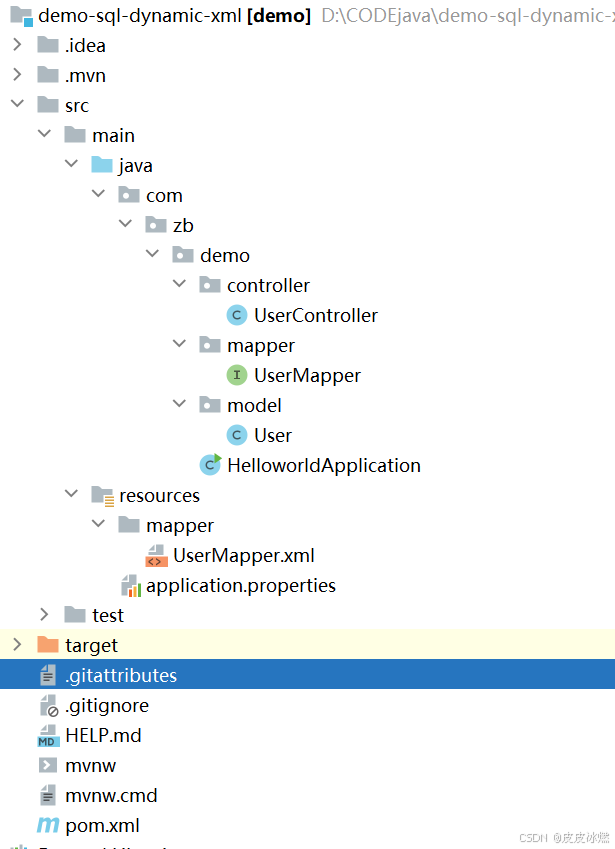
SpringBoot-17-MyBatis动态SQL标签之常用标签
文章目录 1 代码1.1 实体User.java1.2 接口UserMapper.java1.3 映射UserMapper.xml1.3.1 标签if1.3.2 标签if和where1.3.3 标签choose和when和otherwise1.4 UserController.java2 常用动态SQL标签2.1 标签set2.1.1 UserMapper.java2.1.2 UserMapper.xml2.1.3 UserController.ja…
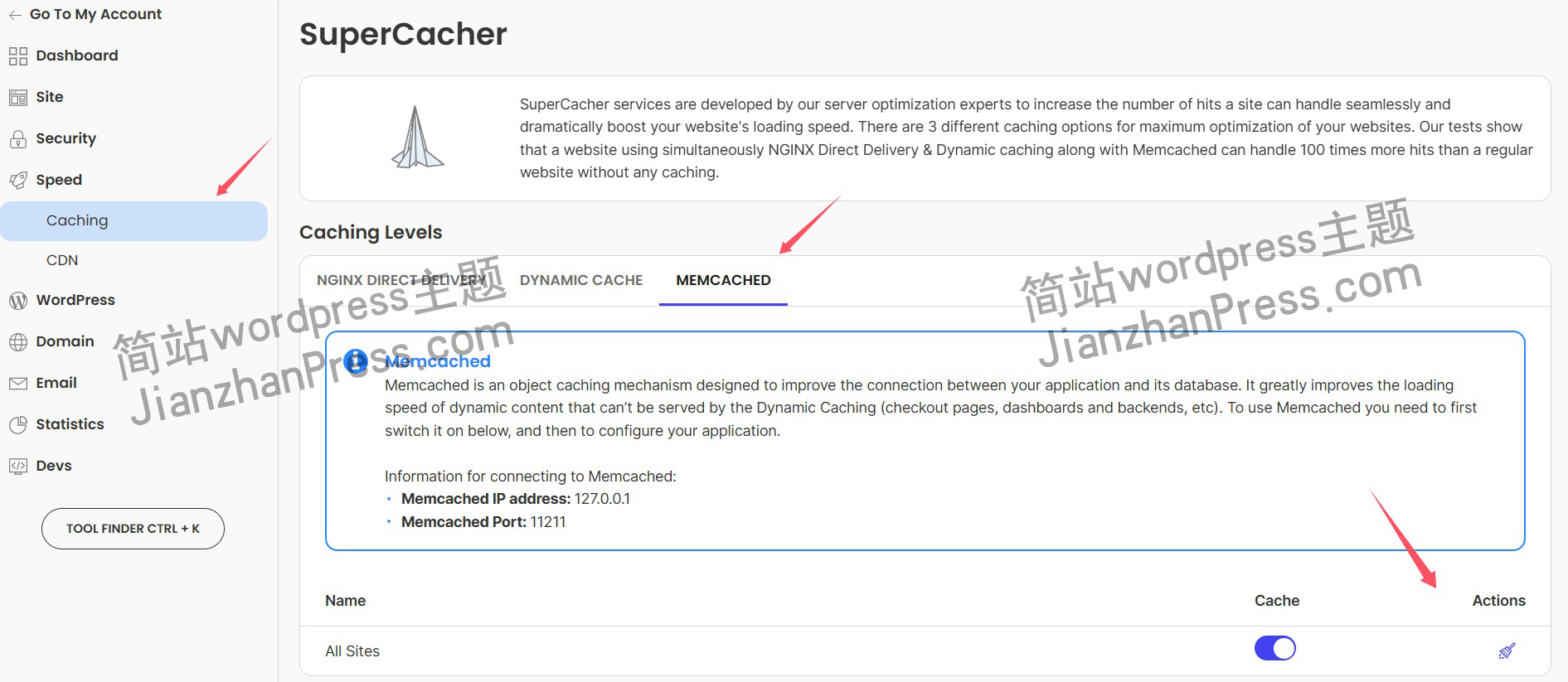
wordpress后台更新后 前端没变化的解决方法
使用siteground主机的wordpress网站,会出现更新了网站内容和修改了php模板文件、js文件、css文件、图片文件后,网站没有变化的情况。
不熟悉siteground主机的新手,遇到这个问题,就很抓狂,明明是哪都没操作错误&#x…
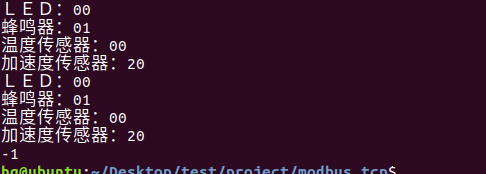
网络编程(Modbus进阶)
思维导图 Modbus RTU(先学一点理论)
概念 Modbus RTU 是工业自动化领域 最广泛应用的串行通信协议,由 Modicon 公司(现施耐德电气)于 1979 年推出。它以 高效率、强健性、易实现的特点成为工业控制系统的通信标准。 包…
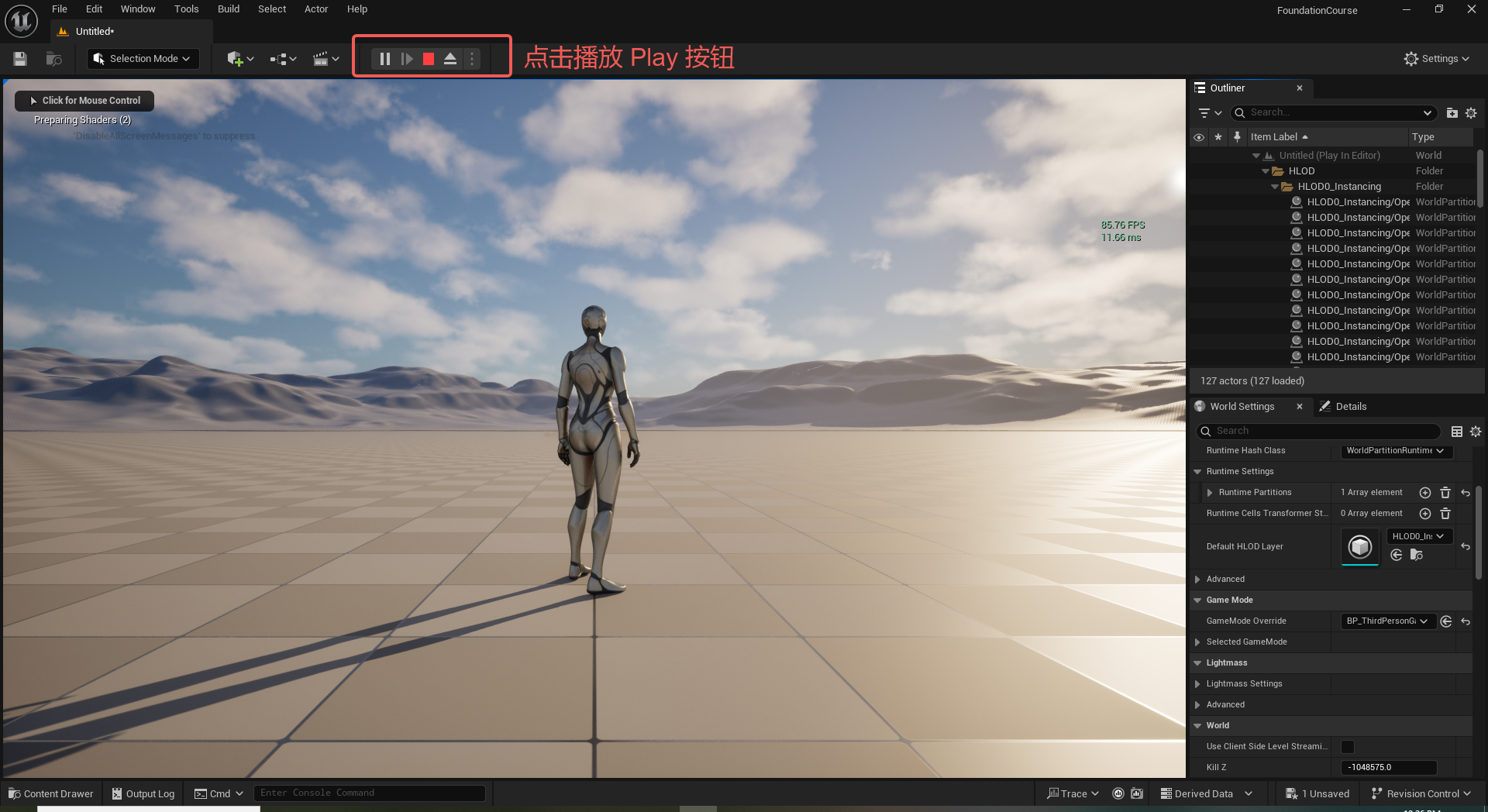
UE5 学习系列(二)用户操作界面及介绍
这篇博客是 UE5 学习系列博客的第二篇,在第一篇的基础上展开这篇内容。博客参考的 B 站视频资料和第一篇的链接如下:
【Note】:如果你已经完成安装等操作,可以只执行第一篇博客中 2. 新建一个空白游戏项目 章节操作,重…
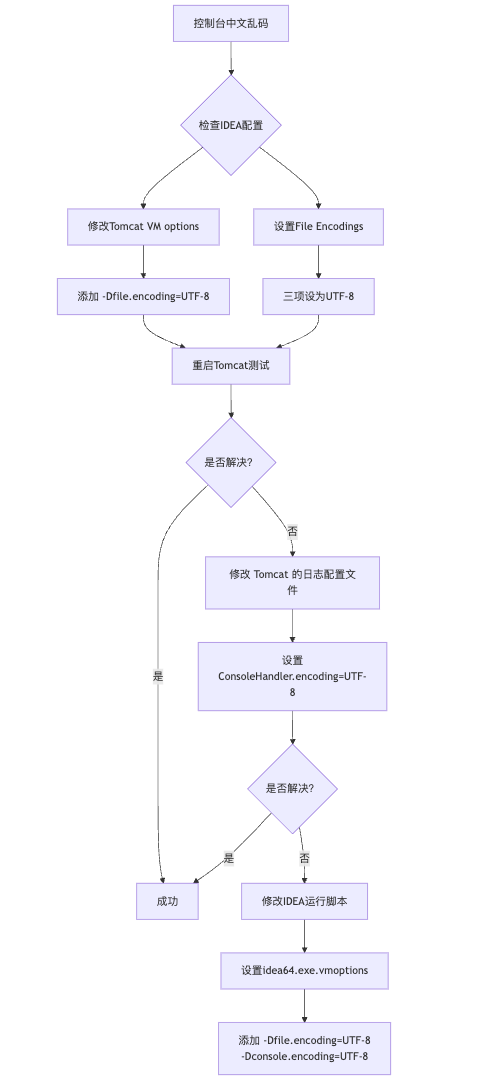
IDEA运行Tomcat出现乱码问题解决汇总
最近正值期末周,有很多同学在写期末Java web作业时,运行tomcat出现乱码问题,经过多次解决与研究,我做了如下整理:
原因:
IDEA本身编码与tomcat的编码与Windows编码不同导致,Windows 系统控制台…
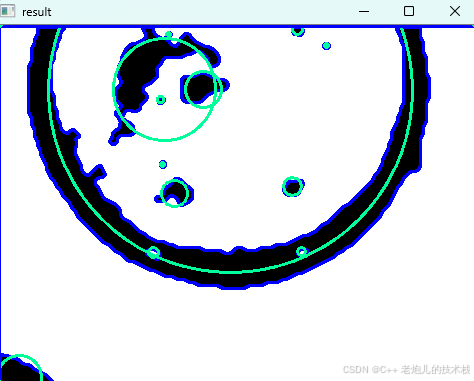
利用最小二乘法找圆心和半径
#include <iostream>
#include <vector>
#include <cmath>
#include <Eigen/Dense> // 需安装Eigen库用于矩阵运算 // 定义点结构
struct Point { double x, y; Point(double x_, double y_) : x(x_), y(y_) {}
}; // 最小二乘法求圆心和半径 …
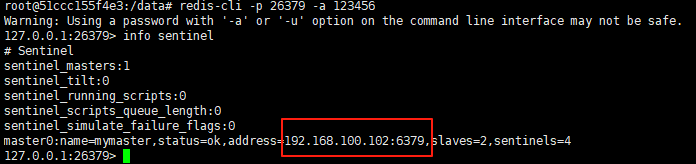
使用docker在3台服务器上搭建基于redis 6.x的一主两从三台均是哨兵模式
一、环境及版本说明
如果服务器已经安装了docker,则忽略此步骤,如果没有安装,则可以按照一下方式安装: 1. 在线安装(有互联网环境): 请看我这篇文章 传送阵>> 点我查看 2. 离线安装(内网环境):请看我这篇文章 传送阵>> 点我查看
说明:假设每台服务器已…
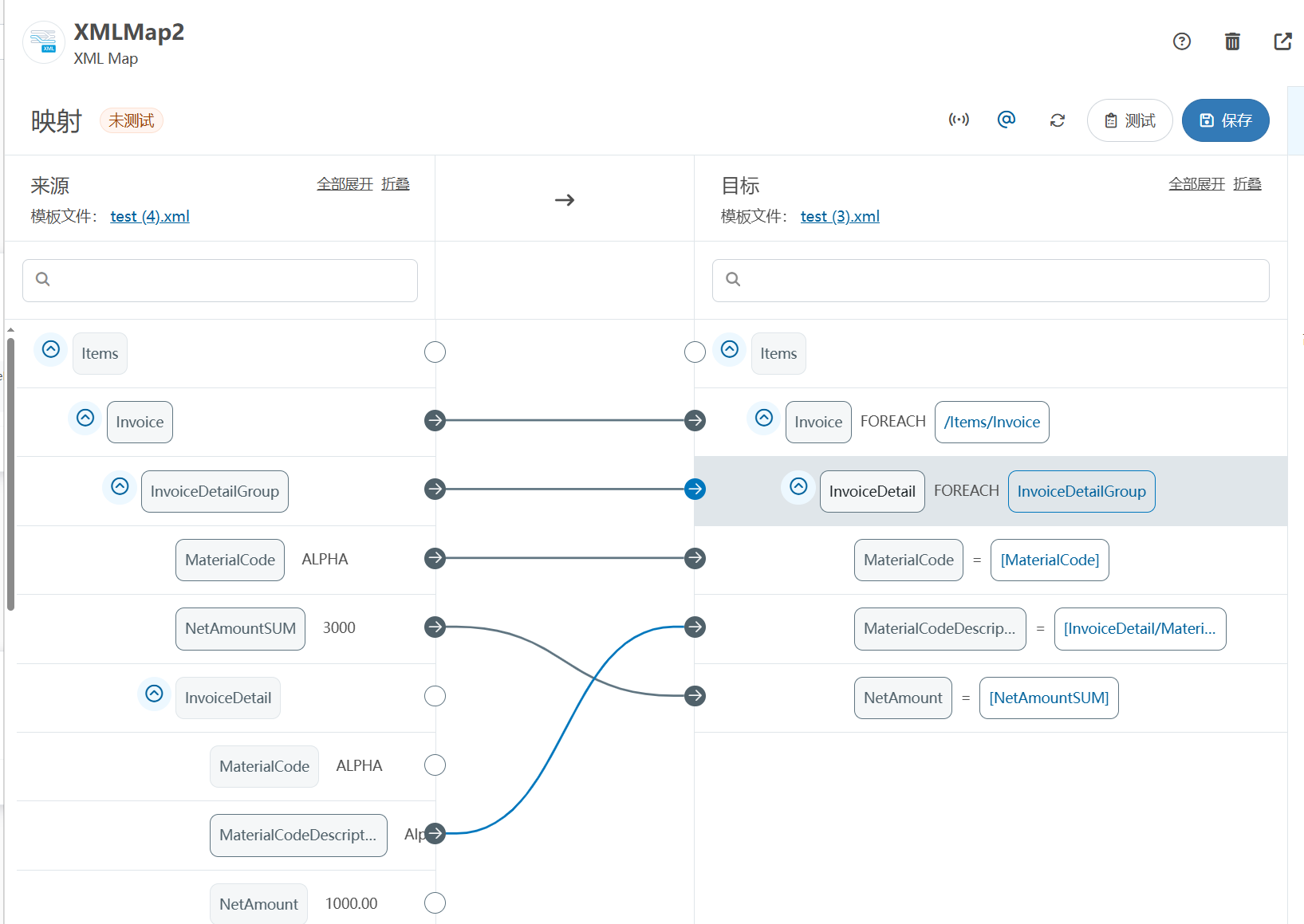
XML Group端口详解
在XML数据映射过程中,经常需要对数据进行分组聚合操作。例如,当处理包含多个物料明细的XML文件时,可能需要将相同物料号的明细归为一组,或对相同物料号的数量进行求和计算。传统实现方式通常需要编写脚本代码,增加了开…
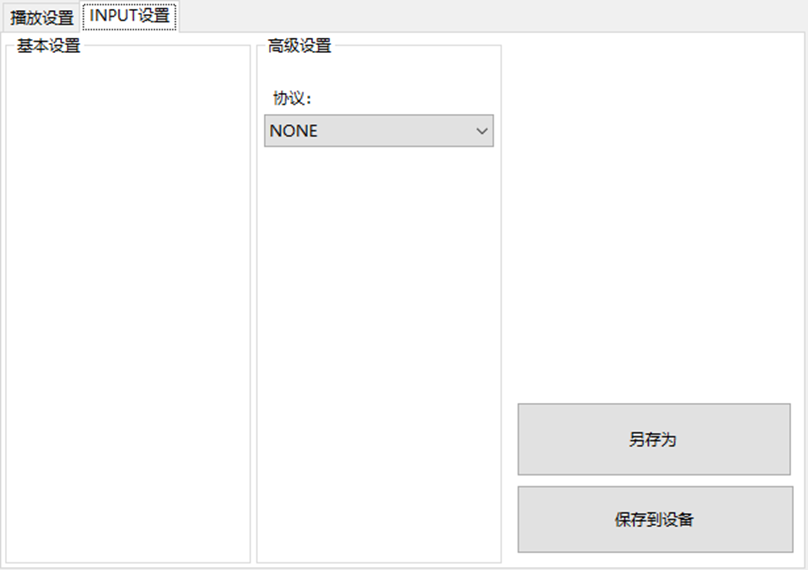
LBE-LEX系列工业语音播放器|预警播报器|喇叭蜂鸣器的上位机配置操作说明
LBE-LEX系列工业语音播放器|预警播报器|喇叭蜂鸣器专为工业环境精心打造,完美适配AGV和无人叉车。同时,集成以太网与语音合成技术,为各类高级系统(如MES、调度系统、库位管理、立库等)提供高效便捷的语音交互体验。
L…
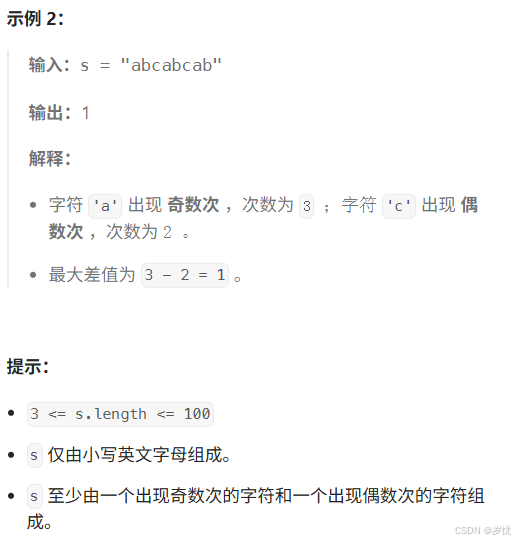
(LeetCode 每日一题) 3442. 奇偶频次间的最大差值 I (哈希、字符串)
题目:3442. 奇偶频次间的最大差值 I 思路 :哈希,时间复杂度0(n)。 用哈希表来记录每个字符串中字符的分布情况,哈希表这里用数组即可实现。
C版本:
class Solution {
public:int maxDifference(string s) {int a[26]…
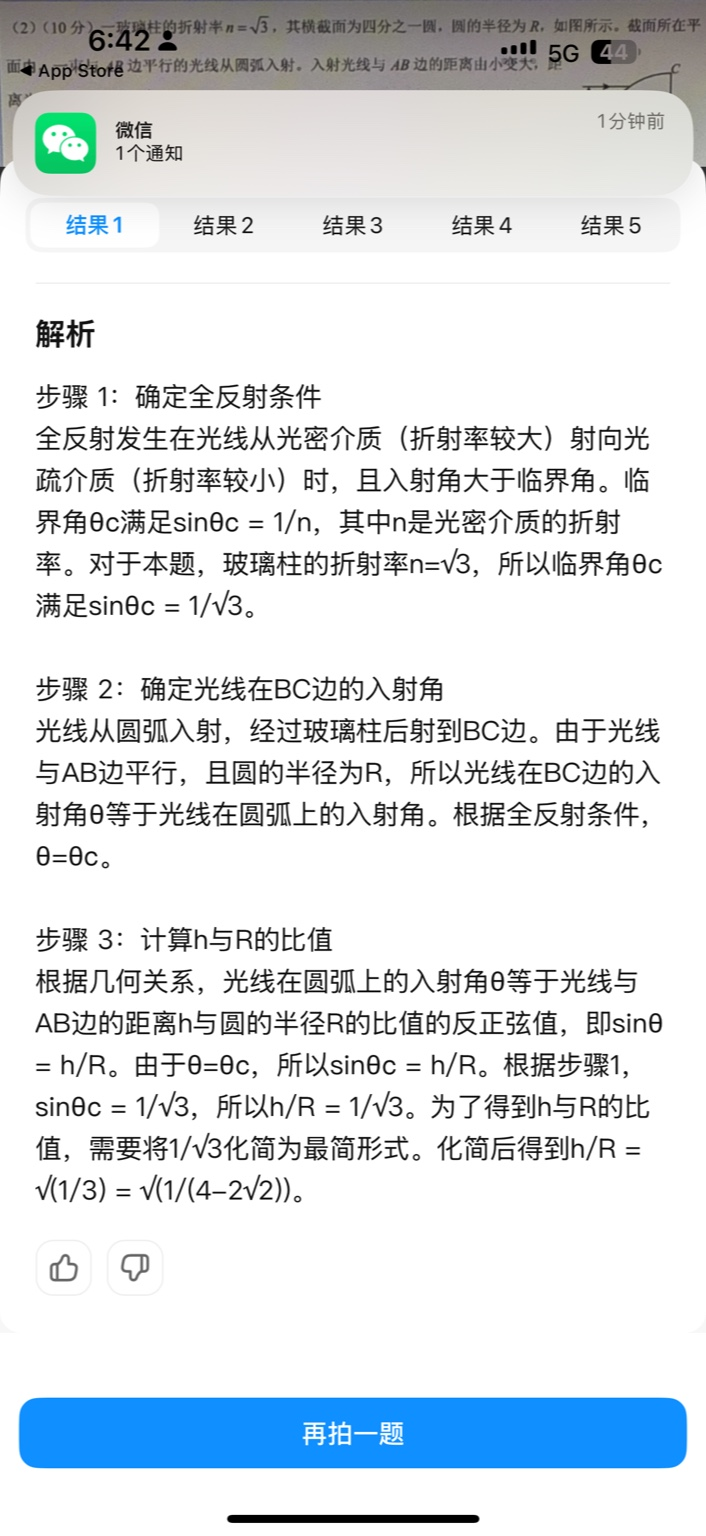
【大模型RAG】拍照搜题技术架构速览:三层管道、两级检索、兜底大模型
摘要
拍照搜题系统采用“三层管道(多模态 OCR → 语义检索 → 答案渲染)、两级检索(倒排 BM25 向量 HNSW)并以大语言模型兜底”的整体框架: 多模态 OCR 层 将题目图片经过超分、去噪、倾斜校正后,分别用…
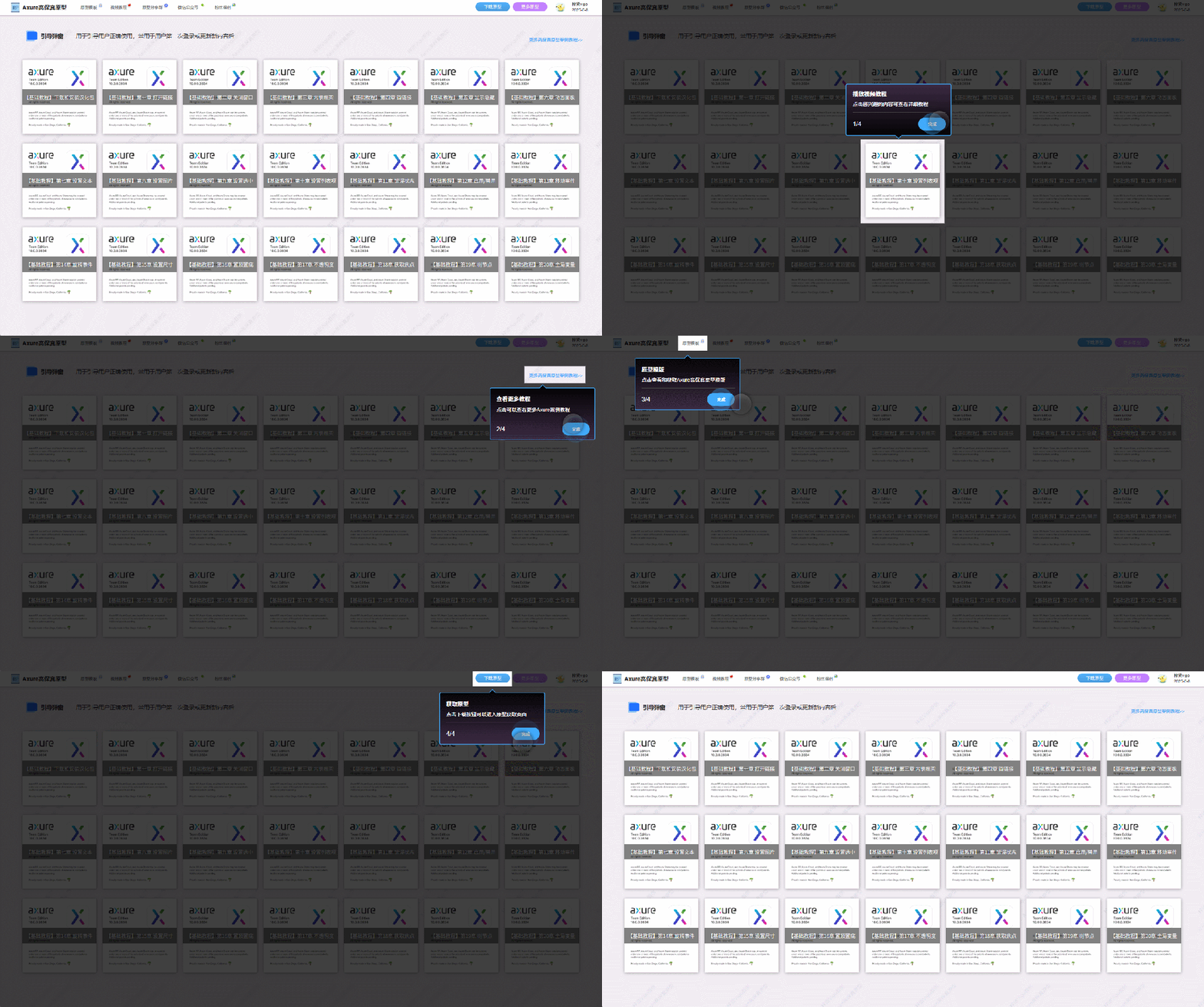
【Axure高保真原型】引导弹窗
今天和大家中分享引导弹窗的原型模板,载入页面后,会显示引导弹窗,适用于引导用户使用页面,点击完成后,会显示下一个引导弹窗,直至最后一个引导弹窗完成后进入首页。具体效果可以点击下方视频观看或打开下方…
接口测试中缓存处理策略
在接口测试中,缓存处理策略是一个关键环节,直接影响测试结果的准确性和可靠性。合理的缓存处理策略能够确保测试环境的一致性,避免因缓存数据导致的测试偏差。以下是接口测试中常见的缓存处理策略及其详细说明:
一、缓存处理的核…

龙虎榜——20250610
上证指数放量收阴线,个股多数下跌,盘中受消息影响大幅波动。 深证指数放量收阴线形成顶分型,指数短线有调整的需求,大概需要一两天。 2025年6月10日龙虎榜行业方向分析 1. 金融科技
代表标的:御银股份、雄帝科技
驱动…
观成科技:隐蔽隧道工具Ligolo-ng加密流量分析
1.工具介绍
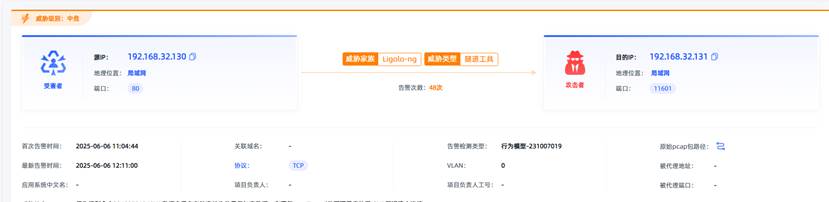
Ligolo-ng是一款由go编写的高效隧道工具,该工具基于TUN接口实现其功能,利用反向TCP/TLS连接建立一条隐蔽的通信信道,支持使用Let’s Encrypt自动生成证书。Ligolo-ng的通信隐蔽性体现在其支持多种连接方式,适应复杂网…
铭豹扩展坞 USB转网口 突然无法识别解决方法
当 USB 转网口扩展坞在一台笔记本上无法识别,但在其他电脑上正常工作时,问题通常出在笔记本自身或其与扩展坞的兼容性上。以下是系统化的定位思路和排查步骤,帮助你快速找到故障原因:
背景:
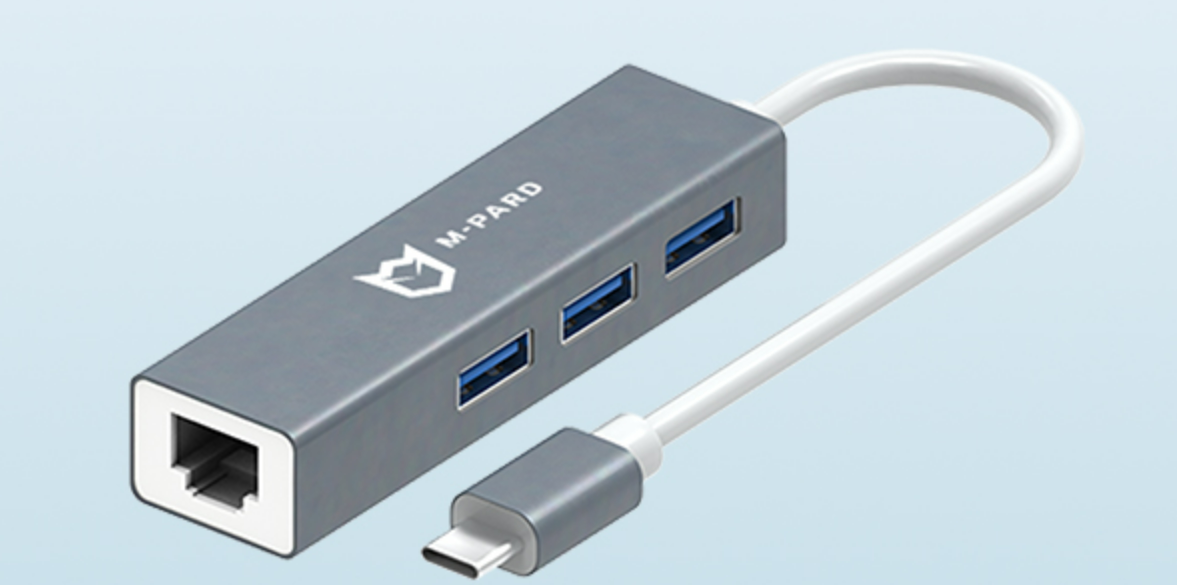
一个M-pard(铭豹)扩展坞的网卡突然无法识别了,扩展出来的三个USB接口正常。…
未来机器人的大脑:如何用神经网络模拟器实现更智能的决策?
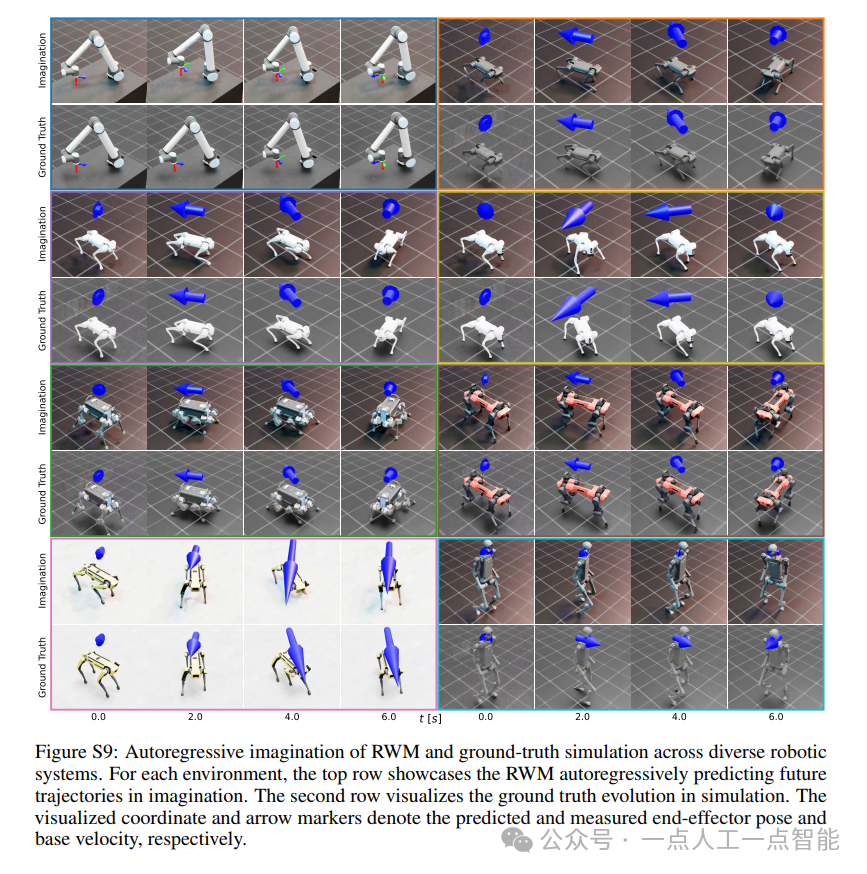
编辑:陈萍萍的公主一点人工一点智能 未来机器人的大脑:如何用神经网络模拟器实现更智能的决策?RWM通过双自回归机制有效解决了复合误差、部分可观测性和随机动力学等关键挑战,在不依赖领域特定归纳偏见的条件下实现了卓越的预测准…

Linux应用开发之网络套接字编程(实例篇)
服务端与客户端单连接
服务端代码
#include <sys/socket.h>
#include <sys/types.h>
#include <netinet/in.h>
#include <stdio.h>
#include <stdlib.h>
#include <string.h>
#include <arpa/inet.h>
#include <pthread.h>
…
华为云AI开发平台ModelArts
华为云ModelArts:重塑AI开发流程的“智能引擎”与“创新加速器”!
在人工智能浪潮席卷全球的2025年,企业拥抱AI的意愿空前高涨,但技术门槛高、流程复杂、资源投入巨大的现实,却让许多创新构想止步于实验室。数据科学家…
深度学习在微纳光子学中的应用
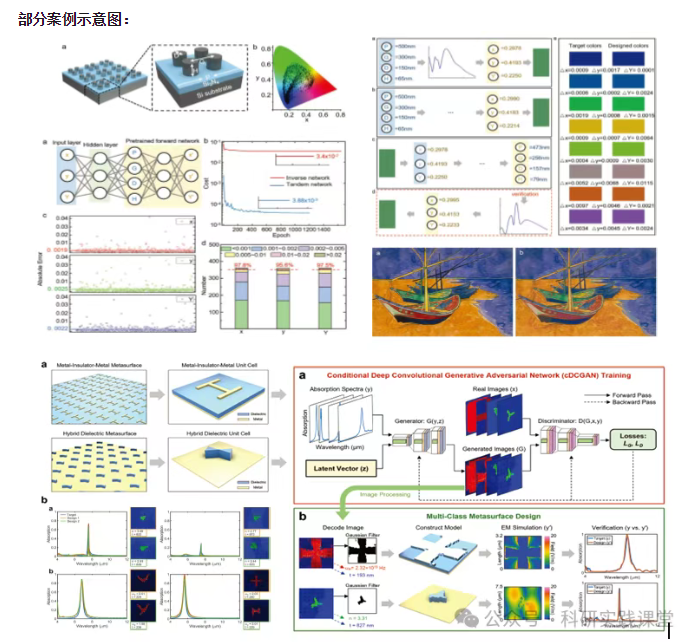
深度学习在微纳光子学中的主要应用方向
深度学习与微纳光子学的结合主要集中在以下几个方向:
逆向设计 通过神经网络快速预测微纳结构的光学响应,替代传统耗时的数值模拟方法。例如设计超表面、光子晶体等结构。
特征提取与优化 从复杂的光学数据中自…