安装OpenClaw - 阿里百炼->选择模型->飞书界面
news2026/4/18 6:34:44
官网教程https://openclaw.ai/安装命令curl -fsSL https://openclaw.ai/install.sh | bash等待下载安装常用命令安装 # 官方脚本 curl -fsSL https://openclaw.ai/install.sh | bash # 国内网络慢可用加速脚本 # curl -fsSL https://open-claw.org.cn/install-cn.sh | bash # 查看版本 openclaw --version # 输出 OpenClaw 2026.x.x 即成功 # 查看技能 openclaw skills list # 重启 OpenClaw 网关 openclaw gateway restart # 停止网关后台服务核心命令 openclaw gateway stop # 启动 网关 openclaw gateway start # 验证是否停止成功 openclaw gateway status # 成功停止会显示Gateway is not running 卸载一键卸载所有组件CLI 可用时 openclaw uninstall --all --yes --non-interactive 方式2 npm uninstall -g openclaw参考macjavaGHuiMacBook-Pro testDemo % curl -fsSL https://openclaw.ai/install.sh | bash OpenClaw Installer Less clicking, more shipping, fewer where did that file go moments. ✓ Detected: macos Install plan OS: macos Install method: npm Requested version: latest [1/3] Preparing environment ✓ Homebrew already installed ✓ Node.js v24.14.0 found · Active Node.js: v24.14.0 (/Users/mac/.nvm/versions/node/v24.14.0/bin/node) · Active npm: 11.9.0 (/Users/mac/.nvm/versions/node/v24.14.0/bin/npm) [2/3] Installing OpenClaw ✓ Git already installed · Installing OpenClaw v2026.3.13 ! npm install failed for openclawlatest Command: env SHARP_IGNORE_GLOBAL_LIBVIPS1 npm --loglevel error --silent --no-fund --no-audit install -g openclawlatest Installer log: /var/folders/sy/1qq81nxn0z3fr41rnz6g7xfm0000gp/T/tmp.k38zRnsGxm ! npm install failed; showing last log lines ! npm install failed; retrying ✓ OpenClaw npm package installed ✓ OpenClaw installed [3/3] Finalizing setup OpenClaw installed successfully (OpenClaw 2026.3.13 (61d171a))! Installation complete. Your productivity is about to get weird. · Starting setup OpenClaw 2026.3.13 (61d171a) — Like having a senior engineer on call, except I dont bill hourly or sigh audibly. ▄▄▄▄▄▄▄▄▄▄▄▄▄▄▄▄▄▄▄▄▄▄▄▄▄▄▄▄▄▄▄▄▄▄▄▄▄▄▄▄▄▄▄▄▄▄▄▄▄▄▄▄ ██░▄▄▄░██░▄▄░██░▄▄▄██░▀██░██░▄▄▀██░████░▄▄▀██░███░██ ██░███░██░▀▀░██░▄▄▄██░█░█░██░█████░████░▀▀░██░█░█░██ ██░▀▀▀░██░█████░▀▀▀██░██▄░██░▀▀▄██░▀▀░█░██░██▄▀▄▀▄██ ▀▀▀▀▀▀▀▀▀▀▀▀▀▀▀▀▀▀▀▀▀▀▀▀▀▀▀▀▀▀▀▀▀▀▀▀▀▀▀▀▀▀▀▀▀▀▀▀▀▀▀▀ OPENCLAW ┌ OpenClaw onboarding │ ◇ Security ─────────────────────────────────────────────────────────────────────────────────╮ │ │ │ Security warning — please read. │ │ │ │ OpenClaw is a hobby project and still in beta. Expect sharp edges. │ │ By default, OpenClaw is a personal agent: one trusted operator boundary. │ │ This bot can read files and run actions if tools are enabled. │ │ A bad prompt can trick it into doing unsafe things. │ │ │ │ OpenClaw is not a hostile multi-tenant boundary by default. │ │ If multiple users can message one tool-enabled agent, they share that delegated tool │ │ authority. │ │ │ │ If you’re not comfortable with security hardening and access control, don’t run │ │ OpenClaw. │ │ Ask someone experienced to help before enabling tools or exposing it to the internet. │ │ │ │ Recommended baseline: │ │ - Pairing/allowlists mention gating. │ │ - Multi-user/shared inbox: split trust boundaries (separate gateway/credentials, ideally │ │ separate OS users/hosts). │ │ - Sandbox least-privilege tools. │ │ - Shared inboxes: isolate DM sessions (session.dmScope: per-channel-peer) and keep │ │ tool access minimal. │ │ - Keep secrets out of the agent’s reachable filesystem. │ │ - Use the strongest available model for any bot with tools or untrusted inboxes. │ │ │ │ Run regularly: │ │ openclaw security audit --deep │ │ openclaw security audit --fix │ │ │ │ Must read: https://docs.openclaw.ai/gateway/security │ │ │ ├────────────────────────────────────────────────────────────────────────────────────────────╯ 按键盘的 方向键 或 空格键把选中状态 按 回车键Enter 确认选择。 ◇ I understand this is personal-by-default and shared/multi-user use requires lock-down. Continue? │ Yes │ ◇ Onboarding mode │ QuickStart │ ◇ QuickStart ─────────────────────────╮ │ │ │ Gateway port: 18789 │ │ Gateway bind: Loopback (127.0.0.1) │ │ Gateway auth: Token (default) │ │ Tailscale exposure: Off │ │ Direct to chat channels. │ │ │ ├──────────────────────────────────────╯ │ ◇ Model/auth provider │ Custom Provider │ ◇ API Base URL │ http://127.0.0.1:11434 默认是这个 需要删除 替换 │ ◇ How do you want to provide this API key? │ Paste API key now │ ◇ API Key (leave blank if not required) │ sk-5a0d1dc2a9******9c7e4b81b │ ◇ Endpoint compatibility │ OpenAI-compatible │ ◇ Model ID │ kimi-k2.5 │ ◇ Verification failed: fetch failed 验证失败了 │ ◇ What would you like to change? │ Change base URL │ ◇ API Base URL │ https://dashscope.aliyuncs.com/compatible-mode/v1 │ ◇ How do you want to provide this API key? │ Paste API key now │ ◇ API Key (leave blank if not required) │ sk-5a0d1dc2******ddc7e4b81b │ ◇ Verification successful. 验证成功 │ ◇ Endpoint ID │ custom-dashscope-aliyuncs-com │ ◇ Model alias (optional) │ kimi-k2.5 Configured custom provider: custom-dashscope-aliyuncs-com/kimi-k2.5 │ ◇ Channel status ────────────────────────────╮ │ │ │ Telegram: needs token │ │ WhatsApp (default): not linked │ │ Discord: needs token │ │ Slack: needs tokens │ │ Signal: needs setup │ │ signal-cli: missing (signal-cli) │ │ iMessage: needs setup │ │ imsg: missing (imsg) │ │ IRC: not configured │ │ Google Chat: not configured │ │ LINE: not configured │ │ Feishu: install plugin to enable │ │ Google Chat: install plugin to enable │ │ Nostr: install plugin to enable │ │ Microsoft Teams: install plugin to enable │ │ Mattermost: install plugin to enable │ │ Nextcloud Talk: install plugin to enable │ │ Matrix: install plugin to enable │ │ BlueBubbles: install plugin to enable │ │ LINE: install plugin to enable │ │ Zalo: install plugin to enable │ │ Zalo Personal: install plugin to enable │ │ Synology Chat: install plugin to enable │ │ Tlon: install plugin to enable │ │ │ ├─────────────────────────────────────────────╯ │ ◇ How channels work ───────────────────────────────────────────────────────────────────────╮ │ │ │ DM security: default is pairing; unknown DMs get a pairing code. │ │ Approve with: openclaw pairing approve channel code │ │ Public DMs require dmPolicyopen allowFrom[*]. │ │ Multi-user DMs: run: openclaw config set session.dmScope per-channel-peer (or │ │ per-account-channel-peer for multi-account channels) to isolate sessions. │ │ Docs: channels/pairing │ │ │ │ Telegram: simplest way to get started — register a bot with BotFather and get going. │ │ WhatsApp: works with your own number; recommend a separate phone eSIM. │ │ Discord: very well supported right now. │ │ IRC: classic IRC networks with DM/channel routing and pairing controls. │ │ Google Chat: Google Workspace Chat app with HTTP webhook. │ │ Slack: supported (Socket Mode). │ │ Signal: signal-cli linked device; more setup (David Reagans: Hop on Discord.). │ │ iMessage: this is still a work in progress. │ │ LINE: LINE Messaging API webhook bot. │ │ Feishu: 飞书/Lark enterprise messaging with doc/wiki/drive tools. │ │ Nostr: Decentralized protocol; encrypted DMs via NIP-04. │ │ Microsoft Teams: Bot Framework; enterprise support. │ │ Mattermost: self-hosted Slack-style chat; install the plugin to enable. │ │ Nextcloud Talk: Self-hosted chat via Nextcloud Talk webhook bots. │ │ Matrix: open protocol; install the plugin to enable. │ │ BlueBubbles: iMessage via the BlueBubbles mac app REST API. │ │ Zalo: Vietnam-focused messaging platform with Bot API. │ │ Zalo Personal: Zalo personal account via QR code login. │ │ Synology Chat: Connect your Synology NAS Chat to OpenClaw with full agent capabilities. │ │ Tlon: decentralized messaging on Urbit; install the plugin to enable. │ │ │ ├───────────────────────────────────────────────────────────────────────────────────────────╯ │ ◇ Select channel (QuickStart) │ Feishu/Lark (飞书) │ ◇ Install Feishu plugin? │ Use local plugin path 10:06:15 [plugins] plugins.allow is empty; discovered non-bundled plugins may auto-load: feishu (/Users/mac/.nvm/versions/node/v24.14.0/lib/node_modules/openclaw/extensions/feishu/index.ts). Set plugins.allow to explicit trusted ids. │ ◇ Feishu credentials ──────────────────────────────────────────────────────────────╮ │ │ │ 1) Go to Feishu Open Platform (open.feishu.cn) │ │ 2) Create a self-built app │ │ 3) Get App ID and App Secret from Credentials page │ │ 4) Enable required permissions: im:message, im:chat, contact:user.base:readonly │ │ 5) Publish the app or add it to a test group │ │ Tip: you can also set FEISHU_APP_ID / FEISHU_APP_SECRET env vars. │ │ Docs: feishu │ │ │ ├───────────────────────────────────────────────────────────────────────────────────╯ │ ◇ How do you want to provide this App Secret? │ Enter App Secret │ ◇ Enter Feishu App Secret │ SU4wKXc0xk3nEblVffu724TEZ3Sg │ ◇ Enter Feishu App ID │ cli_a93cbf52799bd8 [info]: [ client ready ] │ ◇ Feishu connection test ───────────────────────────╮ │ │ │ Connected as ou_f95f40545cd62790c09e6f83ad9 │ │ │ ├────────────────────────────────────────────────────╯ │ ◇ Feishu connection mode │ WebSocket (default) │ ◇ Which Feishu domain? │ Feishu (feishu.cn) - China │ ◇ Group chat policy │ Allowlist - only respond in specific groups │ ◇ Group chat allowlist (chat_ids) │ │ ◇ Selected channels ──────────────────────────────────────────╮ │ │ │ Feishu — 飞书/Lark enterprise messaging. Docs: │ │ feishu │ │ │ ├──────────────────────────────────────────────────────────────╯ Updated ~/.openclaw/openclaw.json Workspace OK: ~/.openclaw/workspace Sessions OK: ~/.openclaw/agents/main/sessions │ ◇ Web search ────────────────────────────────────────╮ │ │ │ Web search lets your agent look things up online. │ │ Choose a provider and paste your API key. │ │ Docs: https://docs.openclaw.ai/tools/web │ │ │ ├─────────────────────────────────────────────────────╯ │ ◇ Search provider │ Skip for now │ ◇ Skills status ─────────────╮ │ │ │ Eligible: 8 │ │ Missing requirements: 48 │ │ Unsupported on this OS: 0 │ │ Blocked by allowlist: 0 │ │ │ ├─────────────────────────────╯ │ ◇ Configure skills now? (recommended) │ No │ ◇ Hooks ──────────────────────────────────────────────────────────────────╮ │ │ │ Hooks let you automate actions when agent commands are issued. │ │ Example: Save session context to memory when you issue /new or /reset. │ │ │ │ Learn more: https://docs.openclaw.ai/automation/hooks │ │ │ ├──────────────────────────────────────────────────────────────────────────╯ │ ◇ Enable hooks? │ Skip for now Config overwrite: /Users/mac/.openclaw/openclaw.json (sha256 3c3702b5922c799cda936cb910cd1101d3156c7d24d693b7a53e4c9ab7e38388 - d9b2e0c544151fa6f5159b047eaf1d87b04d50a971bb0670c9b9da81ff836264, backup/Users/mac/.openclaw/openclaw.json.bak) │ ◇ Gateway service runtime ────────────────────────────────────────────╮ │ │ │ QuickStart uses Node for the Gateway service (stable supported). │ │ │ ├──────────────────────────────────────────────────────────────────────╯ │ ◒ Preparing Gateway service… Installed LaunchAgent: /Users/mac/Library/LaunchAgents/ai.openclaw.gateway.plist Logs: /Users/mac/.openclaw/logs/gateway.log ◇ Gateway service installed. │ ◇ Health check failed: gateway closed (1006 abnormal closure (no close frame)): no close reason Gateway target: ws://127.0.0.1:18789 Source: local loopback Config: /Users/mac/.openclaw/openclaw.json Bind: loopback │ ◇ Health check help ────────────────────────────────╮ │ │ │ Docs: │ │ https://docs.openclaw.ai/gateway/health │ │ https://docs.openclaw.ai/gateway/troubleshooting │ │ │ ├────────────────────────────────────────────────────╯ │ ◇ Optional apps ────────────────────────╮ │ │ │ Add nodes for extra features: │ │ - macOS app (system notifications) │ │ - iOS app (camera/canvas) │ │ - Android app (camera/canvas) │ │ │ ├────────────────────────────────────────╯ │ ◇ Control UI ───────────────────────────────────────────────────────────────────────────────╮ │ │ │ Web UI: http://127.0.0.1:18789/ │ │ Web UI (with token): 访问链接地址打开 │ │ http://127.0.0.1:18789/#token7efdce496bae571540a7c40efe2b904ea35d855e53c37841 │ │ Gateway WS: ws://127.0.0.1:18789 │ │ Gateway: not detected (gateway closed (1006 abnormal closure (no close frame)): no close │ │ reason) │ │ Docs: https://docs.openclaw.ai/web/control-ui │ │ │ ├────────────────────────────────────────────────────────────────────────────────────────────╯ │ ◇ Workspace backup ────────────────────────────────────────╮ │ │ │ Back up your agent workspace. │ │ Docs: https://docs.openclaw.ai/concepts/agent-workspace │ │ │ ├───────────────────────────────────────────────────────────╯ │ ◇ Security ──────────────────────────────────────────────────────╮ │ │ │ Running agents on your computer is risky — harden your setup: │ │ https://docs.openclaw.ai/security │ │ │ ├─────────────────────────────────────────────────────────────────╯ │ ◇ Dashboard ready ────────────────────────────────────────────────────────────────╮ │ │ │ Dashboard link (with token): │ │ http://127.0.0.1:18789/#token7efdce496bae571540a7c40efe2b904ea35d855e53c37841 │ │ Opened in your browser. Keep that tab to control OpenClaw. │ │ │ ├──────────────────────────────────────────────────────────────────────────────────╯ │ ◇ Web search ───────────────────────────────────────╮ │ │ │ Web search was skipped. You can enable it later: │ │ openclaw configure --section web │ │ │ │ Docs: https://docs.openclaw.ai/tools/web │ │ │ ├────────────────────────────────────────────────────╯ │ ◇ What now ─────────────────────────────────────────────────────────────╮ │ │ │ What now: https://openclaw.ai/showcase (What People Are Building). │ │ │ ├────────────────────────────────────────────────────────────────────────╯ │ └ Onboarding complete. Dashboard opened; keep that tab to control OpenClaw.阿里云百炼Base URL:https://dashscope.aliyuncs.com/compatible-mode/v1API Key:选择要用的模型飞书视频教程【小龙虾OpenClaw保姆级安装教程小白10分钟搞定【Windows系统 接入飞书】】 https://www.bilibili.com/video/BV1WDPhzWEVb/?p5share_sourcecopy_webvd_source98086e18be4f73d775a53f392ceb72a0test.py:import lark_oapi as lark ## P2ImMessageReceiveV1 为接收消息 v2.0CustomizedEvent 内的 message 为接收消息 v1.0。 def do_p2_im_message_receive_v1(data: lark.im.v1.P2ImMessageReceiveV1) - None: print(f[ do_p2_im_message_receive_v1 access ], data: {lark.JSON.marshal(data, indent4)}) def do_message_event(data: lark.CustomizedEvent) - None: print(f[ do_customized_event access ], type: message, data: {lark.JSON.marshal(data, indent4)}) event_handler lark.EventDispatcherHandler.builder(, ) \ .register_p2_im_message_receive_v1(do_p2_im_message_receive_v1) \ .register_p1_customized_event(out_approval, do_message_event) \ .build() def main(): cli lark.ws.Client(App ID, App Secret, event_handlerevent_handler, log_levellark.LogLevel.DEBUG) cli.start() if __name__ __main__: main()配对码发个消息openclaw pairing approve feishu 配对码openclaw pairing approve feishu TW*****在测试下发个消息网页打开找到链接打开即可如http://127.0.0.1:18789/#token7efdce496bae861540a7c40efe2b904ea35d855e53c37841
本文来自互联网用户投稿,该文观点仅代表作者本人,不代表本站立场。本站仅提供信息存储空间服务,不拥有所有权,不承担相关法律责任。如若转载,请注明出处:http://www.coloradmin.cn/o/2422478.html
如若内容造成侵权/违法违规/事实不符,请联系多彩编程网进行投诉反馈,一经查实,立即删除!相关文章
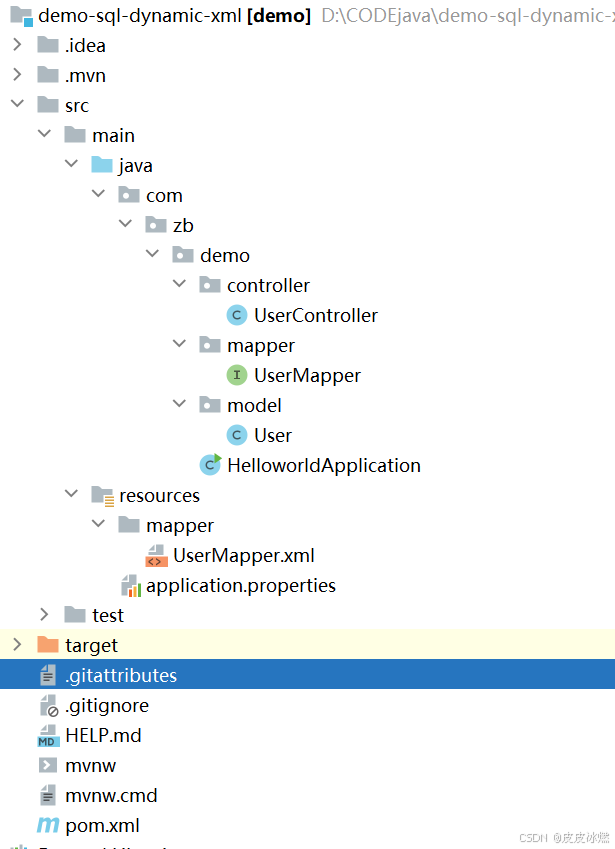
SpringBoot-17-MyBatis动态SQL标签之常用标签
文章目录 1 代码1.1 实体User.java1.2 接口UserMapper.java1.3 映射UserMapper.xml1.3.1 标签if1.3.2 标签if和where1.3.3 标签choose和when和otherwise1.4 UserController.java2 常用动态SQL标签2.1 标签set2.1.1 UserMapper.java2.1.2 UserMapper.xml2.1.3 UserController.ja…
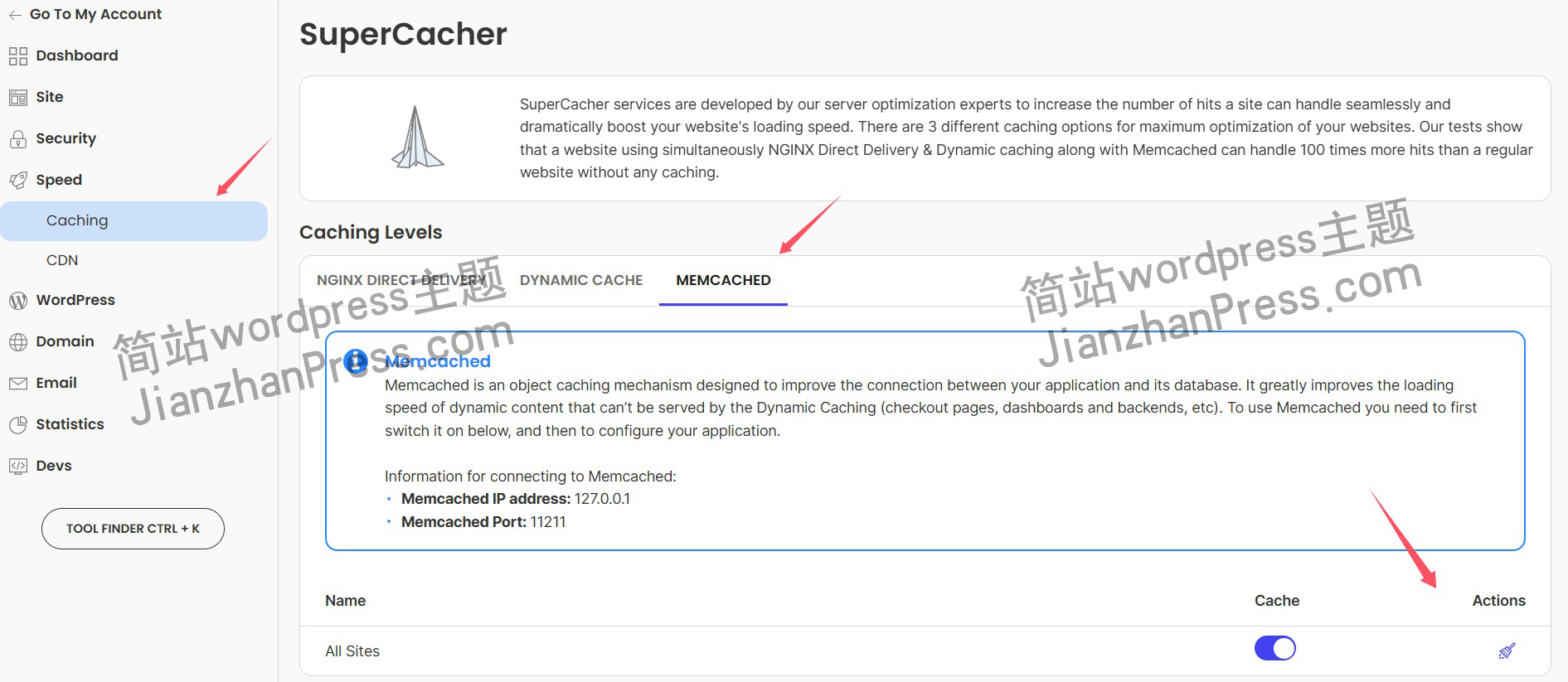
wordpress后台更新后 前端没变化的解决方法
使用siteground主机的wordpress网站,会出现更新了网站内容和修改了php模板文件、js文件、css文件、图片文件后,网站没有变化的情况。
不熟悉siteground主机的新手,遇到这个问题,就很抓狂,明明是哪都没操作错误&#x…
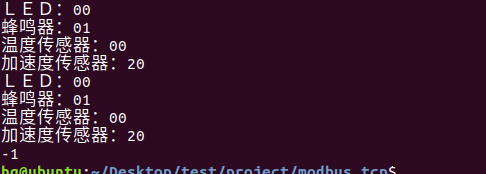
网络编程(Modbus进阶)
思维导图 Modbus RTU(先学一点理论)
概念 Modbus RTU 是工业自动化领域 最广泛应用的串行通信协议,由 Modicon 公司(现施耐德电气)于 1979 年推出。它以 高效率、强健性、易实现的特点成为工业控制系统的通信标准。 包…
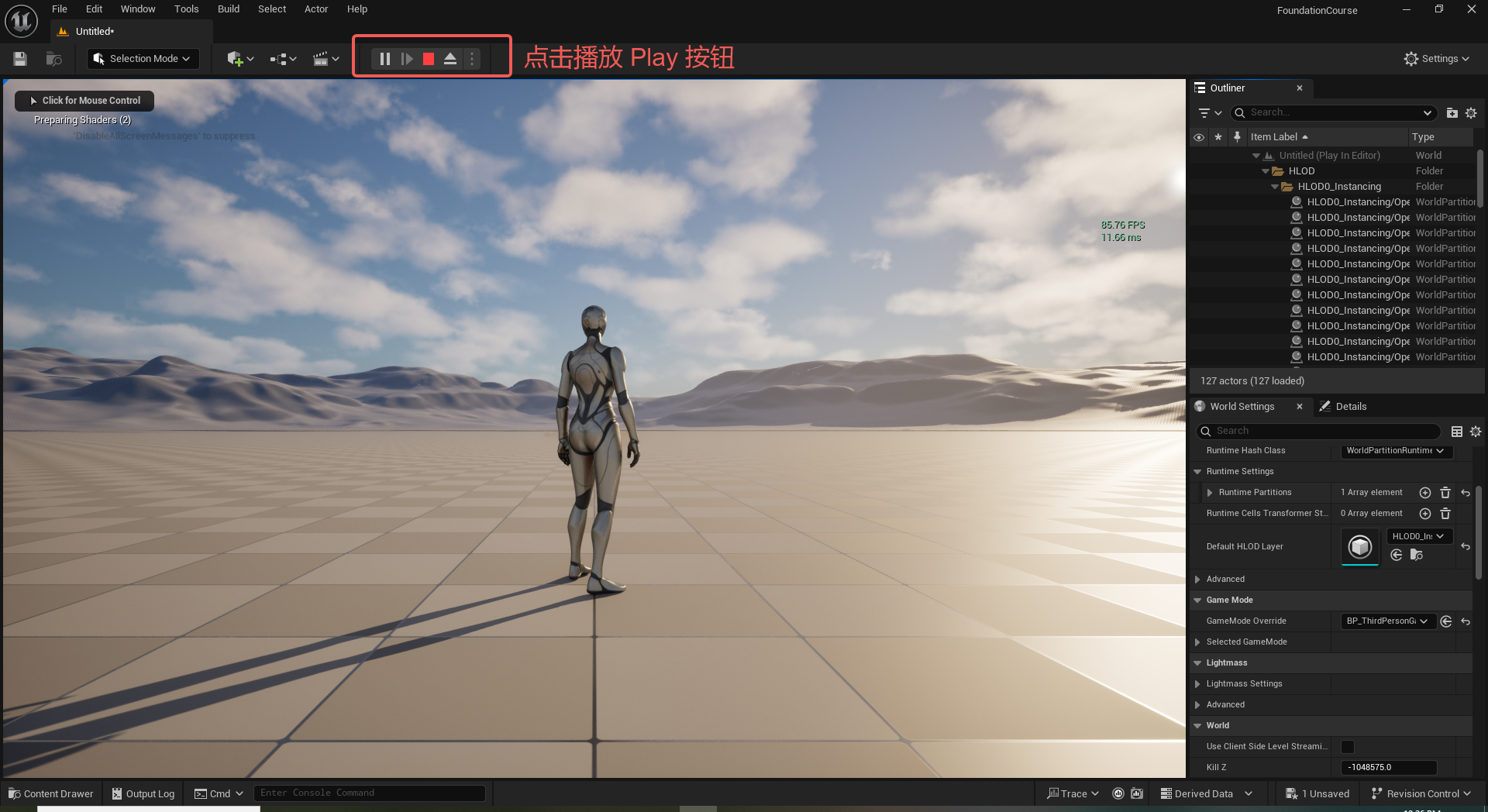
UE5 学习系列(二)用户操作界面及介绍
这篇博客是 UE5 学习系列博客的第二篇,在第一篇的基础上展开这篇内容。博客参考的 B 站视频资料和第一篇的链接如下:
【Note】:如果你已经完成安装等操作,可以只执行第一篇博客中 2. 新建一个空白游戏项目 章节操作,重…
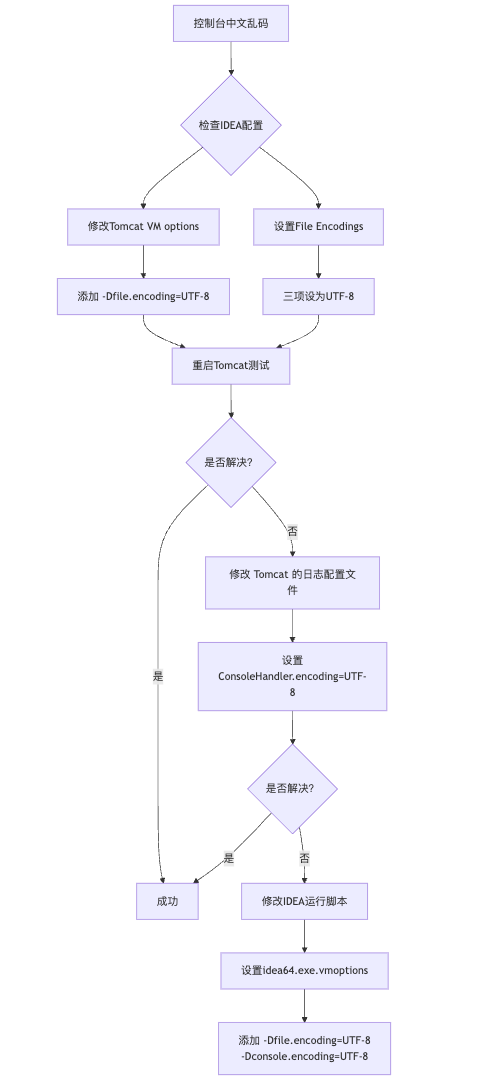
IDEA运行Tomcat出现乱码问题解决汇总
最近正值期末周,有很多同学在写期末Java web作业时,运行tomcat出现乱码问题,经过多次解决与研究,我做了如下整理:
原因:
IDEA本身编码与tomcat的编码与Windows编码不同导致,Windows 系统控制台…
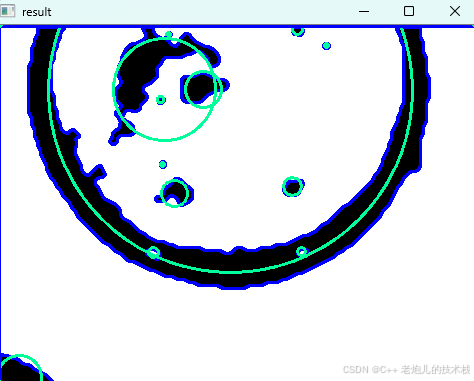
利用最小二乘法找圆心和半径
#include <iostream>
#include <vector>
#include <cmath>
#include <Eigen/Dense> // 需安装Eigen库用于矩阵运算 // 定义点结构
struct Point { double x, y; Point(double x_, double y_) : x(x_), y(y_) {}
}; // 最小二乘法求圆心和半径 …
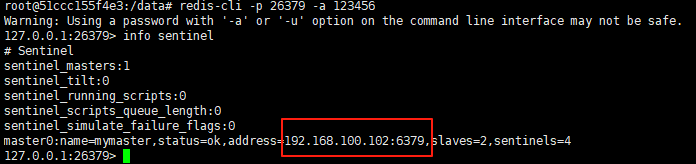
使用docker在3台服务器上搭建基于redis 6.x的一主两从三台均是哨兵模式
一、环境及版本说明
如果服务器已经安装了docker,则忽略此步骤,如果没有安装,则可以按照一下方式安装: 1. 在线安装(有互联网环境): 请看我这篇文章 传送阵>> 点我查看 2. 离线安装(内网环境):请看我这篇文章 传送阵>> 点我查看
说明:假设每台服务器已…
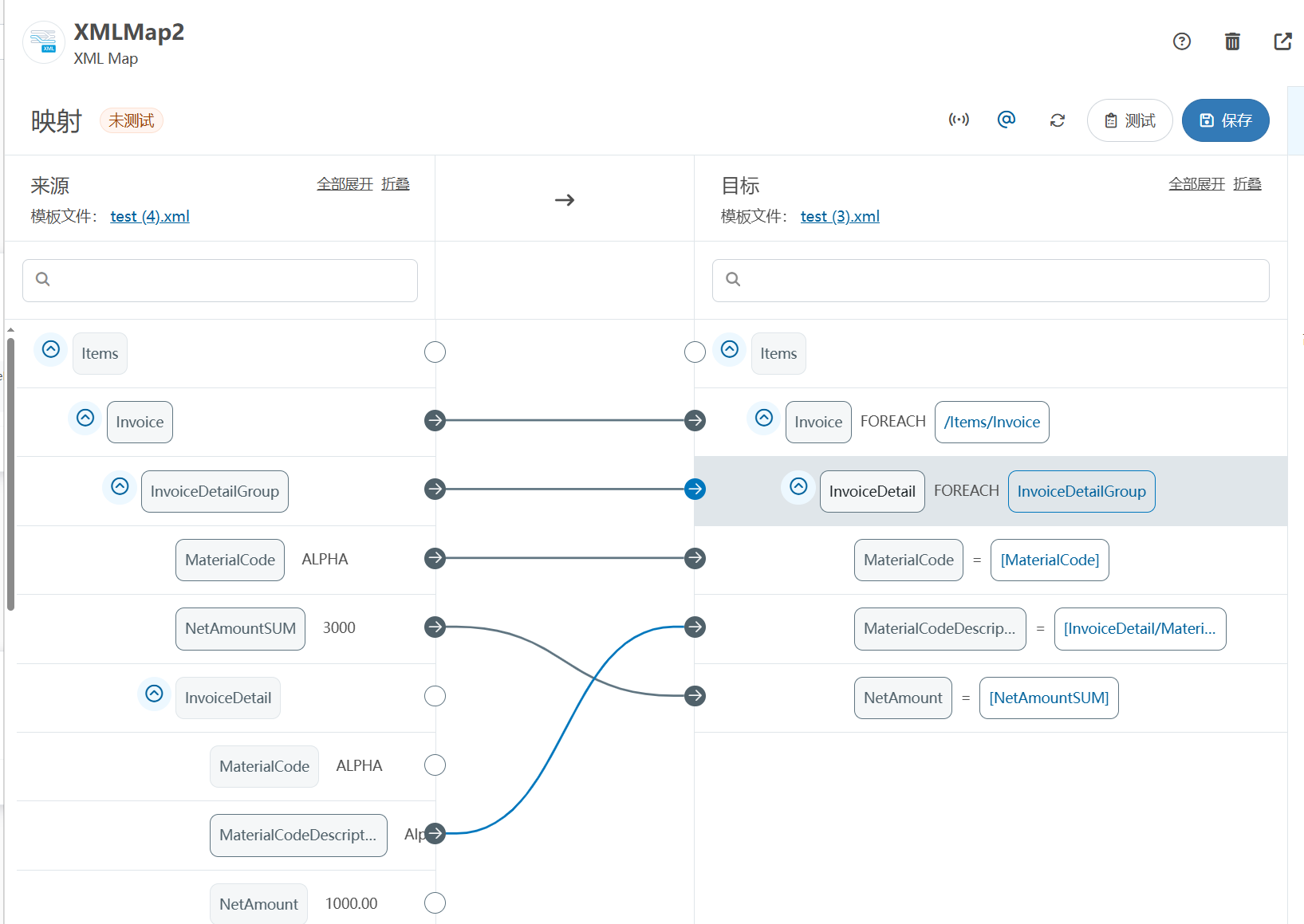
XML Group端口详解
在XML数据映射过程中,经常需要对数据进行分组聚合操作。例如,当处理包含多个物料明细的XML文件时,可能需要将相同物料号的明细归为一组,或对相同物料号的数量进行求和计算。传统实现方式通常需要编写脚本代码,增加了开…
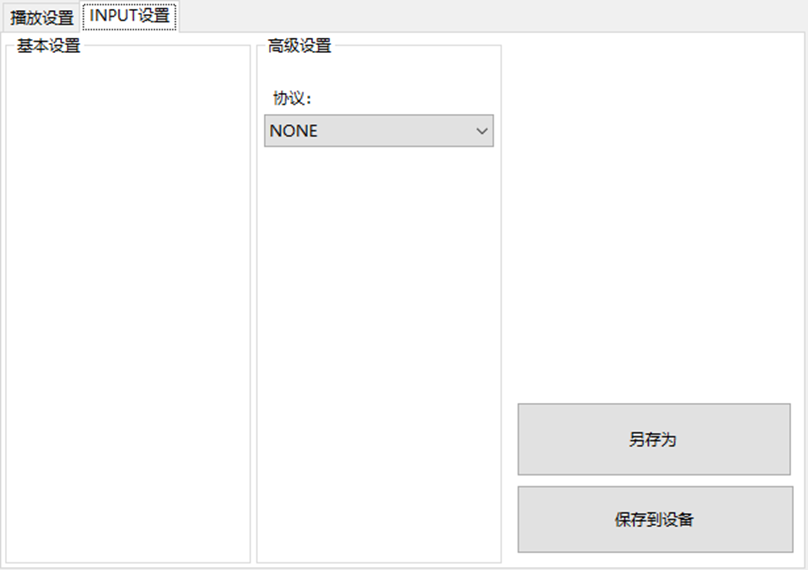
LBE-LEX系列工业语音播放器|预警播报器|喇叭蜂鸣器的上位机配置操作说明
LBE-LEX系列工业语音播放器|预警播报器|喇叭蜂鸣器专为工业环境精心打造,完美适配AGV和无人叉车。同时,集成以太网与语音合成技术,为各类高级系统(如MES、调度系统、库位管理、立库等)提供高效便捷的语音交互体验。
L…
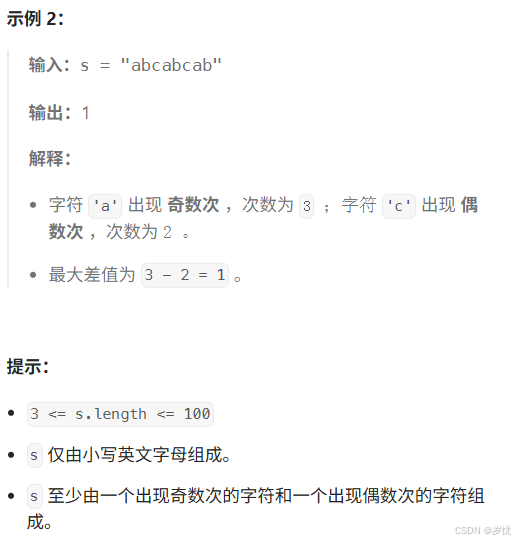
(LeetCode 每日一题) 3442. 奇偶频次间的最大差值 I (哈希、字符串)
题目:3442. 奇偶频次间的最大差值 I 思路 :哈希,时间复杂度0(n)。 用哈希表来记录每个字符串中字符的分布情况,哈希表这里用数组即可实现。
C版本:
class Solution {
public:int maxDifference(string s) {int a[26]…
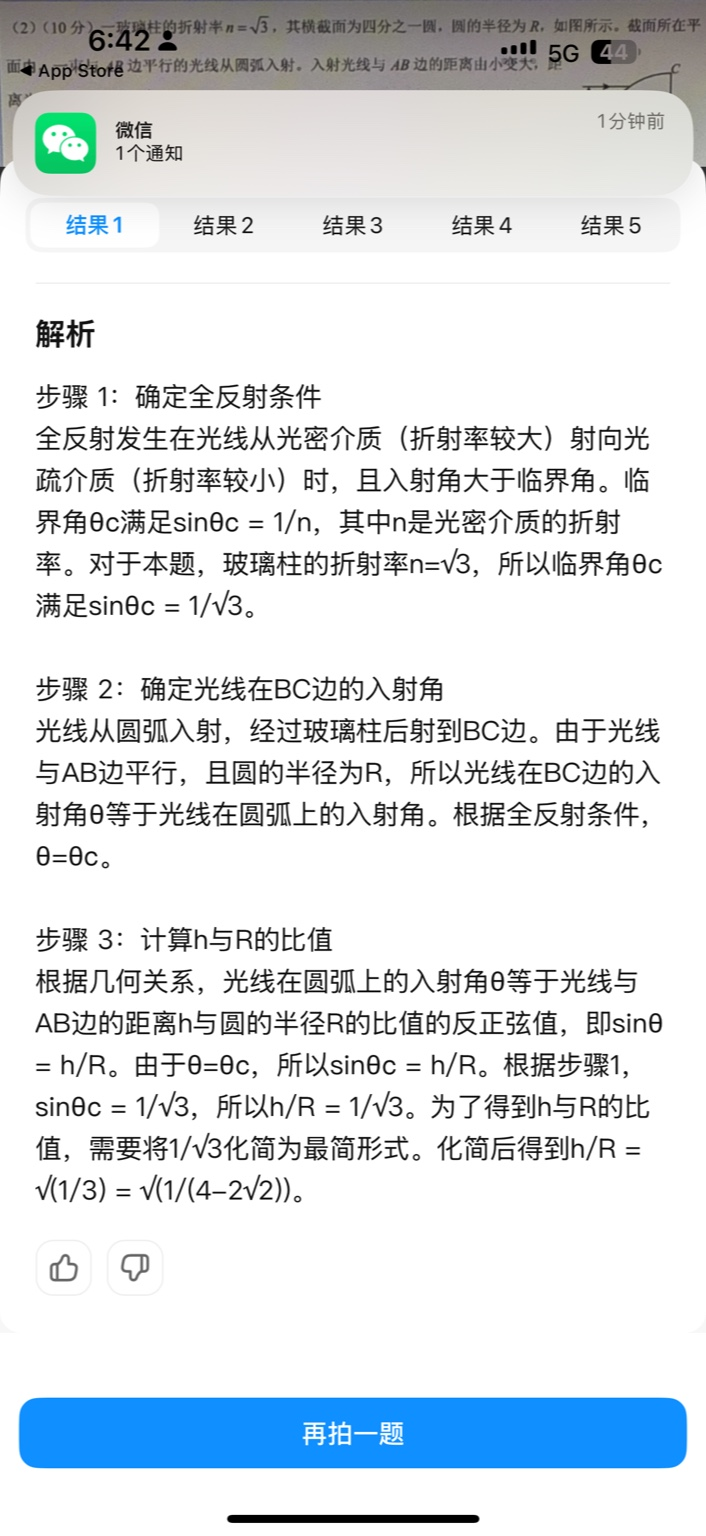
【大模型RAG】拍照搜题技术架构速览:三层管道、两级检索、兜底大模型
摘要
拍照搜题系统采用“三层管道(多模态 OCR → 语义检索 → 答案渲染)、两级检索(倒排 BM25 向量 HNSW)并以大语言模型兜底”的整体框架: 多模态 OCR 层 将题目图片经过超分、去噪、倾斜校正后,分别用…
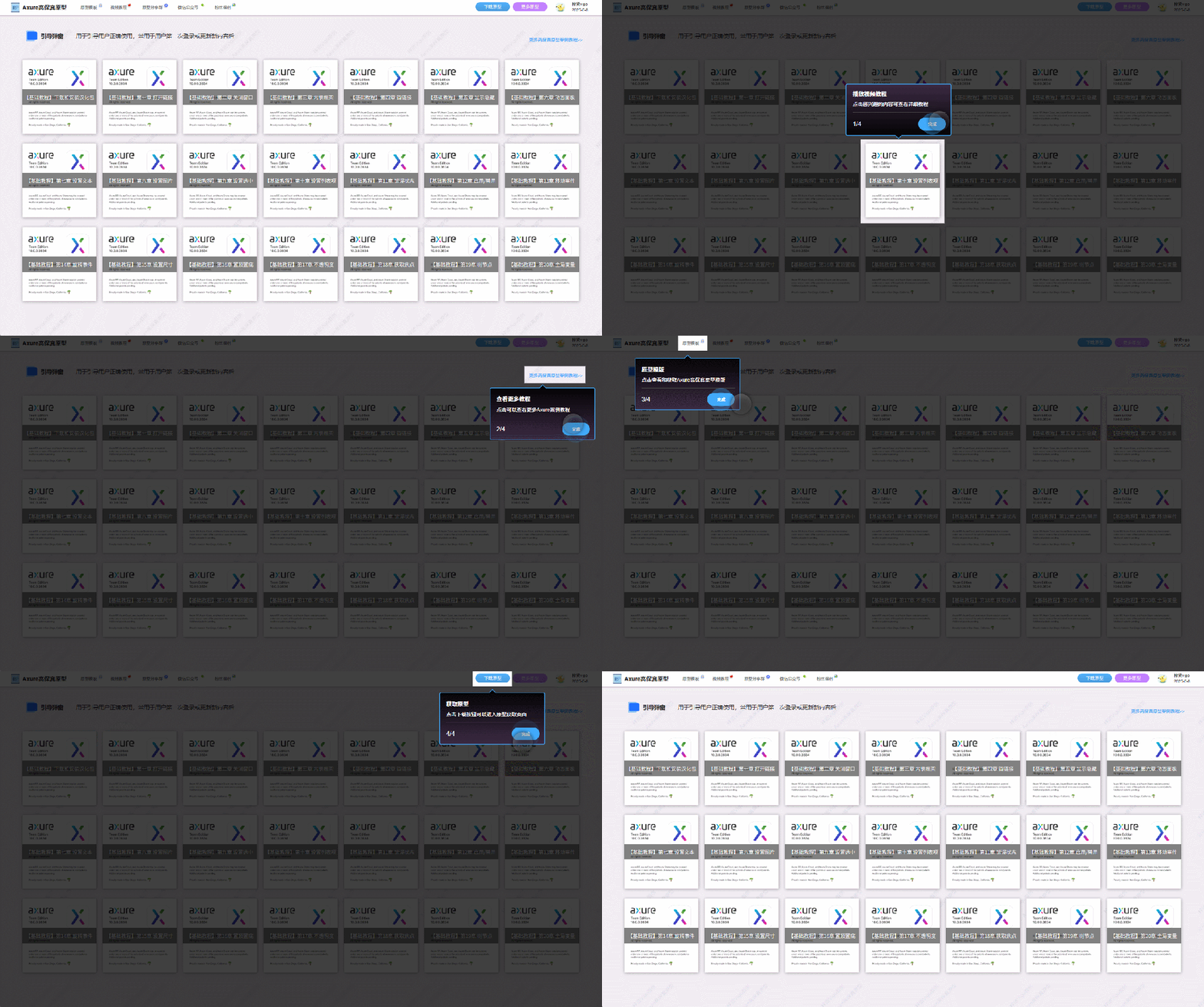
【Axure高保真原型】引导弹窗
今天和大家中分享引导弹窗的原型模板,载入页面后,会显示引导弹窗,适用于引导用户使用页面,点击完成后,会显示下一个引导弹窗,直至最后一个引导弹窗完成后进入首页。具体效果可以点击下方视频观看或打开下方…
接口测试中缓存处理策略
在接口测试中,缓存处理策略是一个关键环节,直接影响测试结果的准确性和可靠性。合理的缓存处理策略能够确保测试环境的一致性,避免因缓存数据导致的测试偏差。以下是接口测试中常见的缓存处理策略及其详细说明:
一、缓存处理的核…

龙虎榜——20250610
上证指数放量收阴线,个股多数下跌,盘中受消息影响大幅波动。 深证指数放量收阴线形成顶分型,指数短线有调整的需求,大概需要一两天。 2025年6月10日龙虎榜行业方向分析 1. 金融科技
代表标的:御银股份、雄帝科技
驱动…
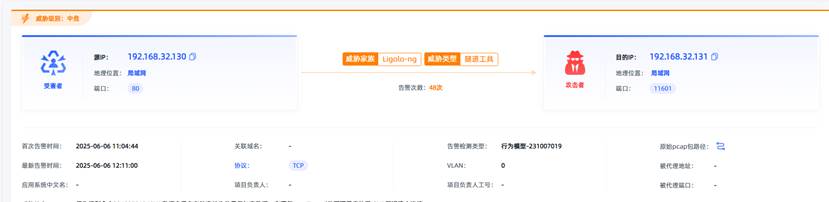
观成科技:隐蔽隧道工具Ligolo-ng加密流量分析
1.工具介绍
Ligolo-ng是一款由go编写的高效隧道工具,该工具基于TUN接口实现其功能,利用反向TCP/TLS连接建立一条隐蔽的通信信道,支持使用Let’s Encrypt自动生成证书。Ligolo-ng的通信隐蔽性体现在其支持多种连接方式,适应复杂网…
铭豹扩展坞 USB转网口 突然无法识别解决方法
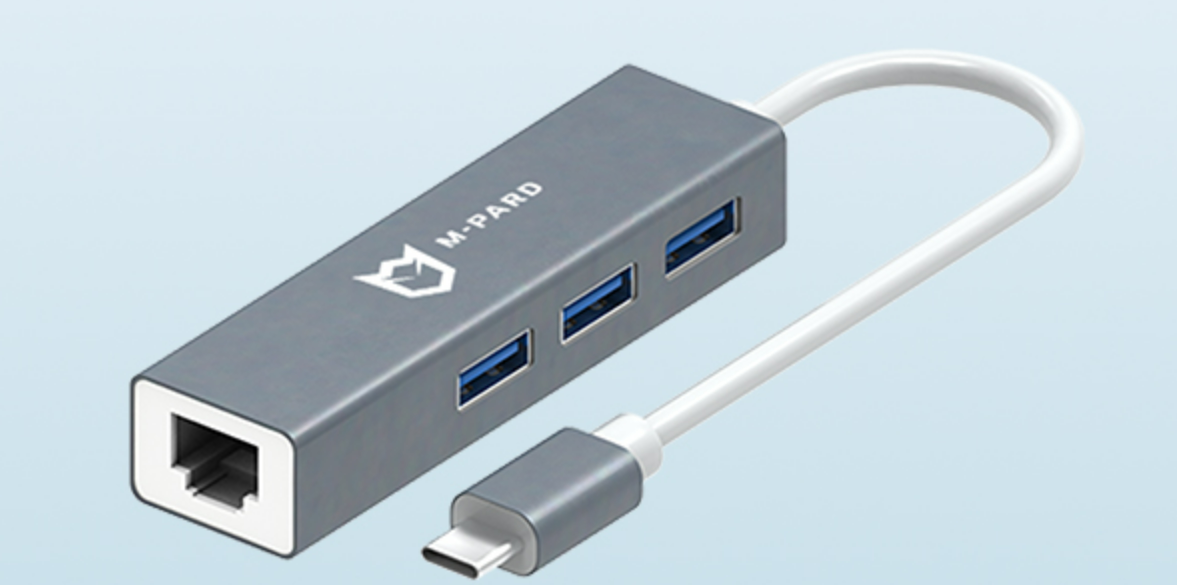
当 USB 转网口扩展坞在一台笔记本上无法识别,但在其他电脑上正常工作时,问题通常出在笔记本自身或其与扩展坞的兼容性上。以下是系统化的定位思路和排查步骤,帮助你快速找到故障原因:
背景:
一个M-pard(铭豹)扩展坞的网卡突然无法识别了,扩展出来的三个USB接口正常。…
未来机器人的大脑:如何用神经网络模拟器实现更智能的决策?
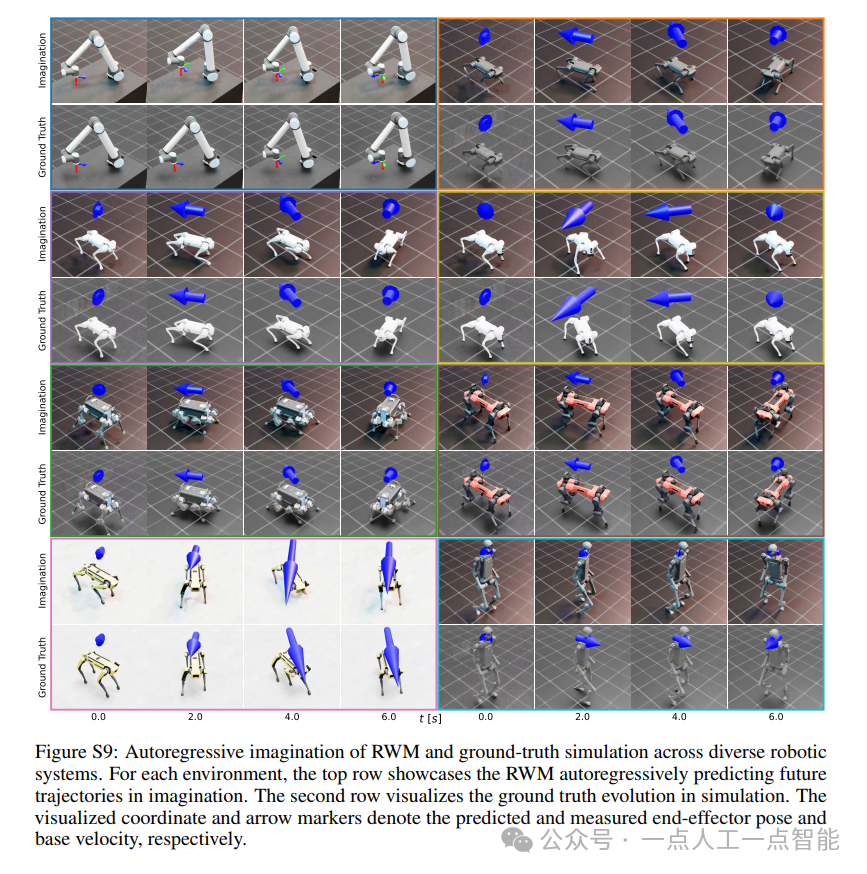
编辑:陈萍萍的公主一点人工一点智能 未来机器人的大脑:如何用神经网络模拟器实现更智能的决策?RWM通过双自回归机制有效解决了复合误差、部分可观测性和随机动力学等关键挑战,在不依赖领域特定归纳偏见的条件下实现了卓越的预测准…

Linux应用开发之网络套接字编程(实例篇)
服务端与客户端单连接
服务端代码
#include <sys/socket.h>
#include <sys/types.h>
#include <netinet/in.h>
#include <stdio.h>
#include <stdlib.h>
#include <string.h>
#include <arpa/inet.h>
#include <pthread.h>
…
华为云AI开发平台ModelArts
华为云ModelArts:重塑AI开发流程的“智能引擎”与“创新加速器”!
在人工智能浪潮席卷全球的2025年,企业拥抱AI的意愿空前高涨,但技术门槛高、流程复杂、资源投入巨大的现实,却让许多创新构想止步于实验室。数据科学家…
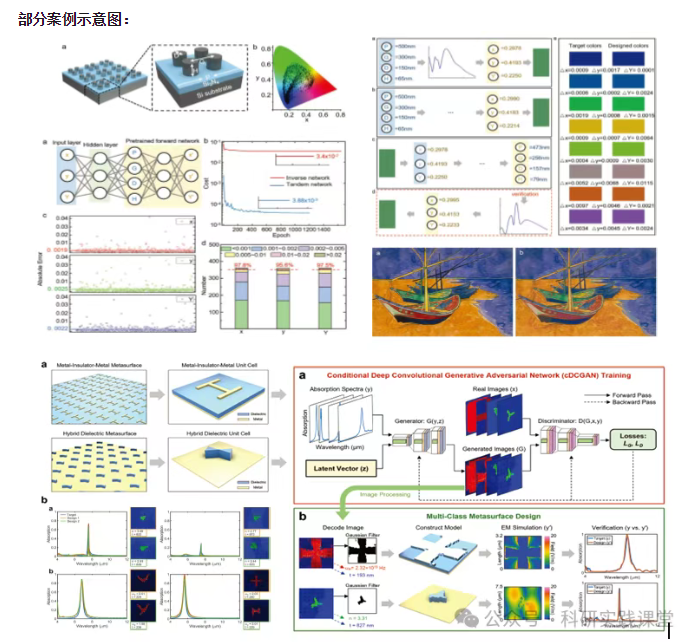
深度学习在微纳光子学中的应用
深度学习在微纳光子学中的主要应用方向
深度学习与微纳光子学的结合主要集中在以下几个方向:
逆向设计 通过神经网络快速预测微纳结构的光学响应,替代传统耗时的数值模拟方法。例如设计超表面、光子晶体等结构。
特征提取与优化 从复杂的光学数据中自…