简介
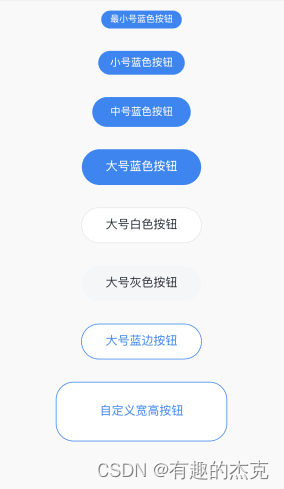
flutter 按钮组件。提供一种封装按钮组件的思路,并不支持过多的自定义属性。根据使用场景及设计规范进行封装,使用起来比较方便。
github地址:https://github.com/ThinkerJack/jac_uikit
pub地址:https://pub.dev/packages/jac_uikit
使用方式:
  CButton(
              colorType: CButtonColorType.blue,
              sizeType: CButtonSizeType.ultraSmall,
              text: "最小号蓝色按钮",
              onTap: () {},
            ),
            CButton(
              colorType: CButtonColorType.blue,
              sizeType: CButtonSizeType.small,
              text: "小号蓝色按钮",
              onTap: () {},
            ),
            CButton(
              colorType: CButtonColorType.blue,
              sizeType: CButtonSizeType.middle,
              text: "中号蓝色按钮",
              onTap: () {},
            ),
            CButton(
              colorType: CButtonColorType.blue,
              sizeType: CButtonSizeType.large,
              text: "大号蓝色按钮",
              onTap: () {},
            ),
            CButton(
              colorType: CButtonColorType.white,
              sizeType: CButtonSizeType.large,
              text: "大号白色按钮",
              onTap: () {},
            ),
            CButton(
              colorType: CButtonColorType.gray,
              sizeType: CButtonSizeType.large,
              text: "大号灰色按钮",
              onTap: () {},
            ),
            CButton(
              colorType: CButtonColorType.blueBorder,
              sizeType: CButtonSizeType.large,
              text: "大号蓝边按钮",
              onTap: () {},
            ),
            CButton(
              colorType: CButtonColorType.blueBorder,
              sizeType: CButtonSizeType.large,
              width: 230,
              height: 80,
              text: "自定义宽高按钮",
              onTap: () {},
            ),
图片示例:
![【2024最新华为OD-C/D卷试题汇总】[支持在线评测] 密码解密(100分) - 三语言AC题解(Python/Java/Cpp)](https://img-blog.csdnimg.cn/direct/c069d33c72154fd4be885e19944459c1.png)



![[创业之路-118] :制造业企业的必备管理神器-ERP-制造业的基本方程式与ERP的发展历程,哪些企业需要ERP?](https://img-blog.csdnimg.cn/direct/0163faf2f4204dd3a3bbedba8355c059.png)