目录
- 1. 题目
- 2. 解答
1. 题目
建立的数据库 YGGL,向库中的 3 个表中插入多行数据记录,然后修改和删除一些记录。
-
根据下表的样本数据,使用
SQL语句向Departments表中插入数据。
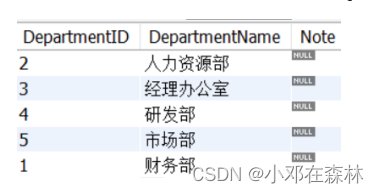
-
使用
SQL语句向Employees表中插入前6条数据。 -
使用图形工具向
Employees表中插入剩下的数据。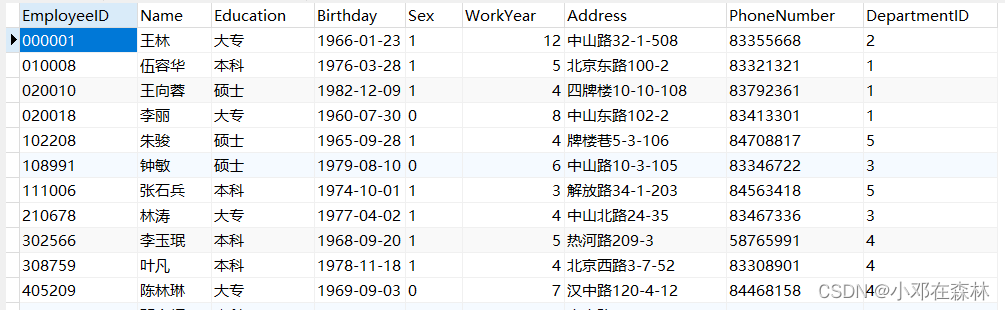
-
根据下表的样本数据,使用
SQL语句向Salary表中插入数据。
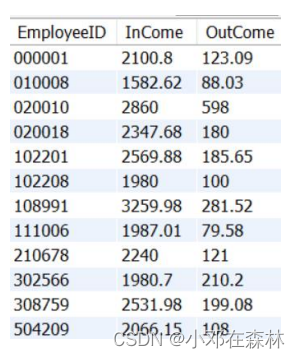
-
向
Salary表插入一行数据:Employee InCome OutCome 000001 2100.8 123.09 在验证操作是否成功时可以在界面工具中观察数据的变化。
-
使用
Replace语句向Departments表插入一行数据:DepartmentID DepartmentName Note 1 广告部 负责推广产品 执行完该语句后使用
select语句查看数据。 -
使用
SQL语句修改表数据:- 将编号为
102201的员工收入改为 2890` 元。 - 将所有员工的收入增加
100元。 - 删除员工表中编号为
102201的员工的信息。 - 删除所有收入大于
2500元的员工信息。
- 将编号为
-
思考:
insert into语句还可以通过select子句来添加其他表的数据,但是select子句中的列要与添加表的的列数目和数据类型一一对应。创建一个空表employees2,结构和employees表完全相同,使用insert into语句将employees表中的数据添加到employees2中。
2. 解答
建立的数据库 YGGL (在之前的练习中已经建立好了,详见 【数据库——MySQL】(3)对于前面两篇文章的习题讲解(数据库基本概念【概念模型与逻辑模型】、E-R图以及数据库和数据表的创建)),向库中的 3 个表中插入多行数据记录,然后修改和删除一些记录。
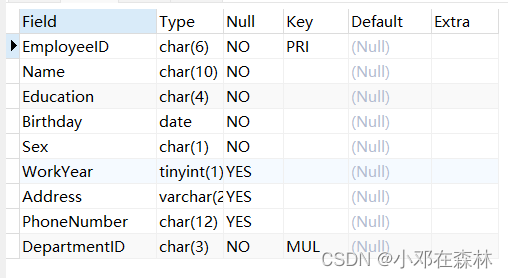
use yggl;
desc employees;
- 根据下表的样本数据,使用
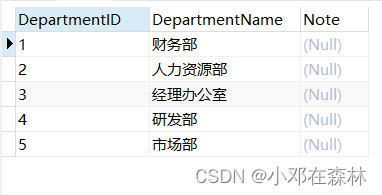
SQL语句向Departments表中插入数据。
insert into departments
    values("2","人力资源部",default),
          ("3","经理办公室",default),
		  ("4","研发部",default),
	      ("5","市场部",default),
		  ("1","财务部",default);

select * from departments;
-
使用
SQL语句向Employees表中插入前6条数据。insert into employees(EmployeeID,`Name`,Education,Birthday,Sex,WorkYear,Address,PhoneNumber,DepartmentID) values("000001","王林","大专","1966-01-23","1",8,"中山路32-1-508","83355668","2"), ("010008","伍容华","本科","1976-03-28","1",3,"北京东路100-2","83321321","1"), ("020010","王向蓉","硕士","1982-12-09","1",2,"四牌楼10-10-108","83792361","1"), ("020018","李丽","大专","1960-07-30","0",6,"中山东路102-2","83413301","1"), ("102201","刘明","本科","1972-10-18","1",3,"虎踞路100-2","83606608","5"), ("102208","朱骏","硕士","1965-09-28","1",2,"牌楼巷5-3-106","84708817","5"); select * from employees;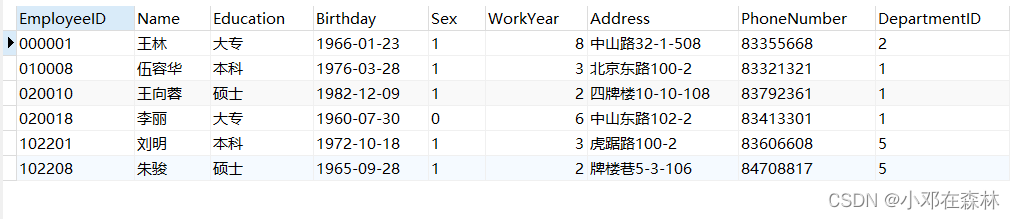
-
使用图形工具向
Employees表中插入剩下的数据。手动插入数据即可。
-
根据下表的样本数据,使用
SQL语句向Salary表中插入数据。
insert into salary
        values("000001",2100.8,123.09),
		      ("010008",1582.62,88.03),
		      ("020010",2860,598),
		      ("020018",2347.68,180),
		      ("102201",2569.88,185.65),
		      ("102208",1980,100),
		      ("108991",3259.98,281.52),
		      ("111006",1987.01,79.58),
		      ("210678",2240,121),
		      ("302566",1980.7,210.2),
		      ("308759",2531.98,199.08),
		      ("504209",2066.15,108);

select * from salary;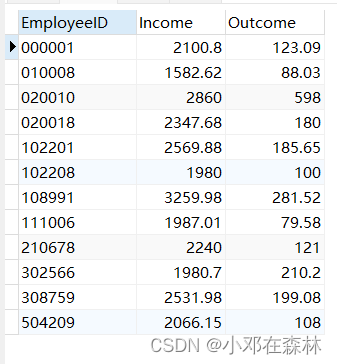
-
向
Salary表插入一行数据:Employee InCome OutCome 000001 2100.8 123.09 在验证操作是否成功时可以在界面工具中观察数据的变化。
insert into salary
    values("000001",2100.8,123.09);
无法插入,关键字重复,数据没有发生变化。 -
使用
Replace语句向Departments表插入一行数据:DepartmentID DepartmentName Note 1 广告部 负责推广产品 执行完该语句后使用
select语句查看数据。replace into departments set DepartmentID="1", DepartmentName="广告部", Note="负责推广产品"; select * from departments;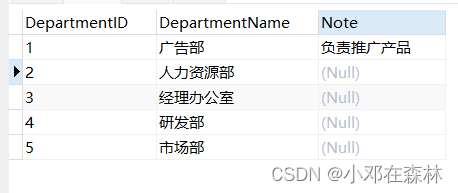
-
使用
SQL语句修改表数据:- 将编号为
102201的员工收入改为 2890` 元。
update salary set Income=2890 where EmployeeID="102201"; # 或者 replace into salary(EmployeeID,Income,Outcome) values('102201',2890,185.65);- 将所有员工的收入增加
100元。
update salary set Income=Income+100;- 删除员工表中编号为
102201的员工的信息。
delete from employees where EmployeeID="102201";- 删除所有收入大于
2500元的员工信息。
delete from salary where Income>2500; delete from Employees where EmployeeID in (select EmployeeID from salary where InCome > 2500); - 将编号为
-
思考:
insert into语句还可以通过select子句来添加其他表的数据,但是select子句中的列要与添加表的的列数目和数据类型一一对应。创建一个空表employees2,结构和employees表完全相同,使用insert into语句将employees表中的数据添加到employees2中。create table Employees2 like Employees; insert into Employees2 select * from Employees; select * from Employees2;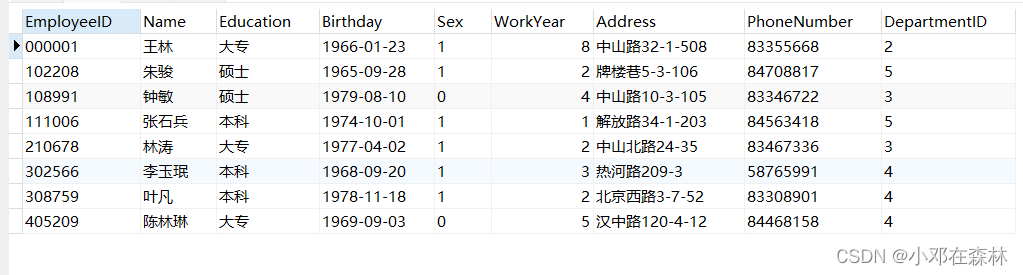
上一篇文章:【数据库——MySQL】(7)查询(2)
下一篇文章:【数据库——MySQL】(9)函数、查询练习及讲解



![linux使用操作[3]](https://img-blog.csdnimg.cn/a850cf57727340db859e449383d7c265.png)