文章目录
- Part.I 快应用
- Part.II 详细操作
- Chap.I Mathtype ↔ Word
- Chap.II Mathtype ↔ Latex
- Chap.III Latex ↔ Word
Part.I 快应用
本文介绍了除了使用 Word 和 Mathtype 之外不使用其他任何辅助软件来实现三者相互转换的方法。
| 项目 | 操作方法 |
|---|---|
Mathtype 转成 Word OMML | Word菜单栏→Mathtype插件→转换公式→要转化的公式类型:Mathtype 或Equation Editor 公式→使用Mathtype 转换的文本:MathML 2.0 (namespase attr) →转换→Alt+=新建一个公式→将转换出的内容粘贴进去即可 |
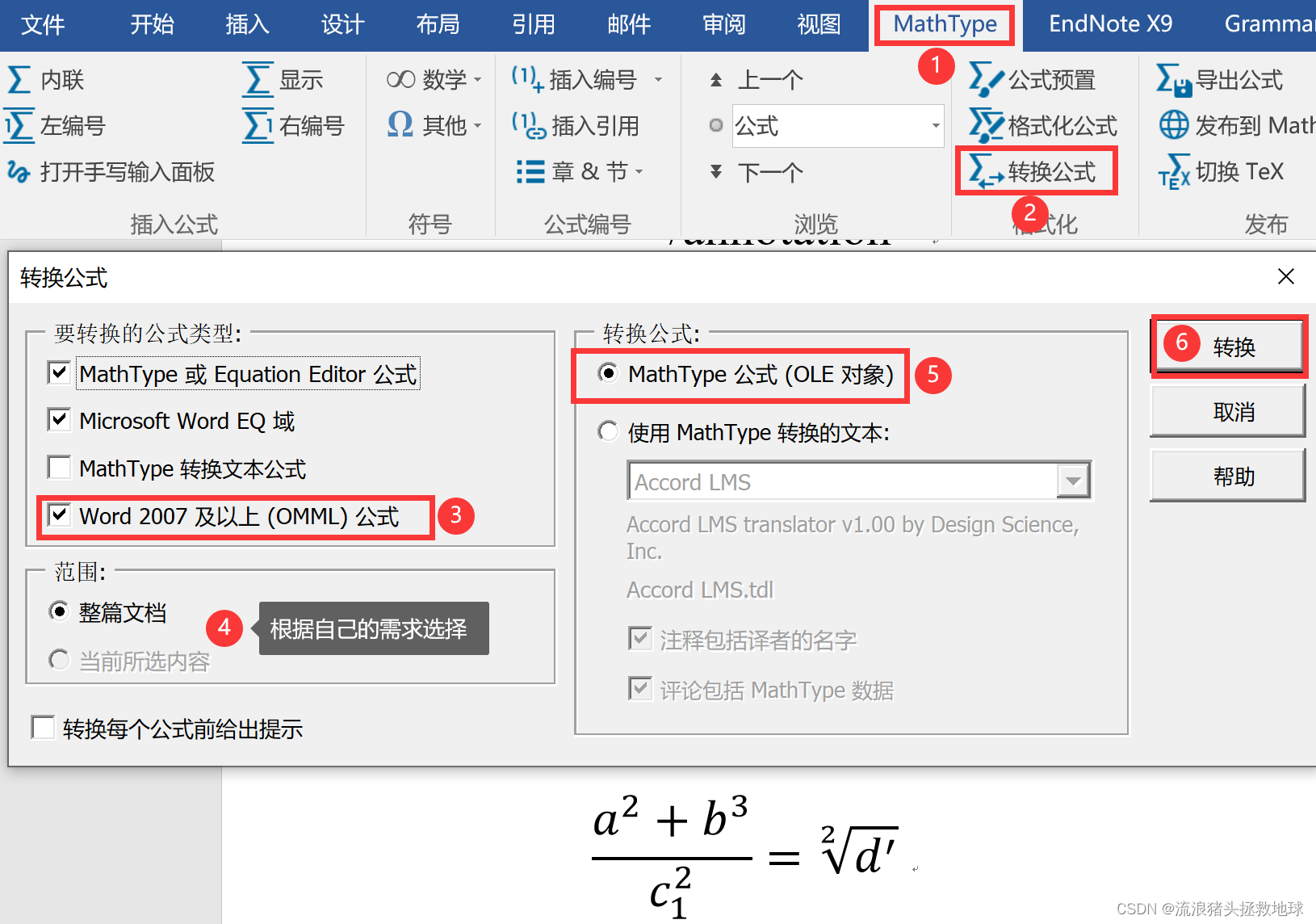
Word OMML转成 Mathtype | Word菜单栏→Mathtype插件→转换公式→要转化的公式类型:Word 2007 及以上(OMML)公式→转换公式:Mathtype 公式(OLE对象)→转换 |
Mathtype 转成Latex | 在 Word 中选中Mathtype 公式→Alt+\ |
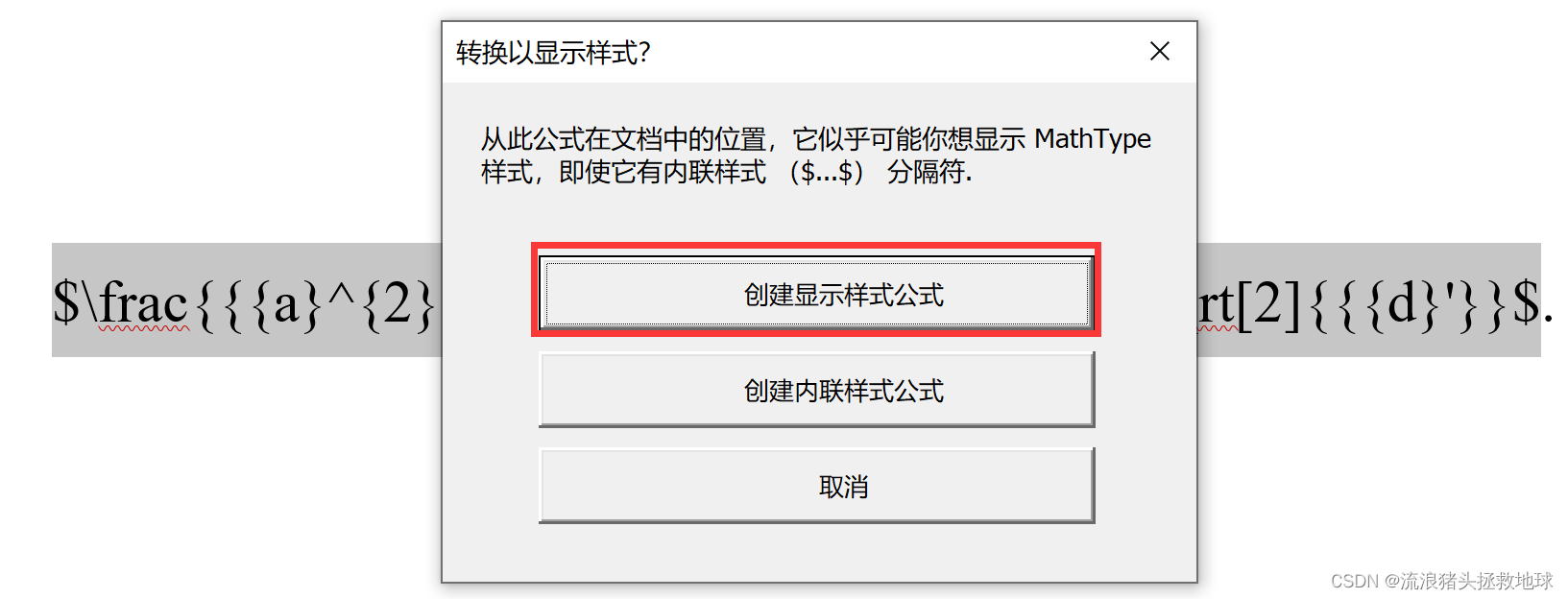
Latex转成Mathtype | 在 Word 中选中用$包裹的Latex 公式→Alt+\ |
Latex ↔ Word | 将Mathtype作为桥梁,实现二者的相互转换 |
Part.II 详细操作
所需软件及版本号:
- Mathtype 7
- Word 2016
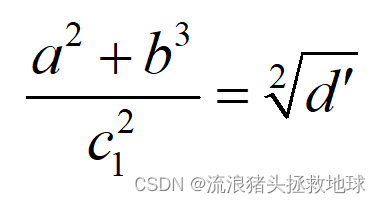
以下操作以下面的公式为例子
Chap.I Mathtype ↔ Word
Mathtype 转成 Word
- 将
Mathtype公式贴到一个空白 word 中
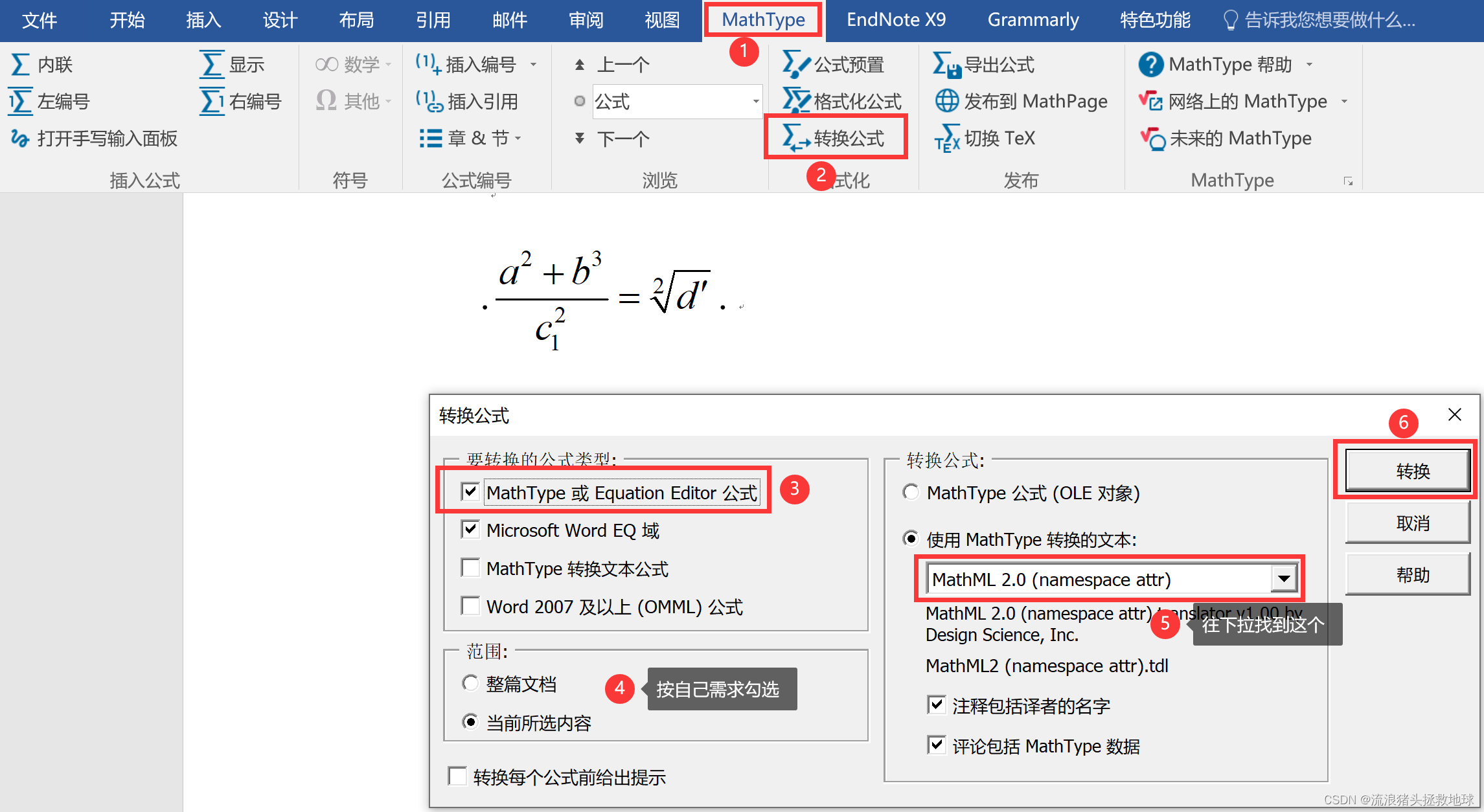
下面是转换出来的结果
<!-- MathType@Translator@5@5@MathML2 (namespace attr).tdl@MathML 2.0 (namespace attr)@ -->
<math display='block' xmlns='http://www.w3.org/1998/Math/MathML'>
<semantics>
<mrow>
<mfrac>
<mrow>
<msup>
<mi>a</mi>
<mn>2</mn>
</msup>
<mo>+</mo><msup>
<mi>b</mi>
<mn>3</mn>
</msup>
</mrow>
<mrow>
<msubsup>
<mi>c</mi>
<mn>1</mn>
<mn>2</mn>
</msubsup>
</mrow>
</mfrac>
<mo>=</mo><mroot>
<msup>
<mi>d</mi>
<mo>′</mo>
</msup>
<mn>2</mn>
</mroot>
</mrow>
<annotation encoding='MathType-MTEF'>MathType@MTEF@5@5@+=
feaahqart1ev3aaatCvAUfeBSjuyZL2yd9gzLbvyNv2CaerbuLwBLn
hiov2DGi1BTfMBaeXatLxBI9gBaerbd9wDYLwzYbItLDharqqtubsr
4rNCHbWexLMBbXgBd9gzLbvyNv2CaeHbl7mZLdGeaGqiVu0Je9sqqr
pepC0xbbL8F4rqqrFfpeea0xe9Lq=Jc9vqaqpepm0xbba9pwe9Q8fs
0=yqaqpepae9pg0FirpepeKkFr0xfr=xfr=xb9adbaqaaeGaciGaai
aabeqaamaabaabauaakeaadaWcaaqaaiaadggadaahaaWcbeqaaiaa
ikdaaaGccqGHRaWkcaWGIbWaaWbaaSqabeaacaaIZaaaaaGcbaGaam
4yamaaDaaaleaacaaIXaaabaGaaGOmaaaaaaGccqGH9aqpdaGcbaqa
aiqadsgagaqbaaWcbaGaaGOmaaaaaaa@492C@
</annotation>
</semantics>
</math>
<!-- MathType@End@5@5@ -->
- 复制转换出来的结果,快捷键
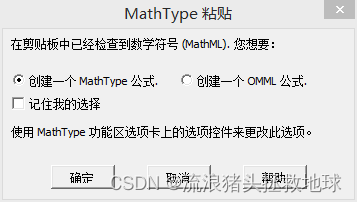
Alt+=新建一个公式,将其粘贴进去,第一次粘贴会弹出一个这样的弹窗,选择创建一个OMML公式,然后勾选记住我的选择即可!
Word转成 Mathtype
如此简单
Chap.II Mathtype ↔ Latex
Mathtype 转成 Latex
使用快捷键Alt+\
$\frac{{{a}^{2}}+{{b}^{3}}}{c_{1}^{2}}=\sqrt[2]{{{d}'}}$
a 2 + b 3 c 1 2 = d ′ 2 \frac{{{a}^{2}}+{{b}^{3}}}{c_{1}^{2}}=\sqrt[2]{{{d}'}} c12a2+b3=2d′
Latex 转成 Mathtype
选中$包裹的Latex公式,使用快捷键Alt+\
Chap.III Latex ↔ Word
可以将Mathtype作为桥梁。
Latex转成Word:先将Latex复制到word中,然后两边加$(有就不用加了),然后使用快捷键Alt+\转成Mathtype;然后执行Mathtype转WordWord转成Latex:Word转成Mathtype;然后快捷键Alt+\将Mathtype转成Latex