在Java中,异常允许我们编写高质量的代码,可以在编译时检查错误而不是在运行时,并且我们可以创建自定义异常,使代码的恢复和调试更加容易。
Java的throw关键字
Java的throw关键字用于显式地抛出异常。
我们指定要抛出的异常对象。异常对象带有一些描述错误的消息。这些异常可能与用户输入、服务器等相关。
我们可以使用throw关键字抛出已检查或未检查的异常。它主要用于抛出自定义异常。我们将在本节中讨论自定义异常。
我们还可以根据自己定义的条件抛出异常,使用throw关键字显式地抛出异常。例如,如果我们将一个数除以另一个数,可以抛出ArithmeticException异常。在这种情况下,我们只需要设置条件并使用throw关键字抛出异常。
Java的throw关键字的语法如下所示。
throw 实例,即
throw new exception_class("error message");让我们看一下throw IOException的示例。
throw new IOException("sorry device error");其中实例必须是Throwable类型或Throwable的子类。例如,Exception是Throwable的子类,用户定义的异常通常扩展Exception类。
Java throw关键字的示例
示例1:抛出未检查异常
在此示例中,我们创建了一个名为validate()的方法,该方法接受一个整数参数。如果年龄小于18岁,我们抛出ArithmeticException异常,否则打印一条欢迎投票的消息。
在此示例中,我们创建了一个接受整数值作为参数的validate方法。如果年龄小于18岁,我们抛出ArithmeticException异常,否则打印一条欢迎投票的消息。
public class TestThrow1 {//检查一个人是否有资格投票的函数public static void validate(int age) {if(age<18) {//如果没有资格投票则抛出算术异常throw new ArithmeticException("Person is not eligible to vote");}else {System.out.println("Person is eligible to vote!!");}}//主要方法public static void main(String args[]){//调用函数validate(13);System.out.println("rest of the code...");}}
输出:

上述代码抛出了一个未检查的异常。类似地,我们也可以抛出未检查和用户定义的异常。
如果使用throw关键字抛出一个已检查的异常,必须使用catch块来处理该异常,或者该方法必须使用throws声明来声明它。
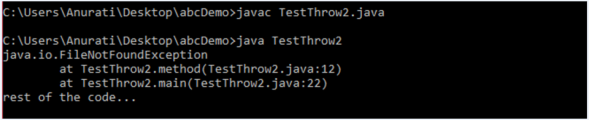
示例2:抛出已检查的异常
import java.io.*;public class TestThrow2 {//检查人是否有资格投票的功能public static void method() throws FileNotFoundException {FileReader file = new FileReader("C:\\Users\\Anurati\\Desktop\\abc.txt");BufferedReader fileInput = new BufferedReader(file);throw new FileNotFoundException();}//主要方法public static void main(String args[]){try{method();}catch (FileNotFoundException e){e.printStackTrace();}System.out.println("rest of the code...");}}
输出:
示例3:抛出用户自定义异常
exception是Throwable类下的其他一切内容。
// 类表示用户定义的异常class UserDefinedException extends Exception{public UserDefinedException(String str){// 调用父异常的构造函数super(str);}}// 在 MyException 上面使用的类public class TestThrow3{public static void main(String args[]){try{// 抛出一个用户定义异常的对象throw new UserDefinedException("This is user-defined exception");}catch (UserDefinedException ude){System.out.println("Caught the exception");//打印来自 MyException 对象的消息System.out.println(ude.getMessage());}}}
输出: