Android Jetpack Compose是一个现代化的UI工具包,让开发者以声明式的方式来构建Android应用。今天我们要讨论的是其中一个重要组件——ModalBottomSheet。
1. ModalBottomSheet简介
ModalBottomSheet是Jetpack Compose中的一个组件,它允许我们从屏幕底部弹出一个可交互的面板。它通常用于提供额外的内容或者功能,而且是一种更优的方式来展示内容,而不是使用全屏的对话框。
2. 如何使用ModalBottomSheet
首先,我们需要创建一个ModalBottomSheetLayout,然后在这个布局中放置我们的内容。最后,我们可以使用showModalBottomSheet函数来显示底部模态面板。下面是一个简单的例子:
@OptIn(ExperimentalMaterialApi::class)
@Preview
@Composable
fun ModalBottomSheetDemo(){
    val modalBottomSheetState = rememberModalBottomSheetState(initialValue = ModalBottomSheetValue.Hidden)
    val coroutineScope =rememberCoroutineScope()

    ModalBottomSheetLayout(
        sheetState =modalBottomSheetState,
        sheetContent = {
            Text(text="Hello from ModalBottomSheet",
            modifier = Modifier.padding(16.dp),
                style = MaterialTheme.typography.h6
            )
            Button(onClick = {coroutineScope.launch { modalBottomSheetState.hide() }},
            modifier = Modifier
                .fillMaxWidth()
                .padding(horizontal = 16.dp, vertical = 8.dp)){
                Text(text = "Hide sheet")
            }
        }
    ){
        Button(
            onClick = { coroutineScope.launch { modalBottomSheetState.show() }},
            modifier = Modifier
                .fillMaxWidth()
                .padding(16.dp)
        ){
            Text(text = "Show sheet")
        }
    }


}
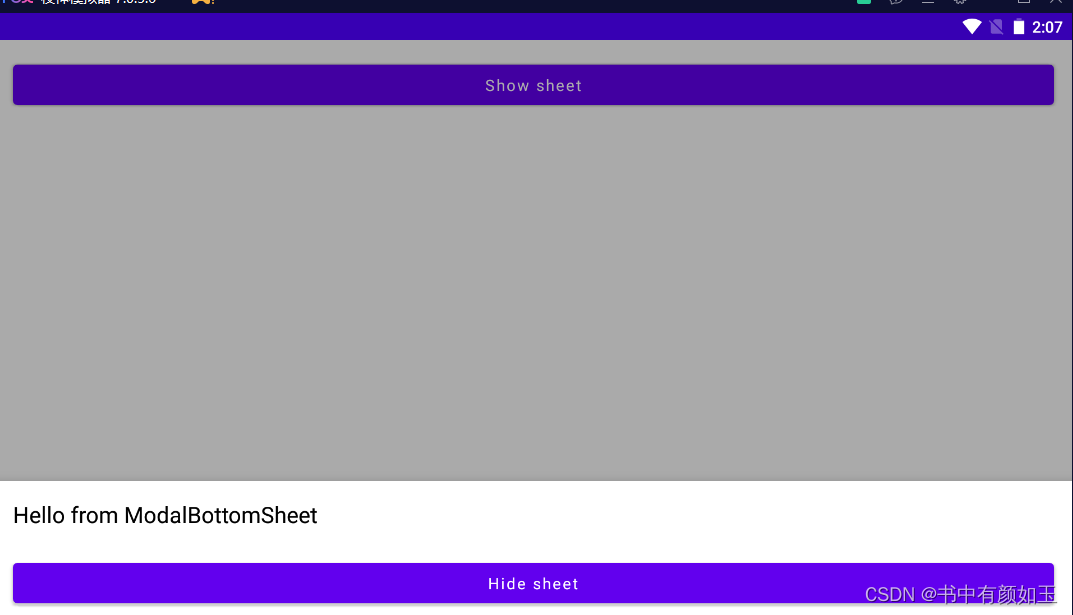
在上述代码中,我们首先创建了一个modalBottomSheetState,它是ModalBottomSheetValue.Hidden的初始值。然后,我们创建了一个ModalBottomSheetLayout,并放置了一个Text和一个Button在面板上。当点击这个按钮时,ModalBottomSheet会被隐藏。最后,我们在布局中添加了一个按钮,当点击这个按钮时,ModalBottomSheet会被显示。
三. 自定义ModalBottomSheet
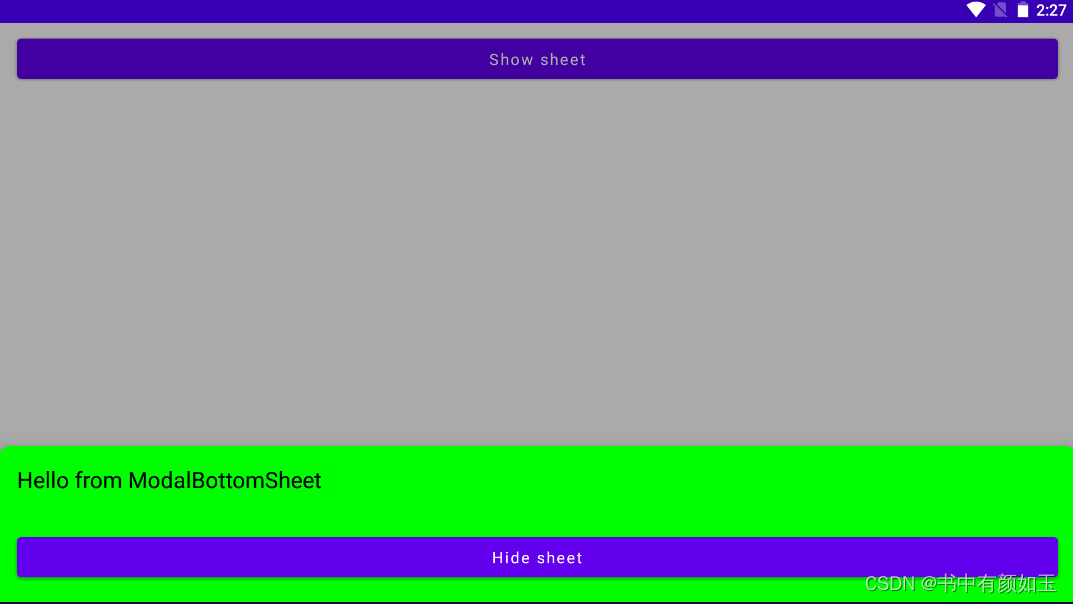
ModalBottomSheet组件提供了许多参数,让开发者可以根据需要进行自定义。例如,你可以自定义sheetElevation、sheetShape和sheetBackgroundColor等属性。
@OptIn(ExperimentalMaterialApi::class)
@Preview
@Composable
fun CustomModalBottomSheetDemo(){
    val modalBottomSheetState = rememberModalBottomSheetState(initialValue = ModalBottomSheetValue.Hidden )
    val coroutineScope =rememberCoroutineScope()

    ModalBottomSheetLayout(sheetState = modalBottomSheetState, sheetShape = RoundedCornerShape(topStart =10.dp, topEnd = 10.dp),
    sheetElevation = 16.dp,
    sheetBackgroundColor = Color.Green,
    sheetContent = {
        Text(text = "Hello from ModalBottomSheet",
        modifier = Modifier.padding(16.dp),
        style = MaterialTheme.typography.h6)
        Button(onClick = {coroutineScope.launch { modalBottomSheetState.hide() }},
        modifier = Modifier
            .fillMaxWidth()
            .padding(16.dp)){
            Text(text = "Hide sheet")
        }
    }) {
        Button(onClick = { coroutineScope.launch{modalBottomSheetState.show()}},
            modifier = Modifier
                .fillMaxWidth()
                .padding(horizontal = 16.dp, vertical = 8.dp)
        ){
            Text(text = "Show sheet")
        }
    }
}
总的来说,ModalBottomSheet是Jetpack Compose中的一个非常有用的组件。通过掌握它的使用方法,你可以在你的Android应用中创建出更好的用户体验。