文章未完成待续
urllib 库是 Python 内置的一个 HTTP 请求库。在 Python 2.x 中,是由 urllib 和 urllib2 两 个库来实现请求发送的,在 Python 3.x 中,这两个库已经合并到一起,统一为 urllib 了。
urllib 库由四个模块组成。
- request 模块:打开和浏览 URL 中的内容。
- error 模块:包含 urllib.request 发生的错误或异常。
- parse 模块:解析 URL。
- robotparser 模块:解析 robots.txt 文件。
1.发送请求
一个简单的模拟访问百度首页的例子,代码示例如下
import urllib.request

resp = urllib.request.urlopen("http://www.baidu.com")
print(resp)
print(resp.read())
代码执行结果如下

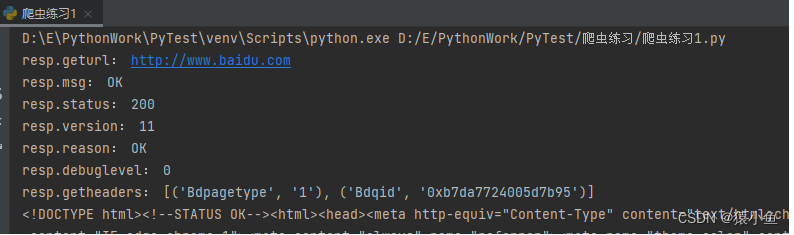
通过 urllib.request 模块提供的 urlopen()函数,我们构造一个 HTTP 请求,从上面的结 果可知,urlopen()函数返回的是一个 HTTPResponse 对象,调用该对象的 read()函数可以获 得请求返回的网页内容。read()返回的是一个二进制的字符串,明显是无法正常阅读的,要调用 decode(‘utf-8’)将其解码为 utf-8 字符串。这里顺便把 HTTPResponse 类常用的方法和属 性打印出来,我们可以使用 dir()函数来查看某个对象的所有方法和属性。修改后的代码如下:
import urllib.request

resp = urllib.request.urlopen("http://www.baidu.com")
print("resp.geturl:", resp.geturl())
print("resp.msg:", resp.msg)
print("resp.status:", resp.status)
print("resp.version:", resp.version)
print("resp.reason:", resp.reason)
print("resp.debuglevel:", resp.debuglevel)
print("resp.getheaders:", resp.getheaders()[0:2])
print(resp.read().decode('utf-8'))
执行结果如下
另外,有一点要注意,在 URL 中包含汉字是不符合 URL 标准的,需要进行编码,代 码示例如下
urllib.request.quote('http://www.baidu.com')
# 编码后:http%3A//www.baidu.com
urllib.request.unquote('http%3A//www.baidu.com')
# 解码后:http://www.baidu.com
2.抓取二进制文件
直接把二进制文件写入文件即可,代码示例如下
import urllib.request

pic_url = "https://www.baidu.com/img/bd_logo1.png"
pic_resp = urllib.request.urlopen(pic_url)
pic = pic_resp.read()
with open("bd_logo.png", "wb") as f:
    f.write(pic)

![[静态时序分析简明教程(八)]虚假路径](https://img-blog.csdnimg.cn/b7bb17870a764c6f923d00c99379c0a5.png)

![[附源码]计算机毕业设计springboot医疗器械公司公告管理系统](https://img-blog.csdnimg.cn/9c2d8d3841234e129d9f75ec69edfcf2.png)

![[附源码]计算机毕业设计学生综合数据分析系统Springboot程序](https://img-blog.csdnimg.cn/8fac5d93f1514737bde372a85756aa66.png)