1.定义
<!--单选按钮-->
<TextView
    android:layout_marginTop="10dp"
    android:layout_width="match_parent"
    android:layout_height="wrap_content"
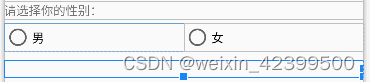
    android:text="请选择你的性别:">
</TextView>
<RadioGroup
    android:id="@+id/rg_gender"
    android:layout_width="match_parent"
    android:layout_height="wrap_content"
    android:orientation="horizontal"
    android:layout_marginTop="5dp">
    <RadioButton
        android:id="@+id/rb_male"
        android:layout_width="0dp"
        android:layout_weight="1"
        android:layout_height="wrap_content"
        android:text="男">
    </RadioButton>

    <RadioButton
        android:id="@+id/rb_female"
        android:layout_width="0dp"
        android:layout_weight="1"
        android:layout_height="wrap_content"
        android:text="女">
    </RadioButton>

</RadioGroup>

<TextView
    android:id="@+id/tv6"
    android:layout_marginTop="10dp"
    android:layout_width="match_parent"
    android:layout_height="wrap_content">
</TextView>
2.代码
RadioButton rb1 = findViewById(R.id.rb_male);
RadioButton rb2 = findViewById(R.id.rb_female);
RadioGroup rg = findViewById(R.id.rg_gender);
tv6 = findViewById(R.id.tv6);
rg.setOnCheckedChangeListener(this::onCheckedChange);
private void onCheckedChange(RadioGroup radioGroup, int i) {

    switch (i) {
        case R.id.rb_male:
            tv6.setText("男");
            break;
        case R.id.rb_female:
            tv6.setText("女");
            break;
    }

}