背景
在一般的Web IDE中,我们需要将经常用到的一些操作放到顶部操作栏里,类似语雀的文档编辑。 代码编辑器,一般也会放一些查找,格式化,撤销,恢复。有些人喜欢用快捷键来进行这些操作,但由于monaco中内置的键盘快捷操作非常地多,所以有些人喜欢用按钮来实现某种操作。本篇文章就来带大家完成使用代码来触发某些action,完成点击一个按钮进行格式化,查找,显示右键菜单的操作。
核心方法
调用api来触发某个action或command,有二种方式,分别是
第一种:
直接使用editor.trigger(source: string, handlerId: string, payload: any): void 来触发某个内置或已经自定义的操作。只要知道handerId就可以完成。
第二种:
先使用editor.getAction(id: string): IEditorAction方法获取action实例,然后调用实例的run(): Promise<void>方法。返回一个Promise。
先说第一种,直接使用trigger方法触发某个操作。传入一个handlerId,也可以添加一些额外的数据。常用的handlerId有,
editor.action.showContextMenu显示右键菜单actions.find查找操作editor.action.formatDocument格式化文档
具体使用方法
// 执行格式化操作
editor.trigger('你自定义一个字符串', `editor.action.formatDocument`)

// 执行查找操作,会显示查找框
editor.trigger('你自定义一个字符串', `action.find`)
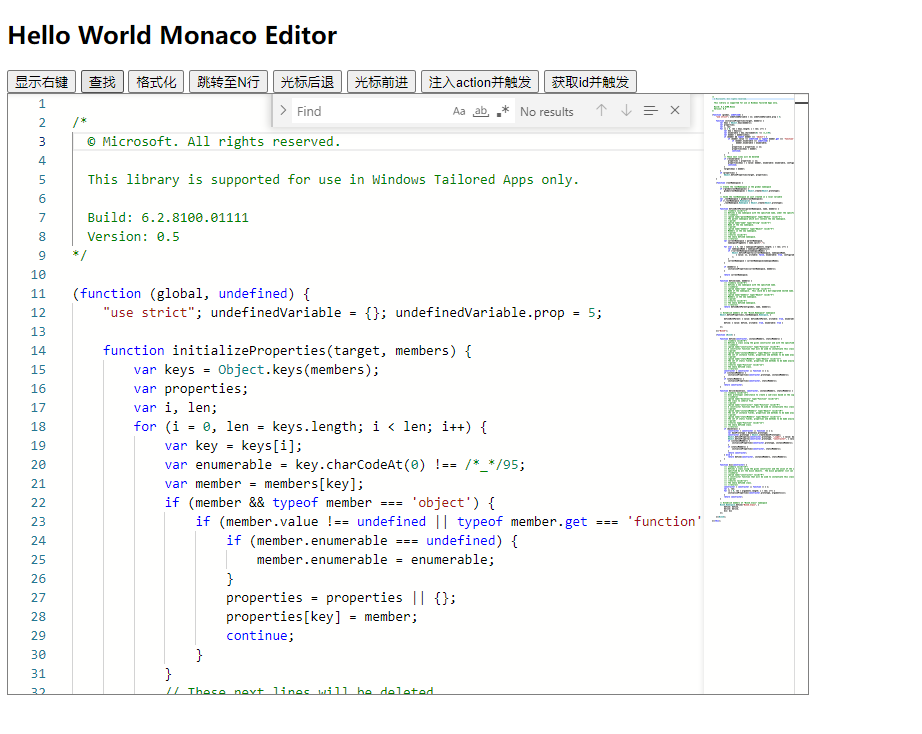
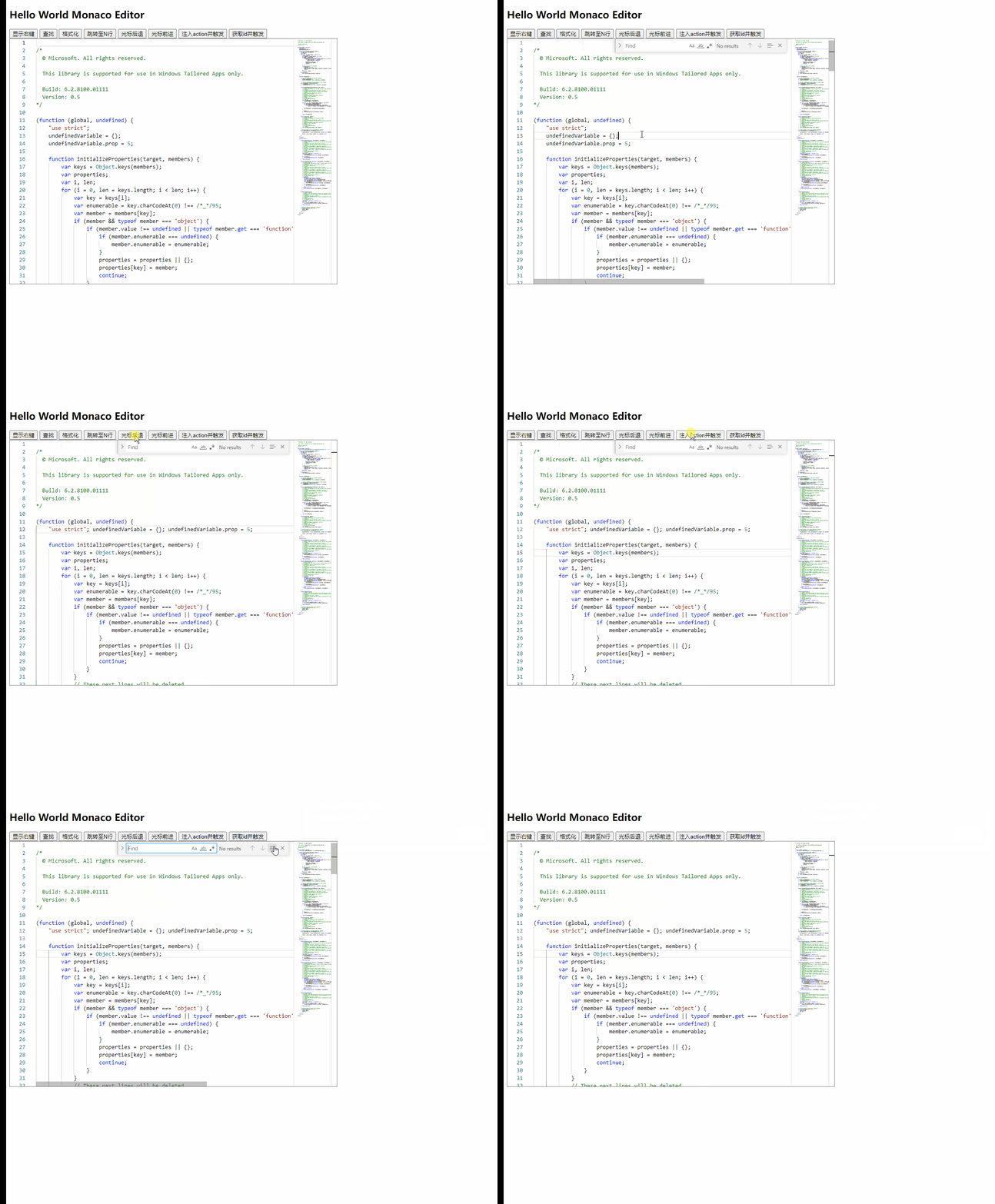
具体效果如下图:
第二种方案
传入一个 handlerId,就可以运行,
function getActionToTrigger(id){
  editor.getAction(id).run().then(() => {
    console.log('运行成功')
  })
}

// 触发查找操作
getActionToTrigger('action.find')
默认的actions
上面提到了要触发某个操作,必须要知道该操作的handlerId,那么具体有哪些HandlerId供使用哪?
对于这个问题我也查了很多资料。也搜索了官方的文档和代码。都没找到。最后我在控制台打印出editor的原型对象。最后发现 editor下有一个_actions属性。这里存放了所有可用的handlerId。
具体请看。
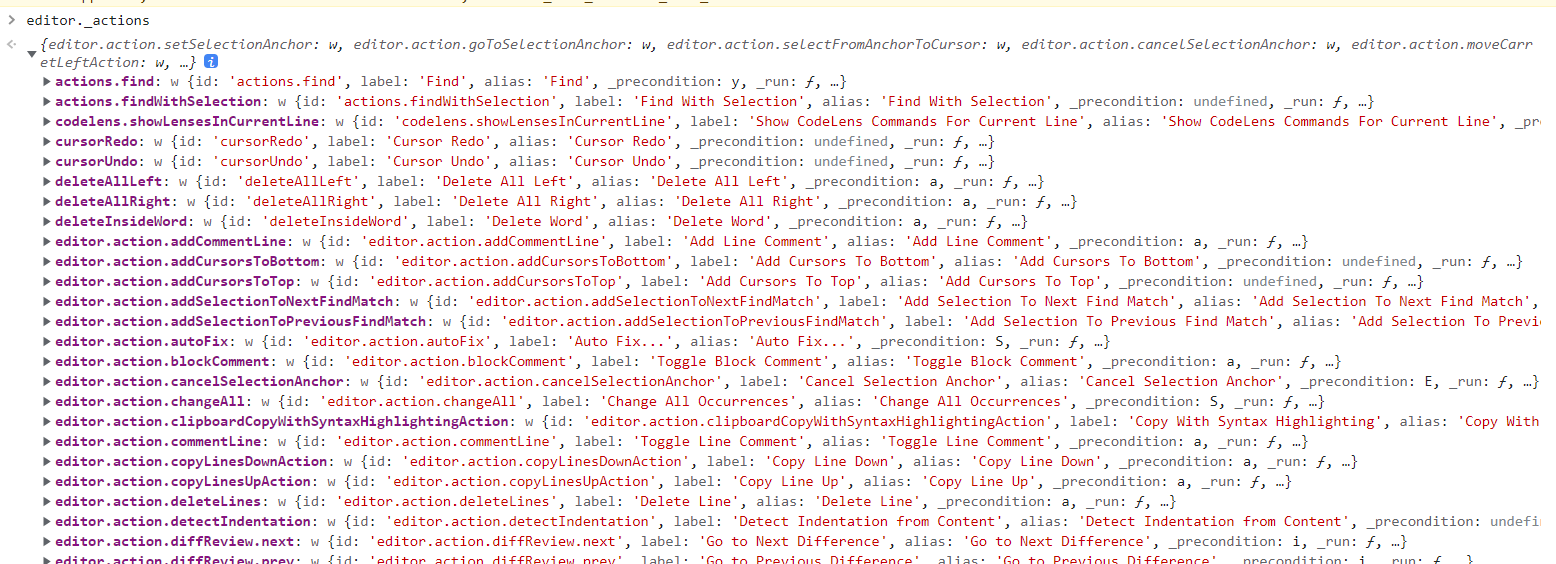
根据资料可以得知,目前有154个action
| (index) | id | label | alias |
|---|---|---|---|
| 0 | ‘editor.action.setSelectionAnchor’ | ‘Set Selection Anchor’ | ‘Set Selection Anchor’ |
| 1 | ‘editor.action.goToSelectionAnchor’ | ‘Go to Selection Anchor’ | ‘Go to Selection Anchor’ |
| 2 | ‘editor.action.selectFromAnchorToCursor’ | ‘Select from Anchor to Cursor’ | ‘Select from Anchor to Cursor’ |
| 3 | ‘editor.action.cancelSelectionAnchor’ | ‘Cancel Selection Anchor’ | ‘Cancel Selection Anchor’ |
| 4 | ‘editor.action.moveCarretLeftAction’ | ‘Move Selected Text Left’ | ‘Move Selected Text Left’ |
| 5 | ‘editor.action.moveCarretRightAction’ | ‘Move Selected Text Right’ | ‘Move Selected Text Right’ |
| 6 | ‘editor.action.transposeLetters’ | ‘Transpose Letters’ | ‘Transpose Letters’ |
| 7 | ‘editor.action.clipboardCopyWithSyntaxHighlightingAction’ | ‘Copy With Syntax Highlighting’ | ‘Copy With Syntax Highlighting’ |
| 8 | ‘editor.action.showContextMenu’ | ‘Show Editor Context Menu’ | ‘Show Editor Context Menu’ |
| 9 | ‘cursorUndo’ | ‘Cursor Undo’ | ‘Cursor Undo’ |
| 10 | ‘cursorRedo’ | ‘Cursor Redo’ | ‘Cursor Redo’ |
| 11 | ‘editor.action.fontZoomIn’ | ‘Editor Font Zoom In’ | ‘Editor Font Zoom In’ |
| 12 | ‘editor.action.fontZoomOut’ | ‘Editor Font Zoom Out’ | ‘Editor Font Zoom Out’ |
| 13 | ‘editor.action.fontZoomReset’ | ‘Editor Font Zoom Reset’ | ‘Editor Font Zoom Reset’ |
| 14 | ‘editor.action.formatDocument’ | ‘Format Document’ | ‘Format Document’ |
| 15 | ‘editor.action.formatSelection’ | ‘Format Selection’ | ‘Format Selection’ |
| 16 | ‘expandLineSelection’ | ‘Expand Line Selection’ | ‘Expand Line Selection’ |
| 17 | ‘editor.action.smartSelect.expand’ | ‘Expand Selection’ | ‘Expand Selection’ |
| 18 | ‘editor.action.smartSelect.shrink’ | ‘Shrink Selection’ | ‘Shrink Selection’ |
| 19 | ‘editor.action.toggleTabFocusMode’ | ‘Toggle Tab Key Moves Focus’ | ‘Toggle Tab Key Moves Focus’ |
| 20 | ‘editor.action.forceRetokenize’ | ‘Developer: Force Retokenize’ | ‘Developer: Force Retokenize’ |
| 21 | ‘editor.action.commentLine’ | ‘Toggle Line Comment’ | ‘Toggle Line Comment’ |
| 22 | ‘editor.action.addCommentLine’ | ‘Add Line Comment’ | ‘Add Line Comment’ |
| 23 | ‘editor.action.removeCommentLine’ | ‘Remove Line Comment’ | ‘Remove Line Comment’ |
| 24 | ‘editor.action.blockComment’ | ‘Toggle Block Comment’ | ‘Toggle Block Comment’ |
| 25 | ‘editor.action.indentationToSpaces’ | ‘Convert Indentation to Spaces’ | ‘Convert Indentation to Spaces’ |
| 26 | ‘editor.action.indentationToTabs’ | ‘Convert Indentation to Tabs’ | ‘Convert Indentation to Tabs’ |
| 27 | ‘editor.action.indentUsingTabs’ | ‘Indent Using Tabs’ | ‘Indent Using Tabs’ |
| 28 | ‘editor.action.indentUsingSpaces’ | ‘Indent Using Spaces’ | ‘Indent Using Spaces’ |
| 29 | ‘editor.action.detectIndentation’ | ‘Detect Indentation from Content’ | ‘Detect Indentation from Content’ |
| 30 | ‘editor.action.reindentlines’ | ‘Reindent Lines’ | ‘Reindent Lines’ |
| 31 | ‘editor.action.reindentselectedlines’ | ‘Reindent Selected Lines’ | ‘Reindent Selected Lines’ |
| 32 | ‘editor.action.copyLinesUpAction’ | ‘Copy Line Up’ | ‘Copy Line Up’ |
| 33 | ‘editor.action.copyLinesDownAction’ | ‘Copy Line Down’ | ‘Copy Line Down’ |
| 34 | ‘editor.action.duplicateSelection’ | ‘Duplicate Selection’ | ‘Duplicate Selection’ |
| 35 | ‘editor.action.moveLinesUpAction’ | ‘Move Line Up’ | ‘Move Line Up’ |
| 36 | ‘editor.action.moveLinesDownAction’ | ‘Move Line Down’ | ‘Move Line Down’ |
| 37 | ‘editor.action.sortLinesAscending’ | ‘Sort Lines Ascending’ | ‘Sort Lines Ascending’ |
| 38 | ‘editor.action.sortLinesDescending’ | ‘Sort Lines Descending’ | ‘Sort Lines Descending’ |
| 39 | ‘editor.action.removeDuplicateLines’ | ‘Delete Duplicate Lines’ | ‘Delete Duplicate Lines’ |
| 40 | ‘editor.action.trimTrailingWhitespace’ | ‘Trim Trailing Whitespace’ | ‘Trim Trailing Whitespace’ |
| 41 | ‘editor.action.deleteLines’ | ‘Delete Line’ | ‘Delete Line’ |
| 42 | ‘editor.action.indentLines’ | ‘Indent Line’ | ‘Indent Line’ |
| 43 | ‘editor.action.outdentLines’ | ‘Outdent Line’ | ‘Outdent Line’ |
| 44 | ‘editor.action.insertLineBefore’ | ‘Insert Line Above’ | ‘Insert Line Above’ |
| 45 | ‘editor.action.insertLineAfter’ | ‘Insert Line Below’ | ‘Insert Line Below’ |
| 46 | ‘deleteAllLeft’ | ‘Delete All Left’ | ‘Delete All Left’ |
| 47 | ‘deleteAllRight’ | ‘Delete All Right’ | ‘Delete All Right’ |
| 48 | ‘editor.action.joinLines’ | ‘Join Lines’ | ‘Join Lines’ |
| 49 | ‘editor.action.transpose’ | ‘Transpose characters around the cursor’ | ‘Transpose characters around the cursor’ |
| 50 | ‘editor.action.transformToUppercase’ | ‘Transform to Uppercase’ | ‘Transform to Uppercase’ |
| 51 | ‘editor.action.transformToLowercase’ | ‘Transform to Lowercase’ | ‘Transform to Lowercase’ |
| 52 | ‘editor.action.transformToSnakecase’ | ‘Transform to Snake Case’ | ‘Transform to Snake Case’ |
| 53 | ‘editor.action.transformToTitlecase’ | ‘Transform to Title Case’ | ‘Transform to Title Case’ |
| 54 | ‘editor.action.transformToKebabcase’ | ‘Transform to Kebab Case’ | ‘Transform to Kebab Case’ |
| 55 | ‘deleteInsideWord’ | ‘Delete Word’ | ‘Delete Word’ |
| 56 | ‘editor.action.quickCommand’ | ‘Command Palette’ | ‘Command Palette’ |
| 57 | ‘codelens.showLensesInCurrentLine’ | ‘Show CodeLens Commands For Current Line’ | ‘Show CodeLens Commands For Current Line’ |
| 58 | ‘editor.action.gotoLine’ | ‘Go to Line/Column…’ | ‘Go to Line/Column…’ |
| 59 | ‘editor.action.inPlaceReplace.up’ | ‘Replace with Previous Value’ | ‘Replace with Previous Value’ |
| 60 | ‘editor.action.inPlaceReplace.down’ | ‘Replace with Next Value’ | ‘Replace with Next Value’ |
| 61 | ‘editor.action.quickFix’ | ‘Quick Fix…’ | ‘Quick Fix…’ |
| 62 | ‘editor.action.refactor’ | ‘Refactor…’ | ‘Refactor…’ |
| 63 | ‘editor.action.refactor.preview’ | ‘Refactor with Preview…’ | ‘Refactor Preview…’ |
| 64 | ‘editor.action.sourceAction’ | ‘Source Action…’ | ‘Source Action…’ |
| 65 | ‘editor.action.organizeImports’ | ‘Organize Imports’ | ‘Organize Imports’ |
| 66 | ‘editor.action.autoFix’ | ‘Auto Fix…’ | ‘Auto Fix…’ |
| 67 | ‘editor.action.fixAll’ | ‘Fix All’ | ‘Fix All’ |
| 68 | ‘editor.action.rename’ | ‘Rename Symbol’ | ‘Rename Symbol’ |
| 69 | ‘editor.action.quickOutline’ | ‘Go to Symbol…’ | ‘Go to Symbol…’ |
| 70 | ‘editor.action.showAccessibilityHelp’ | ‘Show Accessibility Help’ | ‘Show Accessibility Help’ |
| 71 | ‘editor.action.inspectTokens’ | ‘Developer: Inspect Tokens’ | ‘Developer: Inspect Tokens’ |
| 72 | ‘editor.action.selectToBracket’ | ‘Select to Bracket’ | ‘Select to Bracket’ |
| 73 | ‘editor.action.jumpToBracket’ | ‘Go to Bracket’ | ‘Go to Bracket’ |
| 74 | ‘editor.action.linkedEditing’ | ‘Start Linked Editing’ | ‘Start Linked Editing’ |
| 75 | ‘editor.action.openLink’ | ‘Open Link’ | ‘Open Link’ |
| 76 | ‘editor.action.wordHighlight.next’ | ‘Go to Next Symbol Highlight’ | ‘Go to Next Symbol Highlight’ |
| 77 | ‘editor.action.wordHighlight.prev’ | ‘Go to Previous Symbol Highlight’ | ‘Go to Previous Symbol Highlight’ |
| 78 | ‘editor.action.wordHighlight.trigger’ | ‘Trigger Symbol Highlight’ | ‘Trigger Symbol Highlight’ |
| 79 | ‘editor.action.revealDefinition’ | ‘Go to Definition’ | ‘Go to Definition’ |
| 80 | ‘editor.action.revealDefinitionAside’ | ‘Open Definition to the Side’ | ‘Open Definition to the Side’ |
| 81 | ‘editor.action.peekDefinition’ | ‘Peek Definition’ | ‘Peek Definition’ |
| 82 | ‘editor.action.revealDeclaration’ | ‘Go to Declaration’ | ‘Go to Declaration’ |
| 83 | ‘editor.action.peekDeclaration’ | ‘Peek Declaration’ | ‘Peek Declaration’ |
| 84 | ‘editor.action.goToTypeDefinition’ | ‘Go to Type Definition’ | ‘Go to Type Definition’ |
| 85 | ‘editor.action.peekTypeDefinition’ | ‘Peek Type Definition’ | ‘Peek Type Definition’ |
| 86 | ‘editor.action.goToImplementation’ | ‘Go to Implementations’ | ‘Go to Implementations’ |
| 87 | ‘editor.action.peekImplementation’ | ‘Peek Implementations’ | ‘Peek Implementations’ |
| 88 | ‘editor.action.goToReferences’ | ‘Go to References’ | ‘Go to References’ |
| 89 | ‘editor.action.referenceSearch.trigger’ | ‘Peek References’ | ‘Peek References’ |
| 90 | ‘editor.action.diffReview.next’ | ‘Go to Next Difference’ | ‘Go to Next Difference’ |
| 91 | ‘editor.action.diffReview.prev’ | ‘Go to Previous Difference’ | ‘Go to Previous Difference’ |
| 92 | ‘editor.action.triggerParameterHints’ | ‘Trigger Parameter Hints’ | ‘Trigger Parameter Hints’ |
| 93 | ‘editor.action.toggleHighContrast’ | ‘Toggle High Contrast Theme’ | ‘Toggle High Contrast Theme’ |
| 94 | ‘actions.find’ | ‘Find’ | ‘Find’ |
| 95 | ‘editor.action.startFindReplaceAction’ | ‘Replace’ | ‘Replace’ |
| 96 | ‘editor.actions.findWithArgs’ | ‘Find With Arguments’ | ‘Find With Arguments’ |
| 97 | ‘actions.findWithSelection’ | ‘Find With Selection’ | ‘Find With Selection’ |
| 98 | ‘editor.action.nextMatchFindAction’ | ‘Find Next’ | ‘Find Next’ |
| 99 | ‘editor.action.previousMatchFindAction’ | ‘Find Previous’ | ‘Find Previous’ |
| 100 | ‘editor.action.nextSelectionMatchFindAction’ | ‘Find Next Selection’ | ‘Find Next Selection’ |
| 101 | ‘editor.action.previousSelectionMatchFindAction’ | ‘Find Previous Selection’ | ‘Find Previous Selection’ |
| 102 | ‘editor.action.insertCursorAbove’ | ‘Add Cursor Above’ | ‘Add Cursor Above’ |
| 103 | ‘editor.action.insertCursorBelow’ | ‘Add Cursor Below’ | ‘Add Cursor Below’ |
| 104 | ‘editor.action.insertCursorAtEndOfEachLineSelected’ | ‘Add Cursors to Line Ends’ | ‘Add Cursors to Line Ends’ |
| 105 | ‘editor.action.addSelectionToNextFindMatch’ | ‘Add Selection To Next Find Match’ | ‘Add Selection To Next Find Match’ |
| 106 | ‘editor.action.addSelectionToPreviousFindMatch’ | ‘Add Selection To Previous Find Match’ | ‘Add Selection To Previous Find Match’ |
| 107 | ‘editor.action.moveSelectionToNextFindMatch’ | ‘Move Last Selection To Next Find Match’ | ‘Move Last Selection To Next Find Match’ |
| 108 | ‘editor.action.moveSelectionToPreviousFindMatch’ | ‘Move Last Selection To Previous Find Match’ | ‘Move Last Selection To Previous Find Match’ |
| 109 | ‘editor.action.selectHighlights’ | ‘Select All Occurrences of Find Match’ | ‘Select All Occurrences of Find Match’ |
| 110 | ‘editor.action.changeAll’ | ‘Change All Occurrences’ | ‘Change All Occurrences’ |
| 111 | ‘editor.action.addCursorsToBottom’ | ‘Add Cursors To Bottom’ | ‘Add Cursors To Bottom’ |
| 112 | ‘editor.action.addCursorsToTop’ | ‘Add Cursors To Top’ | ‘Add Cursors To Top’ |
| 113 | ‘editor.action.focusNextCursor’ | ‘Focus Next Cursor’ | ‘Focus Next Cursor’ |
| 114 | ‘editor.action.focusPreviousCursor’ | ‘Focus Previous Cursor’ | ‘Focus Previous Cursor’ |
| 115 | ‘editor.unfold’ | ‘Unfold’ | ‘Unfold’ |
| 116 | ‘editor.unfoldRecursively’ | ‘Unfold Recursively’ | ‘Unfold Recursively’ |
| 117 | ‘editor.fold’ | ‘Fold’ | ‘Fold’ |
| 118 | ‘editor.foldRecursively’ | ‘Fold Recursively’ | ‘Fold Recursively’ |
| 119 | ‘editor.foldAll’ | ‘Fold All’ | ‘Fold All’ |
| 120 | ‘editor.unfoldAll’ | ‘Unfold All’ | ‘Unfold All’ |
| 121 | ‘editor.foldAllBlockComments’ | ‘Fold All Block Comments’ | ‘Fold All Block Comments’ |
| 122 | ‘editor.foldAllMarkerRegions’ | ‘Fold All Regions’ | ‘Fold All Regions’ |
| 123 | ‘editor.unfoldAllMarkerRegions’ | ‘Unfold All Regions’ | ‘Unfold All Regions’ |
| 124 | ‘editor.foldAllExcept’ | ‘Fold All Regions Except Selected’ | ‘Fold All Regions Except Selected’ |
| 125 | ‘editor.unfoldAllExcept’ | ‘Unfold All Regions Except Selected’ | ‘Unfold All Regions Except Selected’ |
| 126 | ‘editor.toggleFold’ | ‘Toggle Fold’ | ‘Toggle Fold’ |
| 127 | ‘editor.gotoParentFold’ | ‘Go to Parent Fold’ | ‘Go to Parent Fold’ |
| 128 | ‘editor.gotoPreviousFold’ | ‘Go to Previous Folding Range’ | ‘Go to Previous Folding Range’ |
| 129 | ‘editor.gotoNextFold’ | ‘Go to Next Folding Range’ | ‘Go to Next Folding Range’ |
| 130 | ‘editor.createFoldingRangeFromSelection’ | ‘Create Manual Folding Range from Selection’ | ‘Create Folding Range from Selection’ |
| 131 | ‘editor.removeManualFoldingRanges’ | ‘Remove Manual Folding Ranges’ | ‘Remove Manual Folding Ranges’ |
| 132 | ‘editor.foldLevel1’ | ‘Fold Level 1’ | ‘Fold Level 1’ |
| 133 | ‘editor.foldLevel2’ | ‘Fold Level 2’ | ‘Fold Level 2’ |
| 134 | ‘editor.foldLevel3’ | ‘Fold Level 3’ | ‘Fold Level 3’ |
| 135 | ‘editor.foldLevel4’ | ‘Fold Level 4’ | ‘Fold Level 4’ |
| 136 | ‘editor.foldLevel5’ | ‘Fold Level 5’ | ‘Fold Level 5’ |
| 137 | ‘editor.foldLevel6’ | ‘Fold Level 6’ | ‘Fold Level 6’ |
| 138 | ‘editor.foldLevel7’ | ‘Fold Level 7’ | ‘Fold Level 7’ |
| 139 | ‘editor.action.marker.next’ | ‘Go to Next Problem (Error, Warning, Info)’ | ‘Go to Next Problem (Error, Warning, Info)’ |
| 140 | ‘editor.action.marker.prev’ | ‘Go to Previous Problem (Error, Warning, Info)’ | ‘Go to Previous Problem (Error, Warning, Info)’ |
| 141 | ‘editor.action.marker.nextInFiles’ | ‘Go to Next Problem in Files (Error, Warning, Info)’ | ‘Go to Next Problem in Files (Error, Warning, Info)’ |
| 142 | ‘editor.action.marker.prevInFiles’ | ‘Go to Previous Problem in Files (Error, Warning, Info)’ | ‘Go to Previous Problem in Files (Error, Warning, Info)’ |
| 143 | ‘editor.action.showHover’ | ‘Show Hover’ | ‘Show Hover’ |
| 144 | ‘editor.action.showDefinitionPreviewHover’ | ‘Show Definition Preview Hover’ | ‘Show Definition Preview Hover’ |
| 145 | ‘editor.action.unicodeHighlight.disableHighlightingOfAmbiguousCharacters’ | ‘Disable highlighting of ambiguous characters’ | ‘Disable highlighting of ambiguous characters’ |
| 146 | ‘editor.action.unicodeHighlight.disableHighlightingOfInvisibleCharacters’ | ‘Disable highlighting of invisible characters’ | ‘Disable highlighting of invisible characters’ |
| 147 | ‘editor.action.unicodeHighlight.disableHighlightingOfNonBasicAsciiCharacters’ | ‘Disable highlighting of non basic ASCII characters’ | ‘Disable highlighting of non basic ASCII characters’ |
| 148 | ‘editor.action.unicodeHighlight.showExcludeOptions’ | ‘Show Exclude Options’ | ‘Show Exclude Options’ |
| 149 | ‘editor.action.triggerSuggest’ | ‘Trigger Suggest’ | ‘Trigger Suggest’ |
| 150 | ‘editor.action.resetSuggestSize’ | ‘Reset Suggest Widget Size’ | ‘Reset Suggest Widget Size’ |
| 151 | ‘editor.action.inlineSuggest.trigger’ | ‘Trigger Inline Suggestion’ | ‘Trigger Inline Suggestion’ |
| 152 | ‘editor.action.inlineSuggest.showNext’ | ‘Show Next Inline Suggestion’ | ‘Show Next Inline Suggestion’ |
| 153 | ‘editor.action.inlineSuggest.showPrevious’ | ‘Show Previous Inline Suggestion’ | ‘Show Previous Inline Suggestion’ |
完整代码
<!DOCTYPE html>
<html>

<head>
  <title>Hello World Monaco Editor</title>
  <meta http-equiv="Content-Type" content="text/html;charset=utf-8" />
</head>

<body>
  <h2>Hello World CSDN@拿我格子衫来 Monaco Editor</h2>
  <button onclick="trigger('editor.action.showContextMenu')">显示右键</button>
  <button onclick="trigger('actions.find')">查找</button>
  <button onclick="trigger('editor.action.formatDocument')">格式化</button>
  <button onclick="trigger('editor.action.gotoLine')">跳转至N行</button>
  <button onclick="trigger('cursorUndo')">光标后退</button>
  <button onclick="trigger('cursorRedo')">光标前进</button>

  <button onclick="injectTriggerAction()">注入action并触发</button>

  <button onclick="getActionToTrigger('actions.find')">获取id并触发</button>

  <div id="container" style="width: 800px; height: 600px; border: 1px solid grey"></div>

  <script src="./monaco-editor/package/min/vs/loader.js"></script>
  <script src="./const.js"></script>
  <script>
    require.config({ paths: { vs: './monaco-editor/package/min/vs' } });
    let editor

    require(['vs/editor/editor.main'], function () {
      editor = monaco.editor.create(document.getElementById('container'), {
        value: oldVersion,
        language: 'javascript'
      });
    });


    function addCommand() {
      var fizzCommand = editor.createContextKey('fizzCommand', true);
      editor.addCommand(
        monaco.KeyMod.chord(
          monaco.KeyMod.CtrlCmd | monaco.KeyCode.End,
        )
        , function () {
          const currentModel = editor.getModel()
          console.log(currentModel)
          const lineCount = currentModel.getLineCount()
          const valueLength = currentModel.getValueLength()
          const options = currentModel.getOptions()
          alert(`Fizz Command:
              行数: ${lineCount},
              内容长度: ${valueLength},
           `);
        }, 'fizzCommand');
    }

    function injectTriggerAction() {
      editor.addAction({
        // An unique identifier of the contributed action.
        id: 'fizz-action',

        // A label of the action that will be presented to the user.
        label: 'Fizz Action',

        // An optional array of keybindings for the action.
        keybindings: [
          monaco.KeyMod.CtrlCmd | monaco.KeyCode.F10,
          // chord
          monaco.KeyMod.chord(
            monaco.KeyMod.CtrlCmd | monaco.KeyCode.KeyK,
            monaco.KeyMod.CtrlCmd | monaco.KeyCode.KeyM
          )
        ],

        // A precondition for this action.
        precondition: null,

        // A rule to evaluate on top of the precondition in order to dispatch the keybindings.
        keybindingContext: null,

        contextMenuGroupId: 'navigation',

        contextMenuOrder: 1.5,

        run: function (ed) {
          alert("i'm running => " + ed.getPosition());
        }
      });

      editor.trigger('你自定义一个字符串', 'fizz-action')
    }

    function trigger(commandId) {
      editor.trigger('你自定义一个字符串', commandId)
    }

    function getActionToTrigger(id){
      editor.getAction(id).run().then(() => {
        console.log('运行成功')
      })
    }

  </script>
</body>

</html>
总结
使用api来触发某个action,能够实现很多自动化操作。总之就是很牛X啊。