浔川代码编辑器 v4.1.0 正式版重磅上线!AI 加持,轻量高效,开箱即用
news2026/5/25 7:57:28
浔川代码编辑器 v4.1.0 正式版重磅上线AI 加持轻量高效开箱即用基于Python Tkinter SQLite3深度打磨浔川代码编辑器 v4.1.0 正式版今日全面发布本次迭代全面整合内测优化成果AI 助手、在线运行、菜单布局、登录体验四大核心升级纯本地运行、免安装开箱即用为 Python 初学者、脚本开发者、轻量化编程场景带来更稳定、更便捷、更智能的编码体验。 一、软件核心定位浔川代码编辑器是轻量级桌面代码编辑工具纯本地运行、数据本地存储、无需复杂环境配置集代码编辑、语法高亮、在线运行、AI 快捷助手、账号管理、配置记忆、版本更新、用户反馈于一体新手友好、老手高效一站式满足日常代码编写与调试需求。✨ 二、v4.1.0 正式版核心更新全覆盖内测功能1. AI 助手全新上线编程更智能新增顶部菜单栏「AI 对话」专属入口内置三大 AI 快捷通道豆包、DeepSeek、文心一言修复旧版弹窗空白 Bug点击直接浏览器打开官网无需额外弹窗一键唤 AI 辅助编码、查问题、写思路2. 菜单与布局重构操作更清晰新增在线运行独立菜单栏拆分「代码运行」「在线运行」双模块功能分类更直观、查找更高效优化整体界面布局行号实时显示、编辑区更清爽编码视野无干扰3. 在线代码运行升级免环境写码新增一键在线运行 Python跳转接口无需本地配置 Python 环境打开即用新增一键在线运行 C跳转接口多语言轻量开发全覆盖保留本地运行入口并标注版本提示兼顾未来拓展与当前体验4. 启动与登录优化三种入口随心选账号注册用户名≥3 位、密码≥6 位密码MD5 加密存储本地数据库安全可靠账号登录输入账号密码即可进入首次登录必须同意用户协议合规使用更放心游客模式免注册免登录一键「游客体验」快速上手适合临时编写、快速测试5. 核心编辑能力拉满编码更流畅基础编辑支持多行编辑、无限撤销 / 重做、左侧实时行号基础操作丝滑不卡顿Python 语法高亮关键字蓝、字符串红、注释绿、数字紫自动识别标色代码结构一目了然文件管理支持新建 / 打开 / 保存 / 另存为兼容 .py、.txt 及所有格式文件切换 / 关闭自动检测未保存内容防丢码更安心字体与视图Ctrl/Ctrl- 快速缩放字体最低 10 号防过小登录用户自动记忆字体、窗口大小下次打开还原偏好6. 完整菜单功能一站式操作文件新建、打开、保存、另存为、退出软件编辑撤销、重做、全选、复制、剪切、粘贴视图增大 / 减小字体代码运行本地运行版本提示、在线运行 Python、在线运行 CAI 对话豆包、DeepSeek、文心一言一键直达帮助检查更新、我要反馈、用户协议、关于软件7. 实用快捷键大全高效提速表格快捷键功能CtrlN新建文件CtrlO打开文件CtrlS保存文件CtrlShiftS另存为CtrlZ撤销CtrlY重做CtrlA全选CtrlC复制CtrlX剪切CtrlV粘贴Ctrl增大字体Ctrl-减小字体8. 数据安全与配置持久化本地数据库editor_user.db存储账号信息、加密密码、个人配置、用户协议所有数据本地留存不上传云端隐私更安全反馈文件夹feedback提交反馈自动保存版本、身份、时间、标题、内容问题追踪更高效配置记忆仅登录用户自动保存字体、字号、窗口尺寸游客模式不保存配置兼顾便捷与简洁9. 版本更新与合规机制自动联网检测最新版对比弹窗提示展示更新日志一键跳转下载地址更新更省心内置用户协议新用户首次登录必阅同意随时可在帮助菜单查看合规使用有保障 三、v4.1.0 核心优势免安装单文件运行双击主 Python 文件启动低配电脑也流畅无冗余占用纯本地隐私安全账号、配置、反馈全存在本地不联网上传数据自主掌控AI 在线运行双加持不用装环境、不用搜网址写码→运行→问 AI 一站式完成新手友好全功能语法高亮、自动提示、配置记忆、协议规范零基础也能快速上手轻量化不臃肿无多余插件、无广告干扰专注编码打开即用、用完即关 四、即刻升级开启高效编码浔川代码编辑器 v4.1.0 正式版已全面上线修复所有已知问题、优化性能体验、完善功能细节无论是日常练习 Python、编写小脚本还是快速调试代码都是你的贴心编程搭子立即更新体验AI 辅助 免环境运行 本地安全的轻量编码新方式让写代码更简单、更高效、更安心import tkinter as tk from tkinter import ttk, scrolledtext, messagebox, filedialog, simpledialog import sqlite3 import hashlib import os import sys import requests import json from datetime import datetime import webbrowser # -------------------------- 全局配置与常量 -------------------------- SOFT_NAME 浔川代码编辑器 SOFT_VERSION 4.1.0 UPDATE_API https://jsonplaceholder.typicode.com/posts/1 DB_FILE editor_user.db FEEDBACK_DIR feedback DEFAULT_FONT (Consolas, 12) HIGHLIGHT_COLORS { keyword: #0000FF, string: #A31515, comment: #008000, number: #FF00FF } PYTHON_KEYWORDS { False, None, True, and, as, assert, async, await, break, class, continue, def, del, elif, else, except, finally, for, from, global, if, import, in, is, lambda, nonlocal, not, or, pass, raise, return, try, while, with, yield } LOGGED_USER None PROTOCOL_VERSION 4.1.0 IS_GUEST False # -------------------------- 数据库初始化 -------------------------- def init_database(): conn sqlite3.connect(DB_FILE) c conn.cursor() c.execute(CREATE TABLE IF NOT EXISTS users (id INTEGER PRIMARY KEY AUTOINCREMENT, username TEXT UNIQUE NOT NULL, password TEXT NOT NULL, reg_time TEXT NOT NULL, agree_protocol INTEGER DEFAULT 0)) c.execute(CREATE TABLE IF NOT EXISTS editor_config (user_id INTEGER PRIMARY KEY, font TEXT NOT NULL, font_size INTEGER NOT NULL, win_size TEXT DEFAULT 800x600, FOREIGN KEY(user_id) REFERENCES users(id))) c.execute(CREATE TABLE IF NOT EXISTS user_protocol (version TEXT PRIMARY KEY, content TEXT NOT NULL, update_time TEXT NOT NULL)) c.execute(SELECT * FROM user_protocol WHERE version?, (PROTOCOL_VERSION,)) if not c.fetchone(): default_protocol [浔川代码编辑器用户协议] 版本:4.1.0 更新时间:2026-05-02 1. 本软件为免费开源工具,仅供个人学习和非商业使用; 2. 用户需妥善保管自己的账号密码,因密码泄露造成的损失由用户自行承担; 3. 软件支持在线资源更新,更新过程中请保证网络通畅; 4. 禁止使用本软件编写、运行违法违规、危害网络安全的代码; 5. 如需使用旧版本(未下架),需联系浔川社团官方联合会; 6. 浔川社团官方联合会网址:https://xunchuanshetuan.blog.csdn.net/ 7. 本协议的最终解释权归软件开发者所有,如有更新将在启动时提示. c.execute(INSERT INTO user_protocol VALUES (?, ?, ?), (PROTOCOL_VERSION, default_protocol.strip(), datetime.now().strftime(%Y-%m-%d %H:%M:%S))) conn.commit() conn.close() # -------------------------- 工具函数 -------------------------- def md5_encrypt(s): m hashlib.md5() m.update(s.encode(utf-8)) return m.hexdigest() def db_query(sql, params()): conn sqlite3.connect(DB_FILE) c conn.cursor() c.execute(sql, params) result c.fetchall() conn.close() return result def db_execute(sql, params()): conn sqlite3.connect(DB_FILE) c conn.cursor() try: c.execute(sql, params) conn.commit() return True except sqlite3.IntegrityError: return False finally: conn.close() # -------------------------- 反馈功能 -------------------------- def save_feedback(title, content): try: if not os.path.exists(FEEDBACK_DIR): os.makedirs(FEEDBACK_DIR) user LOGGED_USER if LOGGED_USER else 游客 now datetime.now().strftime(%Y%m%d_%H%M%S) filename f{FEEDBACK_DIR}/反馈_{user}_{now}.txt with open(filename, w, encodingutf-8) as f: f.write(f软件版本:{SOFT_VERSION}\n) f.write(f用户身份:{user}\n) f.write(f反馈时间:{datetime.now().strftime(%Y-%m-%d %H:%M:%S)}\n) f.write(f反馈标题:{title}\n\n) f.write(f反馈内容:\n{content}\n) return True except: return False def show_feedback_window(parent): win tk.Toplevel(parent) win.title(用户反馈) win.geometry(500x400) win.resizable(False, False) win.transient(parent) win.grab_set() ttk.Label(win, text反馈标题, font(SimHei, 12)).pack(pady5) title_entry ttk.Entry(win, width50, font(, 11)) title_entry.pack(pady2) ttk.Label(win, text反馈内容(bug、建议、需求均可), font(SimHei, 12)).pack(pady5) content_text scrolledtext.ScrolledText(win, width60, height15, font(, 10)) content_text.pack(padx10, pady5) def submit(): title title_entry.get().strip() content content_text.get(1.0, tk.END).strip() if not title or not content: messagebox.showwarning(提示, 标题和内容不能为空!) return if save_feedback(title, content): messagebox.showinfo(成功, 反馈已提交,感谢你的支持!) win.destroy() else: messagebox.showerror(失败, 反馈保存失败,请重试!) ttk.Button(win, text提交反馈, commandsubmit, width15).pack(pady10) # -------------------------- 资源更新 -------------------------- def check_update(): try: response requests.get(UPDATE_API, timeout5) if response.status_code 200: update_data { latest_version: 1.1.0, current_version: SOFT_VERSION, update_content: 1. 新增Python语法高亮优化;2. 修复保存文件乱码问题;3. 新增字体大小一键调整;4. 优化登录状态持久化;5. 新增在线运行及代码运行功能., download_url: https://github.com/xxx/python-editor/archive/refs/tags/v1.1.0.zip } return update_data else: return None except Exception as e: return None def update_resource(): messagebox.showinfo(检查更新, 正在检测最新版本,请稍候...) update_info check_update() if not update_info: messagebox.showinfo(检查更新, 当前已是最新版本,或网络异常无法检测更新!) return def version2num(v): return list(map(int, v.split(.))) if version2num(update_info[latest_version]) version2num(SOFT_VERSION): messagebox.showinfo(检查更新, f当前已是最新版本(v{SOFT_VERSION}),无需更新!) return confirm messagebox.askyesno( 发现新版本, f检测到新版本:v{update_info[latest_version]}\n f当前版本:v{SOFT_VERSION}\n\n f更新内容:\n{update_info[update_content]}\n\n 是否前往下载更新包?(下载后请解压替换原文件并重启) ) if confirm: webbrowser.open(update_info[download_url]) # -------------------------- 用户协议 -------------------------- def show_protocol_window(parent, must_agreeFalse): protocol_win tk.Toplevel(parent) protocol_win.title(用户协议) protocol_win.geometry(600x500) protocol_win.resizable(False, False) protocol_win.transient(parent) protocol_win.grab_set() protocol_data db_query(SELECT content, version FROM user_protocol WHERE version?, (PROTOCOL_VERSION,)) if protocol_data: protocol_content protocol_data[0][0] protocol_version protocol_data[0][1] else: protocol_content 暂无协议内容 protocol_version 未知版本 ttk.Label(protocol_win, textf用户协议(版本:{protocol_version}), font(SimHei, 14, bold)).pack(pady10) protocol_text scrolledtext.ScrolledText(protocol_win, font(SimSun, 10), wraptk.WORD, statetk.NORMAL) protocol_text.insert(tk.END, protocol_content) protocol_text.config(statetk.DISABLED) protocol_text.pack(filltk.BOTH, expandTrue, padx20, pady5) btn_frame ttk.Frame(protocol_win) btn_frame.pack(pady10) def agree_action(): if must_agree and LOGGED_USER: user_id db_query(SELECT id FROM users WHERE username?, (LOGGED_USER,))[0][0] db_execute(UPDATE users SET agree_protocol1 WHERE id?, (user_id,)) protocol_win.destroy() def cancel_action(): protocol_win.destroy() if must_agree: global LOGGED_USER LOGGED_USER None parent.quit() messagebox.showwarning(提示, 您必须同意用户协议才能使用本软件!) ttk.Button(btn_frame, text同意, commandagree_action, width10).grid(row0, column0, padx20) if must_agree: ttk.Button(btn_frame, text拒绝, commandcancel_action, width10).grid(row0, column1) else: ttk.Button(btn_frame, text关闭, commandcancel_action, width10).grid(row0, column1) protocol_win.update_idletasks() parent_x parent.winfo_x() parent_y parent.winfo_y() parent_w parent.winfo_width() parent_h parent.winfo_height() win_w protocol_win.winfo_width() win_h protocol_win.winfo_height() x parent_x (parent_w - win_w) // 2 y parent_y (parent_h - win_h) // 2 protocol_win.geometry(f{x}{y}) # -------------------------- 注册登录 -------------------------- class LoginRegisterWindow: def __init__(self, root): self.root root self.root.title(f{SOFT_NAME} - 登录/注册) self.root.geometry(400x380) self.root.resizable(False, False) self.current_frame None self.create_widgets() self.show_login_frame() def create_widgets(self): self.main_frame ttk.Frame(self.root, padding20) self.main_frame.pack(filltk.BOTH, expandTrue) ttk.Label(self.main_frame, textSOFT_NAME, font(SimHei, 18, bold)).pack(pady10) ttk.Label(self.main_frame, textf版本:v{SOFT_VERSION}, font(SimHei, 10)).pack(pady5) def clear_frame(self): if self.current_frame: self.current_frame.destroy() self.current_frame ttk.Frame(self.main_frame) self.current_frame.pack(filltk.BOTH, expandTrue, pady20) def show_login_frame(self): self.clear_frame() ttk.Label(self.current_frame, text用户名:).grid(row0, column0, stickytk.W, pady10) self.login_user ttk.Entry(self.current_frame, width25) self.login_user.grid(row0, column1, pady10) ttk.Label(self.current_frame, text密 码:).grid(row1, column0, stickytk.W, pady10) self.login_pwd ttk.Entry(self.current_frame, width25, show*) self.login_pwd.grid(row1, column1, pady10) ttk.Button(self.current_frame, text登录, commandself.login, width15).grid(row2, column0, columnspan2, pady8) ttk.Button(self.current_frame, text游客体验, commandself.guest_mode, width15).grid(row3, column0, columnspan2, pady8) ttk.Label(self.current_frame, text还没有账号?).grid(row4, column0, stickytk.E) ttk.Button(self.current_frame, text立即注册, commandself.show_register_frame, styleLink.TButton).grid(row4, column1, stickytk.W) self.root.style ttk.Style() self.root.style.configure(Link.TButton, borderwidth0, foreground#0000FF) def show_register_frame(self): self.clear_frame() ttk.Label(self.current_frame, text用户名:).grid(row0, column0, stickytk.W, pady8) self.reg_user ttk.Entry(self.current_frame, width25) self.reg_user.grid(row0, column1, pady8) ttk.Label(self.current_frame, text密 码:).grid(row1, column0, stickytk.W, pady8) self.reg_pwd ttk.Entry(self.current_frame, width25, show*) self.reg_pwd.grid(row1, column1, pady8) ttk.Label(self.current_frame, text确认密码:).grid(row2, column0, stickytk.W, pady8) self.reg_pwd2 ttk.Entry(self.current_frame, width25, show*) self.reg_pwd2.grid(row2, column1, pady8) ttk.Button(self.current_frame, text注册, commandself.register, width15).grid(row3, column0, columnspan2, pady15) ttk.Label(self.current_frame, text已有账号?).grid(row4, column0, stickytk.E) ttk.Button(self.current_frame, text立即登录, commandself.show_login_frame, styleLink.TButton).grid(row4, column1, stickytk.W) def login(self): username self.login_user.get().strip() password self.login_pwd.get().strip() if not username or not password: messagebox.showwarning(提示, 用户名和密码不能为空!) return pwd_md5 md5_encrypt(password) user_data db_query(SELECT id, agree_protocol FROM users WHERE username? AND password?, (username, pwd_md5)) if not user_data: messagebox.showerror(错误, 用户名或密码错误!) return global LOGGED_USER, IS_GUEST LOGGED_USER username IS_GUEST False user_id, agree_protocol user_data[0] if not db_query(SELECT * FROM editor_config WHERE user_id?, (user_id,)): db_execute(INSERT INTO editor_config (user_id, font, font_size) VALUES (?, ?, ?), (user_id, DEFAULT_FONT[0], DEFAULT_FONT[1])) if agree_protocol 0: show_protocol_window(self.root, must_agreeTrue) self.root.destroy() main_editor tk.Tk() CodeEditor(main_editor) main_editor.mainloop() def register(self): username self.reg_user.get().strip() password self.reg_pwd.get().strip() password2 self.reg_pwd2.get().strip() if not username or not password: messagebox.showwarning(提示, 用户名和密码不能为空!) return if len(username) 3 or len(password) 6: messagebox.showwarning(提示, 用户名至少3位,密码至少6位!) return if password ! password2: messagebox.showwarning(提示, 两次输入的密码不一致!) return pwd_md5 md5_encrypt(password) reg_time datetime.now().strftime(%Y-%m-%d %H:%M:%S) success db_execute( INSERT INTO users (username, password, reg_time) VALUES (?, ?, ?), (username, pwd_md5, reg_time) ) if success: messagebox.showinfo(成功, 注册成功!请登录使用~) self.show_login_frame() else: messagebox.showerror(错误, 用户名已存在!) def guest_mode(self): global IS_GUEST, LOGGED_USER IS_GUEST True LOGGED_USER None self.root.destroy() main_editor tk.Tk() CodeEditor(main_editor) main_editor.mainloop() # -------------------------- 代码编辑器 -------------------------- class CodeEditor: def __init__(self, root): self.root root self.file_path None self.user_id None self.is_guest IS_GUEST if self.is_guest: self.root.title(f{SOFT_NAME} - 未命名文件 - 游客模式) else: self.root.title(f{SOFT_NAME} - 未命名文件 - 登录用户:{LOGGED_USER}) self.root.geometry(800x600) self.font DEFAULT_FONT if not self.is_guest: self.user_id db_query(SELECT id FROM users WHERE username?, (LOGGED_USER,))[0][0] self.load_user_config() self.create_menu() self.create_editor() self.bind_shortcuts() self.root.protocol(WM_DELETE_WINDOW, self.on_closing) def load_user_config(self): if self.is_guest: return config db_query(SELECT font, font_size, win_size FROM editor_config WHERE user_id?, (self.user_id,))[0] self.font (config[0], config[1]) self.win_size config[2] self.root.geometry(self.win_size) def save_user_config(self): if self.is_guest: return win_size f{self.root.winfo_width()}x{self.root.winfo_height()} db_execute( UPDATE editor_config SET font?, font_size?, win_size? WHERE user_id?, (self.font[0], self.font[1], win_size, self.user_id) ) def create_menu(self): menubar tk.Menu(self.root) self.root.config(menumenubar) # 文件 file_menu tk.Menu(menubar, tearoff0) file_menu.add_command(label新建, commandself.new_file, acceleratorCtrlN) file_menu.add_command(label打开, commandself.open_file, acceleratorCtrlO) file_menu.add_command(label保存, commandself.save_file, acceleratorCtrlS) file_menu.add_command(label另存, commandself.save_as_file, acceleratorCtrlShiftS) file_menu.add_separator() file_menu.add_command(label安全退出, commandself.on_closing) menubar.add_cascade(label文件, menufile_menu) # 编辑 edit_menu tk.Menu(menubar, tearoff0) edit_menu.add_command(label撤销, commandlambda: self.text_editor.edit_undo(), acceleratorCtrlZ) edit_menu.add_command(label重做, commandlambda: self.text_editor.edit_redo(), acceleratorCtrlY) edit_menu.add_separator() edit_menu.add_command(label全选, commandlambda: self.text_editor.tag_add(tk.SEL, 1.0, tk.END), acceleratorCtrlA) edit_menu.add_command(label复制, commandlambda: self.text_editor.event_generate(Copy), acceleratorCtrlC) edit_menu.add_command(label剪切, commandlambda: self.text_editor.event_generate(Cut), acceleratorCtrlX) edit_menu.add_command(label粘贴, commandlambda: self.text_editor.event_generate(Paste), acceleratorCtrlV) menubar.add_cascade(label编辑, menuedit_menu) # 视图 view_menu tk.Menu(menubar, tearoff0) view_menu.add_command(label增大字体, commandself.increase_font, acceleratorCtrl) view_menu.add_command(label减小字体, commandself.decrease_font, acceleratorCtrl-) menubar.add_cascade(label视图, menuview_menu) # 代码运行 run_menu tk.Menu(menubar, tearoff0) run_menu.add_command(label运行代码, commandself.run_code) menubar.add_cascade(label代码运行, menurun_menu) # 在线运行 online_run_menu tk.Menu(menubar, tearoff0) online_run_menu.add_command(label运行Python代码, commandself.run_python_online) online_run_menu.add_command(label运行C代码, commandself.run_cpp_online) menubar.add_cascade(label在线运行, menuonline_run_menu) # AI 对话(直接菜单打开,100%可用) ai_menu tk.Menu(menubar, tearoff0) ai_menu.add_command(label豆包, commandlambda: webbrowser.open(https://www.doubao.com/)) ai_menu.add_command(labelDeepSeek, commandlambda: webbrowser.open(https://www.deepseek.com/)) ai_menu.add_command(label文心一言, commandlambda: webbrowser.open(https://yiyan.baidu.com/welcome)) menubar.add_cascade(labelAI对话, menuai_menu) # # 帮助 help_menu tk.Menu(menubar, tearoff0) help_menu.add_command(label检查更新, commandupdate_resource) help_menu.add_command(label我要反馈, commandlambda: show_feedback_window(self.root)) help_menu.add_command(label用户协议, commandlambda: show_protocol_window(self.root, must_agreeFalse)) help_menu.add_command(label关于软件, commandself.show_about) menubar.add_cascade(label帮助, menuhelp_menu) def run_code(self): messagebox.showinfo(提示, 本代码编辑器版本暂不支持运行功能,请选择在线运行功能!) def run_python_online(self): webbrowser.open(https://www.jyshare.com/compile/9/) def run_cpp_online(self): webbrowser.open(https://www.jyshare.com/compile/12/) def create_editor(self): editor_frame ttk.Frame(self.root) editor_frame.pack(filltk.BOTH, expandTrue) self.line_num tk.Text(editor_frame, width4, fontself.font, statetk.NORMAL, bg#F0F0F0, wraptk.NONE) self.line_num.pack(sidetk.LEFT, filltk.Y) self.line_num.config(statetk.DISABLED) self.text_editor scrolledtext.ScrolledText(editor_frame, fontself.font, wraptk.NONE, undoTrue, maxundo-1) self.text_editor.pack(sidetk.LEFT, filltk.BOTH, expandTrue) self.text_editor.focus_set() for tag, color in HIGHLIGHT_COLORS.items(): self.text_editor.tag_configure(tag, foregroundcolor) self.text_editor.bind(KeyRelease, self.update_editor) self.text_editor.bind(MouseRelease, self.update_editor) self.text_editor.bind(Configure, self.update_editor) self.update_line_num() def bind_shortcuts(self): self.root.bind(Control-n, lambda e: self.new_file()) self.root.bind(Control-o, lambda e: self.open_file()) self.root.bind(Control-s, lambda e: self.save_file()) self.root.bind(Control-Shift-S, lambda e: self.save_as_file()) self.root.bind(Control-plus, lambda e: self.increase_font()) self.root.bind(Control-minus, lambda e: self.decrease_font()) def update_line_num(self): line_count int(self.text_editor.index(tk.END).split(.)[0]) - 1 self.line_num.config(statetk.NORMAL) self.line_num.delete(1.0, tk.END) self.line_num.insert(tk.END, \n.join(map(str, range(1, line_count 1)))) self.line_num.config(statetk.DISABLED) def syntax_highlight(self): for tag in HIGHLIGHT_COLORS.keys(): self.text_editor.tag_remove(tag, 1.0, tk.END) content self.text_editor.get(1.0, tk.END) lines content.split(\n) for line_idx, line in enumerate(lines): line_num line_idx 1 pos 0 while pos len(line): if line[pos] #: self.text_editor.tag_add(comment, f{line_num}.{pos}, f{line_num}.end) break elif line[pos] in (, ): quote line[pos] end_pos line.find(quote, pos 1) if end_pos ! -1: self.text_editor.tag_add(string, f{line_num}.{pos}, f{line_num}.{end_pos1}) pos end_pos 1 else: pos 1 elif line[pos].isdigit() or (line[pos] - and pos1 len(line) and line[pos1].isdigit()): end_pos pos while end_pos len(line) and (line[end_pos].isdigit() or line[end_pos] .): end_pos 1 self.text_editor.tag_add(number, f{line_num}.{pos}, f{line_num}.{end_pos}) pos end_pos elif line[pos].isalpha() or line[pos] _: end_pos pos while end_pos len(line) and (line[end_pos].isalnum() or line[end_pos] _): end_pos 1 word line[pos:end_pos] if word in PYTHON_KEYWORDS: self.text_editor.tag_add(keyword, f{line_num}.{pos}, f{line_num}.{end_pos}) pos end_pos else: pos 1 def update_editor(self, eventNone): self.update_line_num() self.syntax_highlight() def new_file(self): if self.check_unsaved(): self.text_editor.delete(1.0, tk.END) self.file_path None if self.is_guest: self.root.title(f{SOFT_NAME} - 未命名文件 - 游客模式) else: self.root.title(f{SOFT_NAME} - 未命名文件 - 登录用户:{LOGGED_USER}) def open_file(self): if self.check_unsaved(): file_path filedialog.askopenfilename( title打开文件, filetypes[(Python文件, *.py), (文本文件, *.txt), (所有文件, *.*)] ) if file_path: self.file_path file_path with open(file_path, r, encodingutf-8) as f: content f.read() self.text_editor.delete(1.0, tk.END) self.text_editor.insert(1.0, content) if self.is_guest: self.root.title(f{SOFT_NAME} - {os.path.basename(file_path)} - 游客模式) else: self.root.title(f{SOFT_NAME} - {os.path.basename(file_path)} - 登录用户:{LOGGED_USER}) def save_file(self): if not self.file_path: self.save_as_file() else: content self.text_editor.get(1.0, tk.END) with open(self.file_path, w, encodingutf-8) as f: f.write(content) messagebox.showinfo(成功, 文件保存成功!) def save_as_file(self): file_path filedialog.asksaveasfilename( title另存为, defaultextension.py, filetypes[(Python文件, *.py), (文本文件, *.txt), (所有文件, *.*)] ) if file_path: self.file_path file_path self.save_file() if self.is_guest: self.root.title(f{SOFT_NAME} - {os.path.basename(file_path)} - 游客模式) else: self.root.title(f{SOFT_NAME} - {os.path.basename(file_path)} - 登录用户:{LOGGED_USER}) def increase_font(self): new_size self.font[1] 2 self.font (self.font[0], new_size) self.text_editor.config(fontself.font) self.line_num.config(fontself.font) self.save_user_config() def decrease_font(self): if self.font[1] 10: new_size self.font[1] - 2 self.font (self.font[0], new_size) self.text_editor.config(fontself.font) self.line_num.config(fontself.font) self.save_user_config() def check_unsaved(self): content self.text_editor.get(1.0, tk.END).strip() if content and not self.file_path: confirm messagebox.askyesno(提示, 当前有未保存的内容,是否放弃?) return confirm return True def show_about(self): about_info f {SOFT_NAME} 版本:v{SOFT_VERSION} 开发语言:Python Tkinter 数据库:SQLite3 功能:代码编辑(运行)/AI对话/资源更新/AI辅助/用户反馈 本软件为免费开源工具,仅供学习使用! 更新时间:2026-05-02 messagebox.showinfo(关于软件, about_info.strip()) def on_closing(self): if self.check_unsaved(): self.save_user_config() self.root.destroy() sys.exit() # -------------------------- 程序入口 -------------------------- if __name__ __main__: init_database() login_root tk.Tk() LoginRegisterWindow(login_root) login_root.mainloop()
本文来自互联网用户投稿,该文观点仅代表作者本人,不代表本站立场。本站仅提供信息存储空间服务,不拥有所有权,不承担相关法律责任。如若转载,请注明出处:http://www.coloradmin.cn/o/2643378.html
如若内容造成侵权/违法违规/事实不符,请联系多彩编程网进行投诉反馈,一经查实,立即删除!相关文章
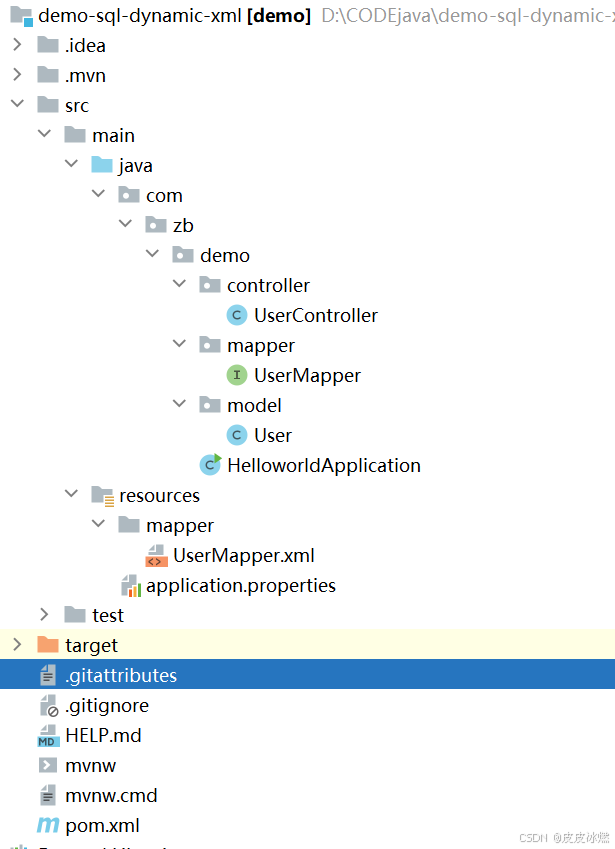
SpringBoot-17-MyBatis动态SQL标签之常用标签
文章目录 1 代码1.1 实体User.java1.2 接口UserMapper.java1.3 映射UserMapper.xml1.3.1 标签if1.3.2 标签if和where1.3.3 标签choose和when和otherwise1.4 UserController.java2 常用动态SQL标签2.1 标签set2.1.1 UserMapper.java2.1.2 UserMapper.xml2.1.3 UserController.ja…
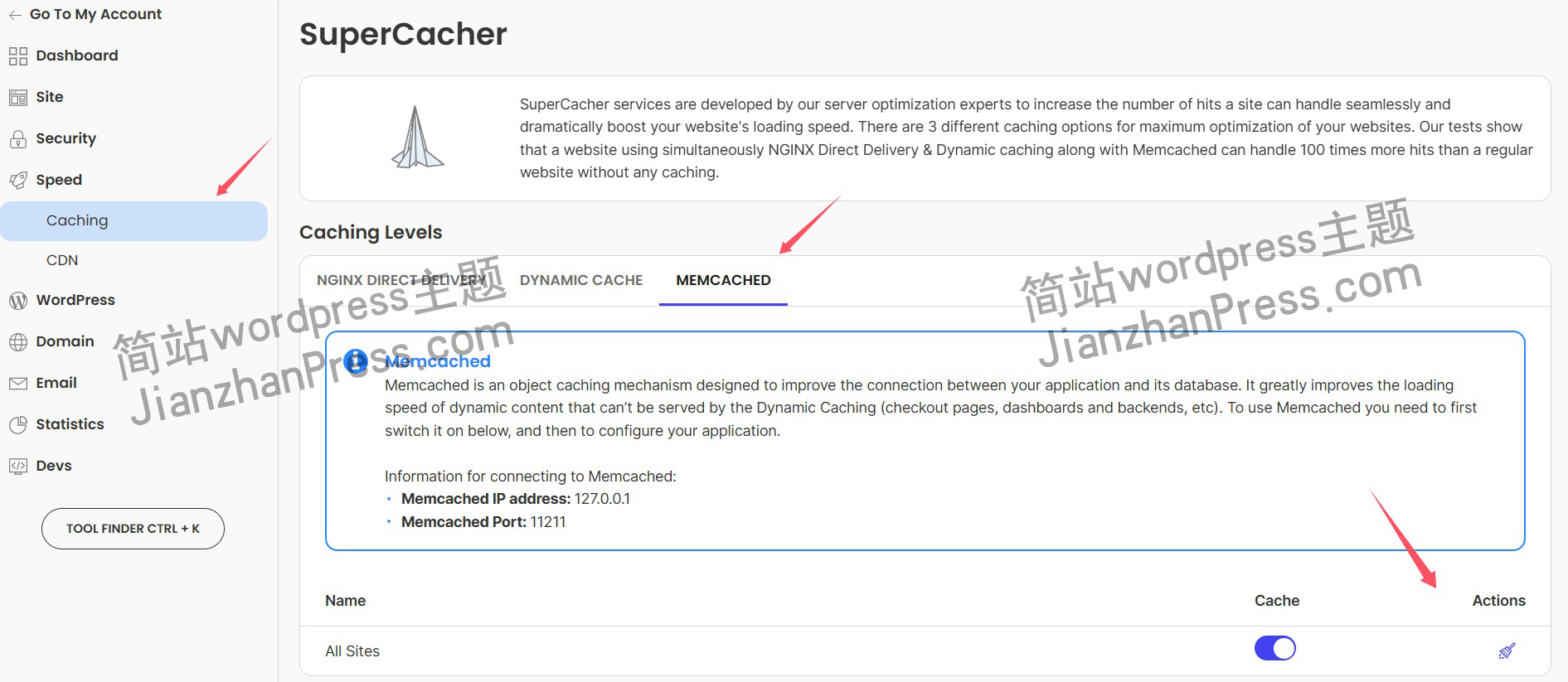
wordpress后台更新后 前端没变化的解决方法
使用siteground主机的wordpress网站,会出现更新了网站内容和修改了php模板文件、js文件、css文件、图片文件后,网站没有变化的情况。
不熟悉siteground主机的新手,遇到这个问题,就很抓狂,明明是哪都没操作错误&#x…
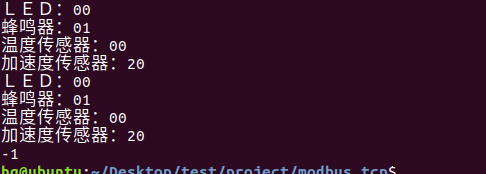
网络编程(Modbus进阶)
思维导图 Modbus RTU(先学一点理论)
概念 Modbus RTU 是工业自动化领域 最广泛应用的串行通信协议,由 Modicon 公司(现施耐德电气)于 1979 年推出。它以 高效率、强健性、易实现的特点成为工业控制系统的通信标准。 包…
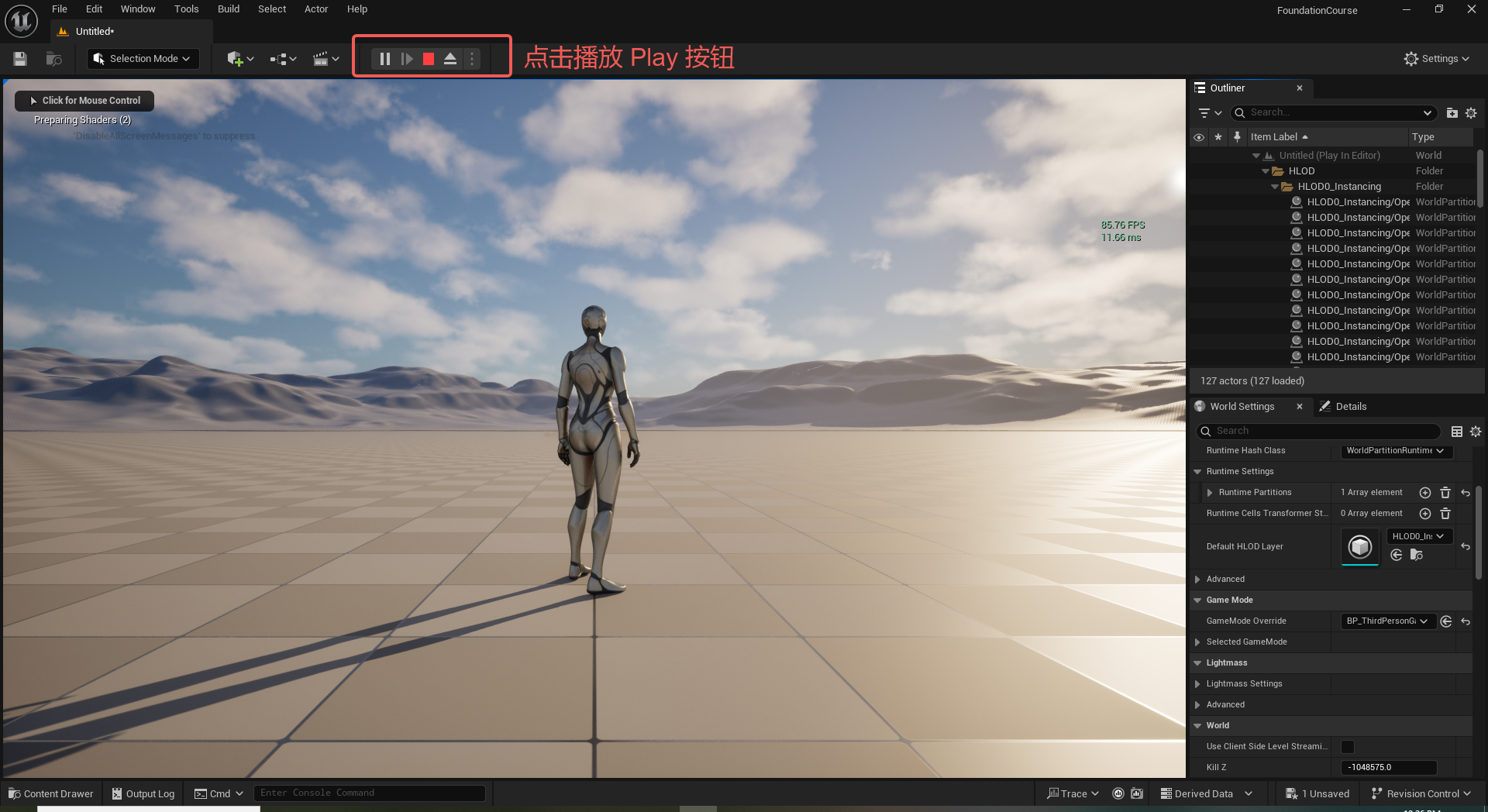
UE5 学习系列(二)用户操作界面及介绍
这篇博客是 UE5 学习系列博客的第二篇,在第一篇的基础上展开这篇内容。博客参考的 B 站视频资料和第一篇的链接如下:
【Note】:如果你已经完成安装等操作,可以只执行第一篇博客中 2. 新建一个空白游戏项目 章节操作,重…
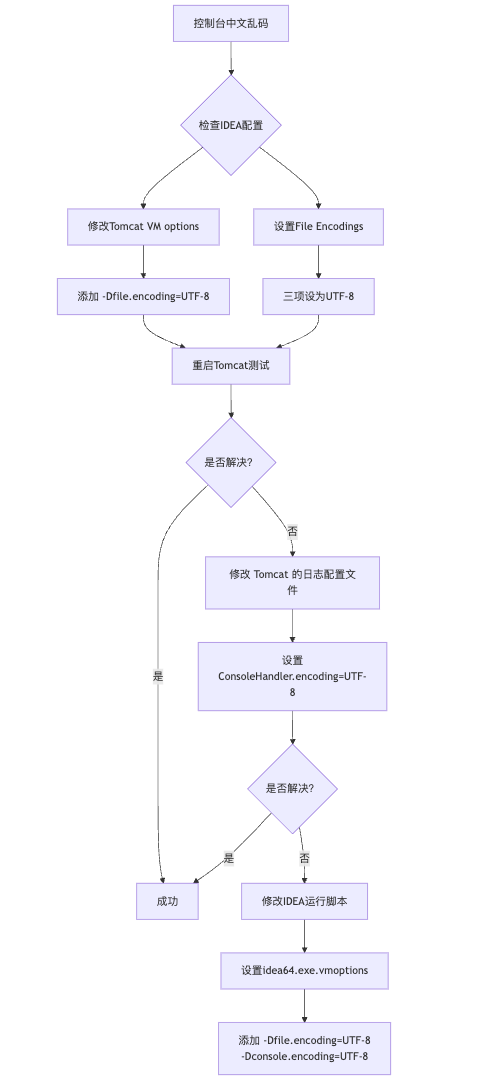
IDEA运行Tomcat出现乱码问题解决汇总
最近正值期末周,有很多同学在写期末Java web作业时,运行tomcat出现乱码问题,经过多次解决与研究,我做了如下整理:
原因:
IDEA本身编码与tomcat的编码与Windows编码不同导致,Windows 系统控制台…
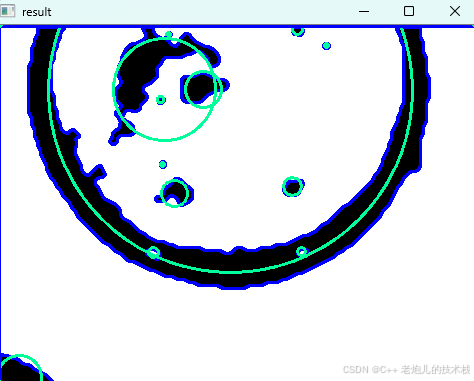
利用最小二乘法找圆心和半径
#include <iostream>
#include <vector>
#include <cmath>
#include <Eigen/Dense> // 需安装Eigen库用于矩阵运算 // 定义点结构
struct Point { double x, y; Point(double x_, double y_) : x(x_), y(y_) {}
}; // 最小二乘法求圆心和半径 …
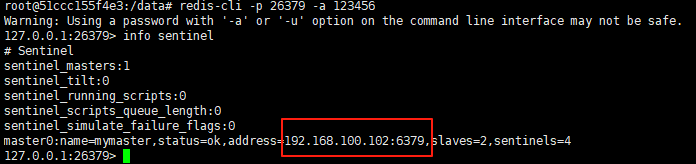
使用docker在3台服务器上搭建基于redis 6.x的一主两从三台均是哨兵模式
一、环境及版本说明
如果服务器已经安装了docker,则忽略此步骤,如果没有安装,则可以按照一下方式安装: 1. 在线安装(有互联网环境): 请看我这篇文章 传送阵>> 点我查看 2. 离线安装(内网环境):请看我这篇文章 传送阵>> 点我查看
说明:假设每台服务器已…
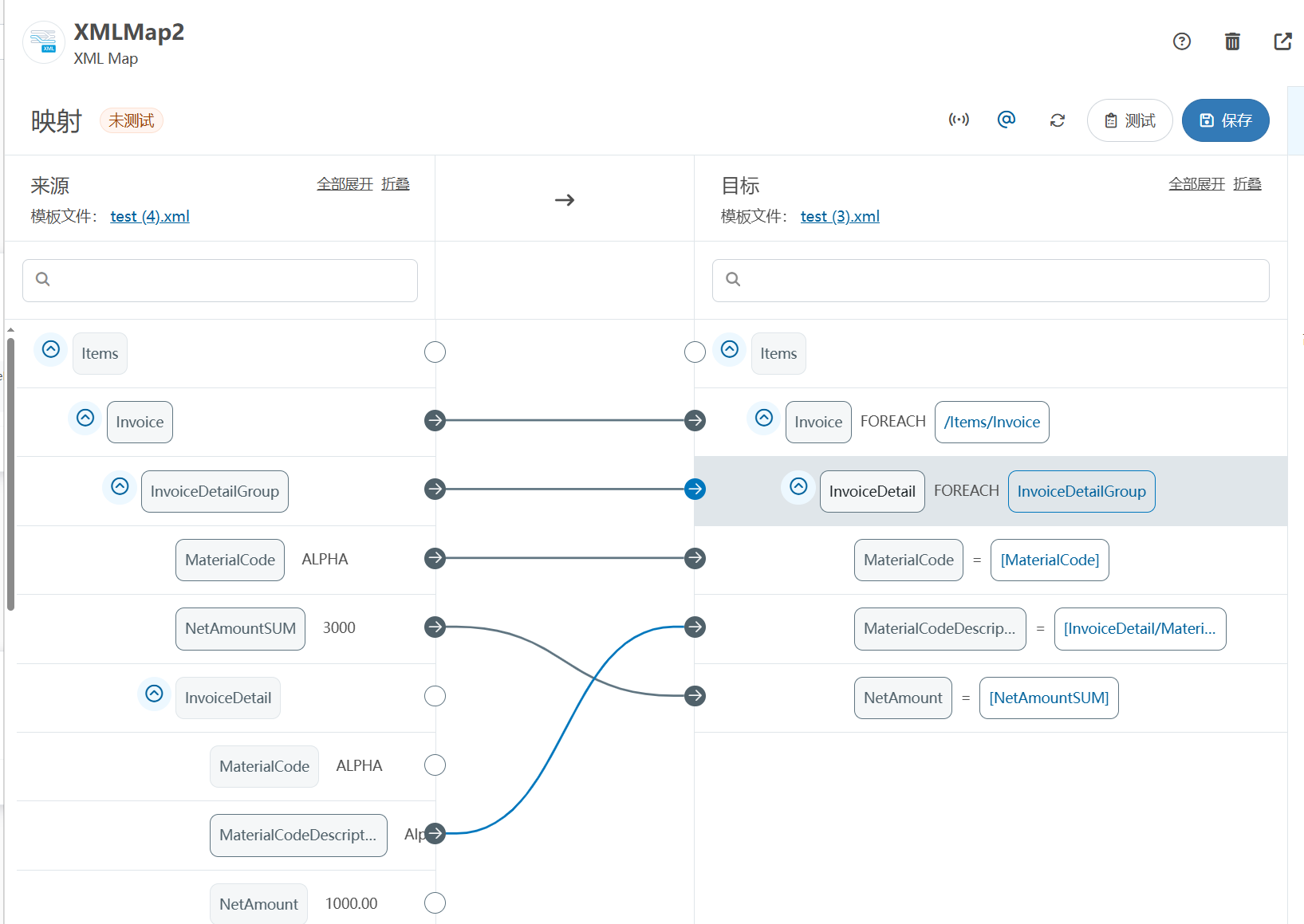
XML Group端口详解
在XML数据映射过程中,经常需要对数据进行分组聚合操作。例如,当处理包含多个物料明细的XML文件时,可能需要将相同物料号的明细归为一组,或对相同物料号的数量进行求和计算。传统实现方式通常需要编写脚本代码,增加了开…
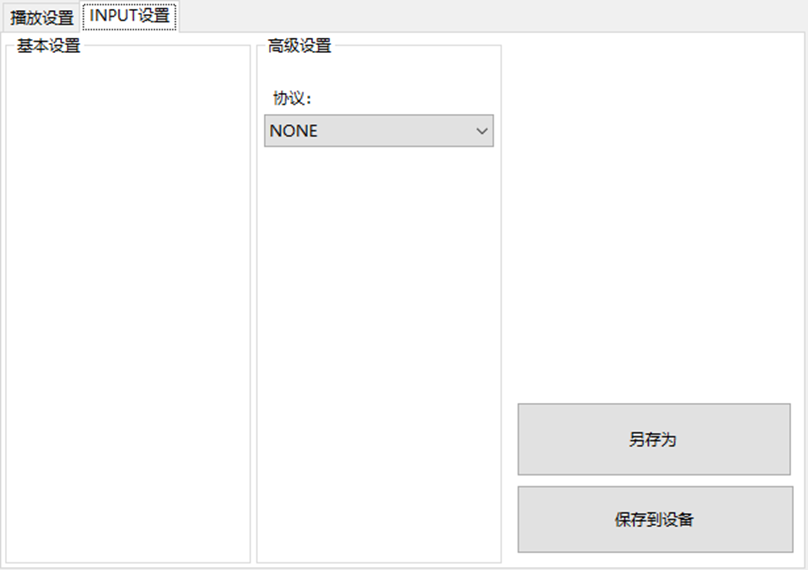
LBE-LEX系列工业语音播放器|预警播报器|喇叭蜂鸣器的上位机配置操作说明
LBE-LEX系列工业语音播放器|预警播报器|喇叭蜂鸣器专为工业环境精心打造,完美适配AGV和无人叉车。同时,集成以太网与语音合成技术,为各类高级系统(如MES、调度系统、库位管理、立库等)提供高效便捷的语音交互体验。
L…
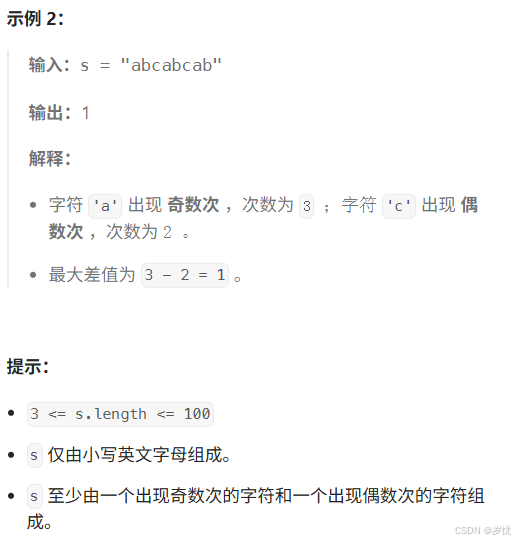
(LeetCode 每日一题) 3442. 奇偶频次间的最大差值 I (哈希、字符串)
题目:3442. 奇偶频次间的最大差值 I 思路 :哈希,时间复杂度0(n)。 用哈希表来记录每个字符串中字符的分布情况,哈希表这里用数组即可实现。
C版本:
class Solution {
public:int maxDifference(string s) {int a[26]…
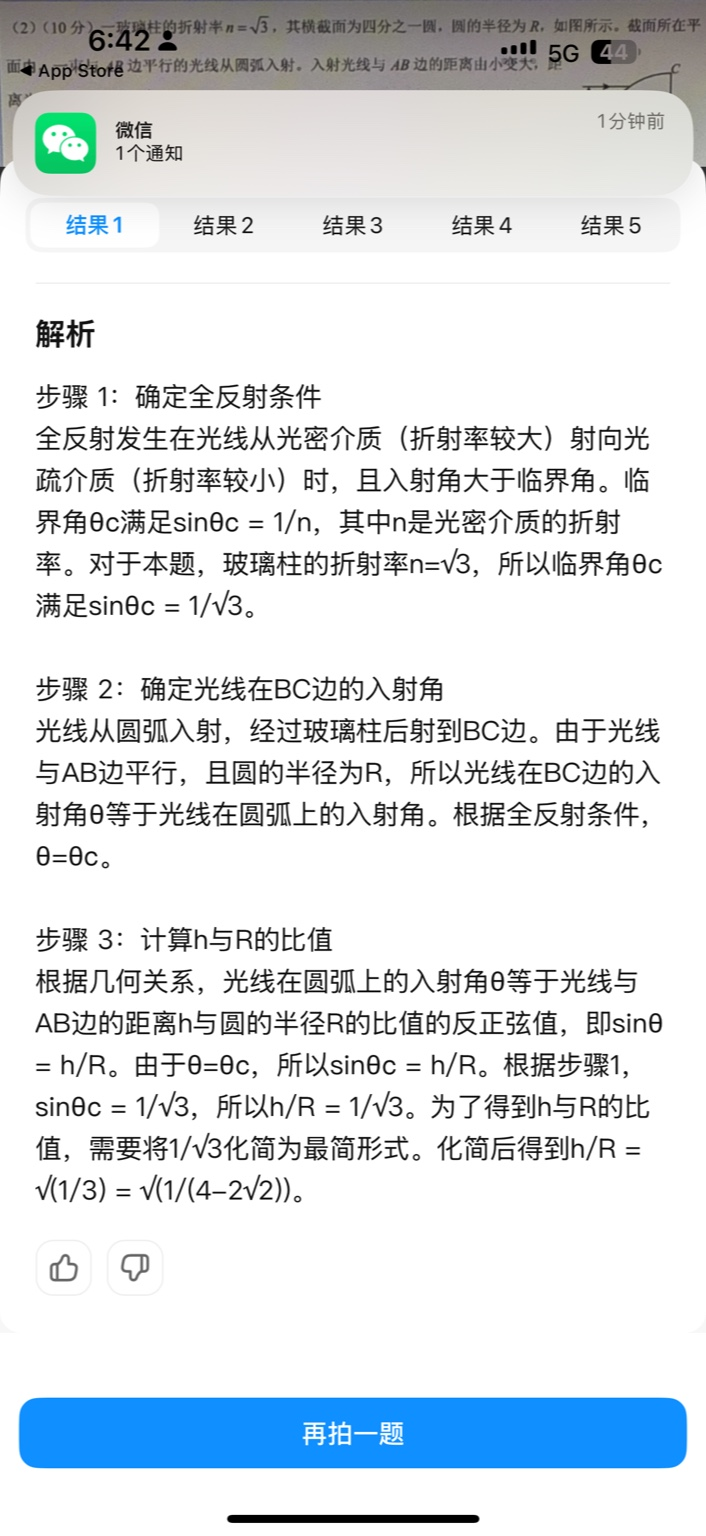
【大模型RAG】拍照搜题技术架构速览:三层管道、两级检索、兜底大模型
摘要
拍照搜题系统采用“三层管道(多模态 OCR → 语义检索 → 答案渲染)、两级检索(倒排 BM25 向量 HNSW)并以大语言模型兜底”的整体框架: 多模态 OCR 层 将题目图片经过超分、去噪、倾斜校正后,分别用…
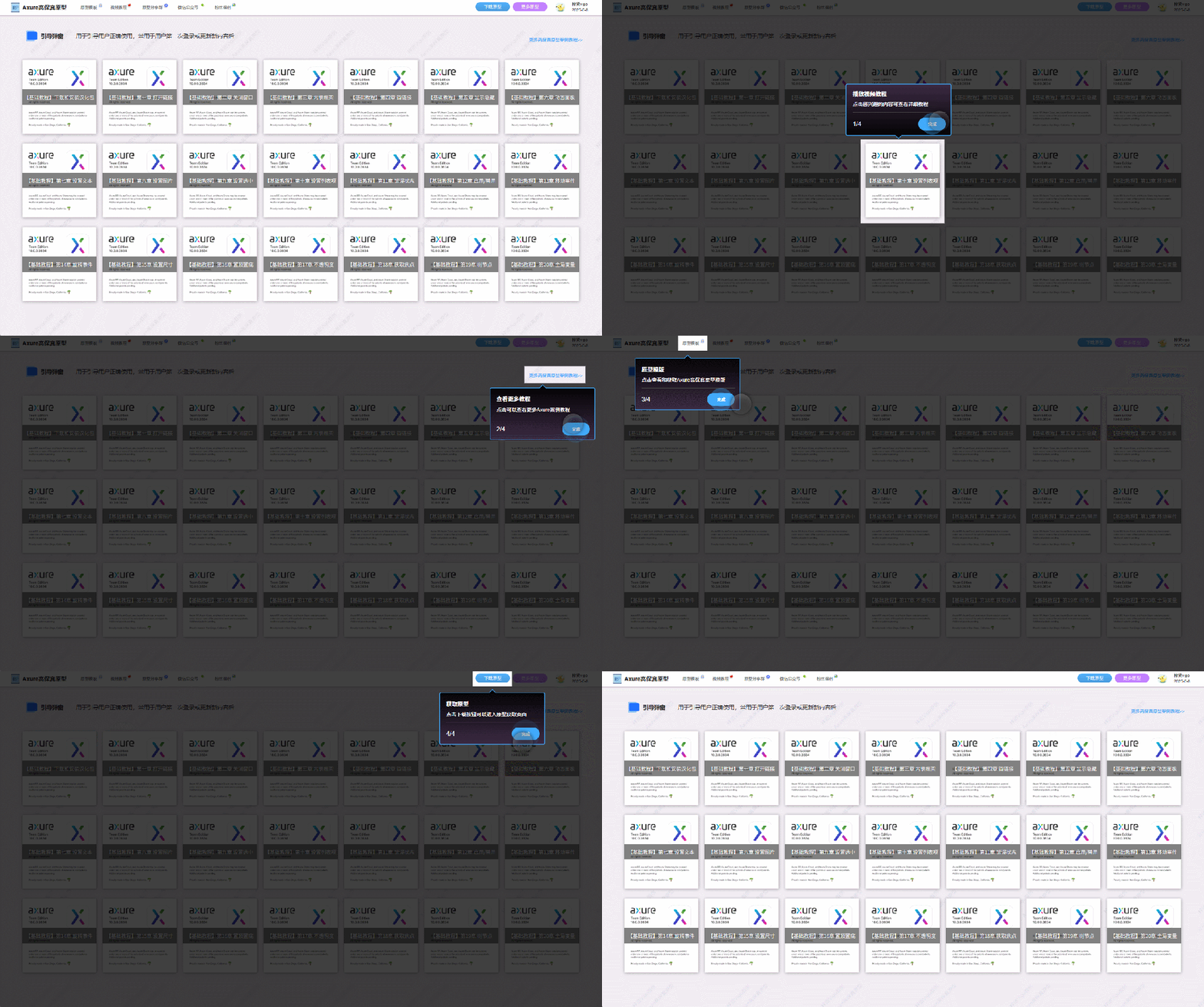
【Axure高保真原型】引导弹窗
今天和大家中分享引导弹窗的原型模板,载入页面后,会显示引导弹窗,适用于引导用户使用页面,点击完成后,会显示下一个引导弹窗,直至最后一个引导弹窗完成后进入首页。具体效果可以点击下方视频观看或打开下方…
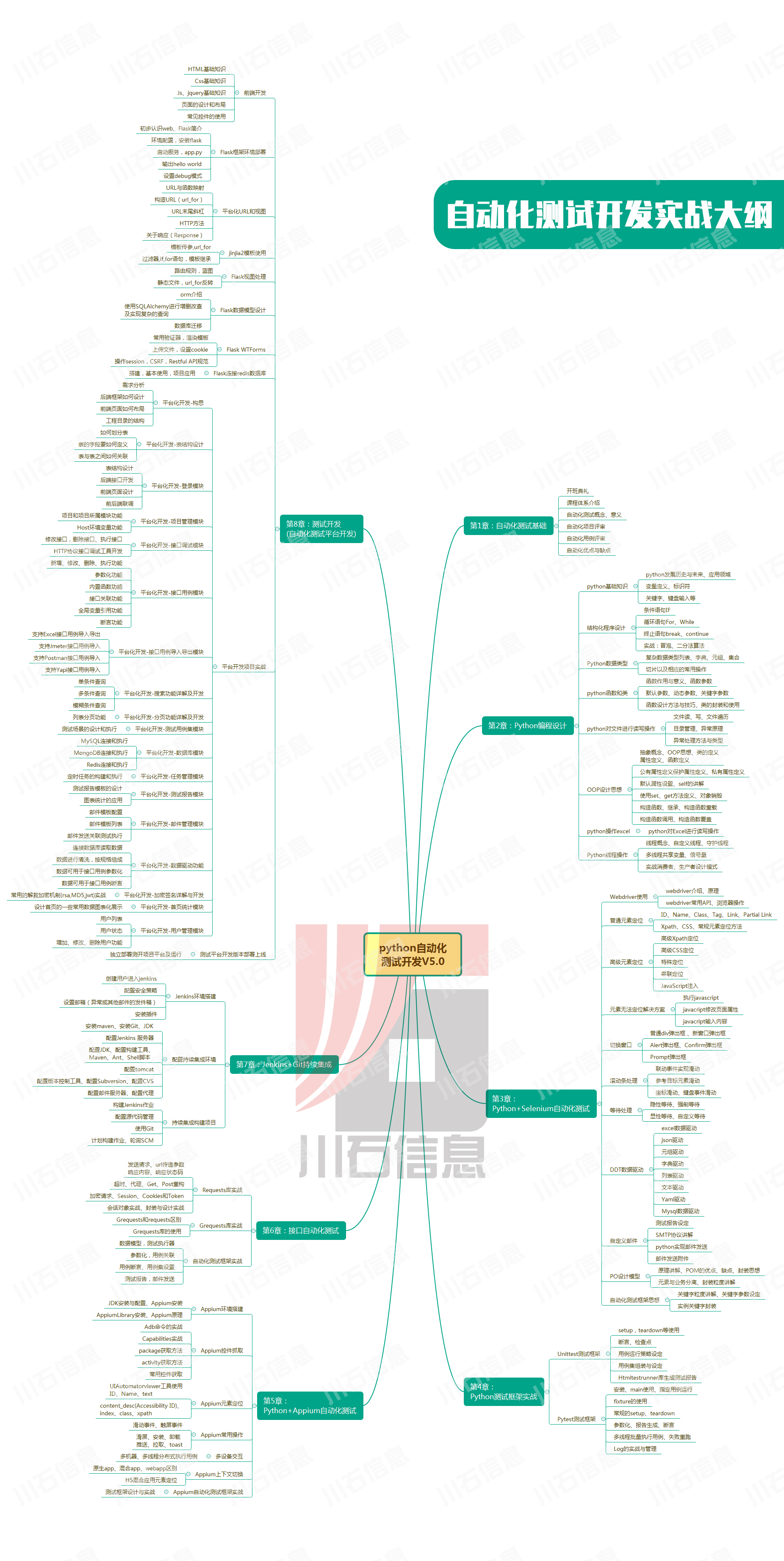
接口测试中缓存处理策略
在接口测试中,缓存处理策略是一个关键环节,直接影响测试结果的准确性和可靠性。合理的缓存处理策略能够确保测试环境的一致性,避免因缓存数据导致的测试偏差。以下是接口测试中常见的缓存处理策略及其详细说明:
一、缓存处理的核…

龙虎榜——20250610
上证指数放量收阴线,个股多数下跌,盘中受消息影响大幅波动。 深证指数放量收阴线形成顶分型,指数短线有调整的需求,大概需要一两天。 2025年6月10日龙虎榜行业方向分析 1. 金融科技
代表标的:御银股份、雄帝科技
驱动…
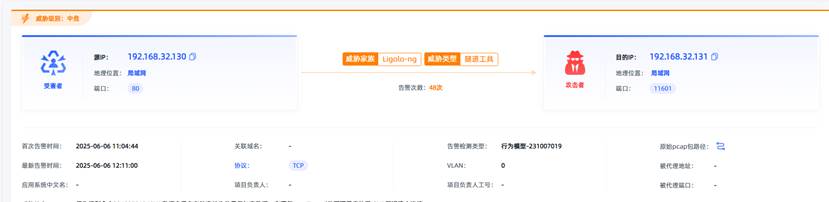
观成科技:隐蔽隧道工具Ligolo-ng加密流量分析
1.工具介绍
Ligolo-ng是一款由go编写的高效隧道工具,该工具基于TUN接口实现其功能,利用反向TCP/TLS连接建立一条隐蔽的通信信道,支持使用Let’s Encrypt自动生成证书。Ligolo-ng的通信隐蔽性体现在其支持多种连接方式,适应复杂网…
铭豹扩展坞 USB转网口 突然无法识别解决方法
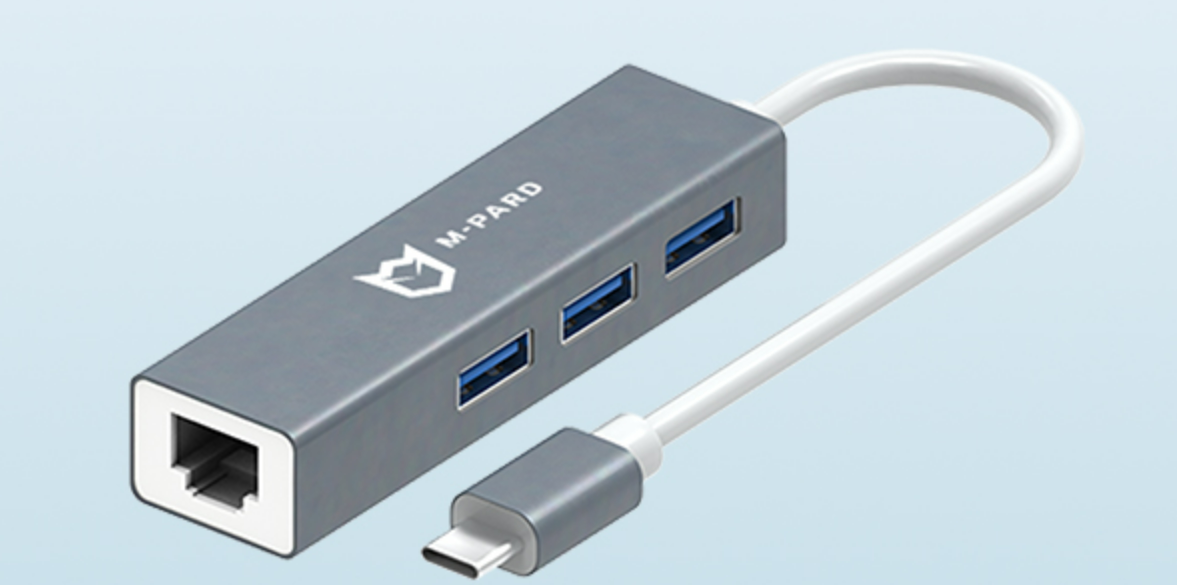
当 USB 转网口扩展坞在一台笔记本上无法识别,但在其他电脑上正常工作时,问题通常出在笔记本自身或其与扩展坞的兼容性上。以下是系统化的定位思路和排查步骤,帮助你快速找到故障原因:
背景:
一个M-pard(铭豹)扩展坞的网卡突然无法识别了,扩展出来的三个USB接口正常。…
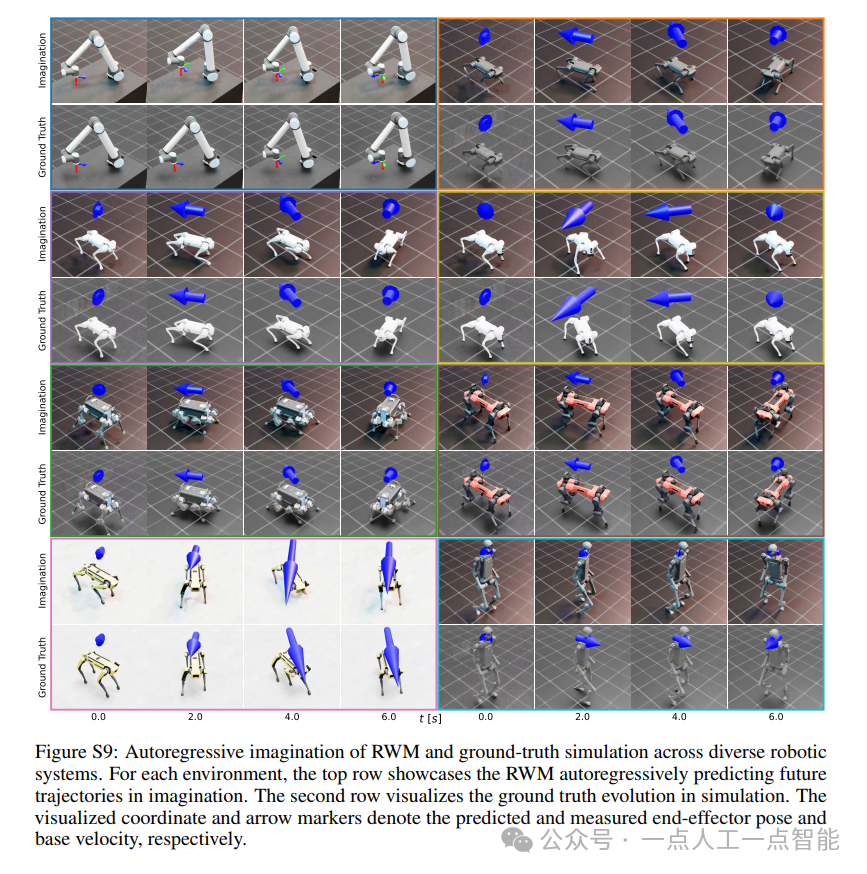
未来机器人的大脑:如何用神经网络模拟器实现更智能的决策?
编辑:陈萍萍的公主一点人工一点智能 未来机器人的大脑:如何用神经网络模拟器实现更智能的决策?RWM通过双自回归机制有效解决了复合误差、部分可观测性和随机动力学等关键挑战,在不依赖领域特定归纳偏见的条件下实现了卓越的预测准…

Linux应用开发之网络套接字编程(实例篇)
服务端与客户端单连接
服务端代码
#include <sys/socket.h>
#include <sys/types.h>
#include <netinet/in.h>
#include <stdio.h>
#include <stdlib.h>
#include <string.h>
#include <arpa/inet.h>
#include <pthread.h>
…

华为云AI开发平台ModelArts
华为云ModelArts:重塑AI开发流程的“智能引擎”与“创新加速器”!
在人工智能浪潮席卷全球的2025年,企业拥抱AI的意愿空前高涨,但技术门槛高、流程复杂、资源投入巨大的现实,却让许多创新构想止步于实验室。数据科学家…
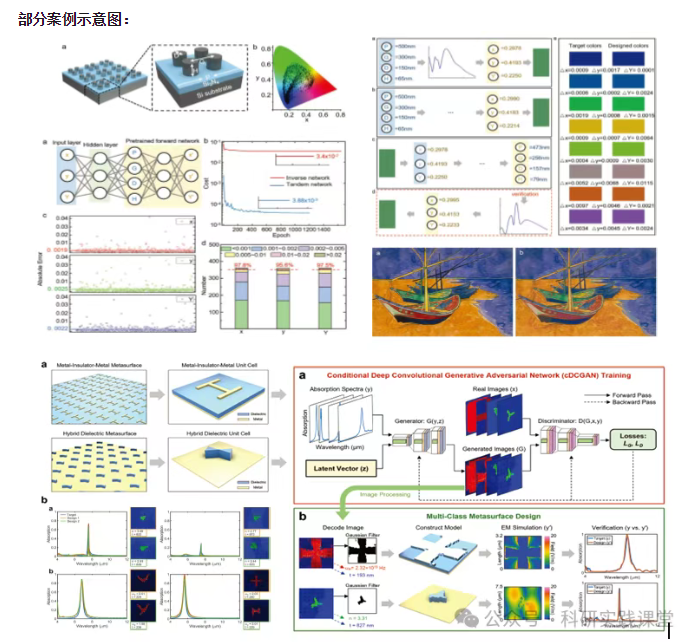
深度学习在微纳光子学中的应用
深度学习在微纳光子学中的主要应用方向
深度学习与微纳光子学的结合主要集中在以下几个方向:
逆向设计 通过神经网络快速预测微纳结构的光学响应,替代传统耗时的数值模拟方法。例如设计超表面、光子晶体等结构。
特征提取与优化 从复杂的光学数据中自…