openclaw技术实践:Nunchaku FLUX.1-dev ComfyUI批量生成脚本编写
news2026/4/12 17:10:59
openclaw技术实践Nunchaku FLUX.1-dev ComfyUI批量生成脚本编写你是不是也遇到过这样的场景在ComfyUI里用Nunchaku FLUX.1-dev模型生成了一张惊艳的图片然后想“要是能批量生成不同风格、不同主题的图片就好了。”但每次都要手动修改提示词、调整参数、点击运行效率实在太低。今天我就来分享一个实战技巧——如何编写ComfyUI批量生成脚本让你一次性生成几十甚至上百张高质量图片彻底解放双手。无论你是做内容创作、电商设计还是个人项目这个技能都能让你的工作效率提升10倍。1. 为什么需要批量生成脚本在深入代码之前我们先聊聊为什么手动操作行不通。想象一下你需要为新产品生成100张不同场景的营销图。手动操作意味着重复输入100次提示词调整100次参数设置点击100次“运行”按钮等待100次生成完成手动保存100张图片这不仅耗时耗力还容易出错。而脚本可以帮你一键生成准备好提示词列表脚本自动循环执行参数批量调整轻松测试不同参数组合的效果结果自动保存生成图片自动命名、分类保存无人值守运行设置好后让电脑自己跑你去喝咖啡接下来我会带你从零开始一步步构建一个实用的批量生成脚本。2. 环境与准备工作在编写脚本之前确保你的环境已经就绪。2.1 基础环境确认首先你的ComfyUI应该已经正常安装并能够运行Nunchaku FLUX.1-dev模型。如果还没完成这一步可以参考我之前写的部署指南。打开终端进入你的ComfyUI目录检查几个关键点# 确认ComfyUI目录结构 cd ~/ComfyUI ls -la # 检查custom_nodes目录下是否有nunchaku_nodes ls custom_nodes/ | grep nunchaku # 检查模型文件是否存在 ls models/unet/ | grep flux.1-dev ls models/text_encoders/ ls models/vae/如果这些都正常说明你的基础环境已经准备好。2.2 理解ComfyUI的API接口ComfyUI提供了强大的API接口允许我们通过代码控制整个生成流程。这是编写批量脚本的基础。ComfyUI默认在http://localhost:8188启动一个WebSocket服务器和一个HTTP API服务器。我们的脚本将通过这些接口获取当前的工作流配置修改工作流参数触发图片生成获取生成结果让我们先测试一下API是否正常工作import requests import json # ComfyUI的API地址 api_url http://localhost:8188 # 测试连接 try: response requests.get(f{api_url}/history) if response.status_code 200: print(✅ ComfyUI API连接成功) else: print(❌ 无法连接到ComfyUI API请检查ComfyUI是否正在运行) except Exception as e: print(f❌ 连接失败: {e})把这个测试脚本保存为test_api.py并运行如果看到成功提示说明API接口可用。3. 批量生成脚本核心实现现在进入最核心的部分——编写批量生成脚本。我会分步骤讲解确保你能完全理解。3.1 基础脚本框架我们先创建一个基础的脚本框架包含必要的功能模块#!/usr/bin/env python3 ComfyUI Nunchaku FLUX.1-dev 批量生成脚本 作者openclaw 功能批量生成图片支持自定义提示词、参数和保存路径 import requests import json import time import os from datetime import datetime from typing import List, Dict, Any import uuid class ComfyUIBatchGenerator: ComfyUI批量生成器 def __init__(self, server_address: str http://localhost:8188): 初始化批量生成器 Args: server_address: ComfyUI服务器地址 self.server_address server_address self.client_id str(uuid.uuid4()) def get_workflow(self) - Dict[str, Any]: 获取当前工作流配置 try: response requests.get(f{self.server_address}/object_info) return response.json() except Exception as e: print(f获取工作流失败: {e}) return {} def queue_prompt(self, prompt: Dict[str, Any]) - str: 提交生成任务到队列 Args: prompt: 工作流配置字典 Returns: prompt_id: 任务ID try: data {prompt: prompt, client_id: self.client_id} response requests.post( f{self.server_address}/prompt, jsondata ) result response.json() return result.get(prompt_id, ) except Exception as e: print(f提交任务失败: {e}) return def get_history(self, prompt_id: str) - Dict[str, Any]: 获取任务历史记录 Args: prompt_id: 任务ID Returns: 历史记录字典 try: response requests.get(f{self.server_address}/history/{prompt_id}) return response.json() except Exception as e: print(f获取历史记录失败: {e}) return {} def wait_for_completion(self, prompt_id: str, timeout: int 300) - bool: 等待任务完成 Args: prompt_id: 任务ID timeout: 超时时间秒 Returns: 是否成功完成 start_time time.time() while time.time() - start_time timeout: history self.get_history(prompt_id) if history and prompt_id in history: status history[prompt_id].get(status, {}) if status.get(completed, False): return True elif status.get(error, False): print(f任务执行出错: {status.get(error_message, 未知错误)}) return False time.sleep(1) # 每秒检查一次 print(f任务超时: {timeout}秒) return False def save_image(self, image_data: bytes, filename: str, output_dir: str output): 保存生成的图片 Args: image_data: 图片二进制数据 filename: 文件名 output_dir: 输出目录 # 创建输出目录 os.makedirs(output_dir, exist_okTrue) # 生成完整路径 filepath os.path.join(output_dir, filename) # 保存图片 with open(filepath, wb) as f: f.write(image_data) print(f✅ 图片已保存: {filepath}) return filepath if __name__ __main__: # 测试脚本 generator ComfyUIBatchGenerator() print(批量生成器初始化完成)这个框架包含了批量生成所需的核心功能连接API、提交任务、等待完成、保存结果。3.2 加载和修改工作流接下来我们需要加载Nunchaku FLUX.1-dev的工作流并能够动态修改参数。首先从ComfyUI导出你的工作流配置在ComfyUI网页端加载nunchaku-flux.1-dev.json工作流点击右上角的Save按钮保存为JSON文件将文件保存到脚本目录命名为flux_workflow.json然后我们添加工作流加载和修改功能class ComfyUIBatchGenerator: # ... 之前的代码 ... def load_workflow(self, workflow_path: str) - Dict[str, Any]: 从文件加载工作流配置 Args: workflow_path: 工作流JSON文件路径 Returns: 工作流配置字典 try: with open(workflow_path, r, encodingutf-8) as f: workflow json.load(f) print(f✅ 工作流加载成功: {workflow_path}) return workflow except Exception as e: print(f❌ 加载工作流失败: {e}) return {} def update_prompt_text(self, workflow: Dict[str, Any], node_id: str, text: str) - Dict[str, Any]: 更新提示词节点的文本内容 Args: workflow: 工作流配置 node_id: 节点ID text: 新的提示词文本 Returns: 更新后的工作流 if prompt in workflow: for node_id_key, node_data in workflow[prompt].items(): if inputs in node_data and text in node_data[inputs]: # 找到文本输入节点 workflow[prompt][node_id_key][inputs][text] text print(f✅ 提示词已更新: {text[:50]}...) break return workflow def update_sampler_steps(self, workflow: Dict[str, Any], node_id: str, steps: int) - Dict[str, Any]: 更新采样器的步数 Args: workflow: 工作流配置 node_id: 节点ID steps: 采样步数 Returns: 更新后的工作流 if prompt in workflow: for node_id_key, node_data in workflow[prompt].items(): if inputs in node_data and steps in node_data[inputs]: # 找到采样器节点 workflow[prompt][node_id_key][inputs][steps] steps print(f✅ 采样步数已更新: {steps}) break return workflow def update_resolution(self, workflow: Dict[str, Any], width: int, height: int) - Dict[str, Any]: 更新生成图片的分辨率 Args: workflow: 工作流配置 width: 图片宽度 height: 图片高度 Returns: 更新后的工作流 if prompt in workflow: for node_id_key, node_data in workflow[prompt].items(): # 查找空 latent 图像节点设置分辨率 if inputs in node_data and width in node_data[inputs]: workflow[prompt][node_id_key][inputs][width] width workflow[prompt][node_id_key][inputs][height] height print(f✅ 分辨率已更新: {width}x{height}) break return workflow3.3 完整的批量生成实现现在我们把所有功能整合起来创建一个完整的批量生成脚本class ComfyUIBatchGenerator: # ... 之前的代码 ... def generate_single_image(self, workflow: Dict[str, Any], prompt_text: str, output_dir: str output, image_prefix: str generated, steps: int 20, width: int 1024, height: int 1024) - str: 生成单张图片 Args: workflow: 基础工作流配置 prompt_text: 提示词 output_dir: 输出目录 image_prefix: 图片文件名前缀 steps: 采样步数 width: 图片宽度 height: 图片高度 Returns: 生成的图片路径 print(f\n 开始生成图片: {prompt_text[:50]}...) # 复制工作流以避免修改原始配置 current_workflow json.loads(json.dumps(workflow)) # 更新参数 current_workflow self.update_prompt_text(current_workflow, , prompt_text) current_workflow self.update_sampler_steps(current_workflow, , steps) current_workflow self.update_resolution(current_workflow, width, height) # 提交生成任务 prompt_id self.queue_prompt(current_workflow) if not prompt_id: print(❌ 提交任务失败) return print(f 任务ID: {prompt_id}) # 等待任务完成 if not self.wait_for_completion(prompt_id): print(❌ 任务执行失败) return # 获取生成结果 history self.get_history(prompt_id) if not history or prompt_id not in history: print(❌ 无法获取任务历史) return # 提取图片数据 outputs history[prompt_id].get(outputs, {}) image_data None for node_id, node_output in outputs.items(): if images in node_output: for image_info in node_output[images]: # 获取图片数据 image_url f{self.server_address}/view?filename{image_info[filename]}type{image_info[type]} response requests.get(image_url) if response.status_code 200: image_data response.content break if image_data: break if not image_data: print(❌ 未找到生成的图片) return # 保存图片 timestamp datetime.now().strftime(%Y%m%d_%H%M%S) filename f{image_prefix}_{timestamp}_{prompt_id[:8]}.png filepath self.save_image(image_data, filename, output_dir) return filepath def batch_generate(self, workflow_path: str, prompts: List[str], output_dir: str output, batch_prefix: str batch, steps: int 20, width: int 1024, height: int 1024) - List[str]: 批量生成图片 Args: workflow_path: 工作流文件路径 prompts: 提示词列表 output_dir: 输出目录 batch_prefix: 批次前缀 steps: 采样步数 width: 图片宽度 height: 图片高度 Returns: 生成的图片路径列表 print(f 开始批量生成共{len(prompts)}个提示词) # 加载工作流 base_workflow self.load_workflow(workflow_path) if not base_workflow: print(❌ 无法加载工作流批量生成终止) return [] # 创建批次输出目录 batch_time datetime.now().strftime(%Y%m%d_%H%M%S) batch_output_dir os.path.join(output_dir, f{batch_prefix}_{batch_time}) os.makedirs(batch_output_dir, exist_okTrue) generated_files [] # 遍历所有提示词 for i, prompt in enumerate(prompts, 1): print(f\n 处理第{i}/{len(prompts)}个提示词) try: # 生成单张图片 filepath self.generate_single_image( workflowbase_workflow, prompt_textprompt, output_dirbatch_output_dir, image_prefixfimg_{i:03d}, stepssteps, widthwidth, heightheight ) if filepath: generated_files.append(filepath) # 记录生成日志 log_entry { index: i, prompt: prompt, filepath: filepath, timestamp: datetime.now().isoformat(), steps: steps, resolution: f{width}x{height} } log_file os.path.join(batch_output_dir, generation_log.json) log_data [] if os.path.exists(log_file): with open(log_file, r, encodingutf-8) as f: log_data json.load(f) log_data.append(log_entry) with open(log_file, w, encodingutf-8) as f: json.dump(log_data, f, ensure_asciiFalse, indent2) print(f✅ 第{i}张图片生成完成) else: print(f❌ 第{i}张图片生成失败) except Exception as e: print(f❌ 处理第{i}个提示词时出错: {e}) continue # 添加短暂延迟避免服务器压力过大 if i len(prompts): time.sleep(1) print(f\n 批量生成完成共生成{len(generated_files)}张图片) print(f 输出目录: {batch_output_dir}) return generated_files # 使用示例 def main(): 批量生成示例 # 初始化生成器 generator ComfyUIBatchGenerator() # 定义提示词列表 prompts [ A beautiful sunset over mountains, digital art, vibrant colors, 8K resolution, A futuristic city at night with flying cars, cyberpunk style, neon lights, A peaceful forest with sunlight streaming through trees, fantasy art style, An astronaut floating in space with Earth in background, realistic, detailed, A cute cartoon cat wearing glasses and reading a book, anime style, An ancient temple in the jungle, overgrown with vines, mysterious atmosphere, A steampunk airship flying over Victorian London, detailed machinery, A magical library with floating books and glowing crystals, fantasy art, A underwater scene with colorful coral reef and tropical fish, realistic, A samurai warrior in cherry blossom forest, traditional Japanese art style ] # 批量生成 generated_files generator.batch_generate( workflow_pathflux_workflow.json, # 你的工作流文件路径 promptsprompts, output_dirbatch_output, batch_prefixflux_batch, steps25, # 推理步数 width1024, # 图片宽度 height1024 # 图片高度 ) print(f\n 生成统计:) print(f 成功: {len(generated_files)}张) print(f 失败: {len(prompts) - len(generated_files)}张) # 显示生成的图片路径 if generated_files: print(\n 生成的图片:) for filepath in generated_files: print(f - {os.path.basename(filepath)}) if __name__ __main__: main()4. 高级功能扩展基础批量生成已经能解决大部分需求但我们可以做得更好。下面添加一些高级功能。4.1 参数组合批量测试有时候我们需要测试不同参数组合的效果。这个功能可以帮你自动测试多种配置class AdvancedBatchGenerator(ComfyUIBatchGenerator): 高级批量生成器支持参数组合测试 def generate_with_parameter_grid(self, workflow_path: str, base_prompt: str, parameter_grid: Dict[str, List[Any]], output_dir: str parameter_test) - Dict[str, List[str]]: 使用参数网格生成图片测试不同参数组合 Args: workflow_path: 工作流文件路径 base_prompt: 基础提示词 parameter_grid: 参数网格格式如 {steps: [20, 30, 40], cfg: [7.0, 8.0, 9.0]} output_dir: 输出目录 Returns: 参数组合到图片路径的映射 print(f 开始参数网格测试) # 加载工作流 base_workflow self.load_workflow(workflow_path) if not base_workflow: return {} # 创建输出目录 test_time datetime.now().strftime(%Y%m%d_%H%M%S) test_output_dir os.path.join(output_dir, fparam_test_{test_time}) os.makedirs(test_output_dir, exist_okTrue) # 生成所有参数组合 from itertools import product param_names list(parameter_grid.keys()) param_values list(parameter_grid.values()) param_combinations list(product(*param_values)) print(f 共{len(param_combinations)}种参数组合) results {} for i, combination in enumerate(param_combinations, 1): # 创建参数描述 param_desc _.join([f{name}_{value} for name, value in zip(param_names, combination)]) prompt_with_params f{base_prompt} | Parameters: {param_desc} print(f\n 测试组合 {i}/{len(param_combinations)}: {param_desc}) # 复制工作流 current_workflow json.loads(json.dumps(base_workflow)) # 应用参数组合 # 这里需要根据实际工作流节点来更新参数 # 示例更新采样步数 if steps in parameter_grid: steps_index param_names.index(steps) current_workflow self.update_sampler_steps( current_workflow, , combination[steps_index] ) # 生成图片 try: filepath self.generate_single_image( workflowcurrent_workflow, prompt_textprompt_with_params, output_dirtest_output_dir, image_prefixfparam_{i:03d}, steps25, # 默认值会被参数覆盖 width1024, height1024 ) if filepath: results[param_desc] { filepath: filepath, parameters: dict(zip(param_names, combination)), prompt: prompt_with_params } # 保存参数配置 config_file os.path.join(test_output_dir, fparam_{i:03d}_config.json) with open(config_file, w, encodingutf-8) as f: json.dump(results[param_desc], f, ensure_asciiFalse, indent2) print(f✅ 参数组合测试完成: {param_desc}) else: print(f❌ 参数组合测试失败: {param_desc}) except Exception as e: print(f❌ 测试参数组合时出错: {e}) continue # 延迟避免服务器过载 time.sleep(2) # 生成测试报告 self.generate_test_report(results, test_output_dir) return results def generate_test_report(self, results: Dict[str, Dict], output_dir: str): 生成参数测试报告 report_path os.path.join(output_dir, test_report.md) with open(report_path, w, encodingutf-8) as f: f.write(# 参数测试报告\n\n) f.write(f生成时间: {datetime.now().strftime(%Y-%m-%d %H:%M:%S)}\n) f.write(f测试组合总数: {len(results)}\n\n) f.write(## 测试结果汇总\n\n) f.write(| 序号 | 参数组合 | 图片文件 | 状态 |\n) f.write(|------|----------|----------|------|\n) for i, (param_desc, result) in enumerate(results.items(), 1): filename os.path.basename(result[filepath]) f.write(f| {i} | {param_desc} | {filename} | ✅ 成功 |\n) f.write(\n## 详细参数配置\n\n) for param_desc, result in results.items(): f.write(f### {param_desc}\n\n) f.write(f- **图片文件**: {os.path.basename(result[filepath])}\n) f.write(f- **提示词**: {result[prompt]}\n) f.write(- **参数**:\n) for param_name, param_value in result[parameters].items(): f.write(f - {param_name}: {param_value}\n) f.write(\n) print(f 测试报告已生成: {report_path}) # 使用示例 def parameter_grid_test(): 参数网格测试示例 generator AdvancedBatchGenerator() # 定义参数网格 parameter_grid { steps: [20, 25, 30], # 测试不同推理步数 cfg_scale: [7.0, 8.0, 9.0], # 测试不同CFG值 # 可以添加更多参数 } base_prompt A beautiful landscape with mountains and lakes, ultra HD, realistic results generator.generate_with_parameter_grid( workflow_pathflux_workflow.json, base_promptbase_prompt, parameter_gridparameter_grid, output_dirparameter_tests ) print(f\n 参数测试完成共测试{len(results)}种组合)4.2 从文件读取提示词对于大规模的批量生成从文件读取提示词更加方便class FileBasedBatchGenerator(ComfyUIBatchGenerator): 基于文件的批量生成器 def load_prompts_from_file(self, filepath: str, format_type: str txt) - List[str]: 从文件加载提示词列表 Args: filepath: 文件路径 format_type: 文件格式支持 txt, csv, json Returns: 提示词列表 prompts [] try: if format_type txt: # 从文本文件读取每行一个提示词 with open(filepath, r, encodingutf-8) as f: for line in f: line line.strip() if line and not line.startswith(#): # 跳过空行和注释 prompts.append(line) elif format_type csv: # 从CSV文件读取 import csv with open(filepath, r, encodingutf-8) as f: reader csv.reader(f) for row in reader: if row and row[0].strip(): prompts.append(row[0].strip()) elif format_type json: # 从JSON文件读取 with open(filepath, r, encodingutf-8) as f: data json.load(f) if isinstance(data, list): prompts data elif isinstance(data, dict) and prompts in data: prompts data[prompts] print(f✅ 从文件加载了{len(prompts)}个提示词: {filepath}) return prompts except Exception as e: print(f❌ 加载提示词文件失败: {e}) return [] def batch_generate_from_file(self, workflow_path: str, prompts_file: str, file_format: str txt, output_dir: str batch_from_file, **kwargs) - List[str]: 从文件批量生成图片 Args: workflow_path: 工作流文件路径 prompts_file: 提示词文件路径 file_format: 文件格式 output_dir: 输出目录 **kwargs: 其他参数传递给batch_generate Returns: 生成的图片路径列表 # 从文件加载提示词 prompts self.load_prompts_from_file(prompts_file, file_format) if not prompts: print(❌ 未加载到有效提示词批量生成终止) return [] # 调用批量生成 return self.batch_generate( workflow_pathworkflow_path, promptsprompts, output_diroutput_dir, **kwargs ) # 使用示例 def file_based_generation(): 基于文件的批量生成示例 # 首先创建一个提示词文件 prompts_content # 商品描述提示词列表 A modern minimalist chair design, white background, product photography, 8K A luxury watch on black velvet, studio lighting, detailed macro shot A smartphone showing app interface, floating in space, concept art A pair of running shoes on mountain trail, action shot, dynamic lighting A ceramic coffee mug with steam rising, morning sunlight, cozy atmosphere A leather wallet with credit cards, flat lay composition, professional A gaming laptop with RGB lighting, futuristic design, cyberpunk style A bouquet of fresh flowers in glass vase, soft focus, romantic mood A set of kitchen knives on wooden cutting board, chefs tools, sharp A camping tent under starry night, long exposure, adventure photography # 保存到文件 with open(product_prompts.txt, w, encodingutf-8) as f: f.write(prompts_content) print( 提示词文件已创建: product_prompts.txt) # 从文件批量生成 generator FileBasedBatchGenerator() generated_files generator.batch_generate_from_file( workflow_pathflux_workflow.json, prompts_fileproduct_prompts.txt, file_formattxt, output_dirproduct_images, batch_prefixproduct_batch, steps25, width1024, height1024 ) print(f\n️ 商品图片批量生成完成共生成{len(generated_files)}张图片)5. 实战应用与优化建议掌握了批量生成脚本的基本用法后我们来看看如何在实际项目中应用和优化。5.1 电商内容生成实战假设你是一个电商运营需要为100个商品生成营销图片。我们可以这样优化脚本def ecommerce_batch_generation(): 电商内容批量生成优化版 generator ComfyUIBatchGenerator() # 电商商品提示词模板 product_templates [ Professional product photo of {product}, white background, studio lighting, 8K resolution, detailed, {product} in natural environment, lifestyle photography, authentic, realistic lighting, Close-up shot of {product}, showing texture and details, macro photography, sharp focus, {product} with creative composition, artistic style, unique perspective, visually striking, {product} in use scenario, showing functionality, practical photography, relatable ] # 商品列表 products [ wireless Bluetooth headphones, smart fitness watch, portable power bank, ergonomic office chair, stainless steel water bottle, wireless charging pad, noise cancelling earbuds, gaming mechanical keyboard, 4K action camera, smart home speaker ] all_prompts [] # 为每个商品生成多种风格的提示词 for product in products: for template in product_templates: prompt template.format(productproduct) all_prompts.append(prompt) print(f 为{len(products)}个商品生成{len(all_prompts)}张图片) # 分批处理避免一次性提交太多任务 batch_size 5 all_generated_files [] for i in range(0, len(all_prompts), batch_size): batch_prompts all_prompts[i:i batch_size] batch_num i // batch_size 1 print(f\n 处理第{batch_num}批共{len(batch_prompts)}个提示词) generated_files generator.batch_generate( workflow_pathflux_workflow.json, promptsbatch_prompts, output_dirfecommerce_batch_{batch_num:03d}, batch_prefixfproduct_batch_{batch_num}, steps25, width1024, height1024 ) all_generated_files.extend(generated_files) # 批次间休息避免服务器压力 if i batch_size len(all_prompts): print(f⏸️ 批次完成等待10秒继续...) time.sleep(10) # 生成电商专用的元数据 generate_ecommerce_metadata(all_generated_files, products) print(f\n 电商批量生成完成共生成{len(all_generated_files)}张商品图片) def generate_ecommerce_metadata(image_files: List[str], products: List[str]): 生成电商图片元数据 metadata { generation_date: datetime.now().isoformat(), total_images: len(image_files), products: products, images: [] } for i, filepath in enumerate(image_files): filename os.path.basename(filepath) product_index i // 5 # 假设每个商品5种风格 if product_index len(products): product products[product_index] style_index i % 5 styles [studio, lifestyle, detail, creative, usage] style styles[style_index] if style_index len(styles) else unknown image_info { filename: filename, filepath: filepath, product: product, style: style, suggested_use: get_suggested_use(style) } metadata[images].append(image_info) # 保存元数据 metadata_file ecommerce_metadata.json with open(metadata_file, w, encodingutf-8) as f: json.dump(metadata, f, ensure_asciiFalse, indent2) print(f 电商元数据已保存: {metadata_file}) def get_suggested_use(style: str) - str: 根据图片风格建议使用场景 suggestions { studio: 产品主图、详情页首图, lifestyle: 场景展示、社交媒体, detail: 细节展示、材质特写, creative: 广告创意、品牌宣传, usage: 功能演示、使用教程 } return suggestions.get(style, 通用展示)5.2 性能优化建议当处理大量生成任务时性能优化很重要class OptimizedBatchGenerator(ComfyUIBatchGenerator): 优化版批量生成器 def __init__(self, server_address: str http://localhost:8188, max_concurrent: int 2): 初始化优化生成器 Args: server_address: 服务器地址 max_concurrent: 最大并发数 super().__init__(server_address) self.max_concurrent max_concurrent self.active_tasks [] def optimized_batch_generate(self, workflow_path: str, prompts: List[str], output_dir: str optimized_output, **kwargs) - List[str]: 优化版批量生成支持并发控制 Args: workflow_path: 工作流文件路径 prompts: 提示词列表 output_dir: 输出目录 **kwargs: 其他参数 Returns: 生成的图片路径列表 import threading from queue import Queue print(f⚡ 使用优化批量生成最大并发: {self.max_concurrent}) # 加载工作流 base_workflow self.load_workflow(workflow_path) if not base_workflow: return [] # 创建输出目录 batch_time datetime.now().strftime(%Y%m%d_%H%M%S) batch_output_dir os.path.join(output_dir, fbatch_{batch_time}) os.makedirs(batch_output_dir, exist_okTrue) # 使用队列管理任务 task_queue Queue() result_queue Queue() # 添加所有任务到队列 for i, prompt in enumerate(prompts): task_queue.put((i, prompt)) # 工作线程函数 def worker(): while not task_queue.empty(): try: i, prompt task_queue.get_nowait() print(f 工作线程处理任务 {i1}/{len(prompts)}) try: filepath self.generate_single_image( workflowbase_workflow, prompt_textprompt, output_dirbatch_output_dir, image_prefixfimg_{i1:03d}, **{k: v for k, v in kwargs.items() if k in [steps, width, height]} ) if filepath: result_queue.put((i, filepath, True)) else: result_queue.put((i, None, False)) except Exception as e: print(f❌ 任务 {i1} 执行出错: {e}) result_queue.put((i, None, False)) task_queue.task_done() except: break # 启动工作线程 threads [] for _ in range(min(self.max_concurrent, len(prompts))): thread threading.Thread(targetworker) thread.start() threads.append(thread) # 等待所有任务完成 for thread in threads: thread.join() # 收集结果 results [None] * len(prompts) success_count 0 while not result_queue.empty(): i, filepath, success result_queue.get() results[i] filepath if success: success_count 1 # 过滤成功的结果 generated_files [f for f in results if f] print(f\n 优化批量生成完成:) print(f 成功: {success_count}/{len(prompts)}) print(f 失败: {len(prompts) - success_count}) print(f 输出目录: {batch_output_dir}) return generated_files # 使用优化版生成器 def optimized_generation_example(): 优化批量生成示例 # 生成大量提示词 base_prompts [ A beautiful {scene} at {time}, {style} style, {quality}, An artistic depiction of {subject}, {mood} atmosphere, {style}, A detailed illustration of {concept}, {perspective} view, {details} ] scenes [mountain landscape, ocean view, forest path, city skyline] times [sunrise, noon, sunset, night] styles [realistic, digital art, painting, sketch] qualities [8K resolution, high detail, professional photography, cinematic] all_prompts [] # 生成组合提示词 for scene in scenes: for time in times: for style in styles: for quality in qualities: prompt fA beautiful {scene} at {time}, {style} style, {quality} all_prompts.append(prompt) print(f 生成{len(all_prompts)}个组合提示词) # 使用优化生成器 generator OptimizedBatchGenerator(max_concurrent3) # 只测试前20个避免生成太多 test_prompts all_prompts[:20] generated_files generator.optimized_batch_generate( workflow_pathflux_workflow.json, promptstest_prompts, output_diroptimized_batch, steps20, width768, height768 ) print(f\n✅ 优化批量生成测试完成生成{len(generated_files)}张图片)6. 总结与最佳实践通过本文的讲解你已经掌握了使用ComfyUI API编写批量生成脚本的核心技能。让我们回顾一下关键要点6.1 核心收获API接口掌握学会了如何通过HTTP API与ComfyUI交互这是批量自动化的基础工作流操作掌握了加载、修改工作流配置的方法能够动态调整生成参数批量生成实现构建了完整的批量生成流程从提示词处理到结果保存高级功能扩展实现了参数测试、文件读取、并发优化等实用功能实战应用了解了如何在实际项目中应用这些技术6.2 最佳实践建议根据我的实践经验这里有一些建议可以帮助你更好地使用批量生成脚本提示词管理技巧使用模板系统避免重复编写相似提示词建立提示词库分类管理不同场景的提示词使用变量替换实现动态提示词生成性能优化建议控制并发数量避免服务器过载分批处理大量任务每批完成后适当休息监控显存使用及时清理缓存错误处理策略添加重试机制处理网络波动记录详细日志方便问题排查实现断点续传避免任务中断结果管理方案使用有意义的文件名方便后续查找保存生成参数和提示词到元数据文件定期整理和备份生成结果6.3 下一步学习方向掌握了基础批量生成后你可以进一步探索工作流自动化结合其他工具实现端到端的自动化流程质量评估添加自动评分系统筛选高质量图片风格迁移批量应用LoRA模型统一图片风格云端部署将脚本部署到云服务器实现24小时不间断生成Web界面为脚本添加Web界面方便非技术人员使用批量生成脚本的真正价值在于解放你的创造力。你不必再被重复操作束缚可以专注于提示词的优化、风格的探索、创意的实现。技术应该服务于创作而不是成为创作的障碍。希望这个脚本能成为你创作路上的得力助手。如果你在实践过程中遇到任何问题或者有更好的改进建议欢迎交流分享。记住最好的脚本是那个最适合你工作流程的脚本不要害怕根据自己的需求进行修改和优化。获取更多AI镜像想探索更多AI镜像和应用场景访问 CSDN星图镜像广场提供丰富的预置镜像覆盖大模型推理、图像生成、视频生成、模型微调等多个领域支持一键部署。
本文来自互联网用户投稿,该文观点仅代表作者本人,不代表本站立场。本站仅提供信息存储空间服务,不拥有所有权,不承担相关法律责任。如若转载,请注明出处:http://www.coloradmin.cn/o/2510265.html
如若内容造成侵权/违法违规/事实不符,请联系多彩编程网进行投诉反馈,一经查实,立即删除!相关文章
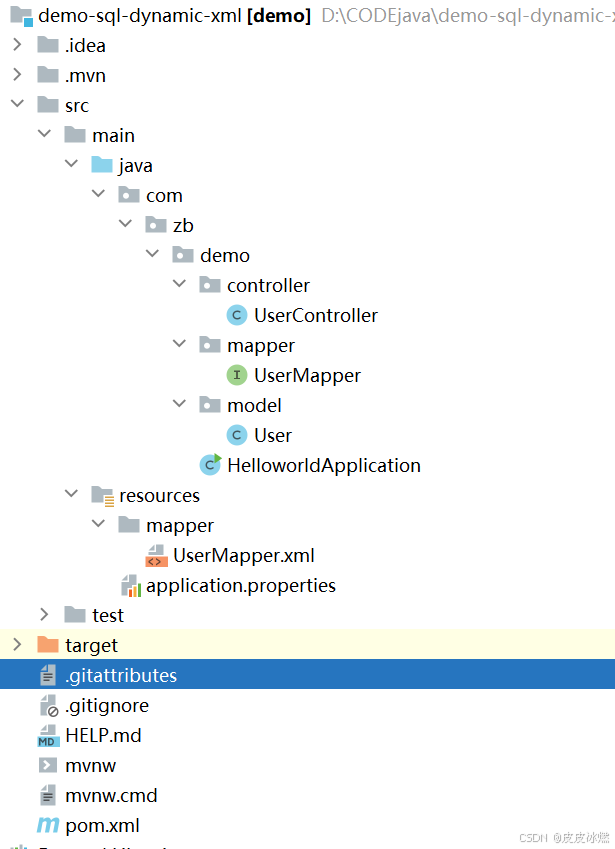
SpringBoot-17-MyBatis动态SQL标签之常用标签
文章目录 1 代码1.1 实体User.java1.2 接口UserMapper.java1.3 映射UserMapper.xml1.3.1 标签if1.3.2 标签if和where1.3.3 标签choose和when和otherwise1.4 UserController.java2 常用动态SQL标签2.1 标签set2.1.1 UserMapper.java2.1.2 UserMapper.xml2.1.3 UserController.ja…
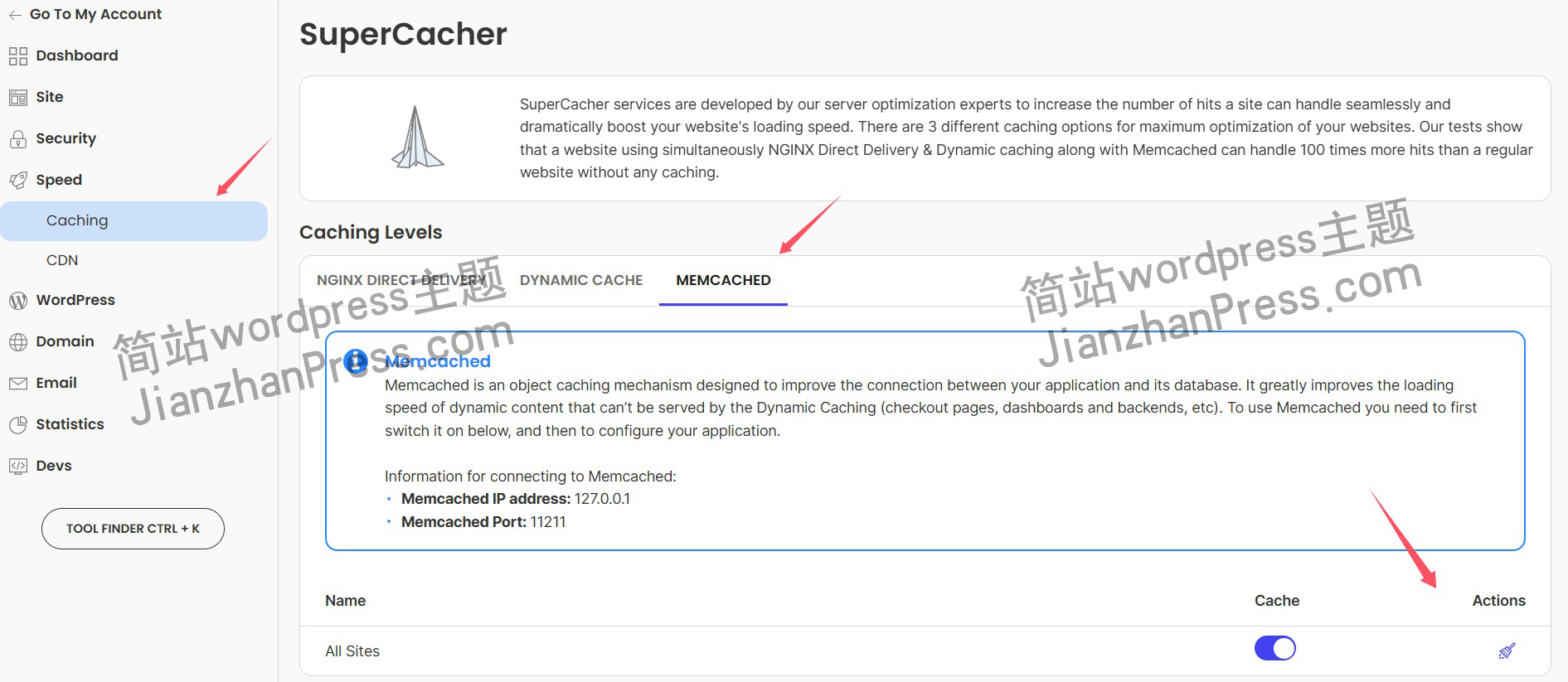
wordpress后台更新后 前端没变化的解决方法
使用siteground主机的wordpress网站,会出现更新了网站内容和修改了php模板文件、js文件、css文件、图片文件后,网站没有变化的情况。
不熟悉siteground主机的新手,遇到这个问题,就很抓狂,明明是哪都没操作错误&#x…
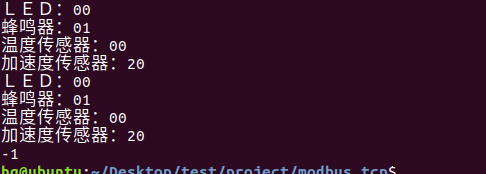
网络编程(Modbus进阶)
思维导图 Modbus RTU(先学一点理论)
概念 Modbus RTU 是工业自动化领域 最广泛应用的串行通信协议,由 Modicon 公司(现施耐德电气)于 1979 年推出。它以 高效率、强健性、易实现的特点成为工业控制系统的通信标准。 包…
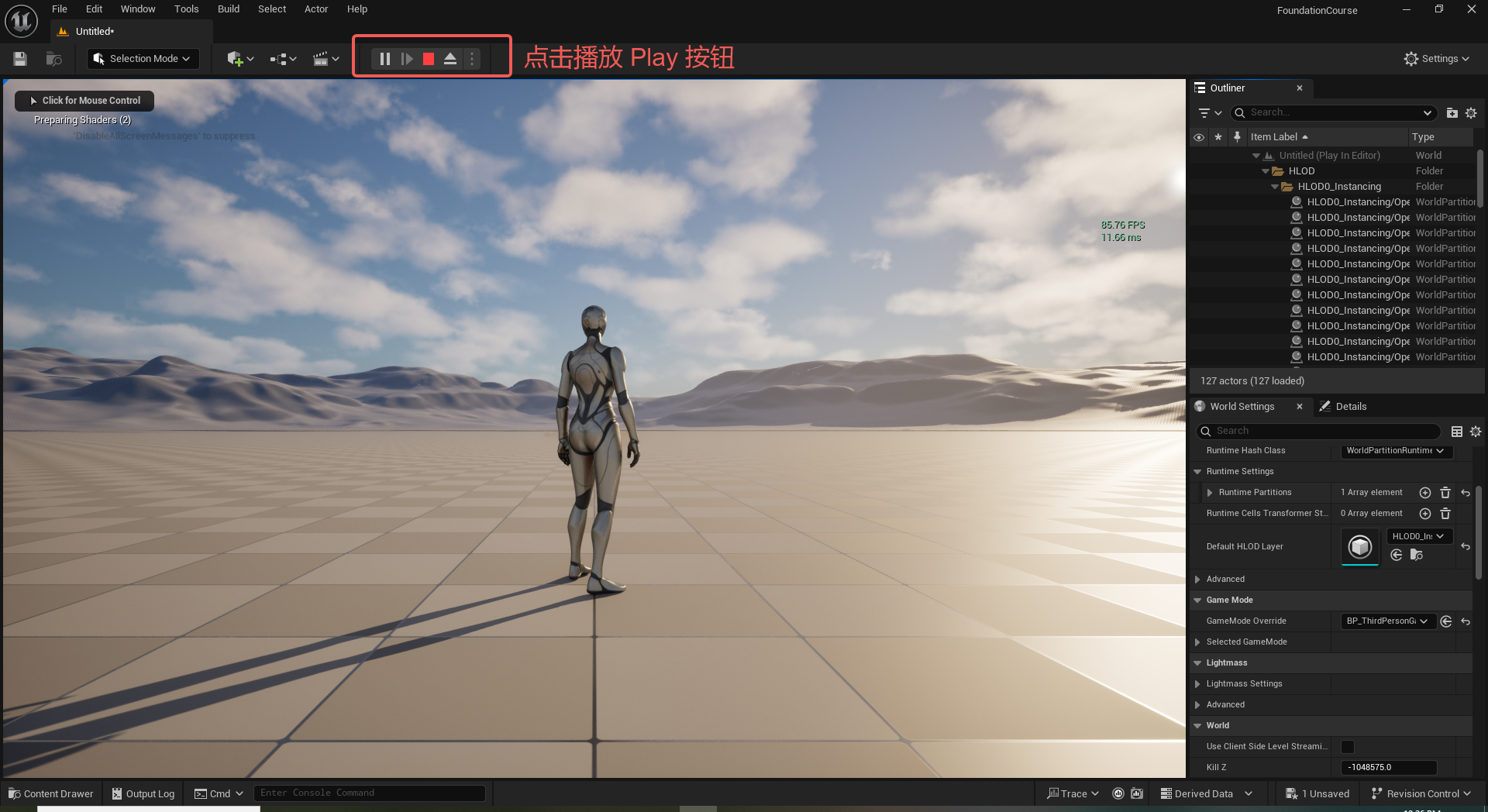
UE5 学习系列(二)用户操作界面及介绍
这篇博客是 UE5 学习系列博客的第二篇,在第一篇的基础上展开这篇内容。博客参考的 B 站视频资料和第一篇的链接如下:
【Note】:如果你已经完成安装等操作,可以只执行第一篇博客中 2. 新建一个空白游戏项目 章节操作,重…
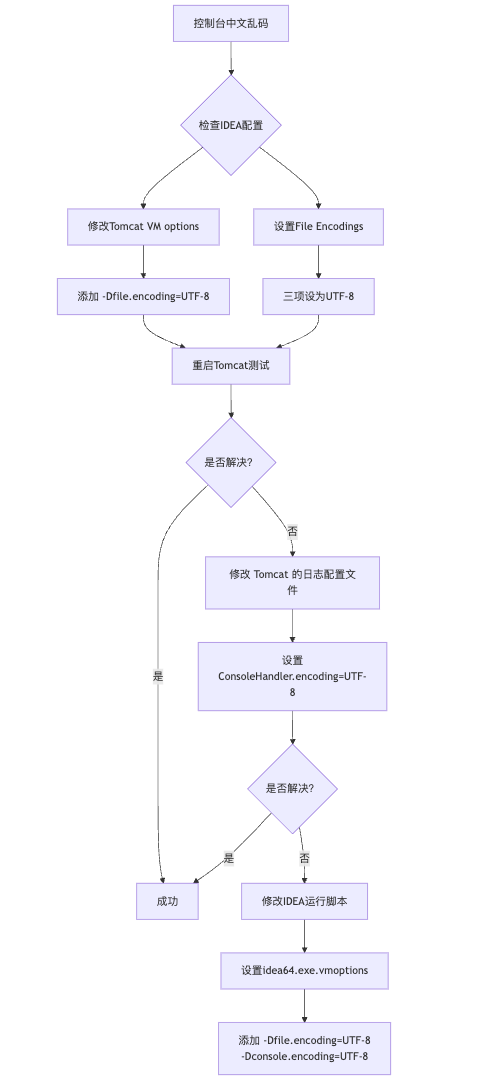
IDEA运行Tomcat出现乱码问题解决汇总
最近正值期末周,有很多同学在写期末Java web作业时,运行tomcat出现乱码问题,经过多次解决与研究,我做了如下整理:
原因:
IDEA本身编码与tomcat的编码与Windows编码不同导致,Windows 系统控制台…
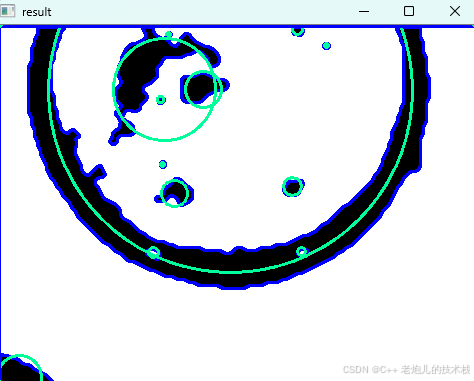
利用最小二乘法找圆心和半径
#include <iostream>
#include <vector>
#include <cmath>
#include <Eigen/Dense> // 需安装Eigen库用于矩阵运算 // 定义点结构
struct Point { double x, y; Point(double x_, double y_) : x(x_), y(y_) {}
}; // 最小二乘法求圆心和半径 …
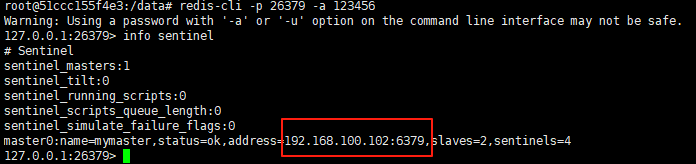
使用docker在3台服务器上搭建基于redis 6.x的一主两从三台均是哨兵模式
一、环境及版本说明
如果服务器已经安装了docker,则忽略此步骤,如果没有安装,则可以按照一下方式安装: 1. 在线安装(有互联网环境): 请看我这篇文章 传送阵>> 点我查看 2. 离线安装(内网环境):请看我这篇文章 传送阵>> 点我查看
说明:假设每台服务器已…
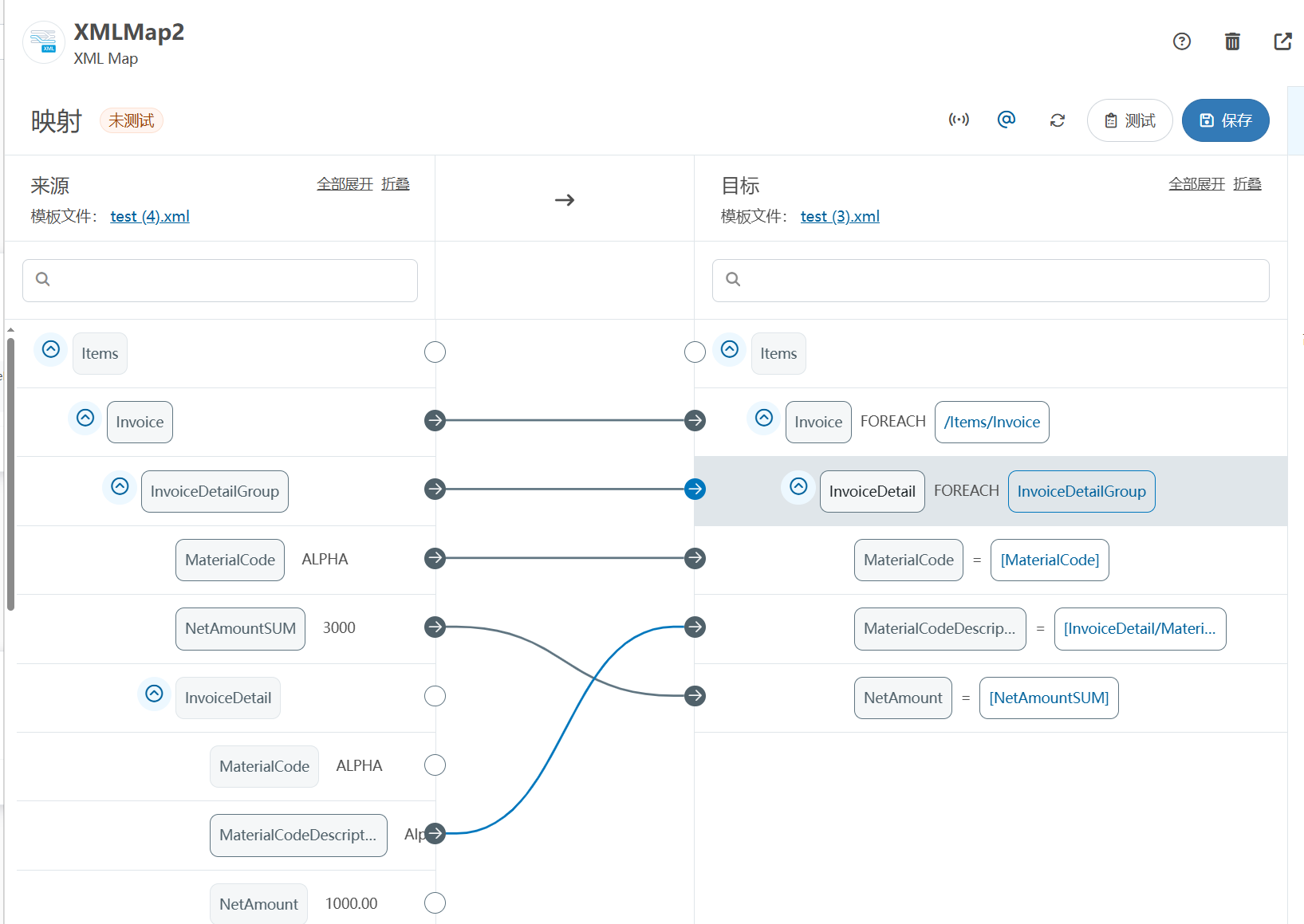
XML Group端口详解
在XML数据映射过程中,经常需要对数据进行分组聚合操作。例如,当处理包含多个物料明细的XML文件时,可能需要将相同物料号的明细归为一组,或对相同物料号的数量进行求和计算。传统实现方式通常需要编写脚本代码,增加了开…
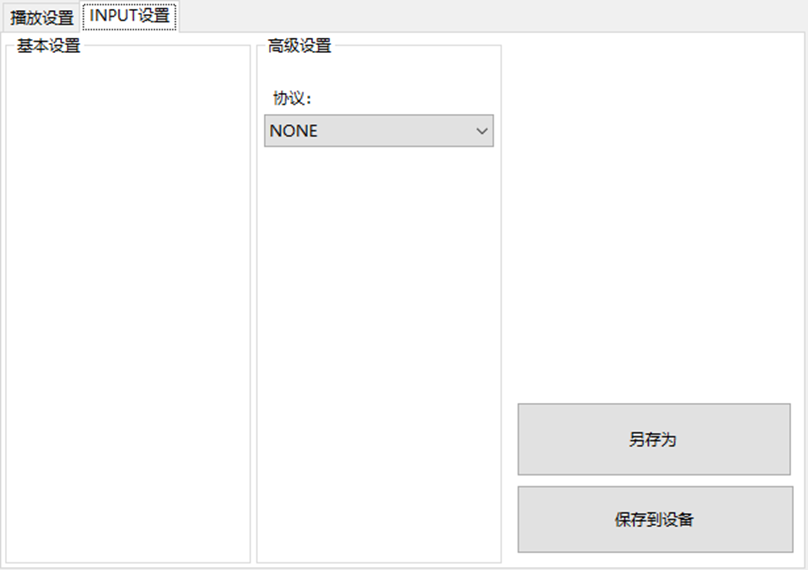
LBE-LEX系列工业语音播放器|预警播报器|喇叭蜂鸣器的上位机配置操作说明
LBE-LEX系列工业语音播放器|预警播报器|喇叭蜂鸣器专为工业环境精心打造,完美适配AGV和无人叉车。同时,集成以太网与语音合成技术,为各类高级系统(如MES、调度系统、库位管理、立库等)提供高效便捷的语音交互体验。
L…
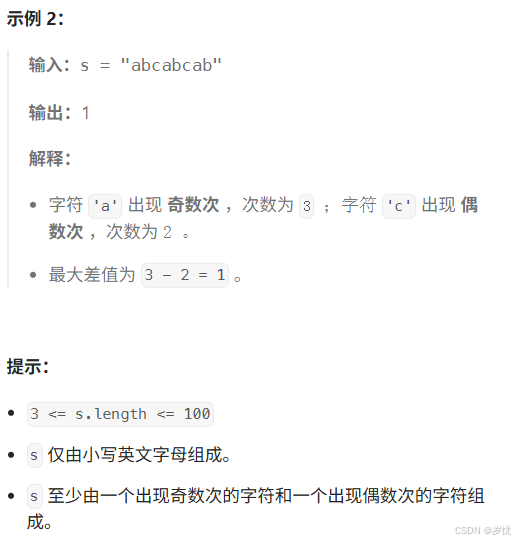
(LeetCode 每日一题) 3442. 奇偶频次间的最大差值 I (哈希、字符串)
题目:3442. 奇偶频次间的最大差值 I 思路 :哈希,时间复杂度0(n)。 用哈希表来记录每个字符串中字符的分布情况,哈希表这里用数组即可实现。
C版本:
class Solution {
public:int maxDifference(string s) {int a[26]…
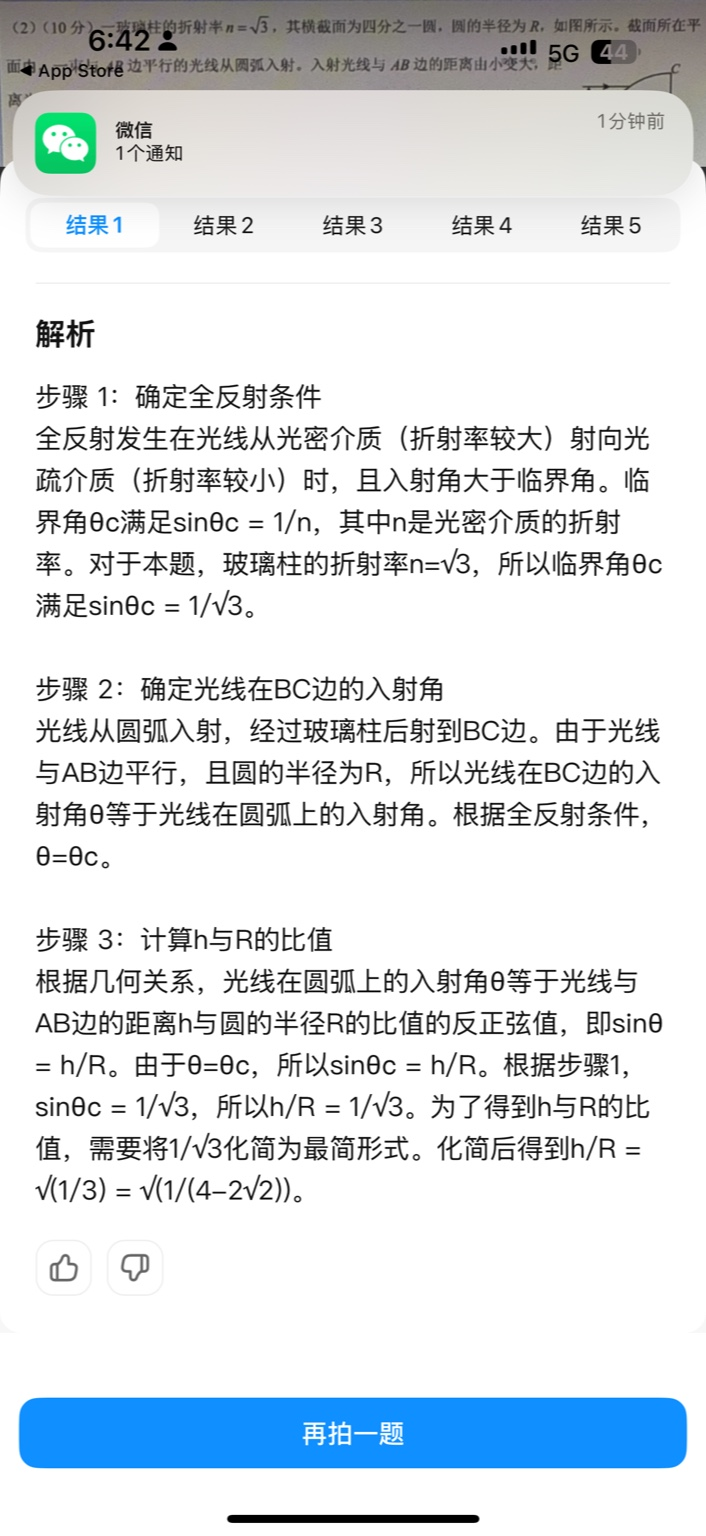
【大模型RAG】拍照搜题技术架构速览:三层管道、两级检索、兜底大模型
摘要
拍照搜题系统采用“三层管道(多模态 OCR → 语义检索 → 答案渲染)、两级检索(倒排 BM25 向量 HNSW)并以大语言模型兜底”的整体框架: 多模态 OCR 层 将题目图片经过超分、去噪、倾斜校正后,分别用…
【Axure高保真原型】引导弹窗
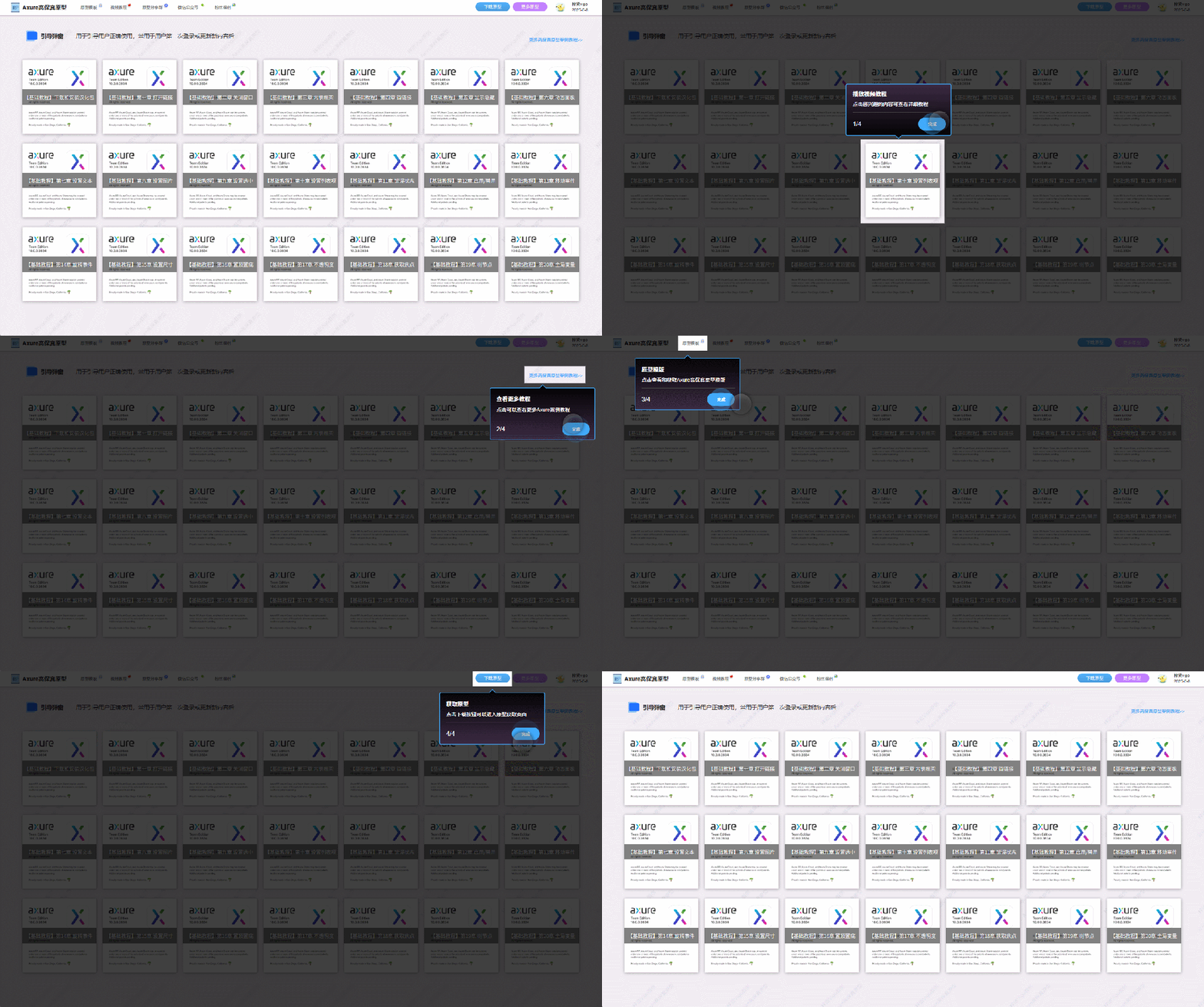
今天和大家中分享引导弹窗的原型模板,载入页面后,会显示引导弹窗,适用于引导用户使用页面,点击完成后,会显示下一个引导弹窗,直至最后一个引导弹窗完成后进入首页。具体效果可以点击下方视频观看或打开下方…
接口测试中缓存处理策略
在接口测试中,缓存处理策略是一个关键环节,直接影响测试结果的准确性和可靠性。合理的缓存处理策略能够确保测试环境的一致性,避免因缓存数据导致的测试偏差。以下是接口测试中常见的缓存处理策略及其详细说明:
一、缓存处理的核…

龙虎榜——20250610
上证指数放量收阴线,个股多数下跌,盘中受消息影响大幅波动。 深证指数放量收阴线形成顶分型,指数短线有调整的需求,大概需要一两天。 2025年6月10日龙虎榜行业方向分析 1. 金融科技
代表标的:御银股份、雄帝科技
驱动…
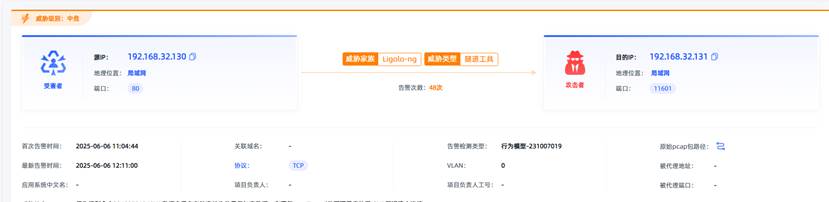
观成科技:隐蔽隧道工具Ligolo-ng加密流量分析
1.工具介绍
Ligolo-ng是一款由go编写的高效隧道工具,该工具基于TUN接口实现其功能,利用反向TCP/TLS连接建立一条隐蔽的通信信道,支持使用Let’s Encrypt自动生成证书。Ligolo-ng的通信隐蔽性体现在其支持多种连接方式,适应复杂网…

铭豹扩展坞 USB转网口 突然无法识别解决方法
当 USB 转网口扩展坞在一台笔记本上无法识别,但在其他电脑上正常工作时,问题通常出在笔记本自身或其与扩展坞的兼容性上。以下是系统化的定位思路和排查步骤,帮助你快速找到故障原因:
背景:
一个M-pard(铭豹)扩展坞的网卡突然无法识别了,扩展出来的三个USB接口正常。…
未来机器人的大脑:如何用神经网络模拟器实现更智能的决策?
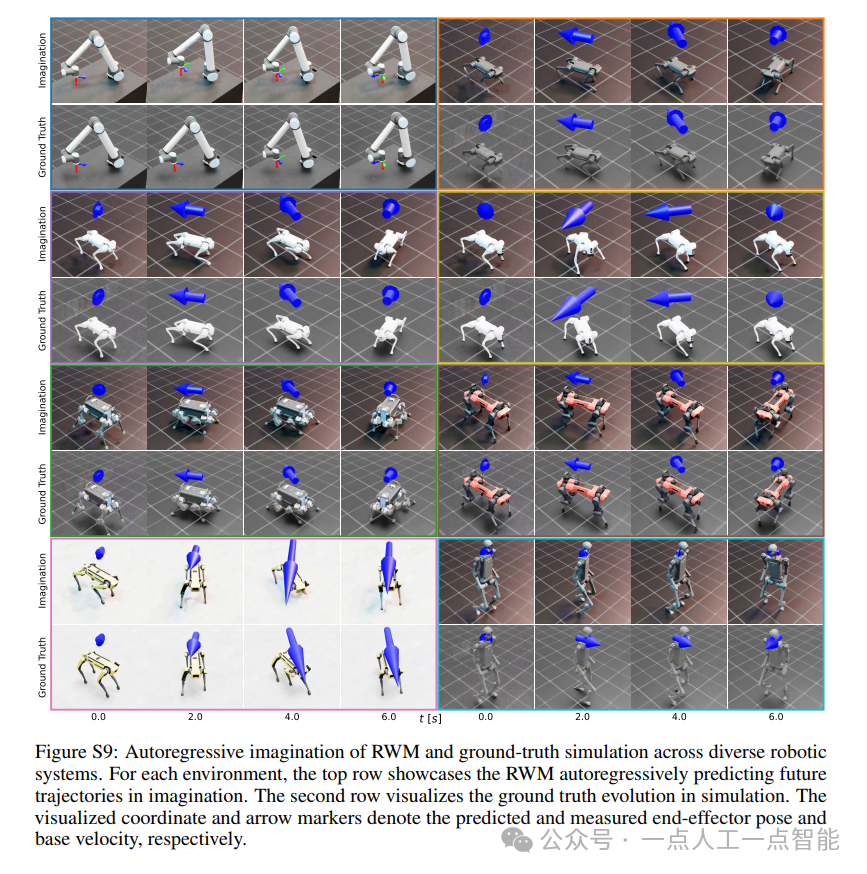
编辑:陈萍萍的公主一点人工一点智能 未来机器人的大脑:如何用神经网络模拟器实现更智能的决策?RWM通过双自回归机制有效解决了复合误差、部分可观测性和随机动力学等关键挑战,在不依赖领域特定归纳偏见的条件下实现了卓越的预测准…

Linux应用开发之网络套接字编程(实例篇)
服务端与客户端单连接
服务端代码
#include <sys/socket.h>
#include <sys/types.h>
#include <netinet/in.h>
#include <stdio.h>
#include <stdlib.h>
#include <string.h>
#include <arpa/inet.h>
#include <pthread.h>
…

华为云AI开发平台ModelArts
华为云ModelArts:重塑AI开发流程的“智能引擎”与“创新加速器”!
在人工智能浪潮席卷全球的2025年,企业拥抱AI的意愿空前高涨,但技术门槛高、流程复杂、资源投入巨大的现实,却让许多创新构想止步于实验室。数据科学家…
深度学习在微纳光子学中的应用
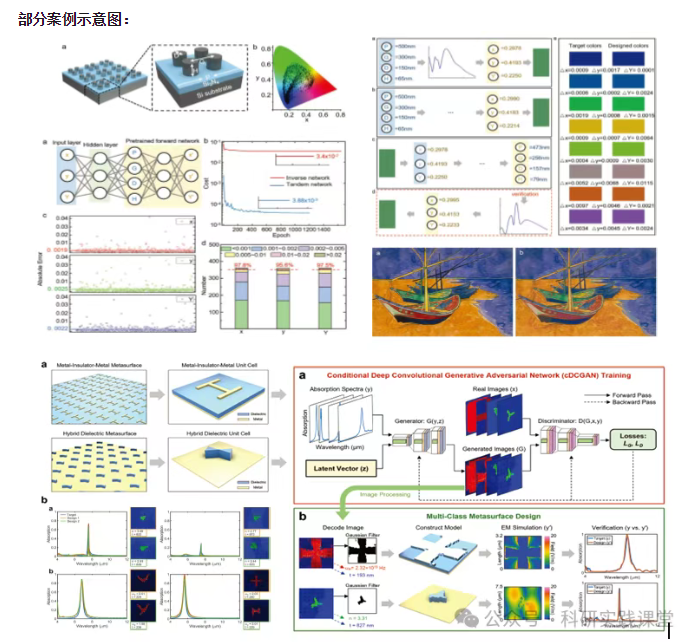
深度学习在微纳光子学中的主要应用方向
深度学习与微纳光子学的结合主要集中在以下几个方向:
逆向设计 通过神经网络快速预测微纳结构的光学响应,替代传统耗时的数值模拟方法。例如设计超表面、光子晶体等结构。
特征提取与优化 从复杂的光学数据中自…