Linux实践
news2026/3/21 12:23:18
内容mysqlhadoop单机模式hadoop集群模式zookeeper单机模式zookeeper集群模式hive客户端三天服务搭建【暂定】一、准备工作创建Download[rootcentos001 ~]# [rootcentos001 ~]# cd /opt/ [rootcentos001 opt]# mkdir download mkdir: 无法创建目录download: 文件已存在 [rootcentos001 opt]# ls download更换源[rootcentos001 download]# vi /etc/yum.repos.d/CentOS-Base.repo# CentOS-Base.repo # # The mirror system uses the connecting IP address of the client and the # update status of each mirror to pick mirrors that are updated to and # geographically close to the client. You should use this for CentOS updates # unless you are manually picking other mirrors. # # If the mirrorlist does not work for you, as a fall back you can try the # remarked out baseurl line instead. # # [base] nameCentOS-$releasever - Base - repo.huaweicloud.com baseurlhttps://repo.huaweicloud.com/centos/$releasever/os/$basearch/ #mirrorlisthttps://mirrorlist.centos.org/? release$releaseverarch$basearchrepoos gpgcheck1 gpgkeyhttps://repo.huaweicloud.com/centos/RPM-GPG-KEY-CentOS-7 #released updates [updates] nameCentOS-$releasever - Updates - repo.huaweicloud.com baseurlhttps://repo.huaweicloud.com/centos/$releasever/updates/$basearch/ #mirrorlisthttps://mirrorlist.centos.org/? release$releaseverarch$basearchrepoupdates gpgcheck1 安装lrzsz gpgkeyhttps://repo.huaweicloud.com/centos/RPM-GPG-KEY-CentOS-7 #additional packages that may be useful [extras] nameCentOS-$releasever - Extras - repo.huaweicloud.com baseurlhttps://repo.huaweicloud.com/centos/$releasever/extras/$basearch/ #mirrorlisthttps://mirrorlist.centos.org/? release$releaseverarch$basearchrepoextras gpgcheck1 gpgkeyhttps://repo.huaweicloud.com/centos/RPM-GPG-KEY-CentOS-7 #additional packages that extend functionality of existing packages [centosplus] nameCentOS-$releasever - Plus - repo.huaweicloud.com baseurlhttps://repo.huaweicloud.com/centos/$releasever/centosplus/$basearch/ #mirrorlisthttps://mirrorlist.centos.org/? release$releaseverarch$basearchrepocentosplus gpgcheck1 enabled0 gpgkeyhttps://repo.huaweicloud.com/centos/RPM-GPG-KEY-CentOS-7安装lrzsz[rootcentos001 download]# yum install lrzsz -y 已加载插件fastestmirror base | 3.6 kB 00:00:00 extras | 2.9 kB 00:00:00 updates | 2.9 kB 00:00:00 (1/4): base/7/x86_64/group_gz | 153 kB 00:00:00 (2/4): extras/7/x86_64/primary_db | 253 kB 00:00:00 (3/4): base/7/x86_64/primary_db | 6.1 MB 00:00:03 (4/4): updates/7/x86_64/primary_db | 27 MB 00:00:07 Determining fastest mirrors 正在解决依赖关系 -- 正在检查事务 --- 软件包 lrzsz.x86_64.0.0.12.20-36.el7 将被 安装 -- 解决依赖关系完成 依赖关系解决 Package 架构 版本 源 大小 正在安装: lrzsz x86_64 0.12.20-36.el7 base 78 k 事务概要 安装 1 软件包 总下载量78 k 安装大小181 k Downloading packages: 警告/var/cache/yum/x86_64/7/base/packages/lrzsz-0.12.20-36.el7.x86_64.rpm: 头V3 RSA/SHA256 Signature, 密钥 ID f4a80eb5: NOKEY lrzsz-0.12.20-36.el7.x86_64.rpm 的公钥尚未安装 lrzsz-0.12.20-36.el7.x86_64.rpm | 78 kB 00:00:00 从 https://repo.huaweicloud.com/centos/RPM-GPG-KEY-CentOS-7 检索密钥 导入 GPG key 0xF4A80EB5: 用户ID : CentOS-7 Key (CentOS 7 Official Signing Key) securitycentos.org 指纹 : 6341 ab27 53d7 8a78 a7c2 7bb1 24c6 a8a7 f4a8 0eb5 来自 : https://repo.huaweicloud.com/centos/RPM-GPG-KEY-CentOS-7 Running transaction check Running transaction test Transaction test succeeded Running transaction 正在安装 : lrzsz-0.12.20-36.el7.x86_64 1/1 验证中 : lrzsz-0.12.20-36.el7.x86_64 1/1 已安装: lrzsz.x86_64 0:0.12.20-36.el7 完毕上传jdk到Linux[rootcentos001 download]# rz [root[rootcentos001 download]# rz -E rz waiting to receive. [rootcentos001 download]# ll 总用量 185368 -rw-r--r--. 1 root root 189815615 3月 20 16:06 jdk-8u162-linux-x64.tar.gz [rootcentos001 download]# tar -zxf jdk-8u162-linux-x64.tar.gz ll^H^H[rootcentos001 download]# ll 总用量 185372 drwxr-xr-x. 8 10 143 4096 12月 20 2017 jdk1.8.0_162 -rw-r--r--. 1 root root 189815615 3月 20 16:06 jdk-8u162-linux-x64.tar.gz [rootcentos001 download]# mv jdk1.8.0_162/ java [rootcentos001 download]# ll 总用量 185372 drwxr-xr-x. 8 10 143 4096 12月 20 2017 java -rw-r--r--. 1 root root 189815615 3月 20 16:06 jdk-8u162-linux-x64.tar.gz [rootcentos001 download]#配置Java的环境变量[rootcentos001 download]# ll 总用量 185372 drwxr-xr-x. 8 10 143 4096 12月 20 2017 java -rw-r--r--. 1 root root 189815615 3月 20 16:06 jdk-8u162-linux-x64.tar.gz [rootcentos001 download]# mv java /usr/local/ [rootcentos001 download]# cd /usr/local/java/ [rootcentos001 java]# pwd /usr/local/java [rootcentos001 java]# ll 总用量 25932 drwxr-xr-x. 2 10 143 4096 12月 20 2017 bin -r--r--r--. 1 10 143 3244 12月 20 2017 COPYRIGHT drwxr-xr-x. 4 10 143 4096 12月 20 2017 db drwxr-xr-x. 3 10 143 4096 12月 20 2017 include -rw-r--r--. 1 10 143 5203041 12月 20 2017 javafx-src.zip drwxr-xr-x. 5 10 143 4096 12月 20 2017 jre drwxr-xr-x. 5 10 143 4096 12月 20 2017 lib -r--r--r--. 1 10 143 40 12月 20 2017 LICENSE drwxr-xr-x. 4 10 143 44 12月 20 2017 man -r--r--r--. 1 10 143 159 12月 20 2017 README.html -rw-r--r--. 1 10 143 424 12月 20 2017 release -rw-r--r--. 1 10 143 21096465 12月 20 2017 src.zip -rw-r--r--. 1 10 143 63933 12月 20 2017 THIRDPARTYLICENSEREADME-JAVAFX.txt -r--r--r--. 1 10 143 145180 12月 20 2017 THIRDPARTYLICENSEREADME.txt[rootc001 java]# vim /etc/profile #jdk环境变量 79 export JAVA_HOME/usr/local/java 80 export PATH$PATH:$JAVA_HOME/bin 81刷新环境变量[rootcentos001 java]# source /etc/profile [rootcentos001 java]# java -version java version 1.8.0_162 Java(TM) SE Runtime Environment (build 1.8.0_162-b12) Java HotSpot(TM) 64-Bit Server VM (build 25.162-b12, mixed mode) [rootcentos001 java]#一、安装MySQL1.1 预安装的依赖安装GCCyum install gcc -y 安装PERLyum install perl -y 安装AUTOCONFyum install autoconf -y 安装LIBAIOyum install libaio -y1.2 安装MySQL1、配置ip映射修改主机名/etc/hostname修改ip映射/etc/hosts127.0.0.1 localhost localhost.localdomain localhost4 localhost4.localdomain4 ::1 localhost localhost.localdomain localhost6 localhost6.localdomain6 192.168.100.101 c001[rootcentos001 ~]# ping c001 PING c001 (192.168.100.101) 56(84) bytes of data. 64 bytes from c001 (192.168.100.101): icmp_seq1 ttl64 time0.189 ms 64 bytes from c001 (192.168.100.101): icmp_seq2 ttl64 time0.120 ms 64 bytes from c001 (192.168.100.101): icmp_seq3 ttl64 time0.124 ms 64 bytes from c001 (192.168.100.101): icmp_seq4 ttl64 time0.142 ms 64 bytes from c001 (192.168.100.101): icmp_seq5 ttl64 time0.146 ms 64 bytes from c001 (192.168.100.101): icmp_seq6 ttl64 time0.125 ms 64 bytes from c001 (192.168.100.101): icmp_seq7 ttl64 time0.125 ms2、上传mysql到服务器[rootcentos001 ~]# rz [rootcentos001 ~]# rz -E rz waiting to receive. [rootcentos001 ~]# tar -zxf mysql-5.6.35-linux-glibc2.5-x86_64.tar.gz [rootcentos001 ~]# ll 总用量 307220 -rw-------. 1 root root 1065 3月 20 21:44 anaconda-ks.cfg drwxr-xr-x. 13 root root 4096 3月 21 00:49 mysql-5.6.35-linux-glibc2.5-x86_64 -rw-r--r--. 1 root root 314581668 3月 20 15:50 mysql-5.6.35-linux-glibc2.5-x86_64.tar.gz [rootcentos001 ~]# mv mysql-5.6.35-linux-glibc2.5-x86_64 mysql [rootcentos001 ~]# ll 总用量 307220 -rw-------. 1 root root 1065 3月 20 21:44 anaconda-ks.cfg drwxr-xr-x. 13 root root 4096 3月 21 00:49 mysql -rw-r--r--. 1 root root 314581668 3月 20 15:50 mysql-5.6.35-linux-glibc2.5-x86_64.tar.gz [rootcentos001 ~]#3、移动到/usr/local目录下[rootcentos001 ~]# mv mysql /usr/local/ [rootcentos001 ~]# cd /usr/local/mysql/ [rootcentos001 mysql]# ll 总用量 52 drwxr-xr-x. 2 root root 4096 3月 21 00:49 bin -rw-r--r--. 1 7161 31415 17987 11月 28 2016 COPYING drwxr-xr-x. 3 root root 17 3月 21 00:48 data drwxr-xr-x. 2 root root 52 3月 21 00:49 docs drwxr-xr-x. 3 root root 4096 3月 21 00:49 include drwxr-xr-x. 3 root root 4096 3月 21 00:48 lib drwxr-xr-x. 4 root root 28 3月 21 00:49 man drwxr-xr-x. 10 root root 4096 3月 21 00:49 mysql-test -rw-r--r--. 1 7161 31415 2496 11月 28 2016 README drwxr-xr-x. 2 root root 29 3月 21 00:48 scripts drwxr-xr-x. 28 root root 4096 3月 21 00:48 share drwxr-xr-x. 4 root root 4096 3月 21 00:49 sql-bench drwxr-xr-x. 2 root root 4096 3月 21 00:48 support-files [rootcentos001 mysql]#4、配置环境变量[rootcentos001 mysql]# vi /etc/profile #mysql环境变量 export MYSQL_HOME/usr/local/mysql export PATH$PATH:$MYSQL_HOME/bin记得刷新~[rootc001 mysql]# source /etc/profile [rootc001 mysql]# clear [rootc001 mysql]# mysql ERROR 2002 (HY000): Cant connect to local MySQL server through socket /tmp/mysql.sock (2)5、创建mysql专属用户和用户组切记不要设置密码~[rootcentos001 mysql]# groupadd mysql [rootcentos001 mysql]# useradd -g mysql mysql [rootcentos001 mysql]#6、创建数据目录/usr/local/mysql/data/mysql[rootcentos001 mysql]# pwd /usr/local/mysql [rootcentos001 mysql]# ll 总用量 52 drwxr-xr-x. 2 root root 4096 3月 21 00:49 bin -rw-r--r--. 1 7161 31415 17987 11月 28 2016 COPYING drwxr-xr-x. 3 root root 17 3月 21 00:48 data drwxr-xr-x. 2 root root 52 3月 21 00:49 docs drwxr-xr-x. 3 root root 4096 3月 21 00:49 include drwxr-xr-x. 3 root root 4096 3月 21 00:48 lib drwxr-xr-x. 4 root root 28 3月 21 00:49 man drwxr-xr-x. 10 root root 4096 3月 21 00:49 mysql-test -rw-r--r--. 1 7161 31415 2496 11月 28 2016 README drwxr-xr-x. 2 root root 29 3月 21 00:48 scripts drwxr-xr-x. 28 root root 4096 3月 21 00:48 share drwxr-xr-x. 4 root root 4096 3月 21 00:49 sql-bench drwxr-xr-x. 2 root root 4096 3月 21 00:48 support-files [rootcentos001 mysql]# ll data/ 总用量 0 drwxr-xr-x. 2 root root 19 3月 21 00:48 test [rootcentos001 mysql]# mkdir data/mysql [rootcentos001 mysql]# ll data/ 总用量 0 drwxr-xr-x. 2 root root 6 3月 21 00:56 mysql drwxr-xr-x. 2 root root 19 3月 21 00:48 test [rootcentos001 mysql]#7、更改用户和用户组[rootcentos001 mysql]# pwd /usr/local/mysql [rootcentos001 mysql]# ll 总用量 52 drwxr-xr-x. 2 root root 4096 3月 21 00:49 bin -rw-r--r--. 1 7161 31415 17987 11月 28 2016 COPYING drwxr-xr-x. 3 root root 17 3月 21 00:48 data drwxr-xr-x. 2 root root 52 3月 21 00:49 docs drwxr-xr-x. 3 root root 4096 3月 21 00:49 include drwxr-xr-x. 3 root root 4096 3月 21 00:48 lib drwxr-xr-x. 4 root root 28 3月 21 00:49 man drwxr-xr-x. 10 root root 4096 3月 21 00:49 mysql-test -rw-r--r--. 1 7161 31415 2496 11月 28 2016 README drwxr-xr-x. 2 root root 29 3月 21 00:48 scripts drwxr-xr-x. 28 root root 4096 3月 21 00:48 share drwxr-xr-x. 4 root root 4096 3月 21 00:49 sql-bench drwxr-xr-x. 2 root root 4096 3月 21 00:48 support-files [rootcentos001 mysql]# ll data/ 总用量 0 drwxr-xr-x. 2 root root 19 3月 21 00:48 test [rootcentos001 mysql]# mkdir data/mysql [rootcentos001 mysql]# ll data/ 总用量 0 drwxr-xr-x. 2 root root 6 3月 21 00:56 mysql drwxr-xr-x. 2 root root 19 3月 21 00:48 test [rootcentos001 mysql]# [rootcentos001 mysql]# pwd /usr/local/mysql [rootcentos001 mysql]# chown -R mysql:mysql ./ [rootcentos001 mysql]# ll 总用量 52 drwxr-xr-x. 2 mysql mysql 4096 3月 21 00:49 bin -rw-r--r--. 1 mysql mysql 17987 11月 28 2016 COPYING drwxr-xr-x. 4 mysql mysql 29 3月 21 00:56 data drwxr-xr-x. 2 mysql mysql 52 3月 21 00:49 docs drwxr-xr-x. 3 mysql mysql 4096 3月 21 00:49 include drwxr-xr-x. 3 mysql mysql 4096 3月 21 00:48 lib drwxr-xr-x. 4 mysql mysql 28 3月 21 00:49 man drwxr-xr-x. 10 mysql mysql 4096 3月 21 00:49 mysql-test -rw-r--r--. 1 mysql mysql 2496 11月 28 2016 README drwxr-xr-x. 2 mysql mysql 29 3月 21 00:48 scripts drwxr-xr-x. 28 mysql mysql 4096 3月 21 00:48 share drwxr-xr-x. 4 mysql mysql 4096 3月 21 00:49 sql-bench drwxr-xr-x. 2 mysql mysql 4096 3月 21 00:48 support-files [rootcentos001 mysql]# ll .. 总用量 8 drwxr-xr-x. 2 root root 6 6月 10 2014 bin drwxr-xr-x. 2 root root 6 6月 10 2014 etc drwxr-xr-x. 2 root root 6 6月 10 2014 games drwxr-xr-x. 2 root root 6 6月 10 2014 include drwxr-xr-x. 8 10 143 4096 12月 20 2017 java drwxr-xr-x. 2 root root 6 6月 10 2014 lib drwxr-xr-x. 2 root root 6 6月 10 2014 lib64 drwxr-xr-x. 2 root root 6 6月 10 2014 libexec drwxr-xr-x. 13 mysql mysql 4096 3月 21 00:49 mysql drwxr-xr-x. 2 root root 6 6月 10 2014 sbin drwxr-xr-x. 5 root root 46 3月 20 21:43 share drwxr-xr-x. 2 root root 6 6月 10 2014 src [rootcentos001 mysql]#8、执行安装程序[rootcentos001 mysql]# pwd /usr/local/mysql [rootcentos001 mysql]# ll 总用量 52 drwxr-xr-x. 2 mysql mysql 4096 3月 21 00:49 bin -rw-r--r--. 1 mysql mysql 17987 11月 28 2016 COPYING drwxr-xr-x. 4 mysql mysql 29 3月 21 00:56 data drwxr-xr-x. 2 mysql mysql 52 3月 21 00:49 docs drwxr-xr-x. 3 mysql mysql 4096 3月 21 00:49 include drwxr-xr-x. 3 mysql mysql 4096 3月 21 00:48 lib drwxr-xr-x. 4 mysql mysql 28 3月 21 00:49 man drwxr-xr-x. 10 mysql mysql 4096 3月 21 00:49 mysql-test -rw-r--r--. 1 mysql mysql 2496 11月 28 2016 README drwxr-xr-x. 2 mysql mysql 29 3月 21 00:48 scripts drwxr-xr-x. 28 mysql mysql 4096 3月 21 00:48 share drwxr-xr-x. 4 mysql mysql 4096 3月 21 00:49 sql-bench drwxr-xr-x. 2 mysql mysql 4096 3月 21 00:48 support-files [rootcentos001 mysql]# ll scripts/ 总用量 36 -rwxr-xr-x. 1 mysql mysql 34558 11月 28 2016 mysql_install_db [rootcentos001 mysql]# ./scripts/mysql_install_db --usermysql -- Installing MySQL system tables...2026-03-21 01:00:20 0 [Warning] TIMESTAMP with implicit DEFAULT value is deprecated. Please use --explicit_defaults_for_timestamp server option (see documentation for more details). 2026-03-21 01:00:20 0 [Note] Ignoring --secure-file-priv value as server is running with --bootstrap. 2026-03-21 01:00:20 0 [Note] ./bin/mysqld (mysqld 5.6.35) starting as process 2707 ... 2026-03-21 01:00:20 2707 [Note] InnoDB: Using atomics to ref count buffer pool pages 2026-03-21 01:00:20 2707 [Note] InnoDB: The InnoDB memory heap is disabled 2026-03-21 01:00:20 2707 [Note] InnoDB: Mutexes and rw_locks use GCC atomic builtins 2026-03-21 01:00:20 2707 [Note] InnoDB: Memory barrier is not used 2026-03-21 01:00:20 2707 [Note] InnoDB: Compressed tables use zlib 1.2.3 2026-03-21 01:00:20 2707 [Note] InnoDB: Using Linux native AIO 2026-03-21 01:00:20 2707 [Note] InnoDB: Using CPU crc32 instructions 2026-03-21 01:00:20 2707 [Note] InnoDB: Initializing buffer pool, size 128.0M 2026-03-21 01:00:20 2707 [Note] InnoDB: Completed initialization of buffer pool 2026-03-21 01:00:20 2707 [Note] InnoDB: The first specified data file ./ibdata1 did not exist: a new database to be created! 2026-03-21 01:00:20 2707 [Note] InnoDB: Setting file ./ibdata1 size to 12 MB 2026-03-21 01:00:20 2707 [Note] InnoDB: Database physically writes the file full: wait... 2026-03-21 01:00:20 2707 [Note] InnoDB: Setting log file ./ib_logfile101 size to 48 MB 2026-03-21 01:00:20 2707 [Note] InnoDB: Setting log file ./ib_logfile1 size to 48 MB 2026-03-21 01:00:20 2707 [Note] InnoDB: Renaming log file ./ib_logfile101 to ./ib_logfile0 2026-03-21 01:00:20 2707 [Warning] InnoDB: New log files created, LSN45781 2026-03-21 01:00:20 2707 [Note] InnoDB: Doublewrite buffer not found: creating new 2026-03-21 01:00:20 2707 [Note] InnoDB: Doublewrite buffer created 2026-03-21 01:00:20 2707 [Note] InnoDB: 128 rollback segment(s) are active. 2026-03-21 01:00:20 2707 [Warning] InnoDB: Creating foreign key constraint system tables. 2026-03-21 01:00:20 2707 [Note] InnoDB: Foreign key constraint system tables created 2026-03-21 01:00:20 2707 [Note] InnoDB: Creating tablespace and datafile system tables. 2026-03-21 01:00:20 2707 [Note] InnoDB: Tablespace and datafile system tables created. 2026-03-21 01:00:20 2707 [Note] InnoDB: Waiting for purge to start 2026-03-21 01:00:20 2707 [Note] InnoDB: 5.6.35 started; log sequence number 0 2026-03-21 01:00:20 2707 [Note] Binlog end 2026-03-21 01:00:20 2707 [Note] InnoDB: FTS optimize thread exiting. 2026-03-21 01:00:20 2707 [Note] InnoDB: Starting shutdown... 2026-03-21 01:00:22 2707 [Note] InnoDB: Shutdown completed; log sequence number 1625977 OK Filling help tables...2026-03-21 01:00:22 0 [Warning] TIMESTAMP with implicit DEFAULT value is deprecated. Please use --explicit_defaults_for_timestamp server option (see documentation for more details). 2026-03-21 01:00:22 0 [Note] Ignoring --secure-file-priv value as server is running with --bootstrap. 2026-03-21 01:00:22 0 [Note] ./bin/mysqld (mysqld 5.6.35) starting as process 2729 ... 2026-03-21 01:00:22 2729 [Note] InnoDB: Using atomics to ref count buffer pool pages 2026-03-21 01:00:22 2729 [Note] InnoDB: The InnoDB memory heap is disabled 2026-03-21 01:00:22 2729 [Note] InnoDB: Mutexes and rw_locks use GCC atomic builtins 2026-03-21 01:00:22 2729 [Note] InnoDB: Memory barrier is not used 2026-03-21 01:00:22 2729 [Note] InnoDB: Compressed tables use zlib 1.2.3 2026-03-21 01:00:22 2729 [Note] InnoDB: Using Linux native AIO 2026-03-21 01:00:22 2729 [Note] InnoDB: Using CPU crc32 instructions 2026-03-21 01:00:22 2729 [Note] InnoDB: Initializing buffer pool, size 128.0M 2026-03-21 01:00:22 2729 [Note] InnoDB: Completed initialization of buffer pool 2026-03-21 01:00:22 2729 [Note] InnoDB: Highest supported file format is Barracuda.9、加入服务服务脚本的存放路径/etc/init.d/[rootcentos001 mysql]# pwd /usr/local/mysql [rootcentos001 mysql]# ll 总用量 60 drwxr-xr-x. 2 mysql mysql 4096 3月 21 00:49 bin -rw-r--r--. 1 mysql mysql 17987 11月 28 2016 COPYING drwxr-xr-x. 4 mysql mysql 29 3月 21 00:56 data drwxr-xr-x. 2 mysql mysql 52 3月 21 00:49 docs drwxr-xr-x. 3 mysql mysql 4096 3月 21 00:49 include drwxr-xr-x. 3 mysql mysql 4096 3月 21 00:48 lib drwxr-xr-x. 4 mysql mysql 28 3月 21 00:49 man -rw-r--r--. 1 root root 943 3月 21 01:00 my.cnf -rw-r--r--. 1 root root 943 3月 21 01:00 my-new.cnf drwxr-xr-x. 10 mysql mysql 4096 3月 21 00:49 mysql-test -rw-r--r--. 1 mysql mysql 2496 11月 28 2016 README drwxr-xr-x. 2 mysql mysql 29 3月 21 00:48 scripts drwxr-xr-x. 28 mysql mysql 4096 3月 21 00:48 share drwxr-xr-x. 4 mysql mysql 4096 3月 21 00:49 sql-bench drwxr-xr-x. 2 mysql mysql 4096 3月 21 00:48 support-files [rootcentos001 mysql]# cp support-files/mysql.server /etc/init.d/mysqld [rootcentos001 mysql]#10、修改服务配置[rootc001 mysql]# vim /etc/init.d/mysqld 40 basedir/usr/local/mysql/ 41 datadir/usr/local/mysql/data/mysql确保mysqld权限为755~11、将MySQL的配置文件放入etc目录下[rootc001 mysql]# ll support-files/ 总用量 32 -rwxr-xr-x. 1 mysql mysql 1153 11月 28 2016 binary-configure -rw-r--r--. 1 mysql mysql 773 11月 28 2016 magic -rw-r--r--. 1 mysql mysql 1126 11月 28 2016 my-default.cnf -rwxr-xr-x. 1 mysql mysql 1061 11月 28 2016 mysqld_multi.server -rwxr-xr-x. 1 mysql mysql 894 11月 28 2016 mysql-log-rotate -rwxr-xr-x. 1 mysql mysql 10875 11月 28 2016 mysql.server [rootc001 mysql]# cp support-files/my-default.cnf /etc/my.cnf cp是否覆盖/etc/my.cnf y [rootc001 mysql]# cat /etc/my.cnf # For advice on how to change settings please see # http://dev.mysql.com/doc/refman/5.6/en/server-configuration-defaults.html # *** DO NOT EDIT THIS FILE. Its a template which will be copied to the # *** default location during install, and will be replaced if you # *** upgrade to a newer version of MySQL. [mysqld] # Remove leading # and set to the amount of RAM for the most important data # cache in MySQL. Start at 70% of total RAM for dedicated server, else 10%. # innodb_buffer_pool_size 128M # Remove leading # to turn on a very important data integrity option: logging # changes to the binary log between backups. # log_bin # These are commonly set, remove the # and set as required. # basedir ..... # datadir ..... # port ..... # server_id ..... # socket ..... # Remove leading # to set options mainly useful for reporting servers. # The server defaults are faster for transactions and fast SELECTs. # Adjust sizes as needed, experiment to find the optimal values. # join_buffer_size 128M [rootc001 mysql]# ll support-files/ 总用量 32 -rwxr-xr-x. 1 mysql mysql 1153 11月 28 2016 binary-configure -rw-r--r--. 1 mysql mysql 773 11月 28 2016 magic -rw-r--r--. 1 mysql mysql 1126 11月 28 2016 my-default.cnf -rwxr-xr-x. 1 mysql mysql 1061 11月 28 2016 mysqld_multi.server -rwxr-xr-x. 1 mysql mysql 894 11月 28 2016 mysql-log-rotate -rwxr-xr-x. 1 mysql mysql 10875 11月 28 2016 mysql.server [rootc001 mysql]# cp support-files/my-default.cnf /etc/my.cnf cp是否覆盖/etc/my.cnf y [rootc001 mysql]# cat /etc/my.cnf # For advice on how to change settings please see # http://dev.mysql.com/doc/refman/5.6/en/server-configuration-defaults.html # *** DO NOT EDIT THIS FILE. Its a template which will be copied to the # *** default location during install, and will be replaced if you # *** upgrade to a newer version of MySQL. [mysqld] # Remove leading # and set to the amount of RAM for the most important data # cache in MySQL. Start at 70% of total RAM for dedicated server, else 10%. # innodb_buffer_pool_size 128M # Remove leading # to turn on a very important data integrity option: logging # changes to the binary log between backups. # log_bin # These are commonly set, remove the # and set as required. # basedir ..... # datadir ..... # port ..... # server_id ..... # socket ..... # Remove leading # to set options mainly useful for reporting servers. # The server defaults are faster for transactions and fast SELECTs. # Adjust sizes as needed, experiment to find the optimal values. # join_buffer_size 128M12、启动和关闭[rootc001 /]# service mysqld start Starting MySQL.Logging to /usr/local/mysql/data/mysql/c001.err. SUCCESS! [rootc001 /]# service mysqld status SUCCESS! MySQL running (2754) [rootc001 /]# ps aux | grep mysqld root 2646 0.0 0.1 11824 1608 pts/0 S 15:22 0:00 /bin/sh /usr/local/mysql//bin/mysqld_safe --datadir/usr/local/mysql/data/mysql --pid- file/usr/local/mysql/data/mysql/c001.pid mysql 2754 1.6 44.8 973596 449632 pts/0 Sl 15:22 0:00 /usr/local/mysql/bin/mysqld --basedir/usr/local/mysql -- datadir/usr/local/mysql/data/mysql --plugin-dir/usr/local/mysql/lib/plugin -- usermysql --log-error/usr/local/mysql/data/mysql/c001.err --pid- file/usr/local/mysql/data/mysql/c001.pid root 2792 0.0 0.0 112820 984 pts/0 R 15:23 0:00 grep -- colorauto mysqld [rootc001 /]# service mysqld stop Shutting down MySQL.. SUCCESS!1.3 远程访问1、关闭防火墙#centos7之前 关闭命令service iptables stop 永久关闭防火墙chkconfig iptables off 查看防火墙关闭状态 service iptables status #centos7之后 临时关闭systemctl stop firewalld 永久关闭systemctl disable firewalld 查看防火墙状态systemctl status firewalld [rootc001 /]# systemctl stop firewalld [rootc001 /]# systemctl disable firewalld rm /etc/systemd/system/dbus-org.fedoraproject.FirewallD1.service rm /etc/systemd/system/basic.target.wants/firewalld.service [rootc001 /]# systemctl status firewalld firewalld.service - firewalld - dynamic firewall daemon Loaded: loaded (/usr/lib/systemd/system/firewalld.service; disabled) Active: inactive (dead) 3月 20 14:54:32 c001 systemd[1]: Starting firewalld - dynamic firewall daemon... 3月 20 14:54:33 c001 systemd[1]: Started firewalld - dynamic firewall daemon. 3月 20 15:26:21 c001 systemd[1]: Stopping firewalld - dynamic firewall daemon... 3月 20 15:26:22 c001 systemd[1]: Stopped firewalld - dynamic firewall daemon.2、设置密码不输入密码直接进入mysql[rootcentos001 /]# service mysqld status SUCCESS! MySQL running (3793) [rootcentos001 /]# mysql -u root -p Enter password: Welcome to the MySQL monitor. Commands end with ; or \g. Your MySQL connection id is 1 Server version: 5.6.35 MySQL Community Server (GPL) Copyright (c) 2000, 2016, Oracle and/or its affiliates. All rights reserved. Oracle is a registered trademark of Oracle Corporation and/or its affiliates. Other names may be trademarks of their respective owners. Type help; or \h for help. Type \c to clear the current input statement. mysql show databases; -------------------- | Database | -------------------- | information_schema | | mysql | | performance_schema | | test | -------------------- 4 rows in set (0.00 sec) mysql use mysql; Reading table information for completion of table and column names You can turn off this feature to get a quicker startup with -A Database changed mysql show tables; --------------------------- | Tables_in_mysql | --------------------------- | columns_priv | | db | | event | | func | | general_log | | help_category | | help_keyword | | help_relation | | help_topic | | innodb_index_stats | | innodb_table_stats | | ndb_binlog_index | | plugin | | proc | | procs_priv | | proxies_priv | | servers | | slave_master_info | | slave_relay_log_info | | slave_worker_info | | slow_log | | tables_priv | | time_zone | | time_zone_leap_second | | time_zone_name | | time_zone_transition | | time_zone_transition_type | | user | --------------------------- 28 rows in set (0.00 sec) mysql
本文来自互联网用户投稿,该文观点仅代表作者本人,不代表本站立场。本站仅提供信息存储空间服务,不拥有所有权,不承担相关法律责任。如若转载,请注明出处:http://www.coloradmin.cn/o/2433392.html
如若内容造成侵权/违法违规/事实不符,请联系多彩编程网进行投诉反馈,一经查实,立即删除!相关文章
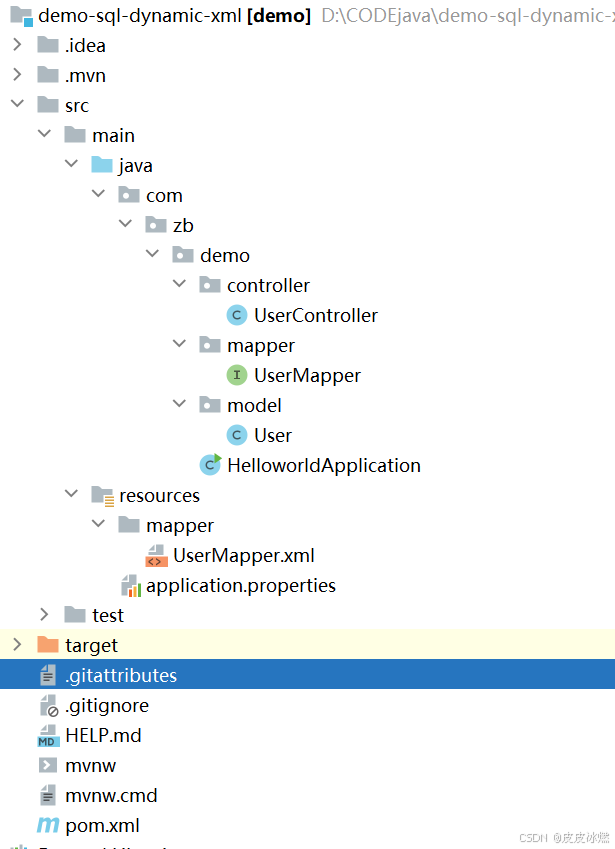
SpringBoot-17-MyBatis动态SQL标签之常用标签
文章目录 1 代码1.1 实体User.java1.2 接口UserMapper.java1.3 映射UserMapper.xml1.3.1 标签if1.3.2 标签if和where1.3.3 标签choose和when和otherwise1.4 UserController.java2 常用动态SQL标签2.1 标签set2.1.1 UserMapper.java2.1.2 UserMapper.xml2.1.3 UserController.ja…
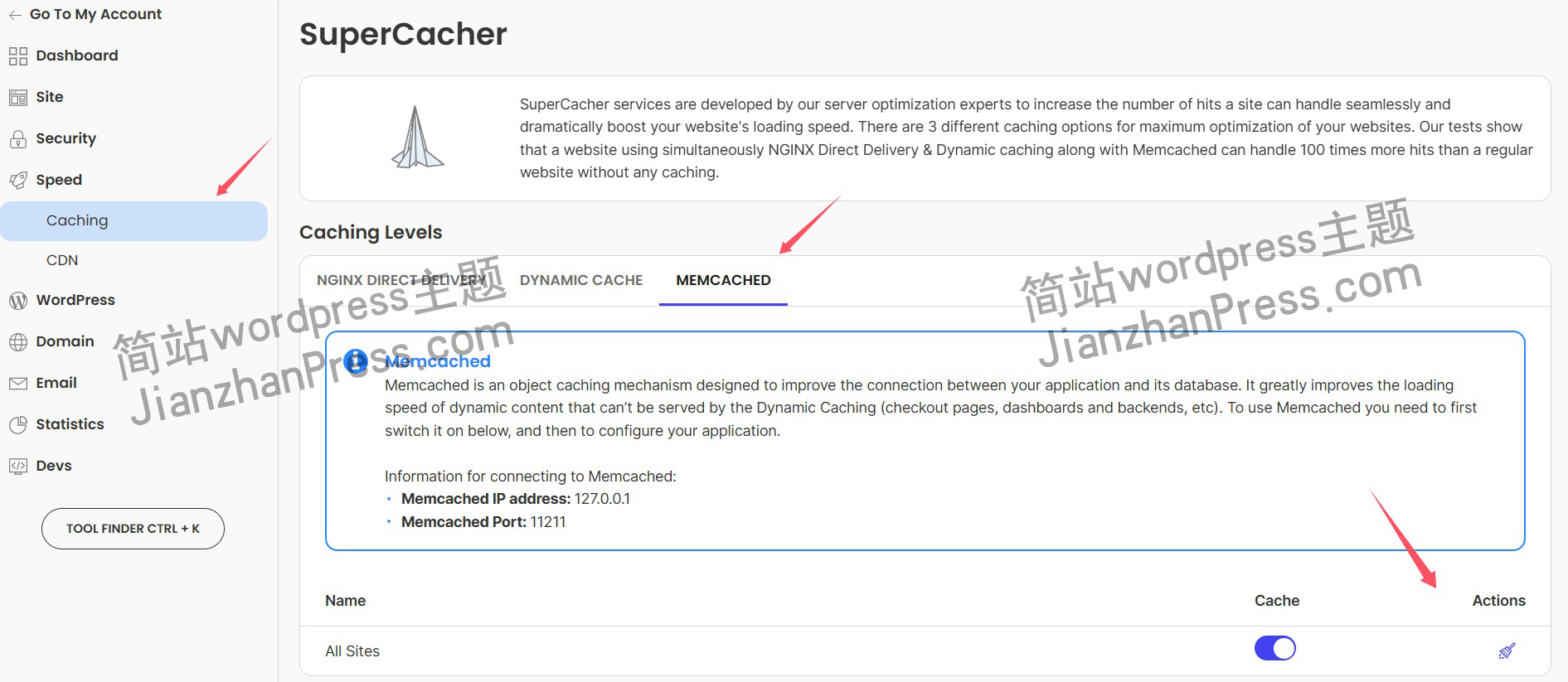
wordpress后台更新后 前端没变化的解决方法
使用siteground主机的wordpress网站,会出现更新了网站内容和修改了php模板文件、js文件、css文件、图片文件后,网站没有变化的情况。
不熟悉siteground主机的新手,遇到这个问题,就很抓狂,明明是哪都没操作错误&#x…
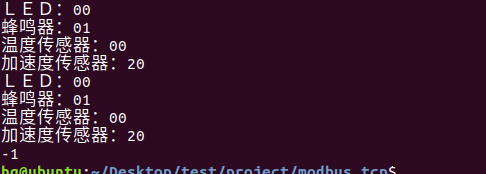
网络编程(Modbus进阶)
思维导图 Modbus RTU(先学一点理论)
概念 Modbus RTU 是工业自动化领域 最广泛应用的串行通信协议,由 Modicon 公司(现施耐德电气)于 1979 年推出。它以 高效率、强健性、易实现的特点成为工业控制系统的通信标准。 包…
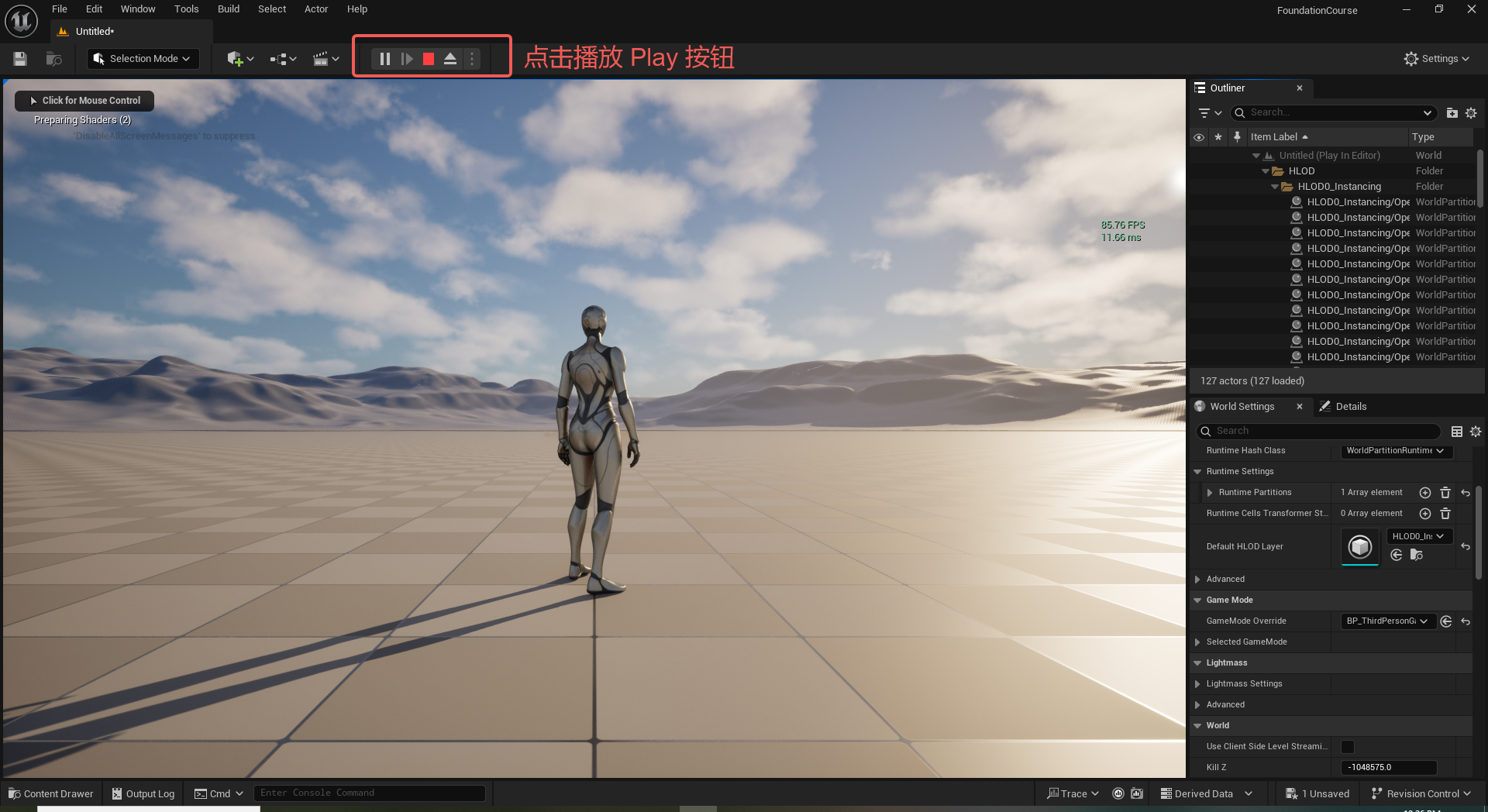
UE5 学习系列(二)用户操作界面及介绍
这篇博客是 UE5 学习系列博客的第二篇,在第一篇的基础上展开这篇内容。博客参考的 B 站视频资料和第一篇的链接如下:
【Note】:如果你已经完成安装等操作,可以只执行第一篇博客中 2. 新建一个空白游戏项目 章节操作,重…
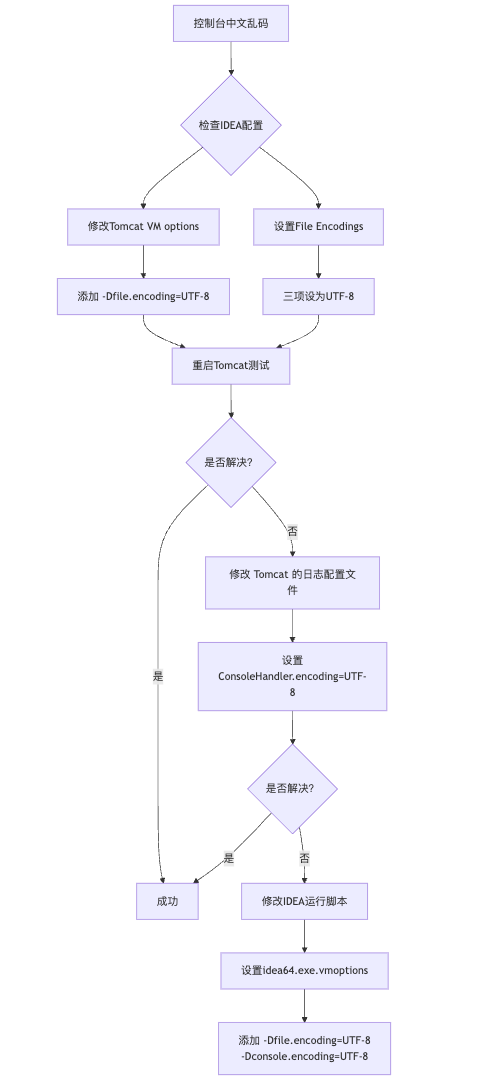
IDEA运行Tomcat出现乱码问题解决汇总
最近正值期末周,有很多同学在写期末Java web作业时,运行tomcat出现乱码问题,经过多次解决与研究,我做了如下整理:
原因:
IDEA本身编码与tomcat的编码与Windows编码不同导致,Windows 系统控制台…

利用最小二乘法找圆心和半径
#include <iostream>
#include <vector>
#include <cmath>
#include <Eigen/Dense> // 需安装Eigen库用于矩阵运算 // 定义点结构
struct Point { double x, y; Point(double x_, double y_) : x(x_), y(y_) {}
}; // 最小二乘法求圆心和半径 …
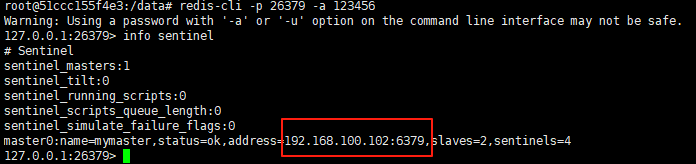
使用docker在3台服务器上搭建基于redis 6.x的一主两从三台均是哨兵模式
一、环境及版本说明
如果服务器已经安装了docker,则忽略此步骤,如果没有安装,则可以按照一下方式安装: 1. 在线安装(有互联网环境): 请看我这篇文章 传送阵>> 点我查看 2. 离线安装(内网环境):请看我这篇文章 传送阵>> 点我查看
说明:假设每台服务器已…
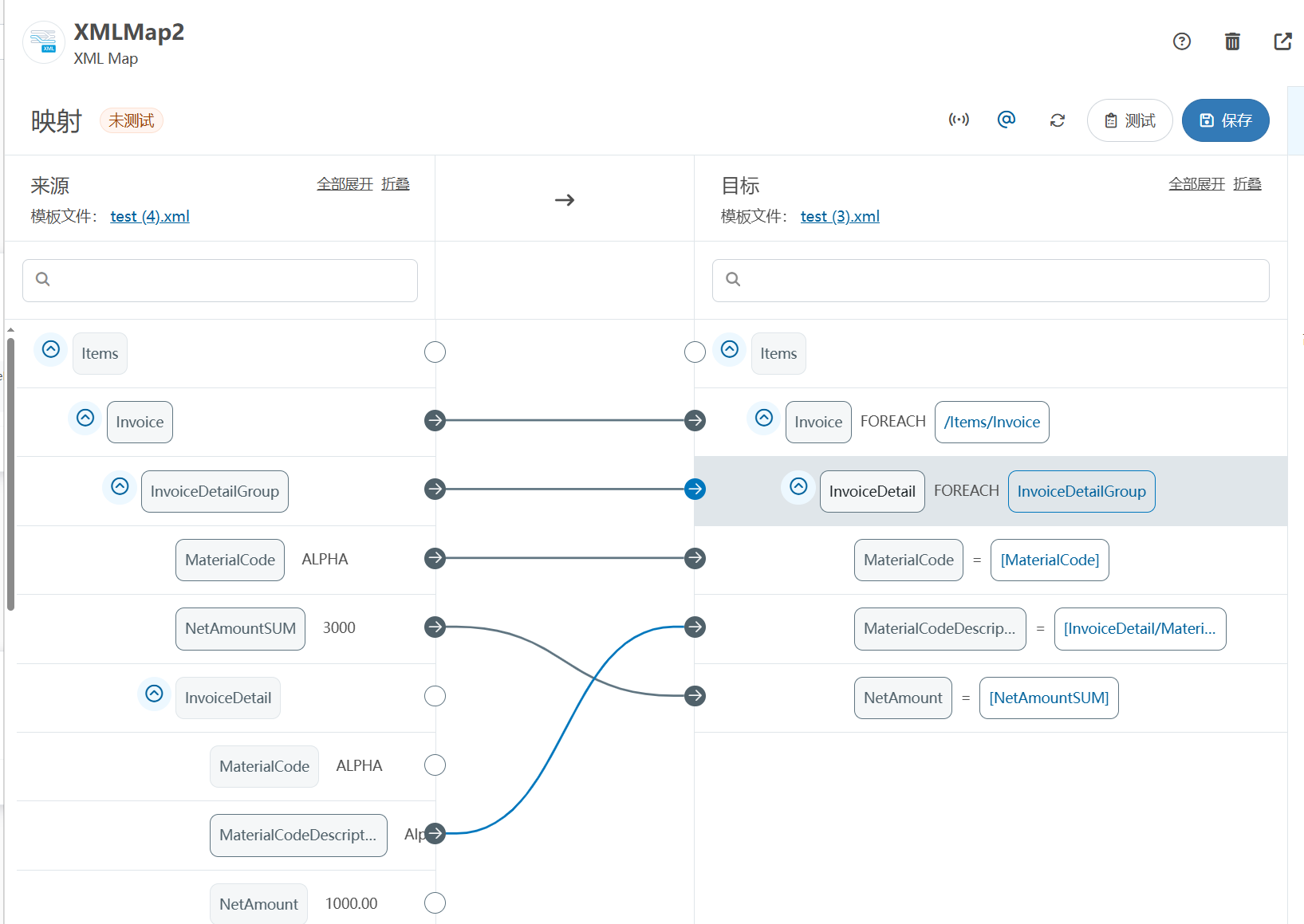
XML Group端口详解
在XML数据映射过程中,经常需要对数据进行分组聚合操作。例如,当处理包含多个物料明细的XML文件时,可能需要将相同物料号的明细归为一组,或对相同物料号的数量进行求和计算。传统实现方式通常需要编写脚本代码,增加了开…
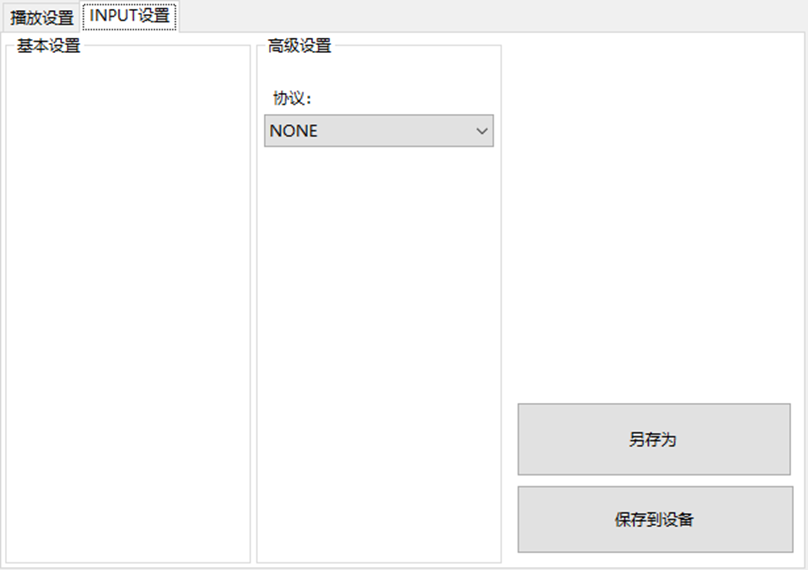
LBE-LEX系列工业语音播放器|预警播报器|喇叭蜂鸣器的上位机配置操作说明
LBE-LEX系列工业语音播放器|预警播报器|喇叭蜂鸣器专为工业环境精心打造,完美适配AGV和无人叉车。同时,集成以太网与语音合成技术,为各类高级系统(如MES、调度系统、库位管理、立库等)提供高效便捷的语音交互体验。
L…
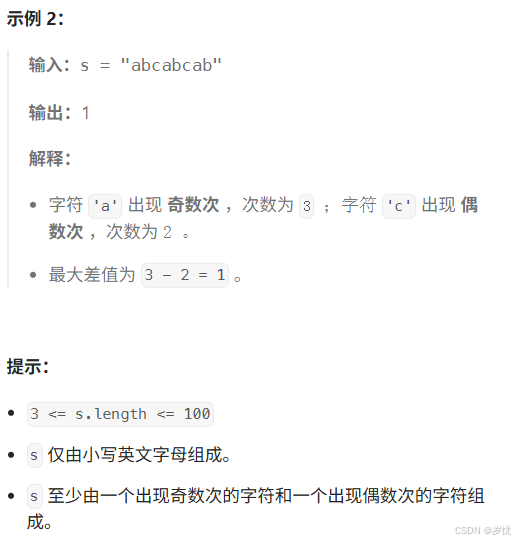
(LeetCode 每日一题) 3442. 奇偶频次间的最大差值 I (哈希、字符串)
题目:3442. 奇偶频次间的最大差值 I 思路 :哈希,时间复杂度0(n)。 用哈希表来记录每个字符串中字符的分布情况,哈希表这里用数组即可实现。
C版本:
class Solution {
public:int maxDifference(string s) {int a[26]…
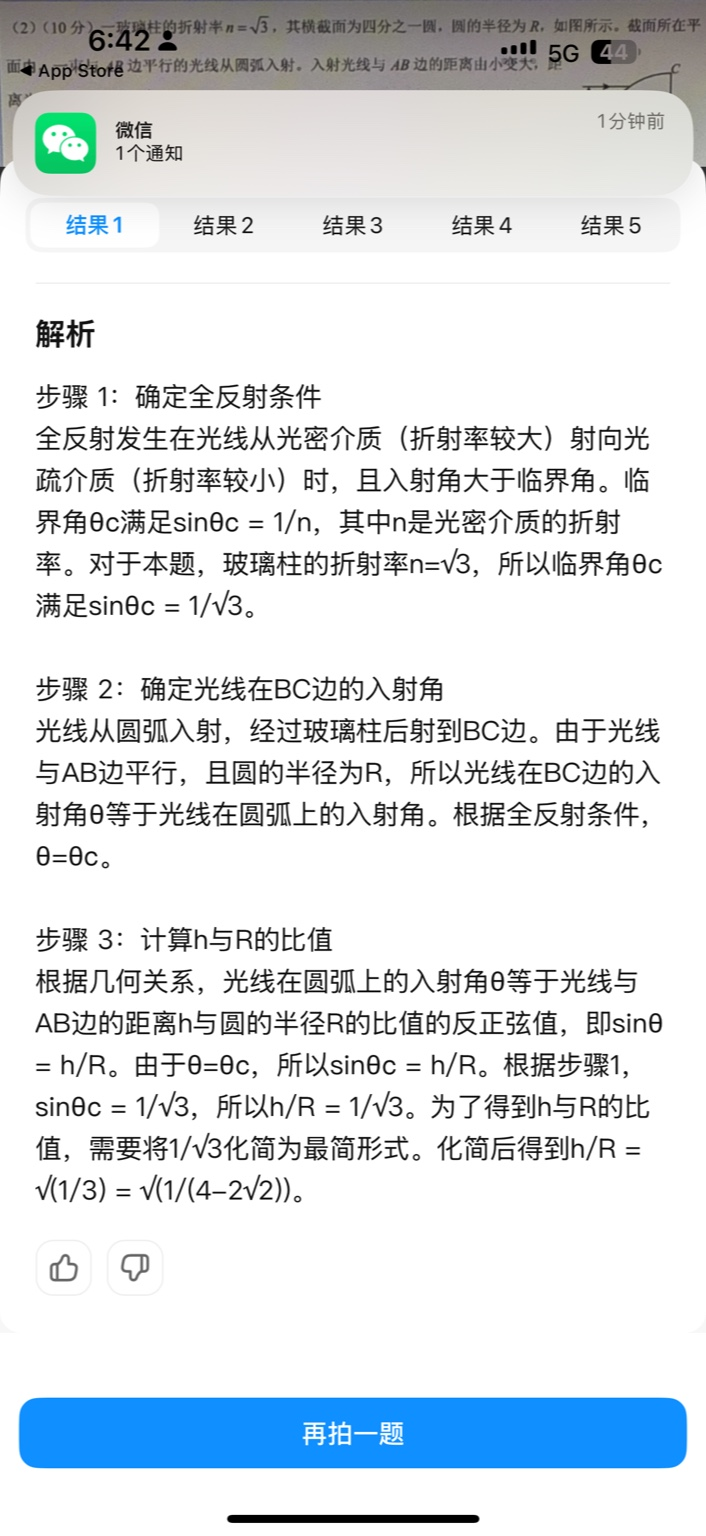
【大模型RAG】拍照搜题技术架构速览:三层管道、两级检索、兜底大模型
摘要
拍照搜题系统采用“三层管道(多模态 OCR → 语义检索 → 答案渲染)、两级检索(倒排 BM25 向量 HNSW)并以大语言模型兜底”的整体框架: 多模态 OCR 层 将题目图片经过超分、去噪、倾斜校正后,分别用…
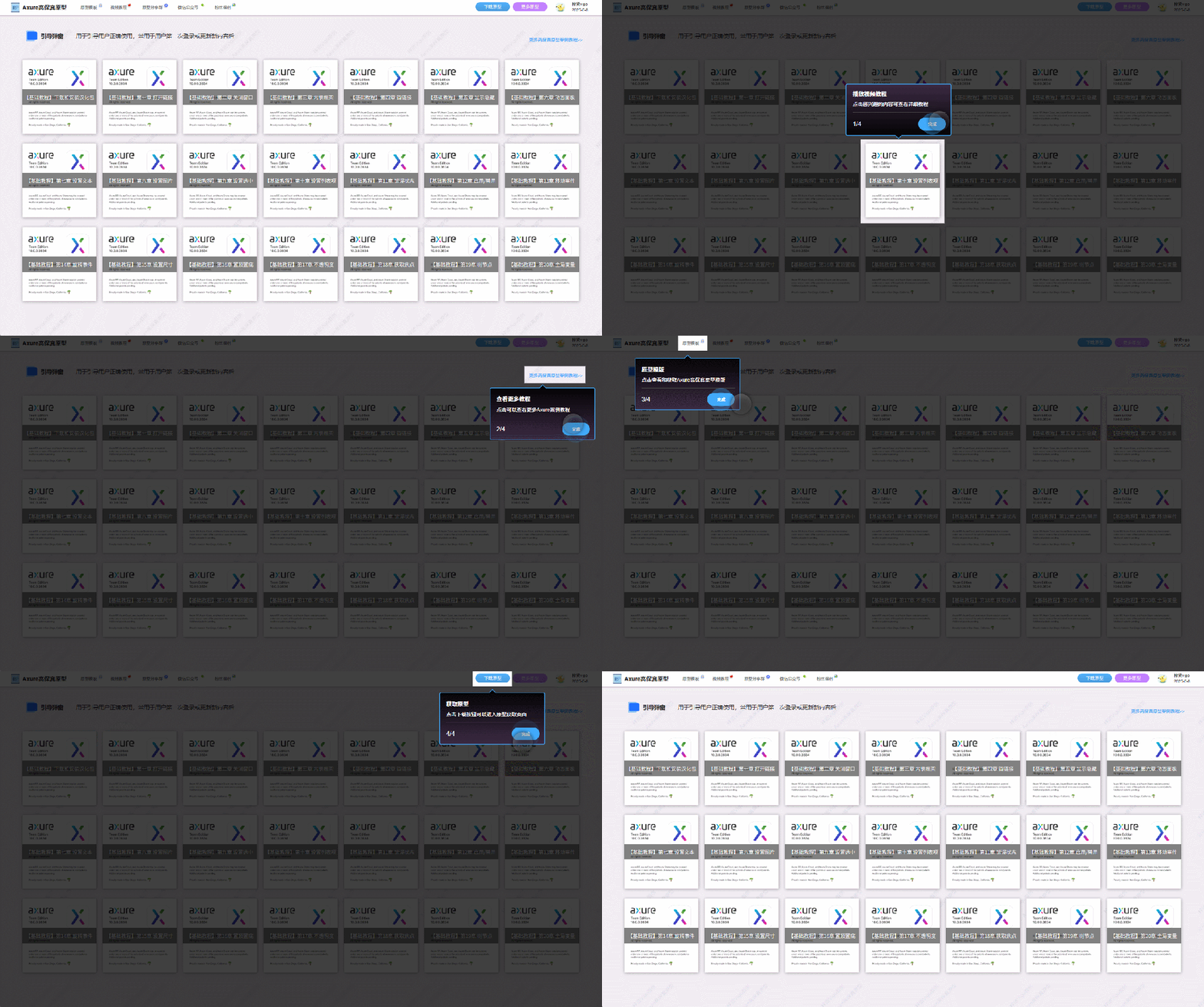
【Axure高保真原型】引导弹窗
今天和大家中分享引导弹窗的原型模板,载入页面后,会显示引导弹窗,适用于引导用户使用页面,点击完成后,会显示下一个引导弹窗,直至最后一个引导弹窗完成后进入首页。具体效果可以点击下方视频观看或打开下方…
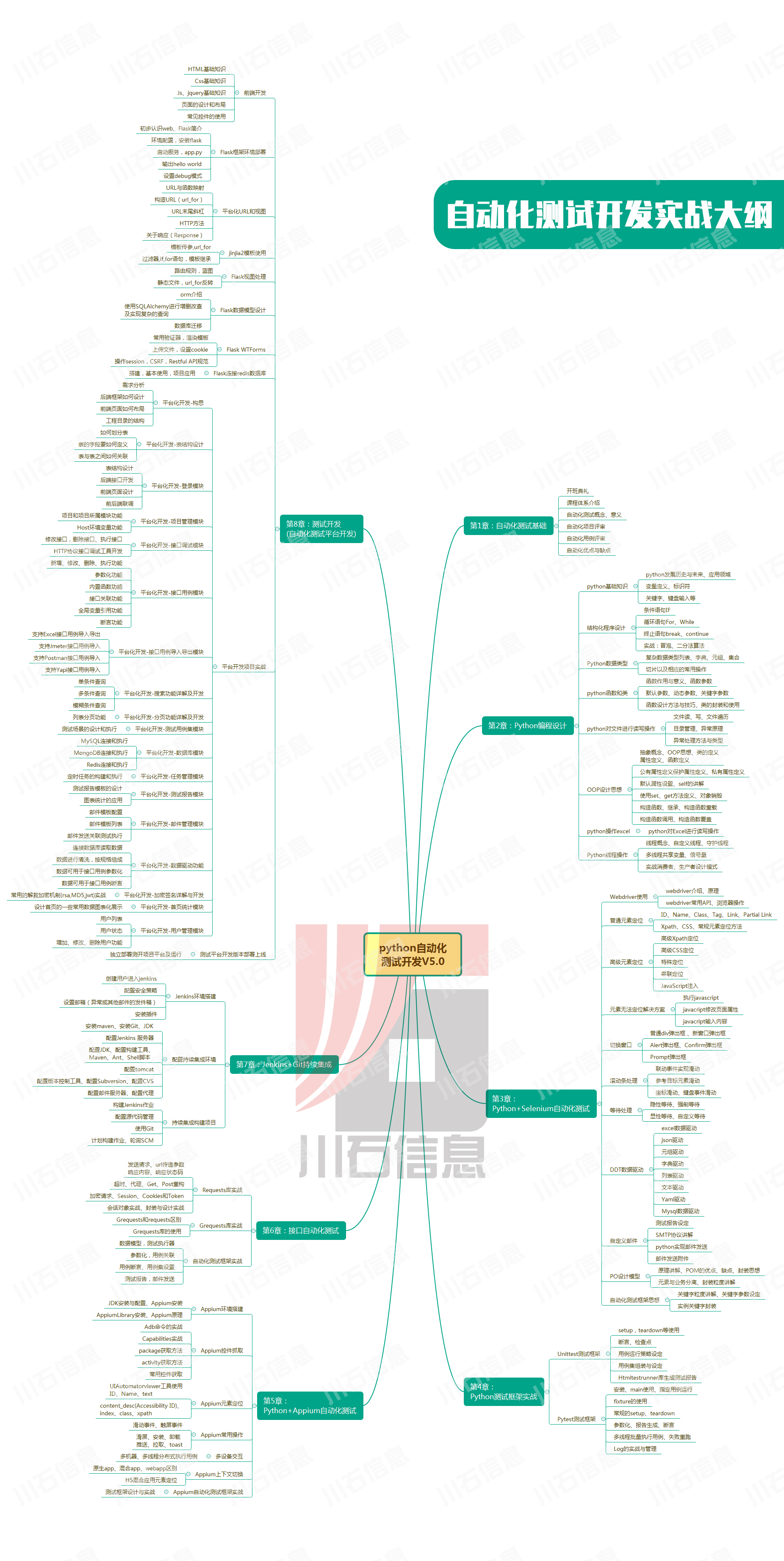
接口测试中缓存处理策略
在接口测试中,缓存处理策略是一个关键环节,直接影响测试结果的准确性和可靠性。合理的缓存处理策略能够确保测试环境的一致性,避免因缓存数据导致的测试偏差。以下是接口测试中常见的缓存处理策略及其详细说明:
一、缓存处理的核…

龙虎榜——20250610
上证指数放量收阴线,个股多数下跌,盘中受消息影响大幅波动。 深证指数放量收阴线形成顶分型,指数短线有调整的需求,大概需要一两天。 2025年6月10日龙虎榜行业方向分析 1. 金融科技
代表标的:御银股份、雄帝科技
驱动…
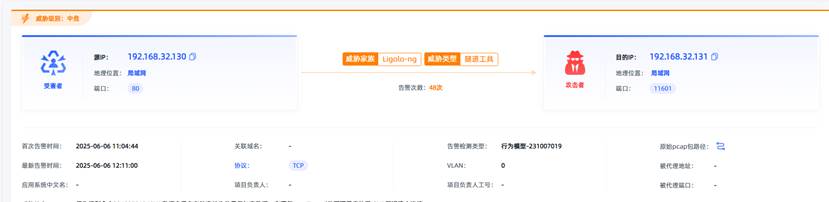
观成科技:隐蔽隧道工具Ligolo-ng加密流量分析
1.工具介绍
Ligolo-ng是一款由go编写的高效隧道工具,该工具基于TUN接口实现其功能,利用反向TCP/TLS连接建立一条隐蔽的通信信道,支持使用Let’s Encrypt自动生成证书。Ligolo-ng的通信隐蔽性体现在其支持多种连接方式,适应复杂网…
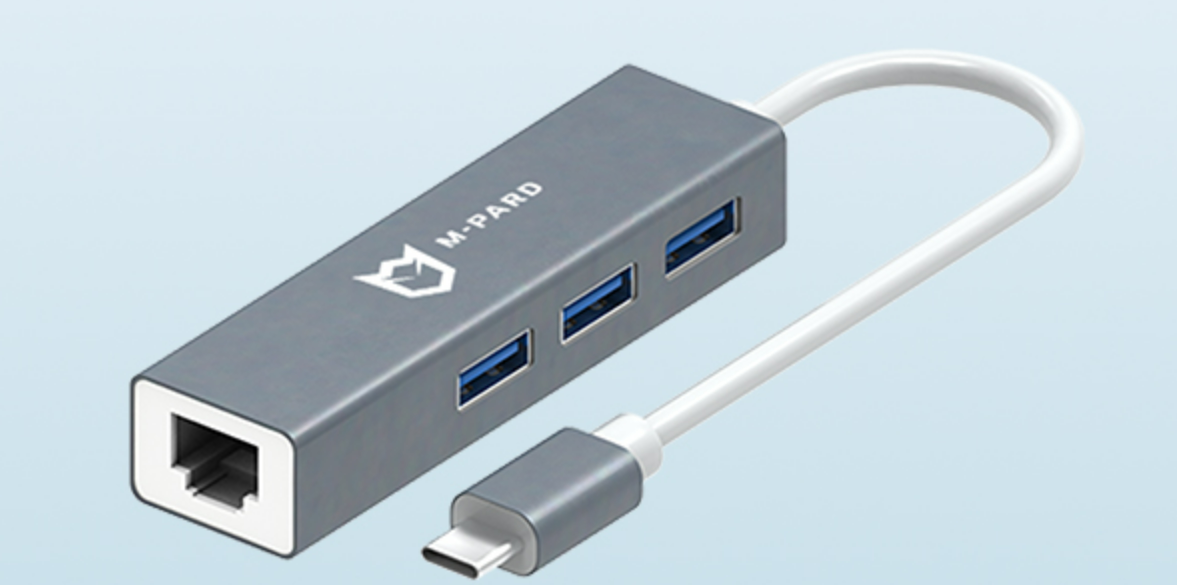
铭豹扩展坞 USB转网口 突然无法识别解决方法
当 USB 转网口扩展坞在一台笔记本上无法识别,但在其他电脑上正常工作时,问题通常出在笔记本自身或其与扩展坞的兼容性上。以下是系统化的定位思路和排查步骤,帮助你快速找到故障原因:
背景:
一个M-pard(铭豹)扩展坞的网卡突然无法识别了,扩展出来的三个USB接口正常。…
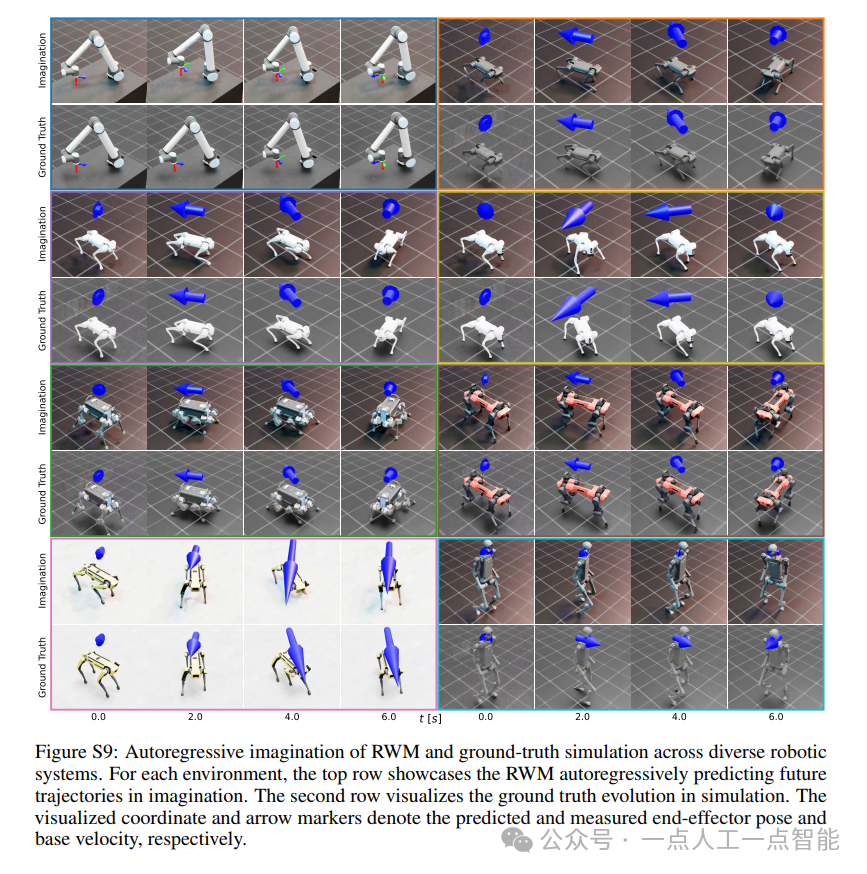
未来机器人的大脑:如何用神经网络模拟器实现更智能的决策?
编辑:陈萍萍的公主一点人工一点智能 未来机器人的大脑:如何用神经网络模拟器实现更智能的决策?RWM通过双自回归机制有效解决了复合误差、部分可观测性和随机动力学等关键挑战,在不依赖领域特定归纳偏见的条件下实现了卓越的预测准…

Linux应用开发之网络套接字编程(实例篇)
服务端与客户端单连接
服务端代码
#include <sys/socket.h>
#include <sys/types.h>
#include <netinet/in.h>
#include <stdio.h>
#include <stdlib.h>
#include <string.h>
#include <arpa/inet.h>
#include <pthread.h>
…

华为云AI开发平台ModelArts
华为云ModelArts:重塑AI开发流程的“智能引擎”与“创新加速器”!
在人工智能浪潮席卷全球的2025年,企业拥抱AI的意愿空前高涨,但技术门槛高、流程复杂、资源投入巨大的现实,却让许多创新构想止步于实验室。数据科学家…
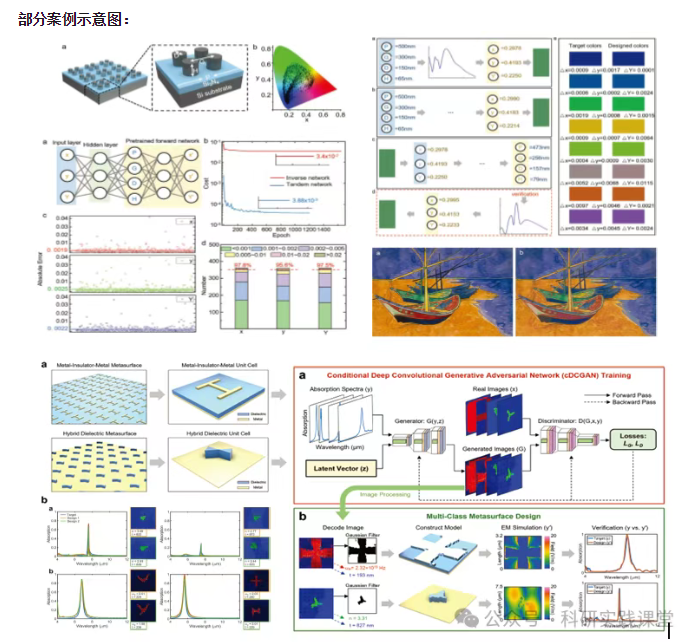
深度学习在微纳光子学中的应用
深度学习在微纳光子学中的主要应用方向
深度学习与微纳光子学的结合主要集中在以下几个方向:
逆向设计 通过神经网络快速预测微纳结构的光学响应,替代传统耗时的数值模拟方法。例如设计超表面、光子晶体等结构。
特征提取与优化 从复杂的光学数据中自…