使用Docker安装Nextcloud网盘
news2026/3/20 18:08:13
1、安装Docker详见https://mp.weixin.qq.com/s/CrjQTLJM0YbJ9SC4GIfKsg2、安装Nextcloud详见https://github.com/nextcloud/docker创建目录mkdir nextcloud切换目录cd nextcloud2.1、方式1使用apache镜像运行容器docker run -d \ --name nextcloud \ -p 8080:80 \ -v ./html:/var/www/html \ nextcloud查看容器列表docker ps停止容器docker stop nextcloud删除容器docker rm nextcloud删除目录rm -rf ./html删除镜像docker rmi nextcloud2.2、方式2使用fpm镜像下载nginx.conf文件详见 https://docs.nextcloud.com/server/latest/admin_manual/installation/nginx.html https://github.com/nextcloud/docker/tree/master/.examples# 方式1未使用代理下载 wget https://raw.githubusercontent.com/nextcloud/docker/master/.examples/docker-compose/insecure/mariadb/fpm/web/nginx.conf# 方式2使用代理下载 # 详见https://mp.weixin.qq.com/s/XTbT3wKp_W2fiK7pGpo7Qg wget https://gh-proxy.com/https://raw.githubusercontent.com/nextcloud/docker/master/.examples/docker-compose/insecure/mariadb/fpm/web/nginx.conf查看nginx.conf文件详见 https://github.com/nextcloud/docker/blob/master/.examples/docker-compose/insecure/mariadb/fpm/web/nginx.conf https://github.com/nextcloud/docker/blob/master/.examples/docker-compose/insecure/postgres/fpm/web/nginx.conf https://github.com/nextcloud/docker/blob/master/.examples/docker-compose/with-nginx-proxy/mariadb/fpm/web/nginx.conf https://github.com/nextcloud/docker/blob/master/.examples/docker-compose/with-nginx-proxy/postgres/fpm/web/nginx.confworker_processes auto; error_log /var/log/nginx/error.log warn; pid /var/run/nginx.pid; events { worker_connections 1024; } http { include mime.types; default_type application/octet-stream; types { text/javascript mjs; } log_format main $remote_addr - $remote_user [$time_local] $request $status $body_bytes_sent $http_referer $http_user_agent $http_x_forwarded_for; access_log /var/log/nginx/access.log main; sendfile on; #tcp_nopush on; # Prevent nginx HTTP Server Detection server_tokens off; keepalive_timeout 65; # Set the immutable cache control options only for assets with a cache busting v argument map $arg_v $asset_immutable { ; default , immutable; } #gzip on; resolver 127.0.0.11 valid2s; upstream php-handler { zone backends 64k; server app:9000 resolve; } server { listen 80; # HSTS settings # WARNING: Only add the preload option once you read about # the consequences in https://hstspreload.org/. This option # will add the domain to a hardcoded list that is shipped # in all major browsers and getting removed from this list # could take several months. #add_header Strict-Transport-Security max-age15768000; includeSubDomains; preload; always; # set max upload size and increase upload timeout: client_max_body_size 512M; client_body_timeout 300s; fastcgi_buffers 64 4K; # The settings allows you to optimize the HTTP2 bandwidth. # See https://blog.cloudflare.com/delivering-http-2-upload-speed-improvements/ # for tuning hints client_body_buffer_size 512k; # Enable gzip but do not remove ETag headers gzip on; gzip_vary on; gzip_comp_level 4; gzip_min_length 256; gzip_proxied expired no-cache no-store private no_last_modified no_etag auth; gzip_types application/atomxml text/javascript application/javascript application/json application/ldjson application/manifestjson application/rssxml application/vnd.geojson application/vnd.ms-fontobject application/wasm application/x-font-ttf application/x-web-app-manifestjson application/xhtmlxml application/xml font/opentype image/bmp image/svgxml image/x-icon text/cache-manifest text/css text/plain text/vcard text/vnd.rim.location.xloc text/vtt text/x-component text/x-cross-domain-policy; # Pagespeed is not supported by Nextcloud, so if your server is built # with the ngx_pagespeed module, uncomment this line to disable it. #pagespeed off; # HTTP response headers borrowed from Nextcloud .htaccess add_header Referrer-Policy no-referrer always; add_header X-Content-Type-Options nosniff always; add_header X-Frame-Options SAMEORIGIN always; add_header X-Permitted-Cross-Domain-Policies none always; add_header X-Robots-Tag noindex, nofollow always; # Remove X-Powered-By, which is an information leak fastcgi_hide_header X-Powered-By; # Path to the root of your installation root /var/www/html; # Specify how to handle directories -- specifying /index.php$request_uri # here as the fallback means that Nginx always exhibits the desired behaviour # when a client requests a path that corresponds to a directory that exists # on the server. In particular, if that directory contains an index.php file, # that file is correctly served; if it doesnt, then the request is passed to # the front-end controller. This consistent behaviour means that we dont need # to specify custom rules for certain paths (e.g. images and other assets, # /updater, /ocm-provider, /ocs-provider), and thus # try_files $uri $uri/ /index.php$request_uri # always provides the desired behaviour. index index.php index.html /index.php$request_uri; # Rule borrowed from .htaccess to handle Microsoft DAV clients location / { if ( $http_user_agent ~ ^DavClnt ) { return 302 /remote.php/webdav/$is_args$args; } } location /robots.txt { allow all; log_not_found off; access_log off; } # Make a regex exception for /.well-known so that clients can still # access it despite the existence of the regex rule # location ~ /(\.|autotest|...) which would otherwise handle requests # for /.well-known. location ^~ /.well-known { # The rules in this block are an adaptation of the rules # in .htaccess that concern /.well-known. location /.well-known/carddav { return 301 /remote.php/dav/; } location /.well-known/caldav { return 301 /remote.php/dav/; } location /.well-known/acme-challenge { try_files $uri $uri/ 404; } location /.well-known/pki-validation { try_files $uri $uri/ 404; } # Let Nextclouds API for /.well-known URIs handle all other # requests by passing them to the front-end controller. return 301 /index.php$request_uri; } # Rules borrowed from .htaccess to hide certain paths from clients location ~ ^/(?:build|tests|config|lib|3rdparty|templates|data)(?:$|/) { return 404; } location ~ ^/(?:\.|autotest|occ|issue|indie|db_|console) { return 404; } # Ensure this block, which passes PHP files to the PHP process, is above the blocks # which handle static assets (as seen below). If this block is not declared first, # then Nginx will encounter an infinite rewriting loop when it prepends /index.php # to the URI, resulting in a HTTP 500 error response. location ~ \.php(?:$|/) { # Required for legacy support rewrite ^/(?!index|remote|public|cron|core\/ajax\/update|status|ocs\/v[12]|updater\/.|ocs-provider\/.|.\/richdocumentscode(_arm64)?\/proxy) /index.php$request_uri; fastcgi_split_path_info ^(.?\.php)(/.*)$; set $path_info $fastcgi_path_info; try_files $fastcgi_script_name 404; include fastcgi_params; fastcgi_param SCRIPT_FILENAME $document_root$fastcgi_script_name; fastcgi_param PATH_INFO $path_info; #fastcgi_param HTTPS on; fastcgi_param modHeadersAvailable true; # Avoid sending the security headers twice fastcgi_param front_controller_active true; # Enable pretty urls fastcgi_pass php-handler; fastcgi_intercept_errors on; fastcgi_request_buffering on; # Required as PHP-FPM does not support chunked transfer encoding and requires a valid ContentLength header. fastcgi_max_temp_file_size 0; } # Serve static files location ~ \.(?:css|js|mjs|svg|gif|ico|jpg|png|webp|wasm|tflite|map|ogg|flac|mp4|webm)$ { try_files $uri /index.php$request_uri; add_header Cache-Control public, max-age15778463$asset_immutable; add_header Referrer-Policy no-referrer always; add_header X-Content-Type-Options nosniff always; add_header X-Frame-Options SAMEORIGIN always; add_header X-Permitted-Cross-Domain-Policies none always; add_header X-Robots-Tag noindex, nofollow always; access_log off; # Optional: Dont log access to assets } location ~ \.(otf|woff2?)$ { try_files $uri /index.php$request_uri; expires 7d; # Cache-Control policy borrowed from .htaccess access_log off; # Optional: Dont log access to assets } # Rule borrowed from .htaccess location /remote { return 301 /remote.php$request_uri; } location / { try_files $uri $uri/ /index.php$request_uri; } } }修改nginx.conf文件# 将app替换成nextcloud容器名称 sed -i s/server app:9000 resolve/server nextcloud:9000/g nginx.conf运行容器# nextcloud docker run -d \ --name nextcloud \ -v ./html:/var/www/html \ nextcloud:fpm# nginx docker run -d \ --name nginx \ -p 8080:80 \ -v ./nginx.conf:/etc/nginx/nginx.conf \ -v ./html:/var/www/html \ --link nextcloud \ nginx:alpine查看容器列表docker ps停止容器docker stop nextcloud nginx删除容器docker rm nextcloud nginx删除目录rm -rf ./html删除镜像docker rmi nextcloud:fpm nginx:alpine2.3、方式3基于apache镜像创建docker-compose.yaml文件services: # Note: MariaDB is external service. You can find more information about the configuration here: # https://hub.docker.com/_/mariadb db: # Note: Check the recommend version here: https://docs.nextcloud.com/server/latest/admin_manual/installation/system_requirements.html#server image: mariadb:lts restart: always command: --transaction-isolationREAD-COMMITTED volumes: - db:/var/lib/mysql environment: - MYSQL_ROOT_PASSWORD - MYSQL_PASSWORD - MYSQL_DATABASEnextcloud - MYSQL_USERnextcloud # Note: Redis is an external service. You can find more information about the configuration here: # https://hub.docker.com/_/redis redis: image: redis:alpine restart: always app: image: nextcloud restart: always ports: - 8080:80 depends_on: - redis - db volumes: - nextcloud:/var/www/html environment: - MYSQL_PASSWORD - MYSQL_DATABASEnextcloud - MYSQL_USERnextcloud - MYSQL_HOSTdb volumes: nextcloud: db:修改docker-compose.yaml文件sed -i s/MYSQL_ROOT_PASSWORD/MYSQL_ROOT_PASSWORDnextcloud/g docker-compose.yaml sed -i s/MYSQL_PASSWORD/MYSQL_PASSWORDnextcloud/g docker-compose.yaml创建并启动容器docker-compose up -d查看容器列表docker ps查看数据卷列表docker volume ls停止并销毁容器docker-compose down删除数据卷docker volume rm nextcloud_nextcloud nextcloud_db删除镜像docker rmi mariadb:lts redis:alpine nextcloud2.4、方式4基于fpm镜像下载nginx.conf文件详见 https://docs.nextcloud.com/server/latest/admin_manual/installation/nginx.html https://github.com/nextcloud/docker/tree/master/.examples# 方式1未使用代理下载 wget https://raw.githubusercontent.com/nextcloud/docker/master/.examples/docker-compose/insecure/mariadb/fpm/web/nginx.conf# 方式2使用代理下载 # 详见https://mp.weixin.qq.com/s/XTbT3wKp_W2fiK7pGpo7Qg wget https://gh-proxy.com/https://raw.githubusercontent.com/nextcloud/docker/master/.examples/docker-compose/insecure/mariadb/fpm/web/nginx.conf查看nginx.conf文件详见 https://github.com/nextcloud/docker/blob/master/.examples/docker-compose/insecure/mariadb/fpm/web/nginx.conf https://github.com/nextcloud/docker/blob/master/.examples/docker-compose/insecure/postgres/fpm/web/nginx.conf https://github.com/nextcloud/docker/blob/master/.examples/docker-compose/with-nginx-proxy/mariadb/fpm/web/nginx.conf https://github.com/nextcloud/docker/blob/master/.examples/docker-compose/with-nginx-proxy/postgres/fpm/web/nginx.confworker_processes auto; error_log /var/log/nginx/error.log warn; pid /var/run/nginx.pid; events { worker_connections 1024; } http { include mime.types; default_type application/octet-stream; types { text/javascript mjs; } log_format main $remote_addr - $remote_user [$time_local] $request $status $body_bytes_sent $http_referer $http_user_agent $http_x_forwarded_for; access_log /var/log/nginx/access.log main; sendfile on; #tcp_nopush on; # Prevent nginx HTTP Server Detection server_tokens off; keepalive_timeout 65; # Set the immutable cache control options only for assets with a cache busting v argument map $arg_v $asset_immutable { ; default , immutable; } #gzip on; resolver 127.0.0.11 valid2s; upstream php-handler { zone backends 64k; server app:9000 resolve; } server { listen 80; # HSTS settings # WARNING: Only add the preload option once you read about # the consequences in https://hstspreload.org/. This option # will add the domain to a hardcoded list that is shipped # in all major browsers and getting removed from this list # could take several months. #add_header Strict-Transport-Security max-age15768000; includeSubDomains; preload; always; # set max upload size and increase upload timeout: client_max_body_size 512M; client_body_timeout 300s; fastcgi_buffers 64 4K; # The settings allows you to optimize the HTTP2 bandwidth. # See https://blog.cloudflare.com/delivering-http-2-upload-speed-improvements/ # for tuning hints client_body_buffer_size 512k; # Enable gzip but do not remove ETag headers gzip on; gzip_vary on; gzip_comp_level 4; gzip_min_length 256; gzip_proxied expired no-cache no-store private no_last_modified no_etag auth; gzip_types application/atomxml text/javascript application/javascript application/json application/ldjson application/manifestjson application/rssxml application/vnd.geojson application/vnd.ms-fontobject application/wasm application/x-font-ttf application/x-web-app-manifestjson application/xhtmlxml application/xml font/opentype image/bmp image/svgxml image/x-icon text/cache-manifest text/css text/plain text/vcard text/vnd.rim.location.xloc text/vtt text/x-component text/x-cross-domain-policy; # Pagespeed is not supported by Nextcloud, so if your server is built # with the ngx_pagespeed module, uncomment this line to disable it. #pagespeed off; # HTTP response headers borrowed from Nextcloud .htaccess add_header Referrer-Policy no-referrer always; add_header X-Content-Type-Options nosniff always; add_header X-Frame-Options SAMEORIGIN always; add_header X-Permitted-Cross-Domain-Policies none always; add_header X-Robots-Tag noindex, nofollow always; # Remove X-Powered-By, which is an information leak fastcgi_hide_header X-Powered-By; # Path to the root of your installation root /var/www/html; # Specify how to handle directories -- specifying /index.php$request_uri # here as the fallback means that Nginx always exhibits the desired behaviour # when a client requests a path that corresponds to a directory that exists # on the server. In particular, if that directory contains an index.php file, # that file is correctly served; if it doesnt, then the request is passed to # the front-end controller. This consistent behaviour means that we dont need # to specify custom rules for certain paths (e.g. images and other assets, # /updater, /ocm-provider, /ocs-provider), and thus # try_files $uri $uri/ /index.php$request_uri # always provides the desired behaviour. index index.php index.html /index.php$request_uri; # Rule borrowed from .htaccess to handle Microsoft DAV clients location / { if ( $http_user_agent ~ ^DavClnt ) { return 302 /remote.php/webdav/$is_args$args; } } location /robots.txt { allow all; log_not_found off; access_log off; } # Make a regex exception for /.well-known so that clients can still # access it despite the existence of the regex rule # location ~ /(\.|autotest|...) which would otherwise handle requests # for /.well-known. location ^~ /.well-known { # The rules in this block are an adaptation of the rules # in .htaccess that concern /.well-known. location /.well-known/carddav { return 301 /remote.php/dav/; } location /.well-known/caldav { return 301 /remote.php/dav/; } location /.well-known/acme-challenge { try_files $uri $uri/ 404; } location /.well-known/pki-validation { try_files $uri $uri/ 404; } # Let Nextclouds API for /.well-known URIs handle all other # requests by passing them to the front-end controller. return 301 /index.php$request_uri; } # Rules borrowed from .htaccess to hide certain paths from clients location ~ ^/(?:build|tests|config|lib|3rdparty|templates|data)(?:$|/) { return 404; } location ~ ^/(?:\.|autotest|occ|issue|indie|db_|console) { return 404; } # Ensure this block, which passes PHP files to the PHP process, is above the blocks # which handle static assets (as seen below). If this block is not declared first, # then Nginx will encounter an infinite rewriting loop when it prepends /index.php # to the URI, resulting in a HTTP 500 error response. location ~ \.php(?:$|/) { # Required for legacy support rewrite ^/(?!index|remote|public|cron|core\/ajax\/update|status|ocs\/v[12]|updater\/.|ocs-provider\/.|.\/richdocumentscode(_arm64)?\/proxy) /index.php$request_uri; fastcgi_split_path_info ^(.?\.php)(/.*)$; set $path_info $fastcgi_path_info; try_files $fastcgi_script_name 404; include fastcgi_params; fastcgi_param SCRIPT_FILENAME $document_root$fastcgi_script_name; fastcgi_param PATH_INFO $path_info; #fastcgi_param HTTPS on; fastcgi_param modHeadersAvailable true; # Avoid sending the security headers twice fastcgi_param front_controller_active true; # Enable pretty urls fastcgi_pass php-handler; fastcgi_intercept_errors on; fastcgi_request_buffering on; # Required as PHP-FPM does not support chunked transfer encoding and requires a valid ContentLength header. fastcgi_max_temp_file_size 0; } # Serve static files location ~ \.(?:css|js|mjs|svg|gif|ico|jpg|png|webp|wasm|tflite|map|ogg|flac|mp4|webm)$ { try_files $uri /index.php$request_uri; add_header Cache-Control public, max-age15778463$asset_immutable; add_header Referrer-Policy no-referrer always; add_header X-Content-Type-Options nosniff always; add_header X-Frame-Options SAMEORIGIN always; add_header X-Permitted-Cross-Domain-Policies none always; add_header X-Robots-Tag noindex, nofollow always; access_log off; # Optional: Dont log access to assets } location ~ \.(otf|woff2?)$ { try_files $uri /index.php$request_uri; expires 7d; # Cache-Control policy borrowed from .htaccess access_log off; # Optional: Dont log access to assets } # Rule borrowed from .htaccess location /remote { return 301 /remote.php$request_uri; } location / { try_files $uri $uri/ /index.php$request_uri; } } }创建docker-compose.yaml文件services: # Note: MariaDB is an external service. You can find more information about the configuration here: # https://hub.docker.com/_/mariadb db: # Note: Check the recommend version here: https://docs.nextcloud.com/server/latest/admin_manual/installation/system_requirements.html#server image: mariadb:lts restart: always command: --transaction-isolationREAD-COMMITTED volumes: - db:/var/lib/mysql environment: - MYSQL_ROOT_PASSWORD - MYSQL_PASSWORD - MYSQL_DATABASEnextcloud - MYSQL_USERnextcloud # Note: Redis is an external service. You can find more information about the configuration here: # https://hub.docker.com/_/redis redis: image: redis:alpine restart: always app: image: nextcloud:fpm restart: always depends_on: - redis - db volumes: - nextcloud:/var/www/html environment: - MYSQL_PASSWORD - MYSQL_DATABASEnextcloud - MYSQL_USERnextcloud - MYSQL_HOSTdb # Note: Nginx is an external service. You can find more information about the configuration here: # https://hub.docker.com/_/nginx/ web: image: nginx:alpine-slim restart: always ports: - 8080:80 depends_on: - app volumes: # https://docs.nextcloud.com/server/latest/admin_manual/installation/nginx.html - ./nginx.conf:/etc/nginx/nginx.conf:ro volumes_from: - app volumes: nextcloud: db:修改docker-compose.yaml文件sed -i s/MYSQL_ROOT_PASSWORD/MYSQL_ROOT_PASSWORDnextcloud/g docker-compose.yaml sed -i s/MYSQL_PASSWORD/MYSQL_PASSWORDnextcloud/g docker-compose.yaml创建并启动容器docker-compose up -d查看容器列表docker ps查看数据卷列表docker volume ls停止并销毁容器docker-compose down删除数据卷docker volume rm nextcloud_nextcloud nextcloud_db删除镜像docker rmi mariadb:lts redis:alpine nextcloud:fpm nginx:alpine-slim3、浏览器访问假设当前ip为192.168.186.128 浏览器访问http://192.168.186.128:8080创建管理员账号:或者登录管理后台仪表盘、文件、照片、动态仪表盘文件照片动态4、详见https://nextcloud.com https://nextcloud.com/install https://docs.nextcloud.com https://docs.nextcloud.com/server/latest/user_manual https://docs.nextcloud.com/server/latest/admin_manual https://docs.nextcloud.com/server/latest/developer_manual https://github.com/nextcloud/docker https://mp.weixin.qq.com/s/LD5U8QQED4VuH5ehC0WPpw
本文来自互联网用户投稿,该文观点仅代表作者本人,不代表本站立场。本站仅提供信息存储空间服务,不拥有所有权,不承担相关法律责任。如若转载,请注明出处:http://www.coloradmin.cn/o/2430701.html
如若内容造成侵权/违法违规/事实不符,请联系多彩编程网进行投诉反馈,一经查实,立即删除!相关文章
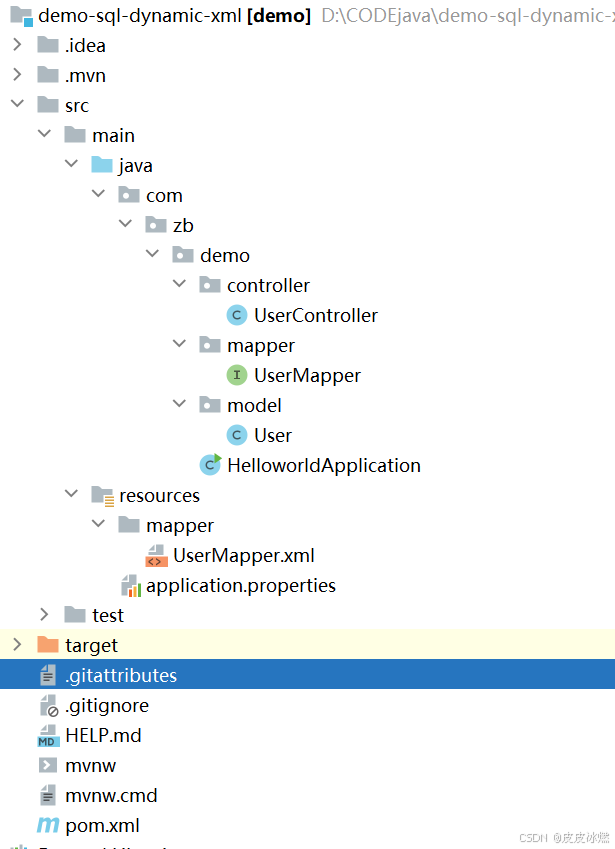
SpringBoot-17-MyBatis动态SQL标签之常用标签
文章目录 1 代码1.1 实体User.java1.2 接口UserMapper.java1.3 映射UserMapper.xml1.3.1 标签if1.3.2 标签if和where1.3.3 标签choose和when和otherwise1.4 UserController.java2 常用动态SQL标签2.1 标签set2.1.1 UserMapper.java2.1.2 UserMapper.xml2.1.3 UserController.ja…
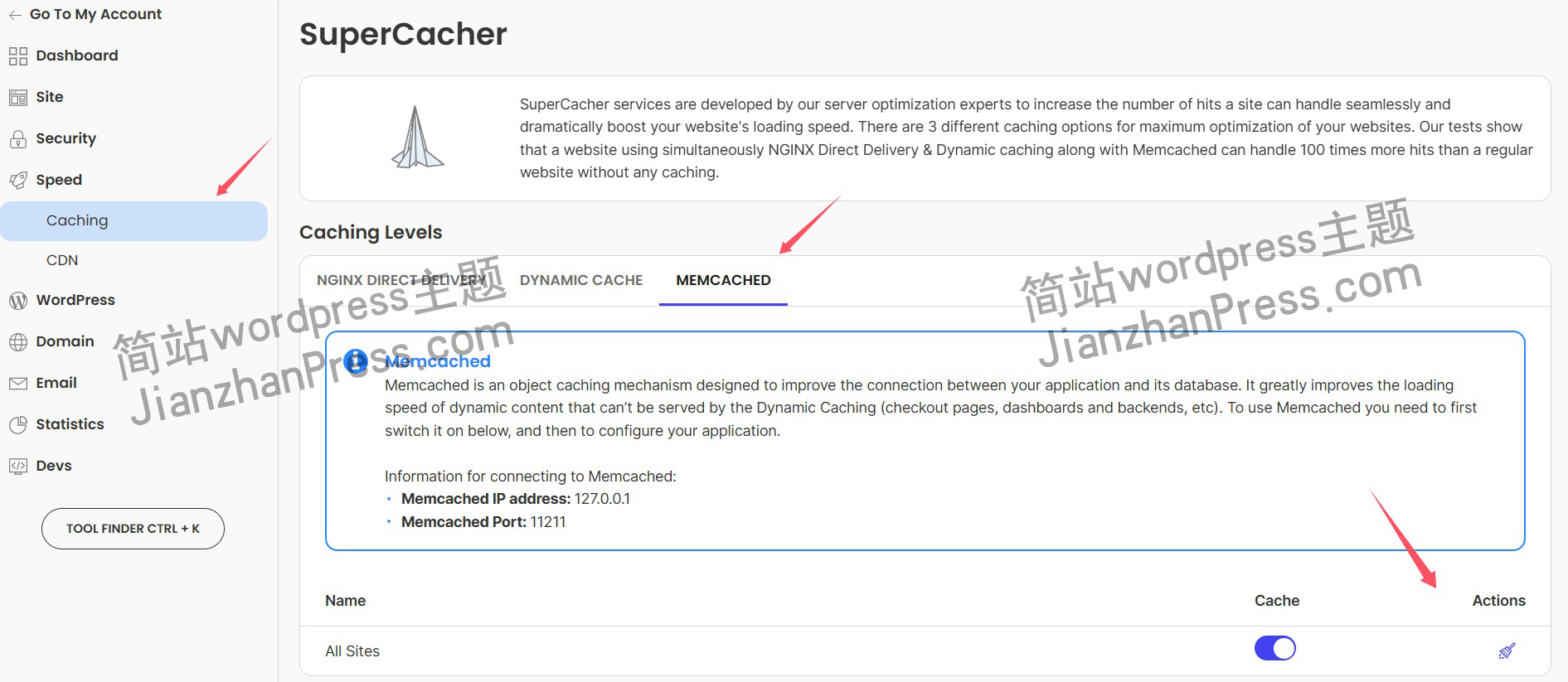
wordpress后台更新后 前端没变化的解决方法
使用siteground主机的wordpress网站,会出现更新了网站内容和修改了php模板文件、js文件、css文件、图片文件后,网站没有变化的情况。
不熟悉siteground主机的新手,遇到这个问题,就很抓狂,明明是哪都没操作错误&#x…
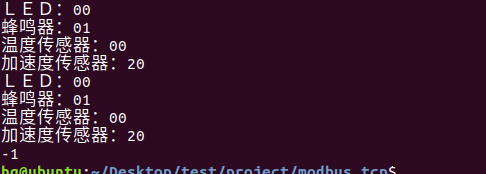
网络编程(Modbus进阶)
思维导图 Modbus RTU(先学一点理论)
概念 Modbus RTU 是工业自动化领域 最广泛应用的串行通信协议,由 Modicon 公司(现施耐德电气)于 1979 年推出。它以 高效率、强健性、易实现的特点成为工业控制系统的通信标准。 包…
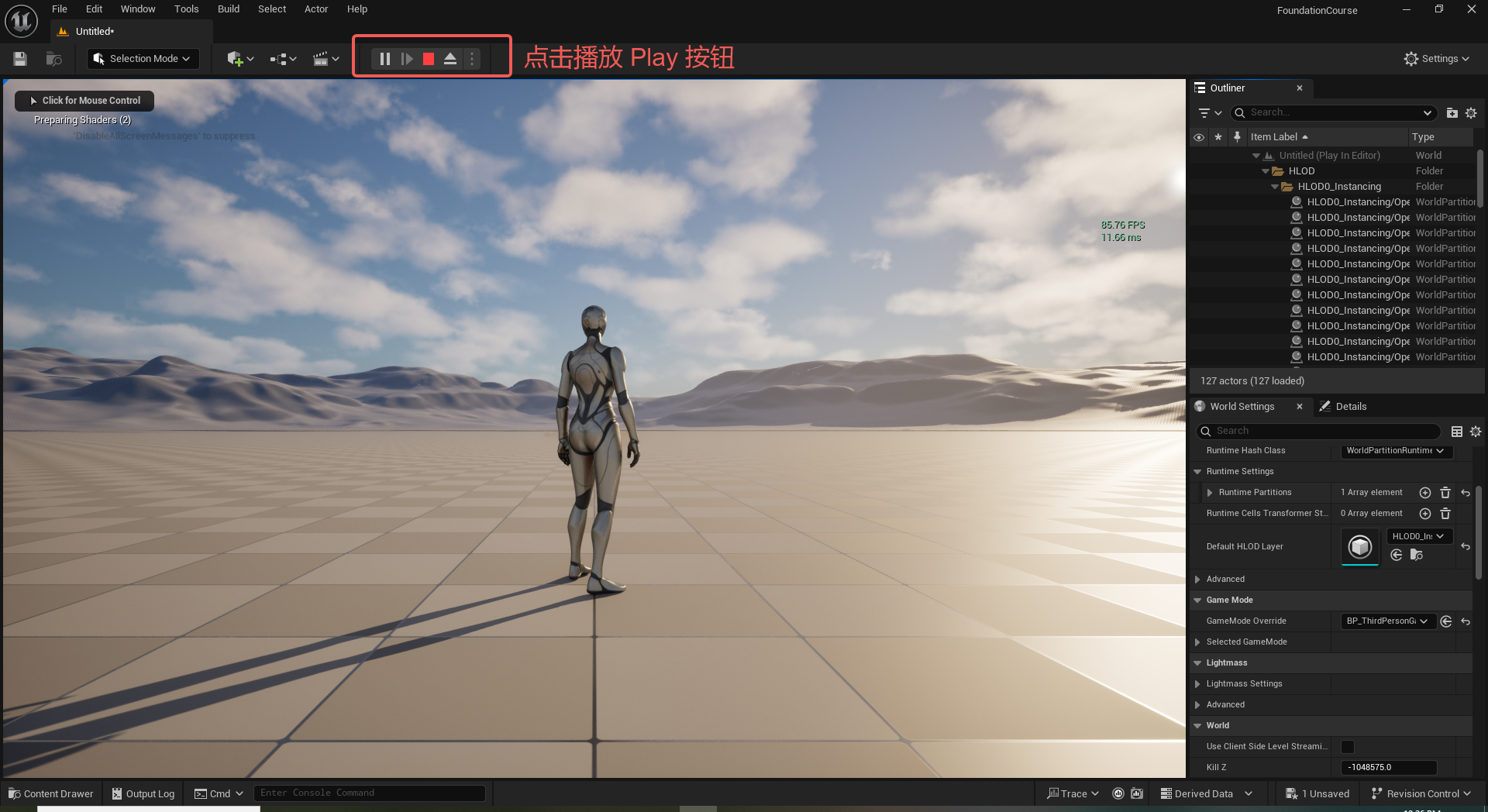
UE5 学习系列(二)用户操作界面及介绍
这篇博客是 UE5 学习系列博客的第二篇,在第一篇的基础上展开这篇内容。博客参考的 B 站视频资料和第一篇的链接如下:
【Note】:如果你已经完成安装等操作,可以只执行第一篇博客中 2. 新建一个空白游戏项目 章节操作,重…
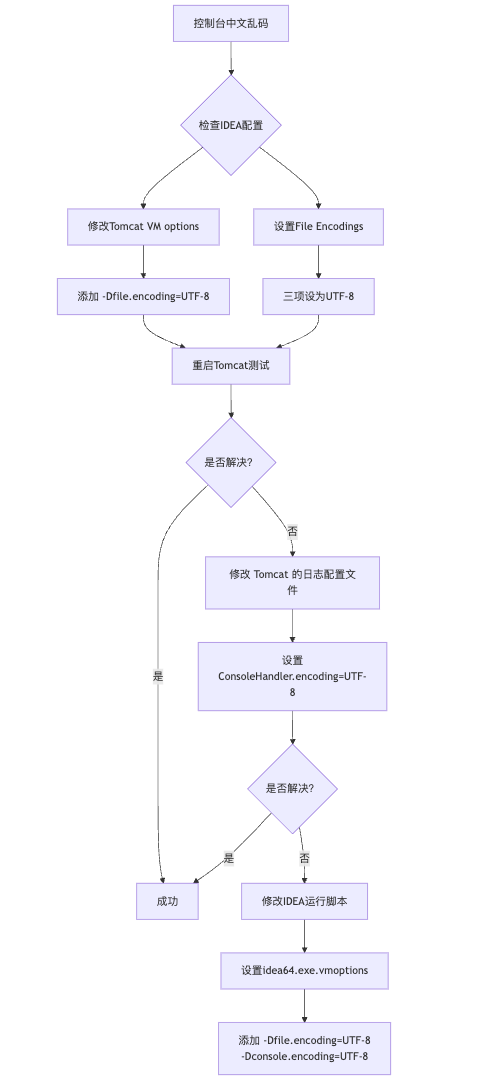
IDEA运行Tomcat出现乱码问题解决汇总
最近正值期末周,有很多同学在写期末Java web作业时,运行tomcat出现乱码问题,经过多次解决与研究,我做了如下整理:
原因:
IDEA本身编码与tomcat的编码与Windows编码不同导致,Windows 系统控制台…
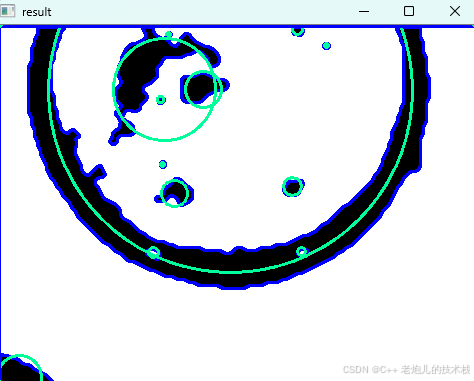
利用最小二乘法找圆心和半径
#include <iostream>
#include <vector>
#include <cmath>
#include <Eigen/Dense> // 需安装Eigen库用于矩阵运算 // 定义点结构
struct Point { double x, y; Point(double x_, double y_) : x(x_), y(y_) {}
}; // 最小二乘法求圆心和半径 …
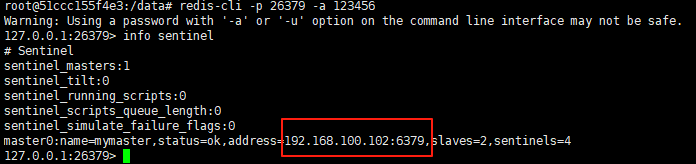
使用docker在3台服务器上搭建基于redis 6.x的一主两从三台均是哨兵模式
一、环境及版本说明
如果服务器已经安装了docker,则忽略此步骤,如果没有安装,则可以按照一下方式安装: 1. 在线安装(有互联网环境): 请看我这篇文章 传送阵>> 点我查看 2. 离线安装(内网环境):请看我这篇文章 传送阵>> 点我查看
说明:假设每台服务器已…
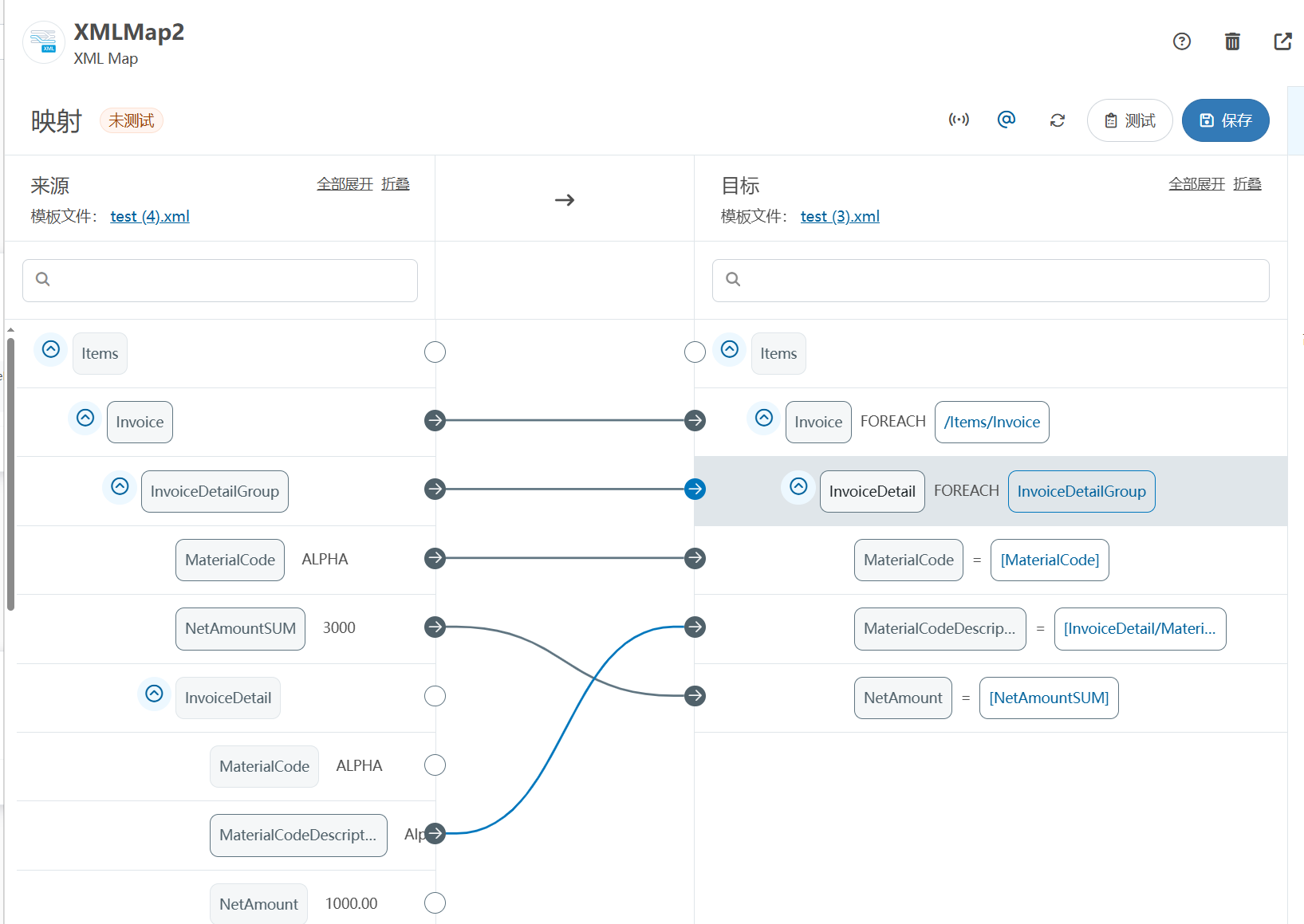
XML Group端口详解
在XML数据映射过程中,经常需要对数据进行分组聚合操作。例如,当处理包含多个物料明细的XML文件时,可能需要将相同物料号的明细归为一组,或对相同物料号的数量进行求和计算。传统实现方式通常需要编写脚本代码,增加了开…
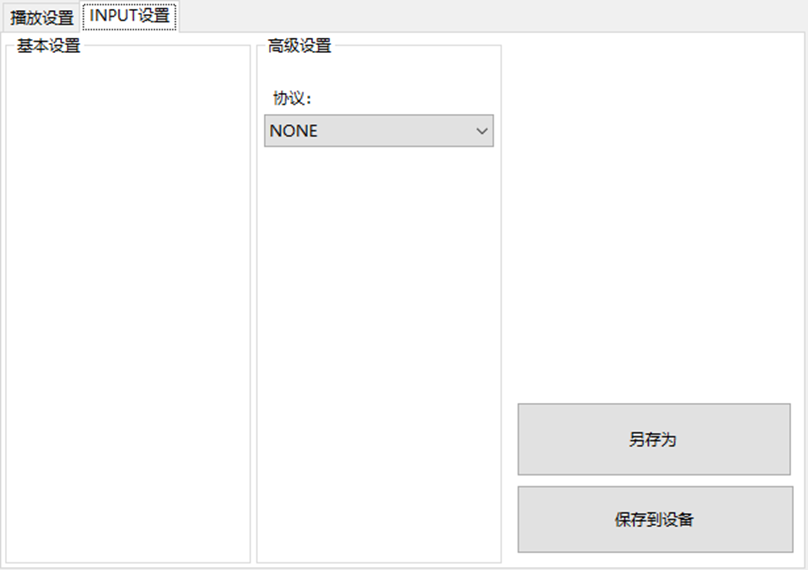
LBE-LEX系列工业语音播放器|预警播报器|喇叭蜂鸣器的上位机配置操作说明
LBE-LEX系列工业语音播放器|预警播报器|喇叭蜂鸣器专为工业环境精心打造,完美适配AGV和无人叉车。同时,集成以太网与语音合成技术,为各类高级系统(如MES、调度系统、库位管理、立库等)提供高效便捷的语音交互体验。
L…
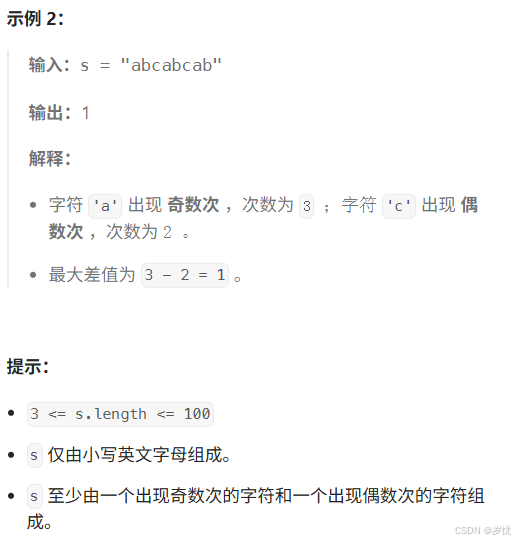
(LeetCode 每日一题) 3442. 奇偶频次间的最大差值 I (哈希、字符串)
题目:3442. 奇偶频次间的最大差值 I 思路 :哈希,时间复杂度0(n)。 用哈希表来记录每个字符串中字符的分布情况,哈希表这里用数组即可实现。
C版本:
class Solution {
public:int maxDifference(string s) {int a[26]…
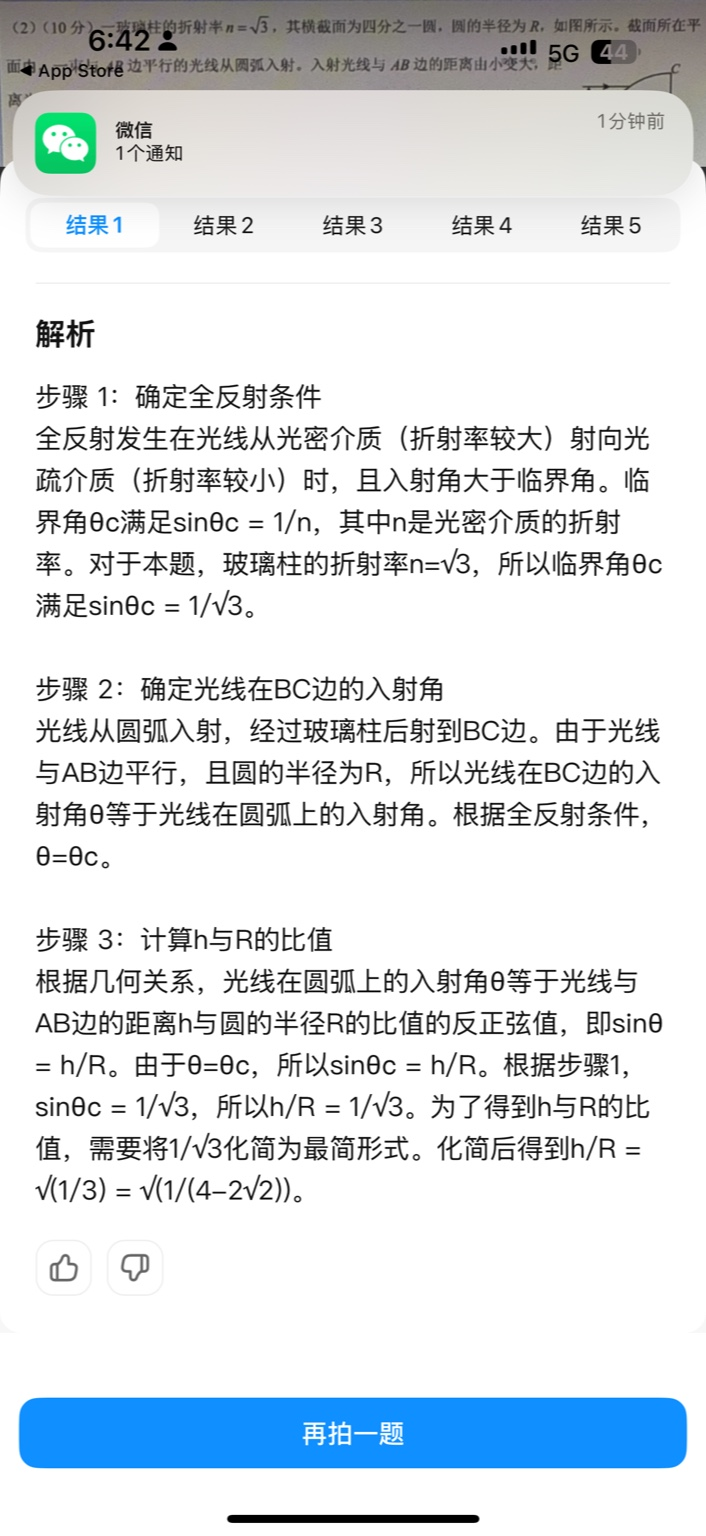
【大模型RAG】拍照搜题技术架构速览:三层管道、两级检索、兜底大模型
摘要
拍照搜题系统采用“三层管道(多模态 OCR → 语义检索 → 答案渲染)、两级检索(倒排 BM25 向量 HNSW)并以大语言模型兜底”的整体框架: 多模态 OCR 层 将题目图片经过超分、去噪、倾斜校正后,分别用…
【Axure高保真原型】引导弹窗
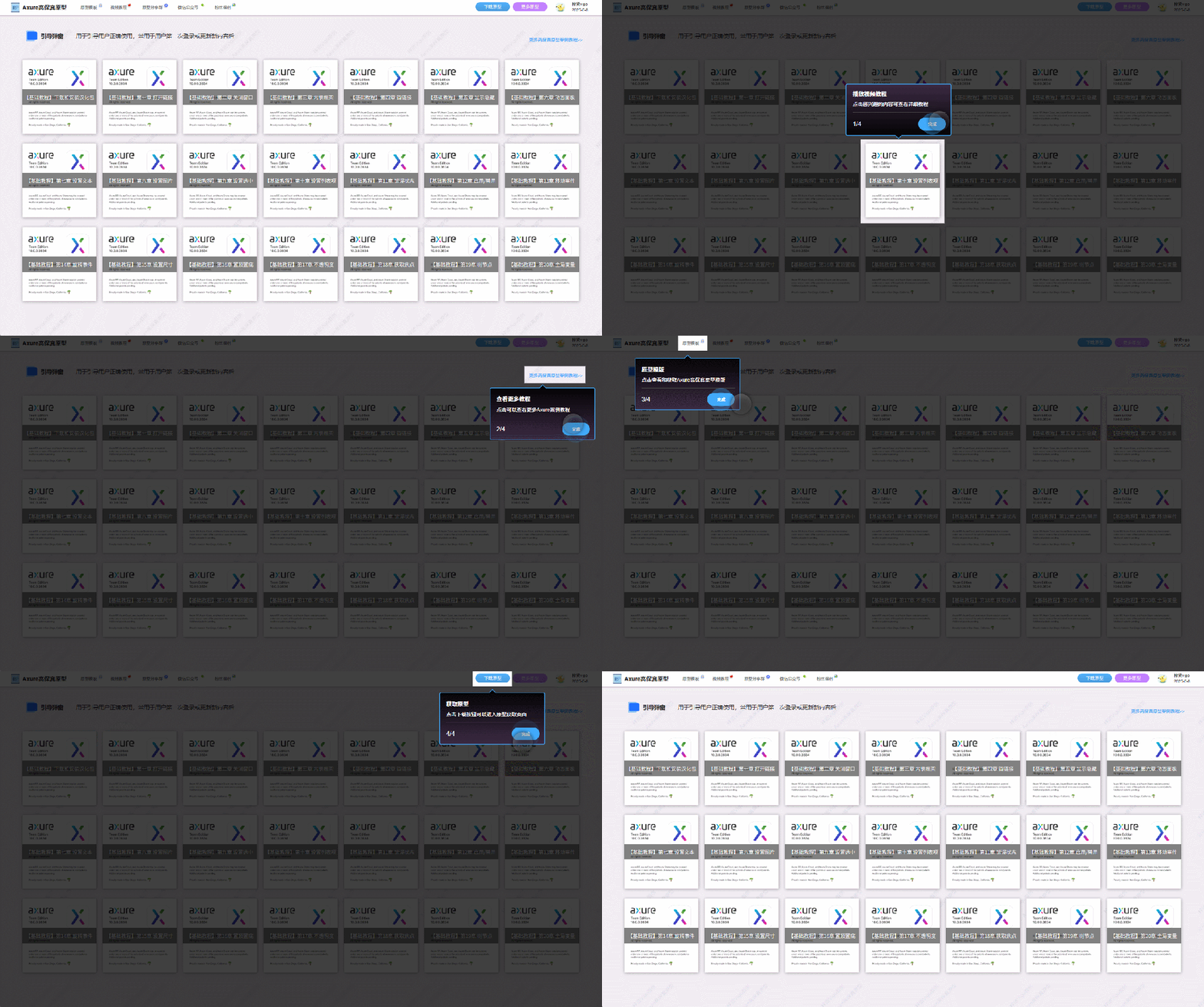
今天和大家中分享引导弹窗的原型模板,载入页面后,会显示引导弹窗,适用于引导用户使用页面,点击完成后,会显示下一个引导弹窗,直至最后一个引导弹窗完成后进入首页。具体效果可以点击下方视频观看或打开下方…
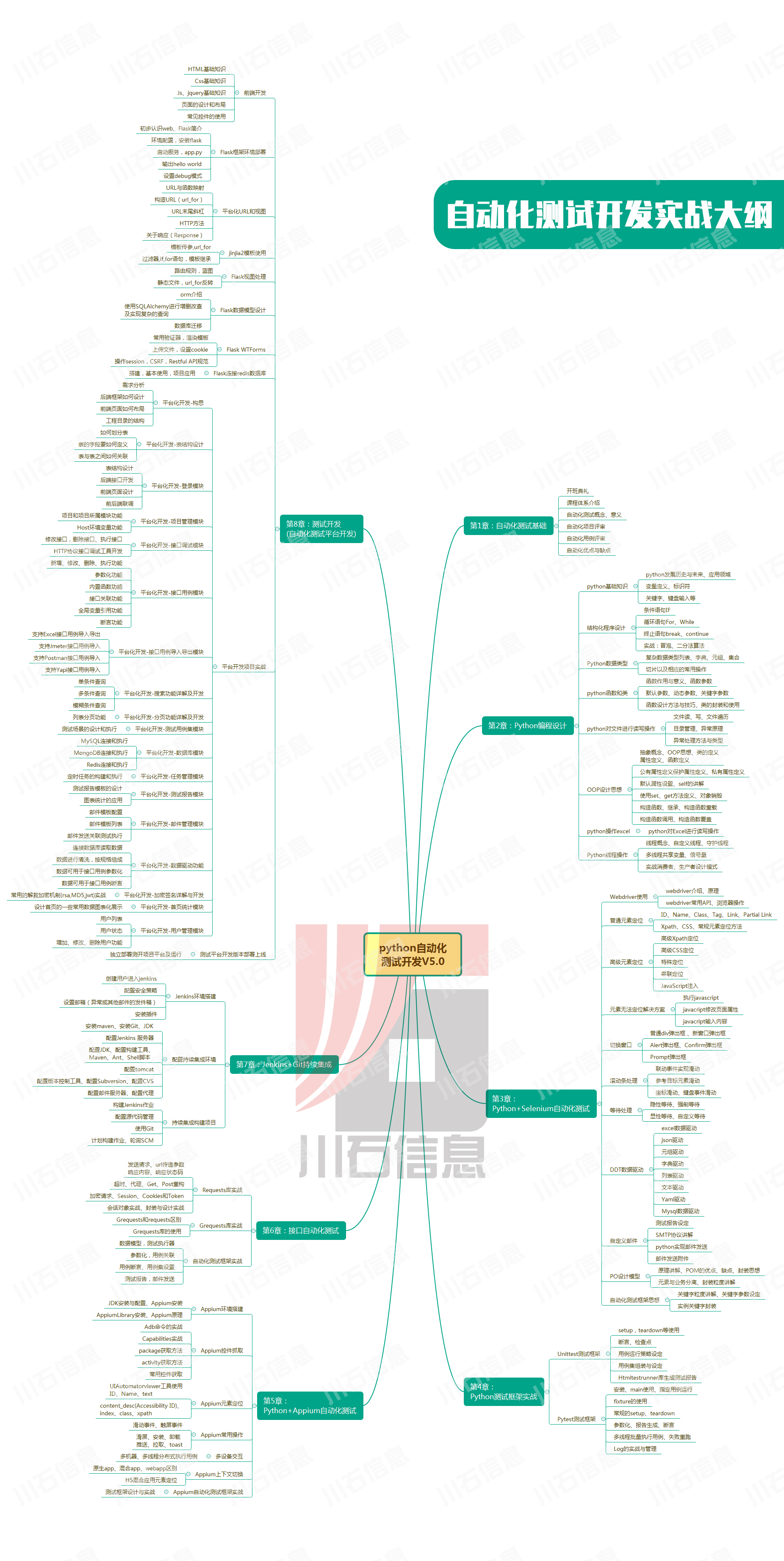
接口测试中缓存处理策略
在接口测试中,缓存处理策略是一个关键环节,直接影响测试结果的准确性和可靠性。合理的缓存处理策略能够确保测试环境的一致性,避免因缓存数据导致的测试偏差。以下是接口测试中常见的缓存处理策略及其详细说明:
一、缓存处理的核…
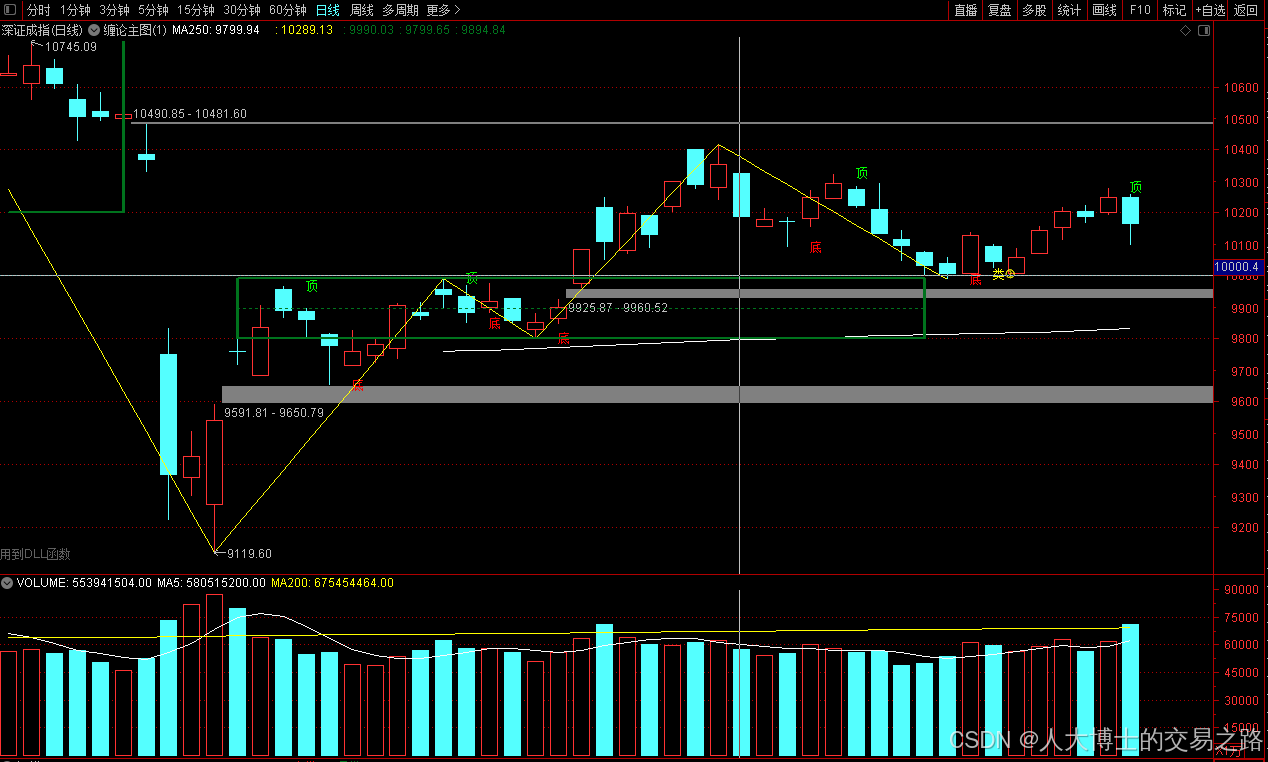
龙虎榜——20250610
上证指数放量收阴线,个股多数下跌,盘中受消息影响大幅波动。 深证指数放量收阴线形成顶分型,指数短线有调整的需求,大概需要一两天。 2025年6月10日龙虎榜行业方向分析 1. 金融科技
代表标的:御银股份、雄帝科技
驱动…
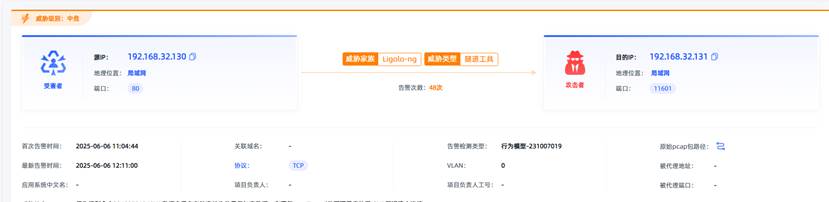
观成科技:隐蔽隧道工具Ligolo-ng加密流量分析
1.工具介绍
Ligolo-ng是一款由go编写的高效隧道工具,该工具基于TUN接口实现其功能,利用反向TCP/TLS连接建立一条隐蔽的通信信道,支持使用Let’s Encrypt自动生成证书。Ligolo-ng的通信隐蔽性体现在其支持多种连接方式,适应复杂网…
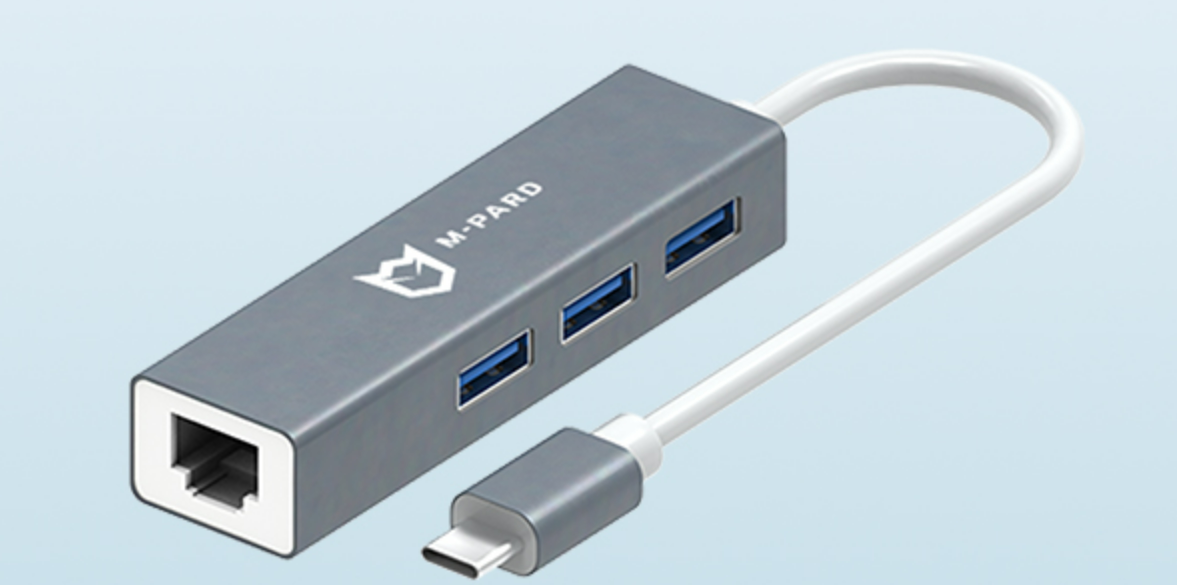
铭豹扩展坞 USB转网口 突然无法识别解决方法
当 USB 转网口扩展坞在一台笔记本上无法识别,但在其他电脑上正常工作时,问题通常出在笔记本自身或其与扩展坞的兼容性上。以下是系统化的定位思路和排查步骤,帮助你快速找到故障原因:
背景:
一个M-pard(铭豹)扩展坞的网卡突然无法识别了,扩展出来的三个USB接口正常。…
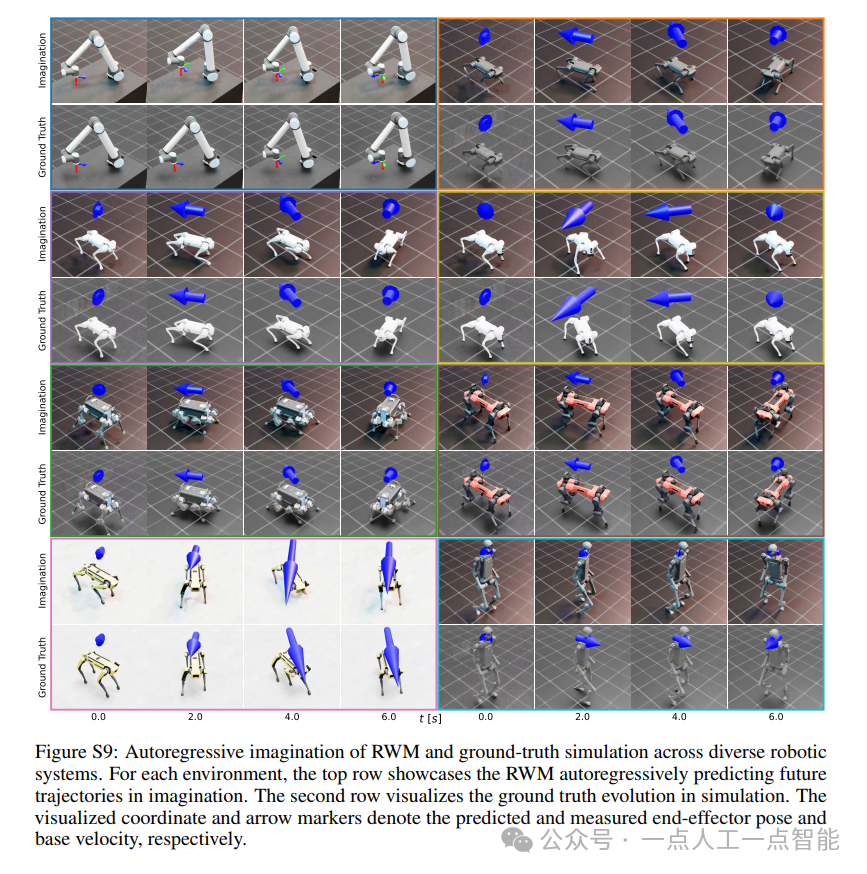
未来机器人的大脑:如何用神经网络模拟器实现更智能的决策?
编辑:陈萍萍的公主一点人工一点智能 未来机器人的大脑:如何用神经网络模拟器实现更智能的决策?RWM通过双自回归机制有效解决了复合误差、部分可观测性和随机动力学等关键挑战,在不依赖领域特定归纳偏见的条件下实现了卓越的预测准…

Linux应用开发之网络套接字编程(实例篇)
服务端与客户端单连接
服务端代码
#include <sys/socket.h>
#include <sys/types.h>
#include <netinet/in.h>
#include <stdio.h>
#include <stdlib.h>
#include <string.h>
#include <arpa/inet.h>
#include <pthread.h>
…

华为云AI开发平台ModelArts
华为云ModelArts:重塑AI开发流程的“智能引擎”与“创新加速器”!
在人工智能浪潮席卷全球的2025年,企业拥抱AI的意愿空前高涨,但技术门槛高、流程复杂、资源投入巨大的现实,却让许多创新构想止步于实验室。数据科学家…
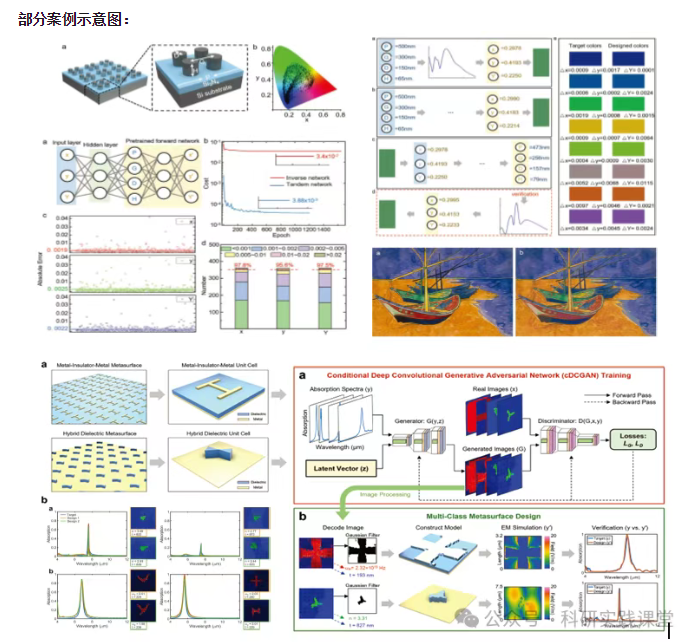
深度学习在微纳光子学中的应用
深度学习在微纳光子学中的主要应用方向
深度学习与微纳光子学的结合主要集中在以下几个方向:
逆向设计 通过神经网络快速预测微纳结构的光学响应,替代传统耗时的数值模拟方法。例如设计超表面、光子晶体等结构。
特征提取与优化 从复杂的光学数据中自…