实操专区-第14周-课堂练习专区-饼图和圆环图、玫瑰图
下载安装ECharts,完成如下样式图形。
代码和截图上传
基本要求:下图3选1,完成代码和截图
完成 3.1.3.13 饼图和圆环图、玫瑰图 中的任务点
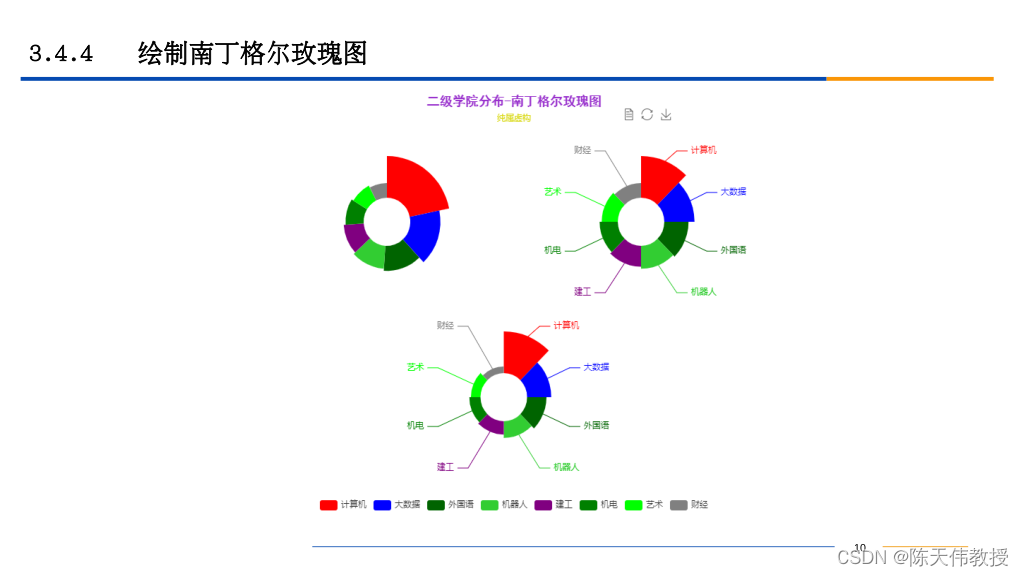
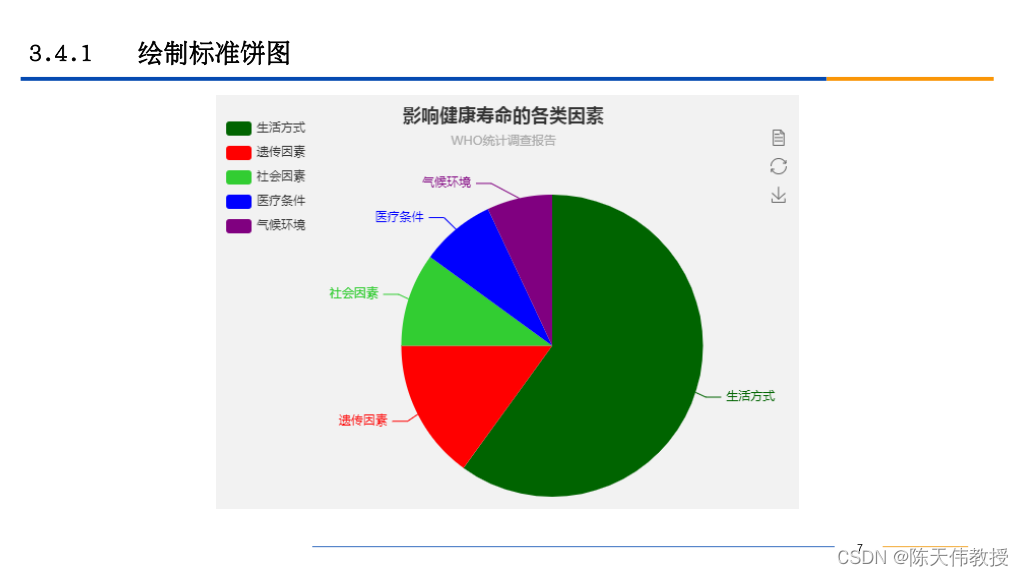

基本要求:3个选一个完成,多做1个加2分。
请用班级+学号+姓名命名。
参考代码:南丁格尔玫瑰图
| <!DOCTYPE html> | |
| <html> | |
| <head> | |
| <meta charset="utf-8"> | |
| <!--引入ECharts脚本--> | |
| <script src="js/echarts.js"></script> | |
| </head> | |
| <body> | |
| <!---为ECharts准备一个具备大小(宽高)的DOM--> | |
| <div id="main" style="width: 800px; height: 600px"></div> | |
| <script type="text/javascript"> | |
| //基于准备好的DOM,初始化ECharts图表 | |
| var myChart = echarts.init(document.getElementById("main")); | |
| //指定图表的配置项和数据 | |
| var option = { | |
| title: { | |
| text: '二级学院分布-南丁格尔玫瑰图', | |
| x: 'center', //设置主标题全部居中 | |
| backgroundColor: '#B5A642', //设置主标题的背景颜色为黄铜色 | |
| textStyle: { //设置主标题 | |
| fontSize: 18, //设置主标题的字号大小 | |
| fontFamily: "黑体", //设置主标题的字体 | |
| color: "#9932CD" //设置主标题的颜色为深兰花色 | |
| }, | |
| }, | |
| tooltip: { //配置提示框组件 | |
| trigger: 'item', //设置提示框的触发方式 | |
| formatter: "{a} <br/>{b} : {c} ({d}%)" | |
| }, | |
| legend: { //配置图例组件 | |
| x: 'center', | |
| y: 'bottom', | |
| data: ['计算机', '大数据', '外国语', '机器人', '建工', '机电', '艺术', '财经'] | |
| }, | |
| toolbox: { //配置工具箱组件 | |
| show: true, | |
| x: 600, //设置工具箱的水平位置 | |
| y: 18, //设置工具箱的垂直位置 | |
| feature: { | |
| mark: { show: true }, | |
| dataView: { show: true, readOnly: false }, | |
| magicType: { | |
| show: true, | |
| type: ['pie', 'funnel'] | |
| }, | |
| restore: { show: true }, | |
| saveAsImage: { show: true } | |
| } | |
| }, | |
| calculable: true, | |
| series: [ //配置数据系列及格式组件 | |
| { //设置第1个数据系列及格式设置 | |
| name: '学生人数(半径模式)', | |
| type: 'pie', //南丁格尔玫瑰图属于饼图中的一种 | |
| radius: ['10%', '50%'], //设置半径 | |
| center: ['50%', 180], //设置圆心 | |
| roseType: 'radius', //设置南丁格尔玫瑰图参数:半径模式 | |
| width: '50%', // for funnel 漏斗图 | |
| max: 40, // for funnel 漏斗图 | |
| itemStyle: { | |
| normal: { | |
| label: { | |
| show: false | |
| }, | |
| labelLine: { | |
| show: false | |
| } | |
| }, | |
| emphasis: { | |
| label: { | |
| show: true | |
| }, | |
| labelLine: { | |
| show: true | |
| } | |
| } | |
| }, | |
| data: [ | |
| { value: 2000, name: '计算机' }, | |
| { value: 1500, name: '大数据' }, | |
| { value: 1200, name: '外国语' }, | |
| { value: 1100, name: '机器人' }, | |
| { value: 1000, name: '建工' }, | |
| { value: 900, name: '机电' }, | |
| { value: 800, name: '艺术' }, | |
| { value: 700, name: '财经' } | |
| ] | |
| }, | |
| { //设置第2个数据系列及格式 | |
| name: '学生人数(面积模式)', | |
| type: 'pie', //南丁格尔玫瑰图属于饼图中的一种 | |
| radius: ['10%', '50%'], //设置半径 | |
| center: ['50%', 180], //设置圆心 | |
| roseType: 'area', //设置南丁格尔玫瑰图参数:面积模式 | |
| x: '50%', // for funnel 漏斗图 | |
| max: 40, // for funnel 漏斗图 | |
| sort: 'ascending', // for funnel 漏斗图 | |
| data: [ | |
| { value: 2000, name: '计算机' }, | |
| { value: 1500, name: '大数据' }, | |
| { value: 1200, name: '外国语' }, | |
| { value: 1100, name: '机器人' }, | |
| { value: 1000, name: '建工' }, | |
| { value: 900, name: '机电' }, | |
| { value: 800, name: '艺术' }, | |
| { value: 700, name: '财经' } | |
| ] | |
| }, | |
| { //设置第3个数据系列及格式 | |
| name: '教授人数(面积模式)', | |
| type: 'pie', //南丁格尔玫瑰图属于饼图中的一种 | |
| radius: ['10%', '50%'], //设置半径 | |
| center: ['50%', 420], //设置圆心 | |
| roseType: 'area', //设置南丁格尔玫瑰图参数:面积模式 | |
| x: '50%', // for funnel 漏斗图 | |
| max: 40, // for funnel 漏斗图 | |
| sort: 'ascending', // for funnel 漏斗图 | |
| data: [ | |
| { value: 25, name: '计算机' }, | |
| { value: 15, name: '大数据' }, | |
| { value: 12, name: '外国语' }, | |
| { value: 10, name: '机器人' }, | |
| { value: 8, name: '建工' }, | |
| { value: 7, name: '机电' }, | |
| { value: 6, name: '艺术' }, | |
| { value: 4, name: '财经' } | |
| ] | |
| } | |
| ] | |
| }; | |
| //使用刚指定的配置项和数据显示图表 | |
| myChart.setOption(option); | |
| </script> | |
| </body> | |
| </html> |