Hello Systemc World
码农老规矩,先写一个hello world并输出,语法什么的后面再说,先能编译运行再说。
目录配置
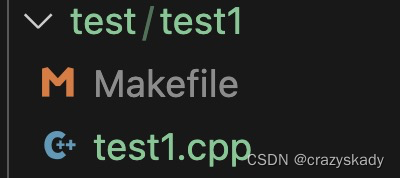
- 使用examples里的配置,在examples/sysc目录下创建test目录,其下创建第一个test1的目录,如下图:

- 在test1目录中创建两个文件,一个是cpp,一个是Makefile
代码编写
test1.cpp中编写如下代码,逻辑很简单,就是在Main函数中创建一个Module,Module中实现一个function来输出一句话,其他语法以后再说:
#include <systemc.h>

SC_MODULE (hello_world) {
    SC_CTOR (hello_world) {
        SC_THREAD(say_hello);
    }

    void say_hello() {
        cout << "Hello systemc world!" << endl;
    }
};

int sc_main(int argc, char* argv[]) {
    hello_world hello("HELLO");
    sc_start();

    return (0);
}
Makefile编写
Makefile也很简单,如下, 其实就是使用build-unix目录下的Makefile规则,来编译test1目录下的cpp文件。
include ../../../build-unix/Makefile.config

PROJECT = test1
SRCS    = $(wildcard *.cpp)
OBJS    = $(SRCS:.cpp=.o)

include ../../../build-unix/Makefile.rules
编译运行
不废话,直接上图

总结
Hello world其实还是挺简单的,下面应该就是需要理解SystemC的运行机制了。





![[足式机器人]Part2 Dr. CAN学习笔记-Advanced控制理论 Ch04-7 LQR控制器 Linear Quadratic Regulator](https://img-blog.csdnimg.cn/direct/10eaecbbeb514e9995a5ccaee8562098.png#pic_center)