Spire.Doc for .NET是一款专门对 Word 文档进行操作的 .NET 类库。在于帮助开发人员无需安装 Microsoft Word情况下,轻松快捷高效地创建、编辑、转换和打印 Microsoft Word 文档。拥有近10年专业开发经验Spire系列办公文档开发工具,专注于创建、编辑、转换和打印Word/PDF/Excel等格式文件处理,小巧便捷。
Spire.Doc for.NET 最新下载(qun:767755948) https://www.evget.com/product/3368/download
Word 中的评论可以包含文本、图像、OLE 对象等丰富的元素。本文介绍了如何使用 Spire.Doc 在 Word 中的评论中插入图片。
第 1 步:初始化 Document 类的实例并加载示例文档。
Document doc = new Document();
doc.LoadFromFile(@"C:\Users\Administrator\Desktop\sample.docx");
第 2 步:从第一节中获取第三段。
Paragraph paragraph = doc.Sections[0].Paragraphs[2];
第 3 步:在段落中附加评论。
Comment comment = paragraph.AppendComment("This is a comment.");
comment.Format.Author = "E-iceblue";
第 4 步:在评论正文中插入图片。
DocPicture docPicture = new DocPicture(doc);
Image img = Image.FromFile(@"C:\Users\Administrator\Desktop\logo.png");
docPicture.LoadImage(img);
comment.Body.AddParagraph().ChildObjects.Add(docPicture);
第 5 步:保存文件。
doc.SaveToFile("result.docx",FileFormat.Docx2013);
输出:
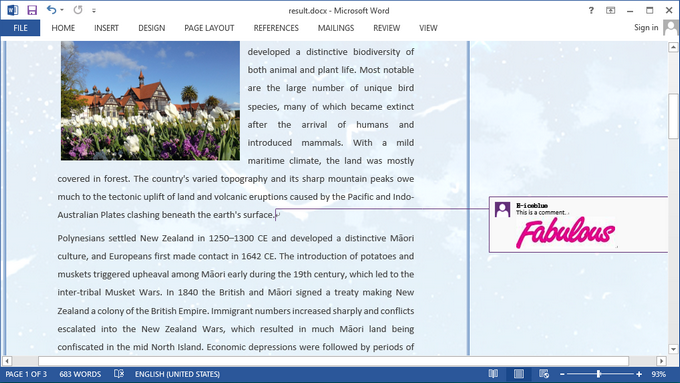
完整代码:
[C#]
using Spire.Doc;
using Spire.Doc.Documents;
using Spire.Doc.Fields;
using System.Drawing;
namespace InsertPicture
{
class Program
{

static void Main(string[] args)
{

Document doc = new Document();
doc.LoadFromFile(@"C:\Users\Administrator\Desktop\sample.docx");
Paragraph paragraph = doc.Sections[0].Paragraphs[2];

Comment comment = paragraph.AppendComment("This is a comment.");
comment.Format.Author = "E-iceblue";
DocPicture docPicture = new DocPicture(doc);
Image img = Image.FromFile(@"C:\Users\Administrator\Desktop\logo.png");
docPicture.LoadImage(img);
comment.Body.AddParagraph().ChildObjects.Add(docPicture);

doc.SaveToFile("result.docx", FileFormat.Docx2013);
}
}
}
[VB.NET]
Imports Spire.Doc
Imports Spire.Doc.Documents
Imports Spire.Doc.Fields
Imports System.Drawing
Namespace InsertPicture
Class Program

Private Shared Sub Main(args As String())

Dim doc As New Document()
doc.LoadFromFile("C:\Users\Administrator\Desktop\sample.docx")
Dim paragraph As Paragraph = doc.Sections(0).Paragraphs(2)

Dim comment As Comment = paragraph.AppendComment("This is a comment.")
comment.Format.Author = "E-iceblue"
Dim docPicture As New DocPicture(doc)
Dim img As Image = Image.FromFile("C:\Users\Administrator\Desktop\logo.png")
docPicture.LoadImage(img)
comment.Body.AddParagraph().ChildObjects.Add(docPicture)

doc.SaveToFile("result.docx", FileFormat.Docx2013)
End Sub
End Class
End Namespace
以上便是在C#、VB.NET如何在Word的评论中插入图片,如果您有其他问题也可以继续浏览本系列文章,获取相关教程,你还可以给我留言或者加入我们的官方技术交流群。